TripleA Logo TripleA Forum
    • TripleA Website
    • Categories
    • Recent
    • Popular
    • Users
    • Groups
    • Tags
    • Register
    • Login

    France Goes First Global 1940

    Scheduled Pinned Locked Moved Feature Requests & Ideas
    62 Posts 5 Posters 11.9k Views 5 Watching
    Loading More Posts
    • Oldest to Newest
    • Newest to Oldest
    • Most Votes
    Reply
    • Reply as topic
    Log in to reply
    This topic has been deleted. Only users with topic management privileges can see it.
    • RogerCooperR Offline
      RogerCooper @crockett36
      last edited by

      @crockett36 TripleA is pretty flexible as to where the files are. You don't need to delete anything other than unused xml files in the games folder.

      1 Reply Last reply Reply Quote 0
      • C Offline
        crockett36
        last edited by

        Was my youtube video correct?

        RogerCooperR 1 Reply Last reply Reply Quote 0
        • RogerCooperR Offline
          RogerCooper @crockett36
          last edited by

          @crockett36 Yes. Now you need to modify some of the files.

          C 1 Reply Last reply Reply Quote 0
          • C Offline
            crockett36 @RogerCooper
            last edited by

            @rogercooper I’ll get to it on the weekend

            C 1 Reply Last reply Reply Quote 1
            • C Offline
              crockett36 @crockett36
              last edited by

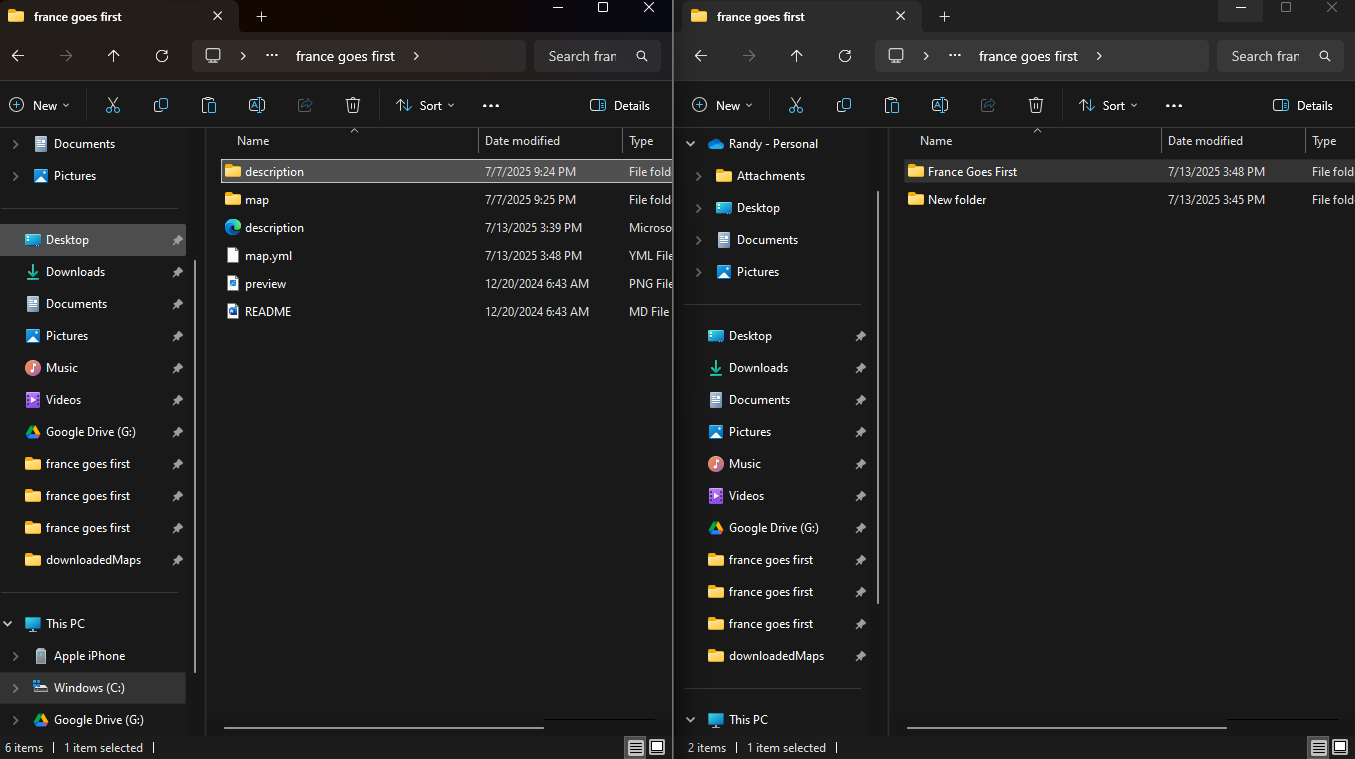
              @crockett36 I have added a description to the description and map files. I don't see any game files.Screenshot 2025-07-13 155423.png

              C 1 Reply Last reply Reply Quote 1
              • C Offline
                crockett36 @crockett36
                last edited by

                @crockett36 How do I change the order of play btw?

                B 1 Reply Last reply Reply Quote 1
                • B Offline
                  beelee @crockett36
                  last edited by beelee

                  @crockett36

                  Hi crockett

                  open the "map" folder. That will show all the games, if more than one xml.

                  Put the xml in a editor of your choice. Most use notepad++ or some variation of.

                  You have to change a few things. Search "France" for starters and switch it where you want it to go. There's a few other things to do as well.

                  Roger will clue you in 🙂

                  Edit
                  so "map" folder
                  then open "games" folder to get to xml

                  RogerCooperR 1 Reply Last reply Reply Quote 0
                  • RogerCooperR Offline
                    RogerCooper @beelee
                    last edited by

                    @beelee You will see a code area like this. Rearrange to your liking.

                          <!-- Italians Game Sequence -->
                          <step name="italianTech" delegate="tech" player="Italians"/>
                          <step name="italianPurchase" delegate="purchase" player="Italians"/>
                          <step name="italianPolitics" delegate="politics" player="Italians"/>
                          <step name="italianCombatMove" delegate="move" player="Italians"/>
                          <step name="italianBattle" delegate="battle" player="Italians"/>
                          <step name="italianNonCombatMove" delegate="move" player="Italians" display="Non Combat Move"/>
                          <step name="italianPlace" delegate="place" player="Italians"/>
                          <step name="italianTechActivation" delegate="tech_activation" player="Italians"/>
                          <step name="italianEndTurn" delegate="endTurn" player="Italians"/>
                          <!-- Russians Game Sequence -->
                          <step name="russianTech" delegate="tech" player="Russians"/>
                          <step name="russianPurchase" delegate="purchase" player="Russians"/>
                          <step name="russianPolitics" delegate="politics" player="Russians"/>
                          <step name="russianCombatMove" delegate="move" player="Russians"/>
                          <step name="russianBattle" delegate="battle" player="Russians"/>
                          <step name="russianNonCombatMove" delegate="move" player="Russians" display="Non Combat Move"/>
                          <step name="russianPlace" delegate="place" player="Russians"/>
                          <step name="russianTechActivation" delegate="tech_activation" player="Russians"/>
                          <step name="russianEndTurn" delegate="endTurn" player="Russians"/>
                    
                    
                    C 1 Reply Last reply Reply Quote 1
                    • C Offline
                      crockett36 @RogerCooper
                      last edited by

                      @rogercooper Yikes.

                      C 1 Reply Last reply Reply Quote 0
                      • C Offline
                        crockett36 @crockett36
                        last edited by

                        @crockett36 We'll give it a try.

                        C 1 Reply Last reply Reply Quote 1
                        • C Offline
                          crockett36 @crockett36
                          last edited by

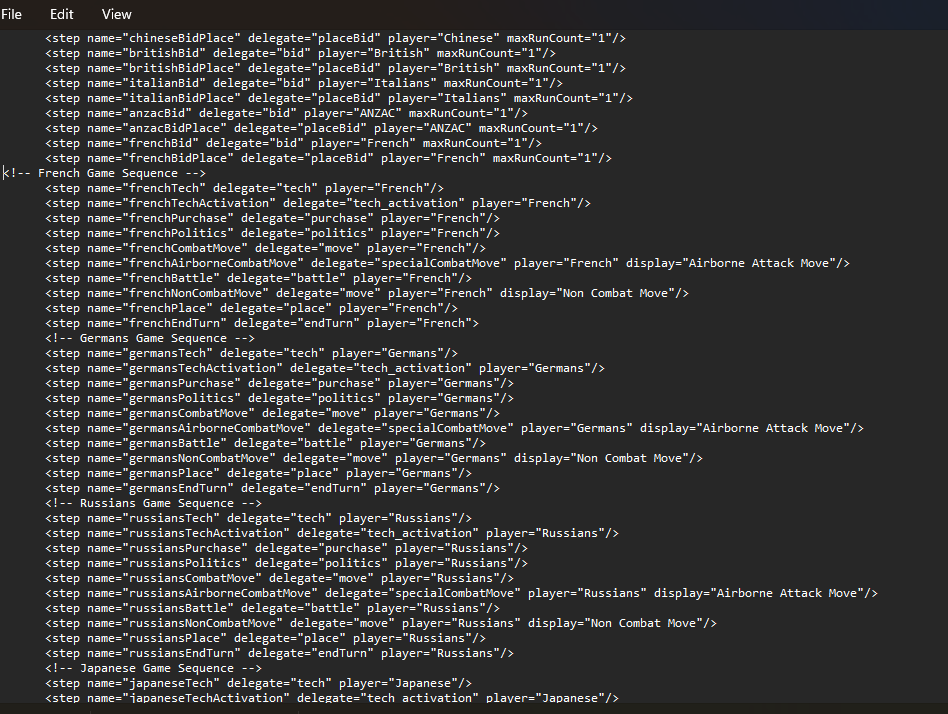
                          @crockett36 Screenshot 2025-07-13 211827.png

                          C 1 Reply Last reply Reply Quote 0
                          • C Offline
                            crockett36 @crockett36
                            last edited by

                            @crockett36 is that right?

                            RogerCooperR 1 Reply Last reply Reply Quote 0
                            • RogerCooperR Offline
                              RogerCooper @crockett36
                              last edited by

                              @crockett36 It looks correct to me. Try it out on your computer and see if there any errors.

                              You should download the Pact of Steel mod.It contains a scenario called Pact of Steel 2 which has detailed comments on the XML code. You can learn a lot by reading the comments.

                              C 1 Reply Last reply Reply Quote 1
                              • C Offline
                                crockett36 @RogerCooper
                                last edited by

                                @rogercooper 2025-7-13-France-Goes-First.tsvg

                                C 1 Reply Last reply Reply Quote 0
                                • C Offline
                                  crockett36 @crockett36
                                  last edited by

                                  @crockett36 Haven't run it yet, but French purchase came up.

                                  C 1 Reply Last reply Reply Quote 0
                                  • C Offline
                                    crockett36 @crockett36
                                    last edited by

                                    @crockett36 ran France and it moved into Germany without error.

                                    1 Reply Last reply Reply Quote 0
                                    • C Offline
                                      crockett36
                                      last edited by

                                      Thank you all!

                                      RogerCooperR 1 Reply Last reply Reply Quote 1
                                      • RogerCooperR Offline
                                        RogerCooper @crockett36
                                        last edited by

                                        @crockett36 Once you are satisified with it, post the file and I will put it into the repository.

                                        RogerCooperR 1 Reply Last reply Reply Quote 0
                                        • RogerCooperR Offline
                                          RogerCooper @RogerCooper
                                          last edited by

                                          @rogercooper I can't post using tsvg file, I need a zip file of the entire folder.

                                          C 1 Reply Last reply Reply Quote 0
                                          • C Offline
                                            crockett36 @RogerCooper
                                            last edited by

                                            @rogercooper back. I’m not exactly sure how to use a zip file.

                                            RogerCooperR 1 Reply Last reply Reply Quote 0

                                            Hello! It looks like you're interested in this conversation, but you don't have an account yet.

                                            Getting fed up of having to scroll through the same posts each visit? When you register for an account, you'll always come back to exactly where you were before, and choose to be notified of new replies (either via email, or push notification). You'll also be able to save bookmarks and upvote posts to show your appreciation to other community members.

                                            With your input, this post could be even better 💗

                                            Register Login
                                            • 1
                                            • 2
                                            • 3
                                            • 4
                                            • 1 / 4
                                            • First post
                                              Last post
                                            Copyright © 2016-2018 TripleA-Devs | Powered by NodeBB Forums