How To Host (using Port-Forwarding)
-
For Mac OS, when you host a game the system will ask you if TripleA can receive incoming requests (authorize it).
Once you've hosted a game, it will show the IPv6 address. For other computers on the LAN, they'll have to connect with the host's IPv4 address.
IP websites will report your router's WAN address, not the one you need. To get the host's local IPv4 address, open terminal and enter "ifconfig getifaddr enX" where X = 0 (eth), 1 (wifi), usually.
-
@prastle said in How To Host:
@prastle How to Host a Bot.
Anyone that can host can host bots.Now you will need to place a bot folder or multiple ones, in the same TripleA program folder. The below is an example of one of my bots. Using windows. Other operating systems are slightly different.
@echo off
SET PORT=3363
SET BOT_NUMBER=25SET LOBBY_HOST=45.79.144.53
SET LOBBY_PORT=3304java -server -Xmx320m -Djava.awt.headless=true -classpath bin/triplea.jar games.strategy.engine.framework.headlessGameServer.HeadlessGameServer -Ptriplea.game.host.console=false -Ptriplea.game= -Ptriplea.server=true -Ptriplea.port=%PORT% -Ptriplea.lobby.host=%LOBBY_HOST% -Ptriplea.lobby.port=%LOBBY_PORT% -Ptriplea.name=Bot%BOT_NUMBER%_Pras1 -Ptriplea.lobby.game.hostedBy=Bot%BOT_NUMBER%_Pras1 -Ptriplea.lobby.game.supportEmail=prastle7@hotmail.com -Ptriplea.lobby.game.comments="automated_host" -Ptriplea.lobby.game.reconnection=172800
pause
Save the above to a notepad file and rename it with the name and number that you wish for your bot. Make sure it is using one of the correct port numbers you have opened on your router. Now resave the notepad file as a .bat file and place it in your Triple program folder. Test to see if your bot launches in the lobby. @RoiEX please have a look at this and see if you agree thanks Pras
Are this instructions out of date? I get:
Error: Could not find or load main class games.strategy.engine.framework.headlessGameServer.HeadlessGameServerWhat it should be isn't obvious to me. Works fine on build 3635.
Also, why is the port 3363? I thought it should default to 3300?
-
@simon33 Port is whatever you are using
new file is located hereLast time I worked with it was .10182
you need to place the headless file in the same folder as the new headed file
-
-
@RoiEX
I assume we have to make changes to the router. Our router is controlled completely by our isp. Are there commands we can run to do the port forwarding without having to get into the router?3300 is open
-
@beelee you need to port forward the router and allow triplea through your windows firewall. A good site to look at is portforward.com
-
@beelee Also if you figure out how to portforward a cell modem let me know

-
yea i can't log in to my router. My ip has to do it ( MCI ) I also have Century Link, but it's pretty slow. I should be able to change it though
-
@prastle said in How To Host:
@beelee Also if you figure out how to portforward a cell modem let me know
heh heh will do
-
hmm... i still can't get it to work
-
Not really able to help you at this point, but once we have a new stable, I can show you something that'll 100% work (if there are no bugs that is) regardless of your ISP.
-
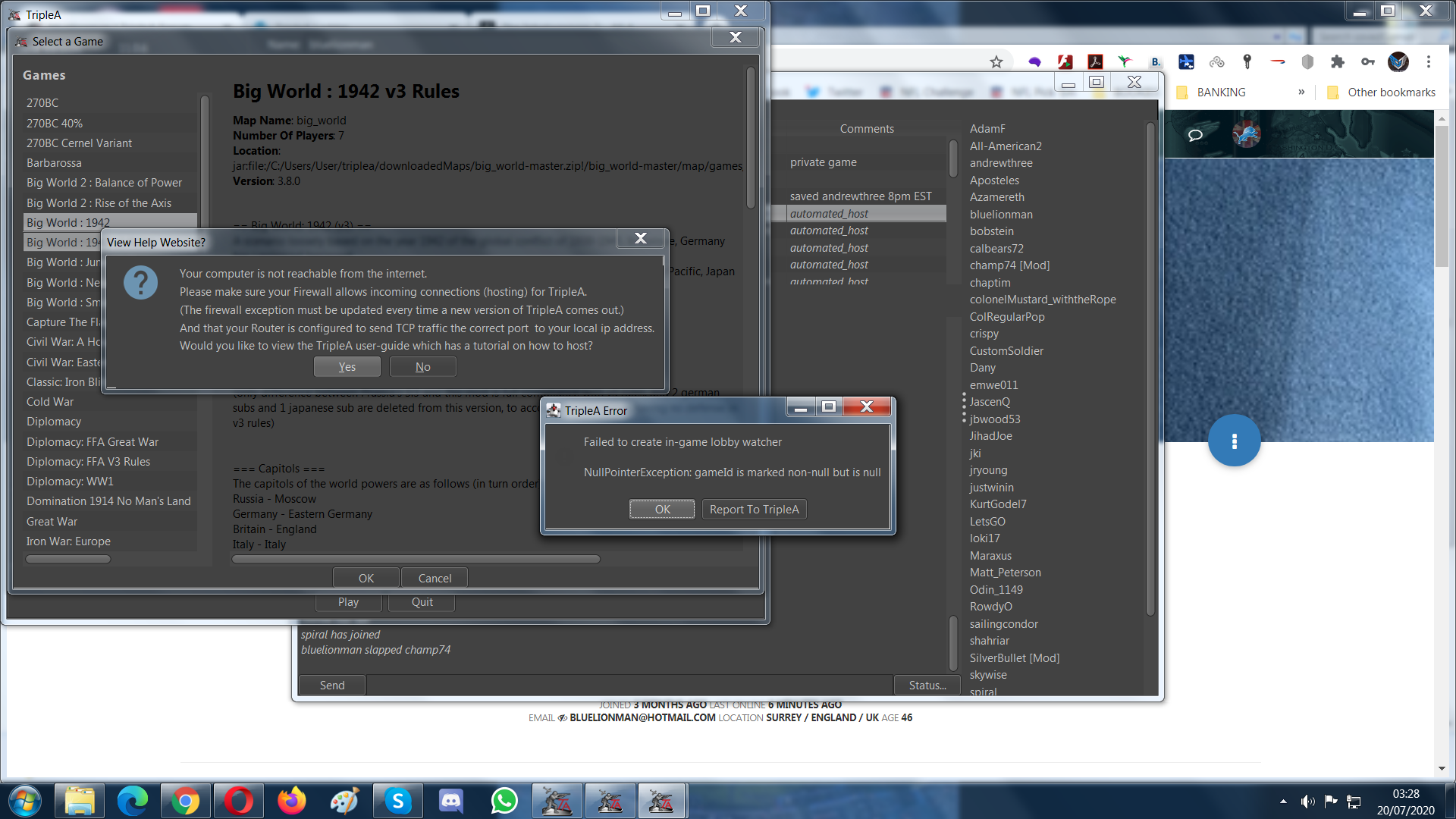
I'm really not very skilled tried to set up being a host and got these error messages (game engine 2.1):
-
@bluelionman Both "error messages" actually reffer to the same problem it seems.
Some technical details @LaFayette : The detailed Dialog is shown asynchronously which doesn't prevent the NullPointerException from happening, that's why 2 dialogs are shown. We might want to create an issue for this.
But back to the topic: @bluelionman Can you explain what you did in order to follow the steps above?
It seems like port-forwarding is not setup correctly which is why the lobby can't reach your host. -
@RoiEX I just followed the instructions watching the YouTube video but it didn't work - clicked on host game and went from there - I really am unsure what to do in my PC settings I'd like to give your website permission get through but don't wanna down my firewalls otherwise. I also think the videos on YouTube could do with updating as not sure the screen and options shown are totally like whats in the videos now. Or maybe I'm just a dim wit. Perhaps I can chat to someone talk me though live how to set up hosting capability.
Is there still a way to play through a forum (is it this forum)?
-
watching the YouTube video
Which YouTube video?

Is there still a way to play through a forum (is it this forum)?
Yes, PbF still exists. You can choose between this forum and the one over at axisandallies.org
-
@RoiEX said in How To Host (using Port-Forwarding):
watching the YouTube video
Which YouTube video?
This one:
-
@bluelionman yeah i am not sure if that video is still correct, if it isnt we could use one that helps people host.
-
@RoiEX what about v6 to v4 - some isps serve v6 addresses to linux clients and end to end is now broken..dsm
-
@Sir-DSM In theory the client should support IPv6.
Could you go into more detail on what you consider broken? -
I got into my router and made a change start/end 3300/3300 TCP {local ip}
start/end remote says 0.0.0.0 <-- should that be different than quad zip?Also did the ufw thiing with sudo on Mint. my test user (another machine) gets refused. Is there some other thing I should look for? My test user is inside the firewall, does user need to be "outside" firewall to work?




Hello! It looks like you're interested in this conversation, but you don't have an account yet.
Getting fed up of having to scroll through the same posts each visit? When you register for an account, you'll always come back to exactly where you were before, and choose to be notified of new replies (either via email, or push notification). You'll also be able to save bookmarks and upvote posts to show your appreciation to other community members.
With your input, this post could be even better 💗
Register Login