Find province command
-
I'd like a simple command for find province (or territory, or whatever we call them formally), that will center your map there and, preferably highlight the territory in some visible way.
I couldn't find one in game anywhere; and nobody I asked knew of one, so feature request.where this actually came up was,
I was playing the new arda map, and there's so many provinces in it, many of which I don't know the names of even though i'm fairly familiar with the source material; and I was figuring out some odd ai behaviors, looking at the ai logs, and it would mention a province of interest, but I'd have little idea where that province was. so it was hard to find.I also realized that in a strategic discussion, it might be hard to find the province someone was talking about if it was one of the less major ones. like if you read a discussion on this forum and you need to find which provinces are being referred to on a map/geography you're unfamiliar with.
-
@zlefin Out of curiosity how would you envision this to operate?
Would there be a search window where you type the name?
I am just wondering how this would be used.
-
I assume a menu command, possibly accessible through a spare key (I'm not sure which key-binds are currently unused and available for commands; something like ctrl-f is always a good choice for find if it's available).
it would open up a text window wherein you input the name then click/press enter to tell it to find it. an optional advanced feature would be that as you fill in the name it lists possible candidate provinces, but that's not really necessary at all.oh, and the reason I said to highlight the province is that while centering the map is sufficient for provinces inthe middle; when the province is on the edge of the map, you don't really center on the province; if the province is in acorner the map would just center as near to that corner as it goes; so having something to note the actual province would be helpful if there's a bunch of provinces in that area. iirc this might apply to some of the 270bc maos.
if anyone has it as a point of comparison, there's the ones in europa universalis 4; and probably a lot of other paradox games have a similar one.
-
@zlefin Would be a good tool if you don't know the map intimately.
-
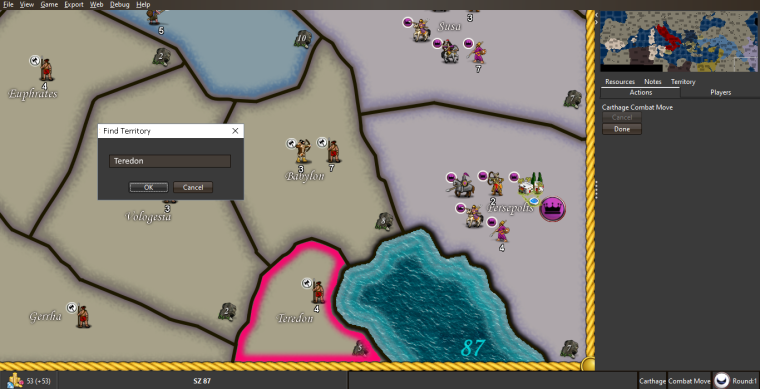
So something like this...
-
@zlefin Yeah, probably this should be a basic functionality for supporting reading PBEM or whatever game history logs. In the moment in which you can theorically have games with 10,000+ territories in the map, you should not be required to search yourself. Also I prefer having no names at all on the board, as they are useless for purely gameplay purposes; so this is even more important for those maps not having names on the board, as I tend to prefer (tho I'm not strongly against having names on maps, but I believe they are just not that good to have anyways, as they can be covered by the units on the map, and I would not reduce placement spots to avoid the name being covered). Of course, this in not an issue for live games, as you get centred on the referred territory, when you scroll through history; so I never personally felt this necessity; but neat idea, now that you point it out.
-
yes, something like that. is that a mockup, or was there such a command already in here that I didn't find?
if the latter, was it added recently, or is it somehow hard to locate the command?
I know I looked awhile trying to find suhc a command, so if there is one it's not apparent enough. -
Yeah, with maps becoming larger over time, this is a good feature request. Added to features list.
-
@zlefin Just a mock up. I find visuals very helpful to underscore how something should look or perform.
-
Nice feature request. Might I add that empire management games seldom have the territory/planet search feature more than one click away. Adding this feature to the menu of TripleA will most likely make it two clicks away. But I guess it is better than nothing

Still, if there is ever to be an effort into redesigning the TripleA UI to a more aesthetical layout version, this feature should probably implemented as a small search button/spy glass near the mini map.
And it would be nice if the search window could also lead to a possible territory name list that was scrollable and clickable, leading also to a centering/highlighting of the territory.
Also, maybe a txt file in the map dir could be made to contain a list of none-searchable or hidden territories. A am ofcours thinking of fake territories, like map space used graphically for info or as menus.
-
@zlefin And then you realize you have no idea how to type "Lhûn" or "Lands of the Éothéod" into the territory finder
-
@alkexr Of course, such a feature should better be able to select the closest name to what you're typing, amongst the available ones.
-
ah, ok hepps, nice mockup then, so good I can't tell i'ts not already in game

the use of non-standard characters can indeed be quite a problem; no good way around that unless you enforce a prohibition on non-standard characters in provinces. or you need some sort of mapper that converts non-standard ones to standard ones for matching purposes. and thus every non-standard character needs to have a standard one it clearly maps to (which is true for diacritics, as often happens in lotr stuff iirc)
What hotkeys do we have available to assign this to? Is F available? or ctrl-f maybe given how often that's used for find in different applications? not that we need be in any rush to decide on the hotkey.
-
Couldn't the search line simply ignore the special characters? Instead looking for a match in simply spelling?
So "Lhûn" could then be searched as Lhun?
or "Lands of the Éothéod" could be searched as Lands of the Eotheod?
"A joyous heart sours with the burden of expectation"
Hepster -
@hepps You'd need a way to map the special û character to u and é to e. Essentially a list of supported character mappings.
-
@hepps Yeah, of course, the program doesn't see the characters looking similar to some basic ones, unless of course a full list telling it so; and anyways either the special characters may look or ever be not just a variant of a basic word, for example you can have Ælf, and you cannot say that is an A or an E, since it became an E in "elf", but it became an A in "Alfred", or you can have words that are multiple, like the German ß, that would be an ss or sz (also the English W is not a word of the actual Latin alphabet, and started as a way to mean VV, but, of course it's now not "special", but just because it is English (if the Germans would have decided what is standard, probably the ß would be on all the world's keyboards as well)) or you can have words that look like some, but eventually became something totally different, like the Polish Ł, that is practically the same sound as the English "W" or Italian "U".
-
Cool, was just making an uniformed suggestion.
-
Could a new properties file be added for games that use special characters?
Say... a "Search Properties" File
Where the map maker defines the plain English character for any and all special characters used within a game?
-
Just wanted to leave this here so people don't spend a lot of time thinking how to convert accented characters to unaccented characters for this feature... In most programming languages (including Java) one can find a library to "normalize" Unicode accented characters to pairs of the corresponding unaccented characters and characters representing the accent marks themselves. Therefore, with some creativity, it should be possible to match the unaccented text a user types to the accented territory names specified in the map.
I was planning on taking a look at this feature, in general, this weekend, but not sure if I'll get to this specific aspect of it.
-
@ssoloff Does it support also alternative characters, like seeing Ƿ as W? And how does that work for stuff like Æ or ß?



Hello! It looks like you're interested in this conversation, but you don't have an account yet.
Getting fed up of having to scroll through the same posts each visit? When you register for an account, you'll always come back to exactly where you were before, and choose to be notified of new replies (either via email, or push notification). You'll also be able to save bookmarks and upvote posts to show your appreciation to other community members.
With your input, this post could be even better 💗
Register Login