Map DL Problem
-
That's a rather unique problem you got there.
It seems like you're using an IBM JDK, updating that to the latest version should already do the trick.If you have no idea how this JDK got on your system you might need to provide some details
-
@RoiEX yea trying to get this new system going and it kept installing java 8 191 which threw a different error. Got this to install 201 but... I'll get rid of all of em n try again thanks
-
Feel free to report this "other" error. Maybe it's simple to fix
-
well got it sorted kinda. Here's the error I get in case your curious. It happens when I install the linux mint default java 8. When I go here and use their's it works.
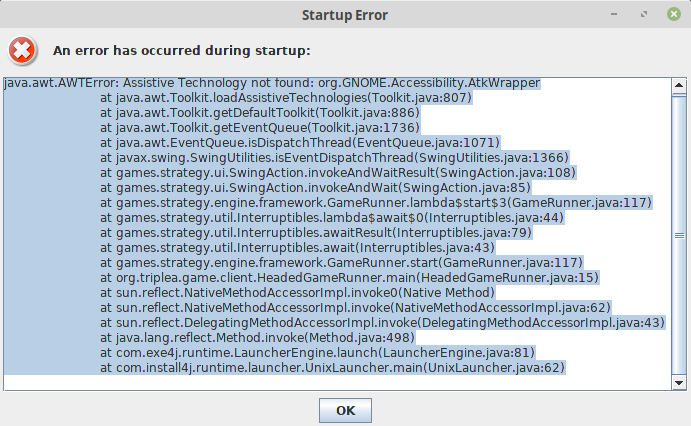
It says it't the same version so idk what's up. Still stuggling to update to 201 or I see there's a 202 now, but I'll continue that battle later.
Thanks for your time
-
Hmm so did you end up installing Oracle java or the openJDK?
-
To shorten the process,
Here's my theory so far:
I'm assuming you tried to install the Oracle JDK and because it's not optimised for Linux Mint (for whatever reason) the error occurs. The OpenJDK should work better using any Linux distro, so switching to the OpenJDK might already do the trick -
Also make sure to uninstall any headless version of the JDK which seems to cause this issue as well:
https://askubuntu.com/questions/695560/assistive-technology-not-found-awterror -
@RoiEX yea the open jdk is what's working.
yea the other was headless Thanks again
-
No problem

-
So ran into same issue. Seems even though Linux Mint java is a ..."1.8.???", that it's some IBM version of Java (that or I downloaded that version and installed by accident).
My answer was to uninstall (sudo apt-get remove) all versions I could find, and in some cases just delete the folders.
Problem #2 was I kept trying to make openjdk-11 work. But when I used the link Beelee provided (https://www.pcsteps.com/5492-how-to-install-java-linux-mint-ubuntu/), and copy pasted the commands into Terminal
sudo apt-get install openjdk-8-jre -y
sudo nano /etc/environment Then appending the file at the end on a new line
JAVA_HOME="/usr/lib/jvm/java-8-openjdk-amd64/jre/bin/java"I was able to download maps. So I don't know enough about the CLI yet to tell if there is a problem with the Linux Mint default Java, but that is a possibility.
Mint has many 'quirks' for one reason or another, but it uses up much less memory than Ubuntu, hence can be popular on low power machines (Like my Toshiba CB-30; that couldn't run Ubuntu, but works well with Mint).
-
@VonRansak
Hi VonYou got it working it sounds like ? I still struggle with a lot of things mint and while it does some good/cool things, It can also be frustrating.
In case you aren't aware of this place:
[link text]https://forums.linuxmint.com/viewforum.php?f=90&sid=c9b46238384a85dcd203d39f7278aa82(link url)
it's a good place for info
If i remember right it was DL ing the wrong java for me for some reason
Oh Yea the IBM one was no good. Anyway looks as if you figured it out

-
Yeah, got it going, thx. Might have been the software manager. Mint does a lot of 'weird' things b/c the devs are Irish and highly 'privacy' oriented. So they tend to not like a lot of 'updates' from the additional software, that come bloated with tracking/spyware/etc.... For ease of use, I'd use Ubuntu, but since it uses twice the memory of Mint for the OS, it bricks my Toshiba CB-30.
-
@VonRansak yea i've been less than impressed with it. Probably gonna go back to ubuntu

Hello! It looks like you're interested in this conversation, but you don't have an account yet.
Getting fed up of having to scroll through the same posts each visit? When you register for an account, you'll always come back to exactly where you were before, and choose to be notified of new replies (either via email, or push notification). You'll also be able to save bookmarks and upvote posts to show your appreciation to other community members.
With your input, this post could be even better 💗
Register Login