Screen centering/cycling around map UI idea
-
@LaFayette Absolutely removing both the flag and the stack number from showing on the right is obviously good (and also looks nicer, centring the images), especially considering that, in theory, you can have any numbers of units (thus wider an wider) and wildly huge "small" flags.
I agree with moving the stack number under the units images, but I would just delete the flag. There is no point having a flag in the moment it is always going to be the one of the turn player.
Once the flag is removed, there would be enough space to have "7 units" instead of just "x7", as that would make clearer all the units are being summed up, differently from the normal stack numbers, that are per each type.
32 per 32 pixels would make also more sense for general coherence with TripleA pictures.
-
I managed to get some scaling code to work reasonably well. To get to the target width, really needed the left/right arrow buttons to be more narrow. The layout code was really resisting it, scaling the image down a bit did get them to be narrow.
Below are some more treatments:
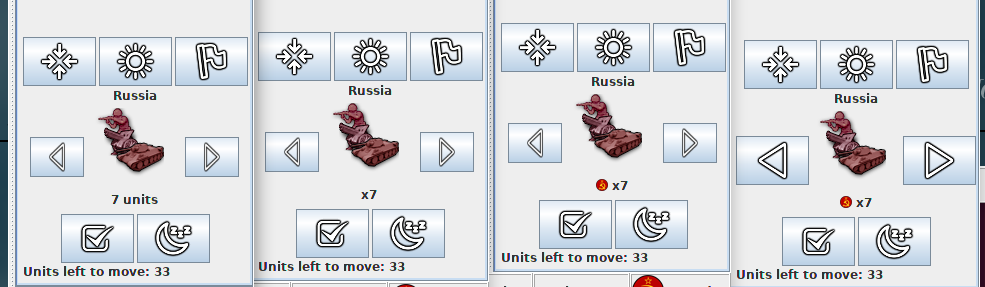
Before I give my 2 cents, I'm curious what feedback there is on these different treatments.
-
Lol.. I've been staring at this for too long. The "Russia" in the above, it's the territory name, not the country name!

-
I suggest having all images 32x32 pixels, except the arrows being 32 pixels wide and 48 pixels high. @Frostion would need to give any newly sized images, to keep the quality at level.
-
@Cernel @LaFayette
I can take a look at it soon and make some 32 px versions.Revised must have a very small minimap. All the maps I have made uses 250-260 px wide minimaps/smallmap.jpeg as I felt that the minimaps were too tiny if they got under 250 px. I did not want to wide minimaps either, as that would take up too much of the screen.
I am in no way advocating for a minimap standard size, but I think maps that would like to support these new buttons should not have tiny minimaps.
And can we not safely assume that the majority of players use 1920×1080 resolution nowadays?
-
@LaFayette If going with my suggestion of "7 units", then below it would be coherent the most to write "33 units left to move", instead of "Units left to move: 33".
-
Here are v3 of the icons. I hope they fit now

I still think that the “wake up option” needs to be implemented. The whole point of this scrolling feature is to help players manage potentially huge numbers of units. If there is a “sleep/infinite skip” option, where you can put units to sleep indefinitely, there NEEDS to be a wake up option. Otherwise one would just put these units in a state/condition as if there were no unit scrolling feature, and they are potentially forgotten, just like what could happen before. I can’t see why this is not obvious.
-
@Frostion Also if the rest/stand command is a moon, I'd expect the sun to be the the wake/attention. So, you already have the image for that, as I don't think highlight is that needed.
-
@Cernel Well, I think highlight in some form is needed. "Center Screen" centers on the territory. But "highlight" makes the unmoved units stick out from all the already moved units and all the non-owned allied units. And when the board is flooded with units, this is handy.
But maybe centering and highlighting could be morphed into one click. Like if you click center, screen centers and you immediately see the unmoved units flash for like 3 seconds, or until you move, skip or sleep them. This could cut down the amount of buttons and simplify things.
Just as removing the flag button would. There is no real need for it, as it is a UI feature that is all ready and should be controlled from the drop-down menu.
A simple unit scrolling feature / button layout should just include 6 buttons:
1 - Center on territory and flash/highlight the unmoved units.
2 - Check/Skip movement of the unmoved units highlighted this round.
3 - Next
4 - Previous
5 - Sleep (until you wake them up)
6 - Wake op all sleeping units -
@Frostion Yeah, I would also remove the flag button, but I suppose I already said that. There are also games for which it is completely useless or worse, as if someone clicks on that in 270BC he will see the Neutrals showing the Switzerland national flag.
-
re: flags+highlight button
Highlight and flags are available during all turn phases, it makes sense to have those buttons located elsewhere. Where, I'm not sure. The buttons are included because we have hotkeys, if we remove the hotkeys, we can remove the buttons.re: wake-all
@Frostion the wake-all makes sense, I've been working through a stack of items, hopefully will have it soon.Re: sun/moon
@Cernel does raise a good point that sun/moon are opposites and one would expect for the two buttons to have related but opposite functions. They do not. It seems unlikely we'll find a better analogy/terminology other than sleep. Things like "guard", "sentry", "station", etc.. have all been suggested and we've fallen a bit flat for any good terms that do not implicitly convey a benefit nor good icons to represent them. We don't have to find something perfect, but something that can be learned relatively easily and is also not a super-far fetched term that nobody would want to use when talking.re: centering+highlight
I'm opposed to centering that also highlights all moveable. The idea is we have a 'current' selection that changes as units are moved, skipped or put to sleep. Centering is meant to highlight that unit and show where they are on the board. IE: you scroll around on the map and then lose track of where that current unit it is. -
Looks like we have three outstanding issues:
-
button sizing and avoiding cut-off: I'm working on this..
-
sun+moon icon / sleep terminology:
Perhaps "station" could work as a term. The shield icon proposed earlier would work. I'm wondering if a 'fort' icon (ie: a building) would maybe work better, eg: https://thenounproject.com/term/fort/2826313/, https://thenounproject.com/term/castle/1697643/. Then IMO the alarm icon plays nicely as when units are stationed, they go into their fort, hang out, then when the alarm is clicked they wake up and are active. @Frostion, given you've been making the icons, I'm curious what you think would work best for an icon, whether a guard shield, a fort image, or something else. @Cernel , would "station" be a seemingly acceptable term? -
Highlight+flags button positioning:
without further better ideas, the unit scroller will be their home for now. Are there any better ideas of how to incorporate those two buttons into the UI?
-
-
I think it should be on the turn player only. When I'm playing with someone (or watching a game) I think I should not be jumping around as he centres on unmoved units territories. That felt really strange and random. I think I would not even had an idea about wtf was happening if I didn't know about this feature.
-
And every time I hit space bar when chatting I jump around too...
-
@Cernel Probably never mind on this one. I guess I assumed he was using the scroller and I was seeing that, but now I think that was maybe happening because I was typing. Anyways, now typing in chat causes the scroller and the hotkeys to activate, which is very bad.
-
@Cernel Chat interfering with keybindings was: https://github.com/triplea-game/triplea/issues/5286, it's been fixed in the last couple days.
-
Updates:
button sizing and avoiding cut-off: I'm working on this..
I think it's about there. The 32x32 images are still an option, but the unit scroller buttons would look a lot less nice.
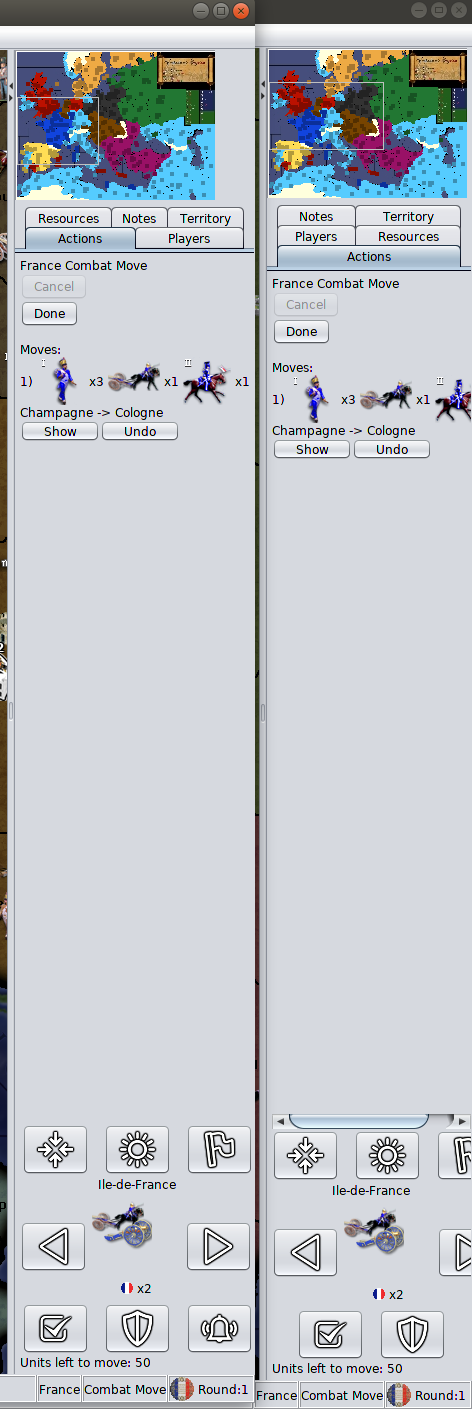
Otherwise, the unit scroller was made more narrow, to get to the last mile, a 250px min was added to the action panel. Here is a before/after (please note that even the unit history has trouble dealing with narrow mini-map, it also cut-off and has scrollbars in the before):
sun+moon icon / sleep terminology:
There's been no feedback on the 'station' suggestion. Going with that for now. We can go back to 'sleep', but we'd have to reconcile the iconography.
-
@LaFayette Maybe there should also be a "surrender" button, for ending the game by surrender?
I already said it, but just for the record, I like narrow minimaps, like the one of Napoleonic Empires, as I don't feel I need any more minimum wideness (and I can temporarily increase it for reading Notes or the stats), while I like having board view and I also don't like the fact of having a bar only on one side, as that factually moves the centre of the screen out of its place (I would actually prefer having two bars of the same size on both sides of the screen all the time). As a mapmaker, generally I go for 200 pixels wide minimaps.
-
@LaFayette I'd prefer sleep over station.
TripleA Developer with a Passion for AI: https://forums.triplea-game.org/topic/105/ai-development-discussion-and-feedback
-
Just for the sake of trying to end this conversation... how about this...





Hello! It looks like you're interested in this conversation, but you don't have an account yet.
Getting fed up of having to scroll through the same posts each visit? When you register for an account, you'll always come back to exactly where you were before, and choose to be notified of new replies (either via email, or push notification). You'll also be able to save bookmarks and upvote posts to show your appreciation to other community members.
With your input, this post could be even better 💗
Register Login