Proposal: Always-shown "Purchased Units" panel
-
Hmm, very strange. I wonder if it's some platform-specific difference.
Has anyone else had a chance to test it? Does it work for other people on Windows?
EDIT: Hmm, I had a chance to try it on Windows and am seeing the same thing. Ugh.
-
@Alexei-Svitkine Yeah, I immediately guessed it was because I'm on Windows and you are on Macintosh, but, then, I've been a little dubious since nobody else said anything or anyways confirmed the bug.
-
Actually, looks like I can reproduce the issue on Mac if I change the look and feel to Subspace, which is what TripleA uses on Windows. So I should be able to debug.
-
I figured out what's wrong and will be sending a fix. Stay tuned - I'll post an update when we have a prerelease build with the fix.
-
@Cernel said in Proposal: Always-shown "Purchased Units" panel:
@Alexei-Svitkine said in Proposal: Always-shown "Purchased Units" panel:
- How does it work with large unit icons? Something to also try out once we have a prerelease build with it.
I already suggested this, did you try it?
I didn't before, but I did now. The panel doesn't show up because as you say, there's no purchase. (I did get an exception with the UnitScroller on it, but this seems unrelated to my change.)
-
@Alexei-Svitkine Well, anyways what I said is that I believe it should not be called "Purchased Units". Like you could have a game that gives you whatever units based on something, also already having some at start game, that you'll place at some point. The matter is not that the units may be purchased, but that you have them still unplaced.
-
@Cernel said in Proposal: Always-shown "Purchased Units" panel:
@Alexei-Svitkine Well, anyways what I said is that I believe it should not be called "Purchased Units". Like you could have a game that gives you whatever units based on something, also already having some at start game, that you'll place at some point. The matter is not that the units may be purchased, but that you have them still unplaced.
Sorry I didn't reply to this. I agree that naming it something different like "Units to Place" would be better - and China on WW2v3 is a good example of this. Feedback noted and will keep it in mind when I iterate on the UI.
Still hoping to get the first UI out for people to try before I go about changing it.
-
@Alexei-Svitkine I think it can be just "To Place", as not like you can place something else but units (besides, also PUs (the main "resource" in the game) are nominally "units", as the meaning is "Production Units").
Alternatives to "To Place" may be "Unplaced", "Under Production", "Mobilizing", "Held" ("heldUnits" is the xml way of calling units in a player's inventory).
-
Okay, so I think we have a prerelease out with the fix here:
https://github.com/triplea-game/triplea/releases/tag/2.0.16244Please try it out, thanks! Sorry for the fact the previous one did not work right on Windows.
-
@Alexei-Svitkine Works for me, but this additional feature rates as an additional problem, in my tracker.
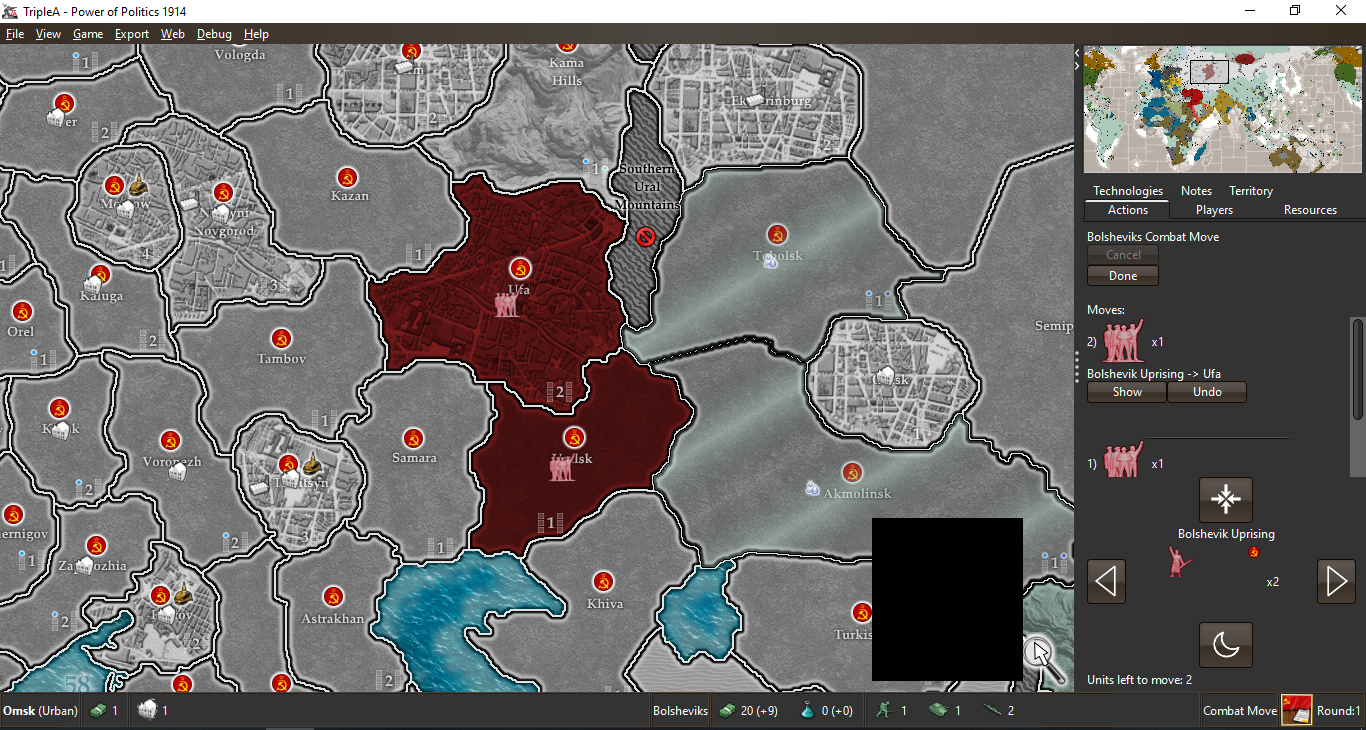
I guess here it is being generally assumed that TripleA maps are all maps with 48x48 pixel units. If so, I hope that is a wrong assumption.
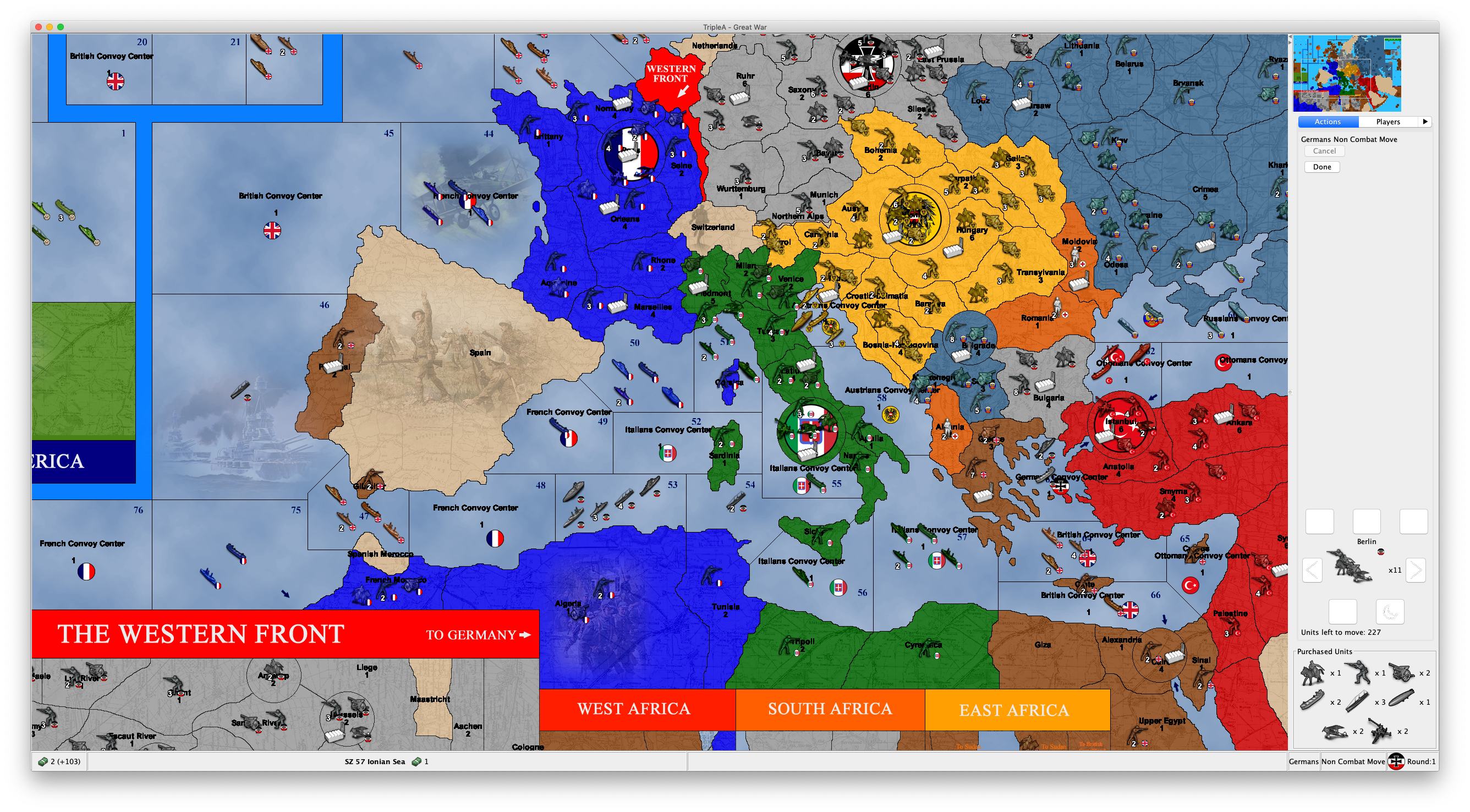
Not a map available anywhere, but an example of what you may get with 64x64 pixels units images on Full HD:

This image confirms my expectations, based on what I already explained.
Here, I cannot even acces the actual actions tab, meaning I'm unable to even undo the single move I made, unless I expand the right bar, of course (actually, I can also do it if I go in Settings/Testing and set Show Beta Features = False, then save and reload the game).
I suggest deleting this feature (if not moving it out of the "Actions" tab). Otherwise, at least assuring the actual actions space is never cut so much as being impossible to undo any or all of them (rather cutting the purchased units space).
-
Scrollbars look like a must. IMO we'd always probably want to see at least 4 of the purchased units, more than that behind scrollbars perhaps (largely need to account for cases where as @Cernel has tested there are a pretty decent number of different units pruchased. Some maps could get more extreme and we'd need to handle it)
IIRC the unit scroller was a bit debatable for taking up too much space. Unit scroller is move related, so it makes sense. We could try to cut down the space it takes, though I'm not sure if there is an obvious solution.
The fly-out tab I still think is the ultimate solution, until we get there moving the purchase panel is probably 2nd rate but at least gets the feature in. The 'resources' tab could make sense to have it. We could help the navigation issue between tabs by ensuring there are hotkeys to the tabs and that the hotkey is displayed on hover. Potentially and in addition to that, we could explore if there is a way to get tabs to show in rows on Mac so that they are all always visible.
-
It is not even that, actually. I have this "Purchased Units" thing everywhere, even if I go to the Notes tab!
Is this a bug, and this feature is actually supposed to stay only on the actions tab?
Anyways, movements are made based on a number of information. It is not feasible putting all such information right into the Actions tab, and I don't see why the units you have in your inventory (or, as some boardgames call it, your "mobilization zone") should have the privilege.
-
@LaFayette said in Proposal: Always-shown "Purchased Units" panel:
(largely need to account for cases where as @Cernel has tested there are a pretty decent number of different units pruchased. Some maps could get more extreme and we'd need to handle it)
That (unreleased) game of mine is not extreme, about this matter: there, I bought 11 units types, only 1 unit type more than what you can buy in "World War II Classic" and less than what you can buy in "World War II Revised"!
And 64x64 pixels units is only 33% wider and higher than the usual 48x48 pixels units.
-
Perhaps we should resize the units shown in this panel to be smaller, regardless of their source image size. Or only do that if there happens to be enough of them to actually take up a significant amount of space.
I actually think it looks quite good on standard WW2 maps where the typical purchase won't be more than say 6 unique types at a time. So perhaps by default we still show the current unit size - but resize them when they get too large/too many.
Can folks try it on a normal WW2 map (e.g. play as you would normally) and tell me how it feels for them there? As I said, in my opinion, it is actually working quite nice there - but would love to hear from others. I'd like to make sure we build something that works well for such a case, and not just for edge cases.
(The other option is to still have the split pane as discussed earlier in the thread or have it tabbed with the unit scroller. I'm not saying we shouldn't pursue those either - just trying to reason about the sizing first.)
I also have a change out to address the suggestion that it should be shown for non-local players too. When testing it myself, I was surprised how useful that is. I'll post a link to a prerelease build with that once it's available.
-
By the way, in the existing code for this, it's already asking for the non-"large" version of the icons. Whereas, for example, the standard unit placement panel asks for the "large" versions. I assume for your map (and maybe most other maps), you only have one size. So you may be able to just fix this for your map by having both "large" and non-"large" icons. For reference, the "large" icons should have an extra "_large" suffix in the filename.
-
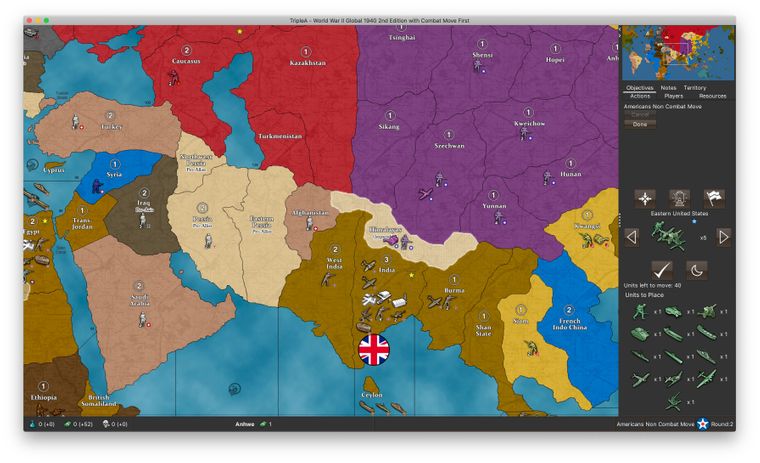
For reference, this is how it looks like for Global 40 2nd edition if the US buys nothing in the first turn and then uses its 104 PUs to buy as many different unit types as possible on the 2nd turn (13 distinct units, of which it is only allowed to place 9). And this is on my laptop screen.
So even with such a ridiculous scenario on a WW2 map, it still looks OK:
-
Cool feature, but it seems as though a solution is definitely needed as space is at a premium. Not being able to see the move history is a bigger detractor than being able to see the purchased units is a benefit. Only being able to see one or perhaps 2 moves would make playing sheer anguish. It can already be hard to isolate moves you made in order to undo them. I shudder to think what the experience would be like if you could only see 2 moves in the window.
I think something along the lines of a floating window would be ideal that opens and expands when you hover your cursor over an icon which is added to the game screen when you have purchased units...
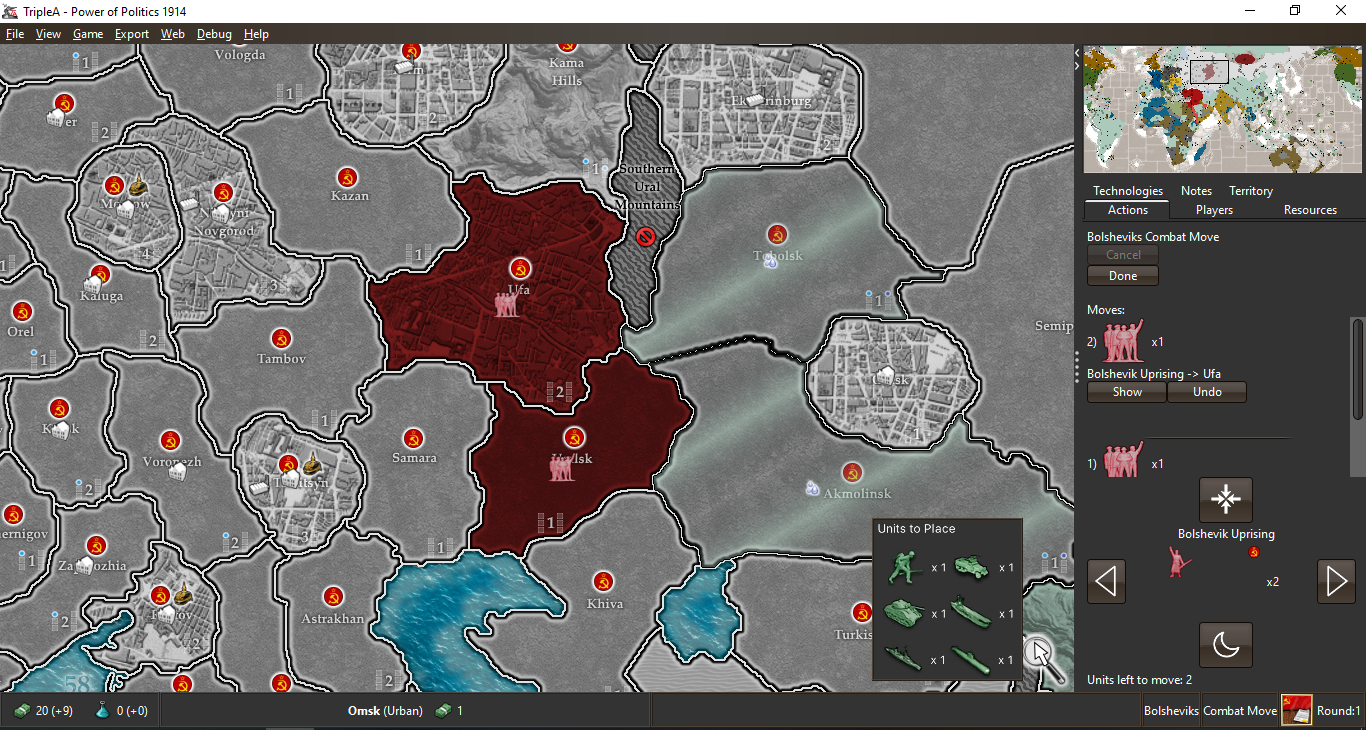
I just pieced this together quickly as an example.
-
@Alexei-Svitkine said in Proposal: Always-shown "Purchased Units" panel:
By the way, in the existing code for this, it's already asking for the non-"large" version of the icons. Whereas, for example, the standard unit placement panel asks for the "large" versions. I assume for your map (and maybe most other maps), you only have one size. So you may be able to just fix this for your map by having both "large" and non-"large" icons. For reference, the "large" icons should have an extra "_large" suffix in the filename.
What!?
Are you telling me that there are various sizes for the units (like the "infantry", "armour", etc.)? Really?
I've never heard about this or seen any maps having this.
Is this actually documented somewhere I've missed or is it just a totally undocumented feature?
-
@Hepps said in Proposal: Always-shown "Purchased Units" panel:
Cool feature, but it seems as though a solution is definitely needed as space is at a premium. Not being able to see the move history is a bigger detractor than being able to see the purchased units is a benefit. Only being able to see one or perhaps 2 moves would make playing sheer anguish. It can already be hard to isolate moves you made in order to undo them. I shudder to think what the experience would be like if you could only see 2 moves in the window.
I think something along the lines of a floating window would be ideal that opens and expands when you hover your cursor over an icon which is added to the game screen when you have purchased units...
I just pieced this together quickly as an example.
Certainly better than in the Actions tab, but not a fan of this.
I'm thinking about a two bottom bars solution.
One bottom bar in which you have all the resources and unplaced units the active player currently has in its inventory, plus the player's name, phase's name, etc..
Another bottom bar in which you have the territory name and what in that territory (plus its territory effects, if wanted).
For example, this way:
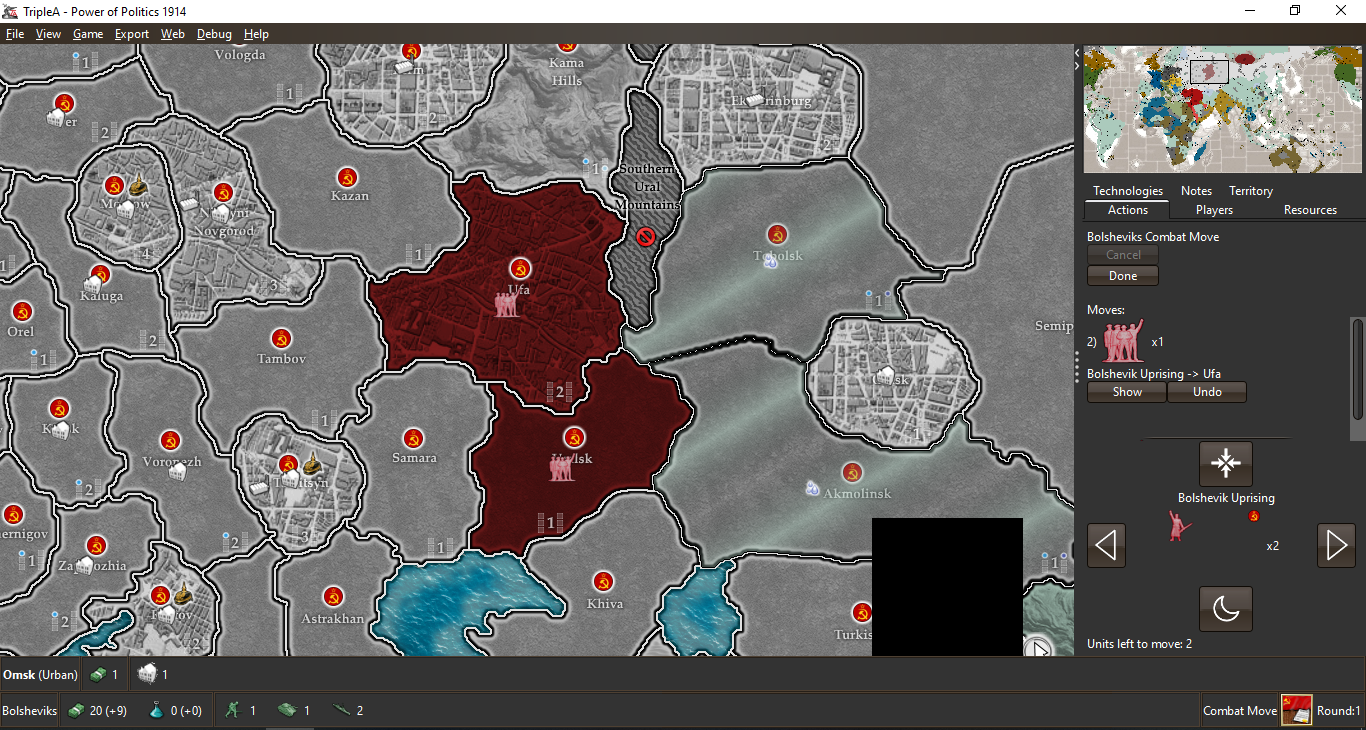
Otherwise all can stay on a single bottom bar, if preferred:
Of course, with a single bottom bar it would be much easier to have not enough space, but I think it would still require an very uncommonly huge amount of resources and units in the inventory or in the territory. To get some more space in it, I think the information about territory effects can be removed (it should be useless anyways, for well made maps, and you can check it in the Territory tab).
As a matter of having the units small enough, my suggestion would be allowing the mapmaker to have a "small" version of them, calling the regular ones otherwise, and shrinking them down to the same height as the normal flag (keeping proportions), if higher.
p.s.: I also don't believe the current bottom bar layout is very rational. First you have the resources of the active player, then you have stuff about the territory you are hovering, then you jump back to the active player, giving its name only at this point, followed by the current phase, that player's flag, and the current round (also this disposition doesn't make much sense to me, and feels jumpy too; I would go with player flag, then player name, then phase name, then current round). Of course, this is off topic, but I'm just saying I believe my two examples above would also have the items in the bottom bar more rationally displayed, as now I'm not sure it is obvious for a new player that the resources he sees bottom left are those of the current player, since it's name and flag are on the other side of the screen, with in the middle some unrelated territory information (but I already unsuccessfully argued with @redrum that the territory information should stay on the left part of the bottom bar, as it was before he changed it).
-
Just want to throw out some options and thoughts:
- a sliding pane (similar to what we have in download maps) could perhaps be an option. I think there is a setting on it that allows for a single-click expand+collapse
- The unit scroller would benefit to be made less tall, even if that is done we'll still be short on space in the move panel. We perhaps could explore using even smaller images (scaling to half-size) to perhaps use even less space.
We do need to try and find something that can be completed in the next week or two and then IMO focus on a more ideal/longer term solution.
I'd like to make sure we build something that works well for such a case, and not just for edge cases.
@Alexei-Svitkine it's a bit of a challenge in TripleA that it's a platform for maps, the core game engine code and infrastructure really needs to be able to handle any map. The 'edge cases' need to be supported, it's not okay for a perfectly okay map to have features be unusable because of display/rendering issues. Again, like backward compatibility concerns, the variety of maps is one of the things that makes TripleA deceptively difficult to work on.



Hello! It looks like you're interested in this conversation, but you don't have an account yet.
Getting fed up of having to scroll through the same posts each visit? When you register for an account, you'll always come back to exactly where you were before, and choose to be notified of new replies (either via email, or push notification). You'll also be able to save bookmarks and upvote posts to show your appreciation to other community members.
With your input, this post could be even better 💗
Register Login