TripleA Logo TripleA Forum
    • TripleA Website
    • Categories
    • Recent
    • Popular
    • Users
    • Groups
    • Tags
    • Register
    • Login

    connection problems

    Scheduled Pinned Locked Moved Map Making
    29 Posts 5 Posters 6.4k Views 5 Watching
    Loading More Posts
    • Oldest to Newest
    • Newest to Oldest
    • Most Votes
    Reply
    • Reply as topic
    Log in to reply
    This topic has been deleted. Only users with topic management privileges can see it.
    • N Offline
      Numetalfan
      last edited by

      Hi,

      all problems are gone.

      The trick - I started a new game and everything worked well.
      However - our saved game is still c´broken, there all connection problems are still alive.

      Strange.

      1 Reply Last reply Reply Quote 0
      • N Offline
        Numetalfan @RogerCooper
        last edited by

        @RogerCooper

        first, thx for the hints. I cleaned up my xml removed all the double entries for connections

        secondly, thx for the compliment. We are still busy working on that szenario, it is not yet finished. The idea of a sploit of the US is a nice thing, it makes the game much more interesting as there is always action in both the Atlantic and the Pacific,
        however there is al lot to do too. new national objectives, balancing the map and the units, the starting income etc.

        1 Reply Last reply Reply Quote 0
        • N Offline
          Numetalfan
          last edited by

          3 months without any problem, but now I got a strange one:

          units cannot move between SZ 53 and 46

          this is very strange, because:

          it worked before
          it is part of the original wwIIv3-41 game, I did not change anything here

          I checked, the centers, polygons and place files and redesigned them with the map editor, with no result

          even more, from BOTH of them it is possible to move to adjacent sea zones
          this means it is possible from SZ 53 to SZ 45 or SZ 79 and then to SZ 46
          logically vice verca it works too, e.g. from SZ46 to SZ45 then to SZ53

          I have used the map editors connection finder and copied the connections into my xml to get rid of double entries or other stupid mistakes I may have made before

          here you see all SZ are connected:

          <connection t1="45 Sea Zone" t2="46 Sea Zone"/>
          <connection t1="45 Sea Zone" t2="53 Sea Zone"/>
          <connection t1="45 Sea Zone" t2="54 Sea Zone"/>
          <connection t1="45 Sea Zone" t2="Fiji Samoa"/>
          <connection t1="46 Sea Zone" t2="47 Sea Zone"/>
          <connection t1="46 Sea Zone" t2="48 Sea Zone"/>
          <connection t1="46 Sea Zone" t2="53 Sea Zone"/>
          <connection t1="46 Sea Zone" t2="79 Sea Zone"/>
          <connection t1="46 Sea Zone" t2="Solomon Islands"/>
          ...

          the files:
          WW2v4-1941.xml
          polygons.txt
          place.txt
          centers.txt

          can it be anything else? a property or something?

          B 1 Reply Last reply Reply Quote 0
          • B Offline
            beelee @Numetalfan
            last edited by

            @Numetalfan can you post the entire game ? Upload to sendspace or something similar. I tried adding those 4 files to the regular WW2v4 game but it wouldn't fire.

            1 Reply Last reply Reply Quote 0
            • N Offline
              Numetalfan
              last edited by

              @belee

              https://storage.driveonweb.de/dowdoc/c84fc4098f53f8a89917db2cfbb57085ef5a5fe19a7142de

              password: TripleAAA

              you can download the game - btw: with 2.5 you can check why it crashes when Italy or US_west turn starts

              1 Reply Last reply Reply Quote 0
              • RogerCooperR Offline
                RogerCooper
                last edited by

                I think your problem may have something to do with your file names. TripleA is confusing world_war_ii_v4.zip with world_war_ii_v4-Master.zip. Try giving it a different name.

                In general, try to avoid the crush of scenarios with some variation of World War II in their name. I would suggest a file name like AA42_Variants.zip and info name like AA42-1941 Setup.

                1 Reply Last reply Reply Quote 1
                • N Offline
                  Numetalfan
                  last edited by

                  Hi,
                  I solved the problem - as usual, by redoing the centers and polygons.

                  now it works

                  battleship now also costs 18 IPC


                  unsolved: why the whole game doesn't run under 2.5 -at least why it crashes round 1 Italy or US.

                  B 1 Reply Last reply Reply Quote 1
                  • B Offline
                    beelee @Numetalfan
                    last edited by

                    @Numetalfan you should redo your DL zip. It has a lot of stuff in it that might be causing problems. When you open the zip the fist folder is fine but when you open that, it looks like this:

                    Screenshot from 2020-12-07 22-53-37.png

                    It should look like:
                    Screenshot from 2020-12-07 23-00-04.png
                    although I'm pretty sure you can get by without description and README for playing local. Those are for the git upload.

                    Then when you open "map" it should roughly look like this:

                    Screenshot from 2020-12-07 22-55-06.png

                    1 Reply Last reply Reply Quote 1
                    • N Offline
                      Numetalfan
                      last edited by

                      I will do that, already made a map folder,
                      but what is a description folder good for? what files should it contain?

                      B 1 Reply Last reply Reply Quote 0
                      • N Offline
                        Numetalfan
                        last edited by

                        Hi,

                        let's go back to

                        https://forums.triplea-game.org/topic/2435/post-turn-summary/13?_=1607414920560

                        that's where we started the 2.5/1.9 issue.

                        This thread was for connection error discussions 😉

                        1 Reply Last reply Reply Quote 0
                        • B Offline
                          beelee @Numetalfan
                          last edited by

                          @Numetalfan description is an image of the map that shows up when you hit select maps. Is needed to upload to triplea but not for local play/testing.

                          Yea, you shouldn't have any zip files in your "map" map 🙂 Also the 2 xmls at the bottom. That is why 2 maps were showing in select map. Your shipyard image should go in each players units folder. Probably a few other things.

                          Might wanna just look at the original v3 41 and make it look like that.

                          L

                          1 Reply Last reply Reply Quote 0
                          • N Offline
                            Numetalfan
                            last edited by

                            Hi belee,

                            I cleaned up:

                            https://storage.driveonweb.de/dowdoc/c84fc4098f53f8a891526fe7c7ba3a61288eec3f04cf9286

                            password: TripleAAA

                            the things mentioned should no longer appear

                            1 Reply Last reply Reply Quote 1
                            • N Offline
                              Numetalfan
                              last edited by

                              Hi all,

                              happy new year

                              In my game there were

                              a) a 73 Sea zone
                              b) a French indo-China Thailand

                              both countries are removed, I find none remnants in either the xml, the centers, the place or the polygons.
                              all of these files are attached.
                              polygons.txt
                              place.txt
                              centers.txt
                              world_war_ii_v4.xml

                              However, when I start the game, somewhere like a ghost these territories still exit - but where, in which file?

                              the error message is:
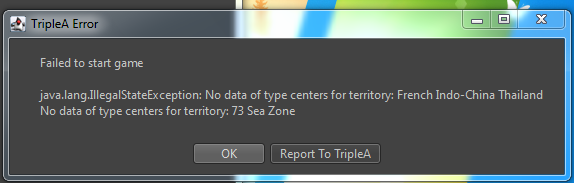
                              no data territory.PNG

                              please help

                              C 1 Reply Last reply Reply Quote 1
                              • C Offline
                                Contango @Numetalfan
                                last edited by

                                @Numetalfan

                                This reminds me of an issue I had where I made changes to a placement file, but then when running the game I was still getting my original placement locations.

                                If I remember correctly it was a problem of having multiple copies of my map folder (for previous versions) and the game was continuing to call the information from a previous folder even though the XML was the newest version.

                                Long story short, I’m wondering if it might be a similar problem of calling info from a folder you’re not expecting. Perhaps you think you’re running the game on the latest XML but TripleA is actually running an older version that still has references to your deleted territories.

                                I’m far from experienced, so just a guess.

                                B 1 Reply Last reply Reply Quote 1
                                • B Offline
                                  beelee @Contango
                                  last edited by

                                  @Contango yea stick everything in a separate folder then delete all triplea stuff and try it. If you have to, email the folder to yourself and 86 that too.

                                  1 Reply Last reply Reply Quote 0
                                  • N Offline
                                    Numetalfan
                                    last edited by

                                    Hi,

                                    ist the tripleA folder the problem or the downloaded games folder?

                                    B 1 Reply Last reply Reply Quote 0
                                    • B Offline
                                      beelee @Numetalfan
                                      last edited by

                                      @Numetalfan yea idk I've had that problem and with java too. Damn stuff hides out

                                      1 Reply Last reply Reply Quote 0
                                      • N Offline
                                        Numetalfan
                                        last edited by

                                        Incredible this worked!

                                        1 Reply Last reply Reply Quote 1

                                        Hello! It looks like you're interested in this conversation, but you don't have an account yet.

                                        Getting fed up of having to scroll through the same posts each visit? When you register for an account, you'll always come back to exactly where you were before, and choose to be notified of new replies (either via email, or push notification). You'll also be able to save bookmarks and upvote posts to show your appreciation to other community members.

                                        With your input, this post could be even better 💗

                                        Register Login
                                        • 1
                                        • 2
                                        • 2 / 2
                                        • First post
                                          Last post
                                        Copyright © 2016-2018 TripleA-Devs | Powered by NodeBB Forums