Revisiting an old project
-
@Hepps hides the ter value but gd stuff
-
@prastle Where do you live? Cause if its not too far... I'm going to come over there right now and donkey punch you.
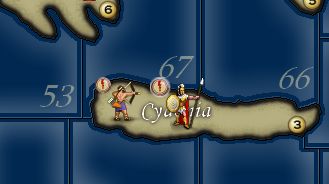
Here's the Greeks for now.
-
@Hepps gigglez im a farm boy and a truck mechanic give er
 guessing within 2.5 hrs of u or less. but even if ya did id still crack a Kieths and enjoy the bonfire.. either way im just happy with clear units
-
@Hepps How about opening a poll on the matter of the Neutral units having a flag or not?
-
This looks great. A bit like 3D. Nice work. And it is much better with the rounders in the same corner.
What type of units do "neutral" have in this map? Do they have access to every unit type of the map, so that a mod maker can setup up various scenarios? If they have rounders, then it could just be a white one, maybe
Map maker of: Star Wars: Galactic War + Star Wars: Tatooine War + Caribbean Trade War + Dragon War + Age of Tribes + Star Trek: Dilithium War + Iron War + Iron War: Europe + Warcraft: War Heroes
-
@Frostion the barbarian hordes are the neutrals
-
@Frostion The Neutral are normal neutrals: the null player. And, no, they have access only to a few units, some of them redundant (only the defence value matters, thus it is like they have only 3 units, at defence 1, 2 and 3). It is the same for my variants, 270BC Cernel Variant and 270BC 40%, as well as Rome Total War, but not for Total Ancient War.
-
@Frostion I gave the neutral Barbarians a very none descript Battle Axe silhouette as their national Roundel.
-
@Hepps Ahh OK. That is a good choice, like the barbarians in Civilization
 Maybe you should make the neutrals have access to all unit types so modders can make neutral territories everywhere and place the units everywhere without them being out of place culturally.
Map maker of: Star Wars: Galactic War + Star Wars: Tatooine War + Caribbean Trade War + Dragon War + Age of Tribes + Star Trek: Dilithium War + Iron War + Iron War: Europe + Warcraft: War Heroes
-
@Frostion I think you over estimate my involvement with this mod....
I am doing this because everytime I watch a match I feel like somebody is committing buggery to my eye sockets.... I simply want to be able to watch a game without my visual sense feeling dirty afterwards.
-
-
@Hepps And the barbarian.
Also, I suggest you close the circle and tweak the Neutral city too, tho it is not used, except you can see it in Unit Help.
I actually almost totally like how the current units look when they are zoomed under 100%, but definitely they look too pixellated and generally not of good quality at 100%. I'm guessing you keep the Unit Size at 100%? I never keep them at 100%, because blurring the image with the zoom is really needed to make them watchable.
-
@Cernel They could be 2% and it would still offend my senses.

-
Greece is now done.
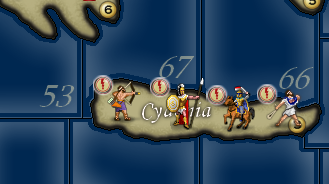
Onto the Macedonians... Probably going to make slight changes to some of their units just to break up the repetitiveness of some of the units that are common to multiple nations.
-
@Hepps As said, maybe make the hoplite of them, as well as Seleucid and Carthage, look like a Macedonian phalangite. It would not make sense with the name (but it would be possible to switch it from hoplite to phalangite or whatever anytime), but it would make some more sense with the setting. Of course, you are not going to represent the sarissa in all its lenght, but maybe this is something you may want to do not to have the Macedonians etc. looking like having hoplites, which is so silly.
https://en.wikipedia.org/wiki/Pezhetairos
Just a suggestion; I know this game is silly fantasy anyways.
On the other hand, I've no idea what the "swordman" of Macedonia might be representing, if anything at all. -
@Cernel That's exactly what I was looking at. Makes very little sense that all look like the Greek unit.
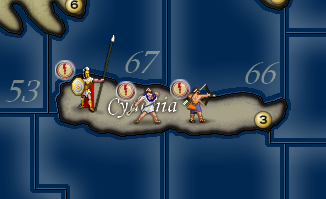
And I could make the sarissa realistic for the longer versions of the weapon if the unit images were anchored at the bottom left instead of the top left. Otherwise we just assume they are carrying a Dory.
If placement code was changed we might dare to see something like this....
-
@Hepps said in Revisiting an old project:
And I could make the sarissa realistic for the longer versions of the weapon if the unit images were anchored at the bottom left instead of the top left.
Sadly, this is not viable, as it would still turn silly in the other places in which you see the image (territory tab, the battle window, battlecalculator...). In general, I think it is better all images having the same dimension, and just leave a lot of unused space for the smaller ones, instead of having units of different sizes (here it would mean like having all units with a lot of unused space just to allow a bit longer spear for the hoplite=phalangite (you are not going to fit in a 6+ meters long one anyways)). Duno if you want maybe to consider to expand all units to 64x64, with a lot of unused space, just for allowing an about 3 metres spear to show up for the hoplite=phalangite; probably it would look not that justifiable, since anyways, at under 4 metres, that would not be a sarissa either (you would need to go to 128x128 to have something the like, while keeping the dude centred, but this is definitely not advisable for many reasons).
-
@Hepps said in Revisiting an old project:
@Cernel That's exactly what I was looking at. Makes very little sense that all look like the Greek unit.
And I could make the sarissa realistic for the longer versions of the weapon if the unit images were anchored at the bottom left instead of the top left. Otherwise we just assume they are carrying a Dory.
If placement code was changed we might dare to see something like this....
Yah, but not really viable because, in that case, assuming only the hoplite there is bigger than the other ones, then you would have it very differently spaced in the territory tab and in the battle window etc.. So it would need all of a serie of other changes beside an option to draw from botton-left. More sensible would be to make all images the same dimension, and the others just having a lot of transparent unused space, but you would still take away space in territory tab etc. to not very good reasons; so it would need a setting for cutting the image down, as wanted, when shown outside of the board (in this case, cutting the spear out when the image is shown elsewhere). The problem is that doubt a developer would be on board for that.
-
@Cernel Yes... that is what I'm saying... it would make a hell of a lot more sense from a design standpoint if all anchor points were from the bottom left.... every unit has to "stand" some where.... if all unit images were anchored from the bottom left... in every aspect of the game mechanics... then it would improve designability tremendously. Because you could leave the visible area starting from the bottom and then simply have the upper edges of the max viewable window size (55 x 55) would be cut off.... in this case... the top of the spear.
-
@Hepps Yes, this may be a cool feature request. But it would still need to be integrated by other tweaks in other areas because, for having experimented with big images, I can tell that there are several issues, in that you would have the full image in territory tab and the image would be equally cut up and down in the combat windows and other things that would make a setting to draw from bottom-left alone not enough.
Personally, I would prefer to solve this by having the dude always about at the centre of the image, with like a 128x128 image, and then assure that, outside of the board, it is always cut down to size.



Hello! It looks like you're interested in this conversation, but you don't have an account yet.
Getting fed up of having to scroll through the same posts each visit? When you register for an account, you'll always come back to exactly where you were before, and choose to be notified of new replies (either via email, or push notification). You'll also be able to save bookmarks and upvote posts to show your appreciation to other community members.
With your input, this post could be even better 💗
Register Login