Achievable improvements to the Triplea User Interface
-
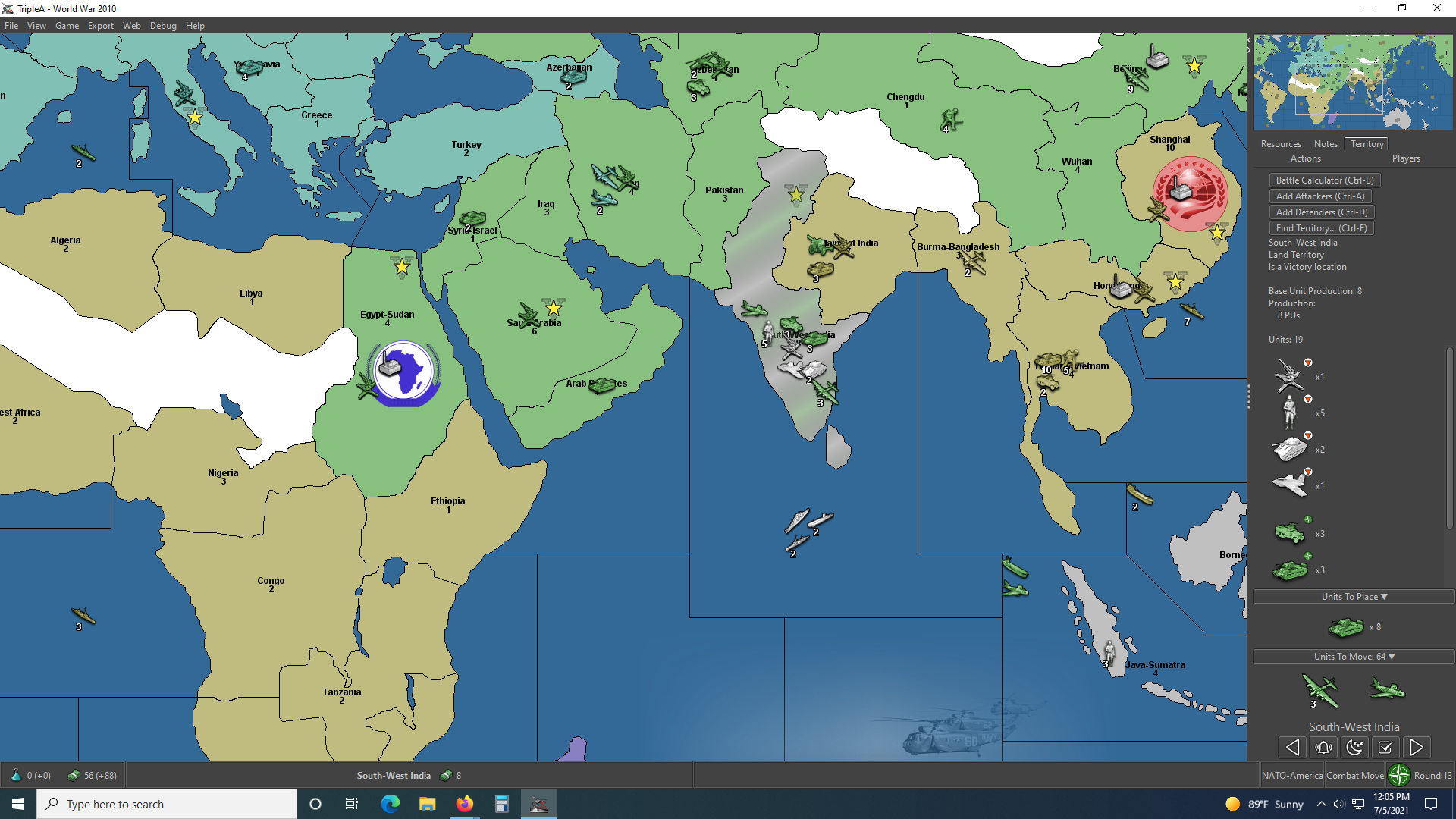
@thedog One issue with the unitScroller is that it isn't displayed during the purchase phase and I think it is also useful to be able to view factories when planning production.
- I've added a mouse action on the round label/flag icon, which I have a bound to the hide the sidePanel (Ctrl-X) command. Hiding the sidePanel currently resets it to its starting size.
-The default map text font size has been increased from 12 to 24 (this setting is used when reset to default is used). I am also thinking about splitting in one font size for unit counts (default: 24) and another font size for territory/PUs/Convoy (default: 18) used in Maps like POS2.
- Having the tabs on a single line is a improvement IMO. It also makes finding the command/action tab much easier.
@thedog Status Bar: move to the top of the screen.
Moving the whole status bar to the top of the screen would not be practical, but the status label could be moved to the menubar. Maps with territory effects and multiple ressources are quite badly constrained currently, so it should be looked at.
It would of course be possible to remove the bottom bar if the contents were moved elsewhere. -
@butterw said in Achievable improvements to the Triplea User Interface:
@thedog One issue with the unitScroller is that it isn't displayed during the purchase phase and I think it is also useful to be able to view factories when planning production.
I agree, are you thinking of using the unitScroller as a factoryScroller in the purchase phase?
- I've added a mouse action on the round label/flag icon, which I have a bound to the hide the sidePanel (Ctrl-X) command. Hiding the sidePanel currently resets it to its starting size.
Is this the Flag bottom right of the screen?
-The default map text font size has been increased from 12 to 24 (this setting is used when reset to default is used). I am also thinking about splitting in one font size for unit counts (default: 24) and another font size for territory/PUs/Convoy (default: 18) used in Maps like POS2.
Is this so they occupy less space?
- Having the tabs on a single line is a improvement IMO. It also makes finding the command/action tab much easier.
Agreed
@thedog Status Bar: move to the top of the screen.
Moving the whole status bar to the top of the screen would not be practical, but the status label could be moved to the menubar. Maps with territory effects and multiple ressources are quite badly constrained currently, so it should be looked at.The right click Territory popup would solve the above?
It would of course be possible to remove the bottom bar if the contents were moved elsewhere.
Oooh yes it could, some of it could go into the right click on a Territory popup?
I think the far right of the status bar should stay where is, but put it inside the right hand panel -
@thedog
The standard delay for java tooltip is about 1s, whereas the tooltip on units only comes up after 2s. I would assume this extra delay is deliberate...There probably should be an option to prevent unit tooltips from displaying on the map.
-
@butterw
Or use a switch Hover or Right Click on a unit or territory to get their tooltip as I think you will always have the need to see the unit or territory detail. -
A lot of the issues with the territory detail is that the info display isn't optimized. It works OK as long as the map doesn't use too many special features (ex: 5 players, no terrain effects, PUs as single ressource, only basic units).
Optimizing (simplifying) the output (territory detail, tooltip) would make it much easier to fit the info on screen for complex maps. -
@butterw
Agreed.My current preference is for a right click on the territory over hover over a territory as its instant and no waiting around.
Here is a list of the info that could be displayed on the territory popup.
https://forums.triplea-game.org/topic/2798/achievable-improvements-to-the-triplea-user-interface/82 -
We should only be careful about choosing carefully right click functionality. Right click and drag might be a nicer way to move the map. If so, then detecting a single right click vs a right click and drag could be problematic. Overall right click is underused, so ideally we'd design it to be used somehow. A context menu with more options than info might be good. For example, instead of requiring a player to know 'ctrl+b', we could have the battle calc for a territory be part of the right click. Right click might be well used for undoing of actions, so that is another thing to consider.
-
@lafayette said in Achievable improvements to the Triplea User Interface:
We should only be careful about choosing carefully right click functionality. Right click and drag might be a nicer way to move the map. If so, then detecting a single right click vs a right click and drag could be problematic. Overall right click is underused, so ideally we'd design it to be used somehow. A context menu with more options than info might be good. For example, instead of requiring a player to know 'ctrl+b', we could have the battle calc for a territory be part of the right click. Right click might be well used for undoing of actions, so that is another thing to consider.
A contextual menu/info display on territory/zones seems like an interesting idea.
RIght click +/OR a keyboard key could be used (ex: MENU key). -
The current menus are a bit troublesome to work with because most items are added in a slightly different way. This makes modifications more difficult than they should be. I'm doing a mockup of the tripleaframe that should allow testing out changes easily (it will handle the menuBar and the splitPane initially).
I will be looking into making the menubar hideable (while retaining the hotkeys defined in menus) and will hopefully have a new dev build this week.
My approach is to set height of menubar to zero when hidden. The menus remain accessible with Alt+Mnemonic (F, V, G, etc.) or F10 (opens the _File menu on Windows) even if the menubar is not displayed.
When collapsed with CTRL+X, the sidepanel will be completely hidden, and will remember it's previous position. I'm adding a separate command to reset the sidepanel size. -
@butterw said in Achievable improvements to the Triplea User Interface:
A contextual menu/info display on territory/zones seems like an interesting idea.
RIght click +/OR a keyboard key could be used (ex: MENU key).yea it'd b nice to be able to activate the Territory tab and scroll without having to have the cursor up top and then moved over to it
-
well I've not read through all 6 pages on this forum and I hope I'm not being redundant with this concern. When There are a lot of units in a territory, I click the territory tab to see the list of the units on the right of the screen. The list is too long for the window and there is a scroll bar, however after clicking the territory tab, then the map location, as I bring my mouse back to the scroll bar the territory tab window doesn't maintain focus on the territory I wanted info on. Instead it reacts to whatever map locations I hover over on my way back to the territory tab scroll bar making it useless. Is there something I'm doing incorrectly? I've tried the arrow keys, shift and cntl clicking etc. to no avail. Here is a screenshot if it helps anyone understand what I'm talking about. You can see that I can't see my bombers in the territory info tab and I can't find a way to get that scroll bar to work. Thanks
![alt text]
-
@pact_of_plastic
Yes its a common problem.
The current answer is to move the map territory next to the right hand Action/Players panel and then you scroll the units.This is one of the fixes under consideration.
-
If you click on the territory and hold down the click button, you can then move the mouse while holding click and the territory tab will not change. It's not an ideal UX, no.
-
@lafayette This is really a life hack, isn't it. I don't think you are ever supposed to left click but for selecting something.
Having anything you can click on inside the territory tab really doesn't make sense if I'm assuming correctly that the trick of holding the left mouse button while moving the cursor on there is not something intended. If it is, likely it should be documented in "Movement/Selection Help".
-
@lafayette said in Achievable improvements to the Triplea User Interface:
If you click on the territory and hold down the click button, you can then move the mouse while holding click and the territory tab will not change. It's not an ideal UX, no.
Well you learn something new ...
Yes that works as well. -
The standard delay for java tooltip is about 1s, whereas the tooltip on units only comes up after 2s. I would assume this extra delay is deliberate...
There probably should be an option to prevent unit tooltips from displaying on the map.
Unit tooltips are set to 2s in MapUnitTooltipManager.java, and are called from TripleaFrame.
I'm adding a "Show Tooltips on Map" option to the View Menu (the setting isn't persistent).
-
@lafayette said in Achievable improvements to the Triplea User Interface:
If you click on the territory and hold down the click button, you can then move the mouse while holding click and the territory tab will not change. It's not an ideal UX, no.
wow that works pretty good ! Wish i'd have known that years ago lol
-
@butterw I guess TripleA is a rare "game" not allowing the user to set the tooltip delay time. Still, having the option of not having tooltips at all might be good too.
-
@cernel
The map tooltip delay value might be easy to hack in the code.
Making a value configurable in the interface requires more work, and setting a value is more complex than just enabling/disabling, then there is the issue of whether it should be made persistent, etc.None of this actually requires great programming skills, but any such changes would need to be tested and proven to be beneficial to make it into the main game version. Feedback on development builds is very critical here.
The current configuration ui also wouldn't scale, meaning only the most important parameters can realistically be made configurable.
-
@butterw
From you have said I would drop the hover ability in favour of a right click.It can happen that I have a window application open over the top of TripleA and the hover pop-up, bleeds through and pops up over this window disrupting my work.


Hello! It looks like you're interested in this conversation, but you don't have an account yet.
Getting fed up of having to scroll through the same posts each visit? When you register for an account, you'll always come back to exactly where you were before, and choose to be notified of new replies (either via email, or push notification). You'll also be able to save bookmarks and upvote posts to show your appreciation to other community members.
With your input, this post could be even better 💗
Register Login