TripleA Logo TripleA Forum
    • TripleA Website
    • Categories
    • Recent
    • Popular
    • Users
    • Groups
    • Tags
    • Register
    • Login

    Achievable improvements to the Triplea User Interface

    Scheduled Pinned Locked Moved Development
    130 Posts 9 Posters 74.0k Views 8 Watching
    Loading More Posts
    • Oldest to Newest
    • Newest to Oldest
    • Most Votes
    Reply
    • Reply as topic
    Log in to reply
    This topic has been deleted. Only users with topic management privileges can see it.
    • LaFayetteL Offline
      LaFayette Admin @TheDog
      last edited by

      If you click on the territory and hold down the click button, you can then move the mouse while holding click and the territory tab will not change. It's not an ideal UX, no.

      C TheDogT B 3 Replies Last reply Reply Quote 1
      • C Offline
        Cernel Moderators Lobby Moderators @LaFayette
        last edited by

        @lafayette This is really a life hack, isn't it. I don't think you are ever supposed to left click but for selecting something.

        Having anything you can click on inside the territory tab really doesn't make sense if I'm assuming correctly that the trick of holding the left mouse button while moving the cursor on there is not something intended. If it is, likely it should be documented in "Movement/Selection Help".

        1 Reply Last reply Reply Quote 1
        • TheDogT Offline
          TheDog @LaFayette
          last edited by

          @lafayette said in Achievable improvements to the Triplea User Interface:

          If you click on the territory and hold down the click button, you can then move the mouse while holding click and the territory tab will not change. It's not an ideal UX, no.

          Well you learn something new ...
          Yes that works as well.

          https://forums.triplea-game.org/tags/thedog
          https://forums.triplea-game.org/topic/3741/curated-best-top-maps-triplea-guides

          1 Reply Last reply Reply Quote 0
          • B Offline
            butterw @butterw
            last edited by

            The standard delay for java tooltip is about 1s, whereas the tooltip on units only comes up after 2s. I would assume this extra delay is deliberate...

            There probably should be an option to prevent unit tooltips from displaying on the map.

            Unit tooltips are set to 2s in MapUnitTooltipManager.java, and are called from TripleaFrame.

            I'm adding a "Show Tooltips on Map" option to the View Menu (the setting isn't persistent).

            C 1 Reply Last reply Reply Quote 0
            • B Offline
              beelee @LaFayette
              last edited by

              @lafayette said in Achievable improvements to the Triplea User Interface:

              If you click on the territory and hold down the click button, you can then move the mouse while holding click and the territory tab will not change. It's not an ideal UX, no.

              wow that works pretty good ! Wish i'd have known that years ago lol

              1 Reply Last reply Reply Quote 0
              • C Offline
                Cernel Moderators Lobby Moderators @butterw
                last edited by Cernel

                @butterw I guess TripleA is a rare "game" not allowing the user to set the tooltip delay time. Still, having the option of not having tooltips at all might be good too.

                1 Reply Last reply Reply Quote 0
                • B Offline
                  butterw
                  last edited by

                  @cernel
                  The map tooltip delay value might be easy to hack in the code.
                  Making a value configurable in the interface requires more work, and setting a value is more complex than just enabling/disabling, then there is the issue of whether it should be made persistent, etc.

                  None of this actually requires great programming skills, but any such changes would need to be tested and proven to be beneficial to make it into the main game version. Feedback on development builds is very critical here.

                  The current configuration ui also wouldn't scale, meaning only the most important parameters can realistically be made configurable.

                  TheDogT 1 Reply Last reply Reply Quote 0
                  • TheDogT Offline
                    TheDog @butterw
                    last edited by

                    @butterw
                    From you have said I would drop the hover ability in favour of a right click.

                    It can happen that I have a window application open over the top of TripleA and the hover pop-up, bleeds through and pops up over this window disrupting my work.

                    https://forums.triplea-game.org/tags/thedog
                    https://forums.triplea-game.org/topic/3741/curated-best-top-maps-triplea-guides

                    1 Reply Last reply Reply Quote 2
                    • B Offline
                      butterw
                      last edited by

                      1080p fullscreen with hidden sidebar and menubar, window is undecorated.
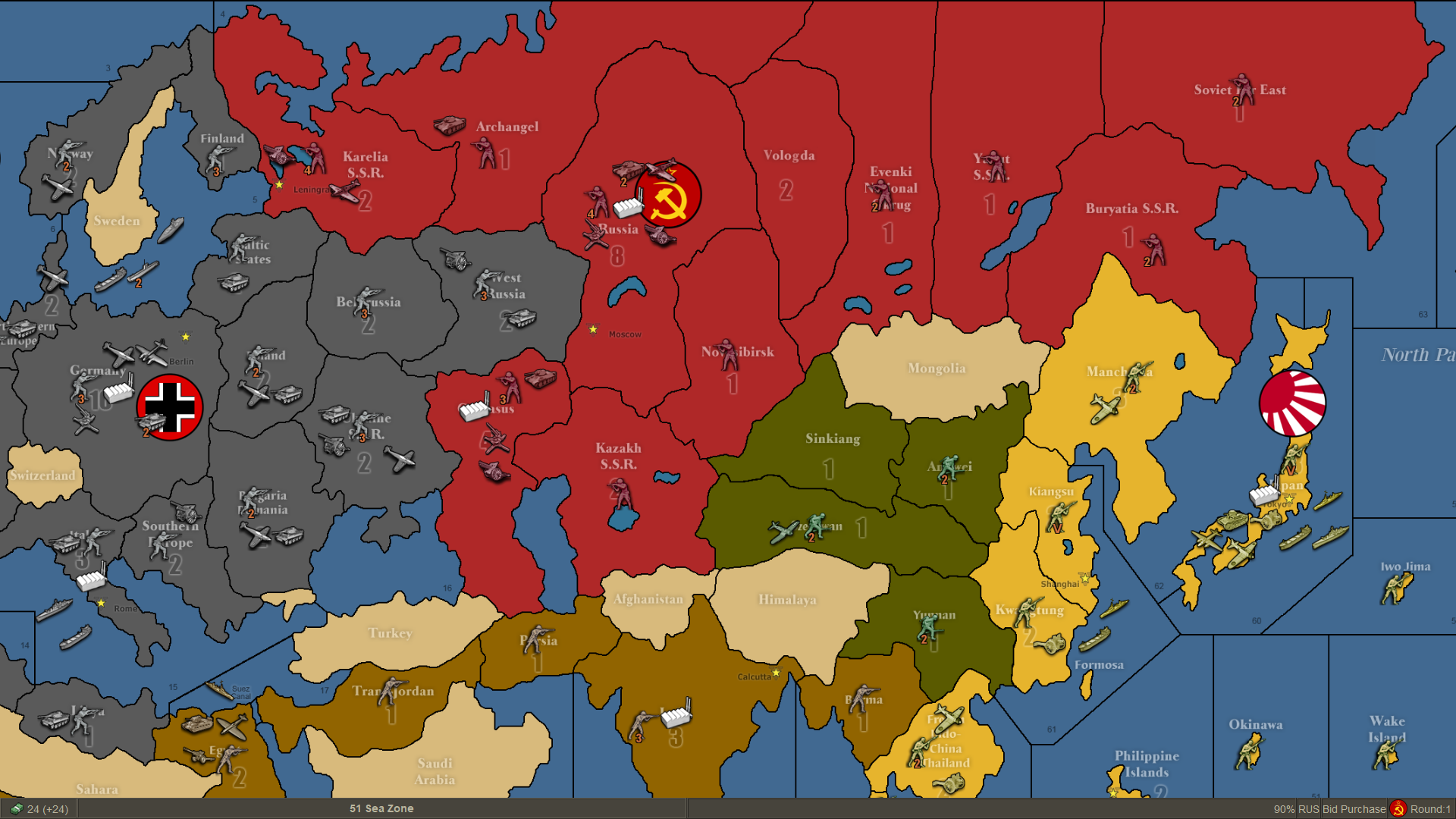
                      alt text

                      TheDogT 1 Reply Last reply Reply Quote 2
                      • TheDogT Offline
                        TheDog @butterw
                        last edited by

                        @butterw
                        Looking very good!

                        Just in case you have missed this, the History needs a H 😉
                        cf0acdff-9685-4532-afd1-863e9c688785-image.png

                        https://forums.triplea-game.org/tags/thedog
                        https://forums.triplea-game.org/topic/3741/curated-best-top-maps-triplea-guides

                        B 1 Reply Last reply Reply Quote 1
                        • B Offline
                          butterw @TheDog
                          last edited by butterw

                          @thedog said in Achievable improvements to the Triplea User Interface:

                          Just in case you have missed this, the History needs a H 😉

                          cf0acdff-9685-4532-afd1-863e9c688785-image.png

                          I haven't looked into why but with the History and current game mode, the sidepanel tabs can actually get re-populated at 3 different places in the code.
                          If there is room keeping the special tab "History" in full probably makes sense. Same for Edit.

                          For your tooltip bleed-through issues, you should Iconify the app rather than use Alt-Tab.
                          F11 will toggle (undecorated window) fullscreenMode.
                          It looks like it would be troublesome to change the decoration status of the TripleA frame at runtime, meaning full screen (undecorated frame) will need to be set before you the map is launched.
                          CTRL+F11 will allow to iconify triplea (in fullscreenMode). Modal OptionPane dialogs will need to be closed before iconifying as they get their own iconified entry.
                          CTRL+ALT (on key release) will toggle the menubar display.
                          It would be possible to always display the menubar when ALT is pressed, but this would cause a hidden menubar to display when ALT is used as a hotkey modifier, which seems undesireable.

                          TheDogT 1 Reply Last reply Reply Quote 1
                          • TheDogT Offline
                            TheDog @butterw
                            last edited by

                            @butterw
                            Thanks for the advice and CTRL+ALT is fine.

                            https://forums.triplea-game.org/tags/thedog
                            https://forums.triplea-game.org/topic/3741/curated-best-top-maps-triplea-guides

                            1 Reply Last reply Reply Quote 0
                            • B Offline
                              butterw
                              last edited by butterw

                              I haven't add time to do much progress. I still plan to post an updated dev version this month.

                              I will also be adding the status bar to my frame mockup and will upload the code for it. The flag and ressource PU icons can be used as command launchers.
                              The fullscreenMode option should be persistent, but can be changed at runtime with F11. In fullscreenMode, the window decoration is removed, this also causes the (map) gameName to not be immediately visible.
                              With the menubar displayed, it is possible to have a menuLabel to display info. The menu is also used to display hotkeys.
                              I've added the new commands to the Game Menu, however it would be better to move them to a new Window Menu.
                              Game Menu should be solely dedicated to Gameplay options IMO, and View Menu should only contain Map Display options.
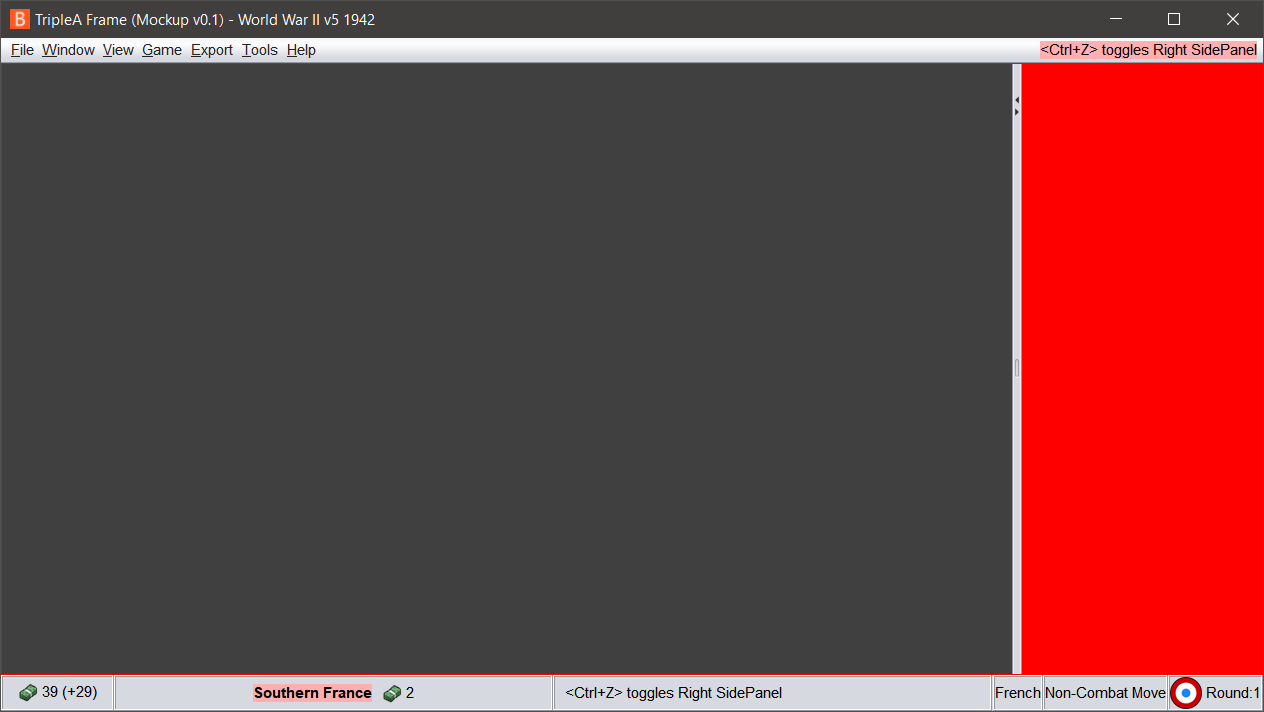
                              image url)

                              1 Reply Last reply Reply Quote 0
                              • B Offline
                                butterw
                                last edited by butterw

                                I will be posting my ui mockup (see image in the previous post) at https://github.com/butterw/ui

                                To run it unzip the MenuSwing.zip file to your work directory
                                java -jar BFrame.jar
                                or
                                java MenuSwing.java (requires Java 11 JDK)

                                the display (text, icons, etc) can be customized via the ui.properties file (this is a scalable approach for user parameters).
                                It uses the Nimbus look and feel. dpi scaling and the font can be customized.
                                the sidePanel is hidable (by clicking the player flag icon or via a user customizable hotkey), F11 toggles fullscreen mode (undecorated +maximized window). The menubar includes a status Label.

                                The code is a lot easier to modify than the triplea code.
                                Hotkeys are in a single class.
                                The Menu is a single class (structure directly matches the displayed menu).

                                v0.1 features:
                                File > Exit (Alt+F4)
                                Window Menu (Fullscreen F11, Iconify, toggle sidePanel, reset sidepanel, toggle menubar)
                                View > Map Zoom
                                Help > About

                                B 1 Reply Last reply Reply Quote 0
                                • B Offline
                                  butterw @butterw
                                  last edited by

                                  The jar version v0.11 has now been uploaded:
                                  https://github.com/butterw/ui/blob/main/code/MenuSwing.zip

                                  It can be used for experimentation, ex: with the player flag icon size (24, 32, 48), which sets the size of the bottomBar.

                                  Menus can be reorganised, ex: the File Menu entry could be removed.

                                  I would expect to add the sidepanel layout.

                                  Some different features will be added to the dev build (ex active hideable menu).

                                  Unless there are issues with it (I haven't done much testing and only on Win10), I would expect to open a pull request to add fullscreenMode to the triplea v2.6.

                                  B 1 Reply Last reply Reply Quote 0
                                  • B Offline
                                    butterw @butterw
                                    last edited by butterw

                                    Java versions

                                    to run a jar file, path.to/java.exe -jar BFrame.jar

                                    Java 11 is required, to check the version: path.to/java.exe -version
                                    It is possible to have multiple version of java installed on a system at the same time, but the version used by triplea (v2.5/2.6) is java 11.

                                    JRE (Java runtime) only allows to run programs.
                                    JDK (Java development kit) allows to (modify) compile programs as well as run them.
                                    available at: https://adoptopenjdk.net/

                                    TheDogT 1 Reply Last reply Reply Quote 2
                                    • TheDogT Offline
                                      TheDog @butterw
                                      last edited by

                                      Thanks as Oracles Java did not work, but your adoptopenjdk.net works well.

                                      Had a quick test and the only comment is the Menu Bar ctrl+alt appears to work best when I
                                      press ctrl (hold down) then
                                      press alt
                                      Pressing ctrl+alt together does not always work, but the above does.

                                      Otherwise looking very good.

                                      How do I uninstall adoptopenjdk.net, it has no Win10 Uninstall and is not listed in the Apps?
                                      A quick Google says to remove the environment path variable, is that the best way to uninstall it and then manually delete the folder?

                                      https://forums.triplea-game.org/tags/thedog
                                      https://forums.triplea-game.org/topic/3741/curated-best-top-maps-triplea-guides

                                      B 1 Reply Last reply Reply Quote 0
                                      • B Offline
                                        butterw @TheDog
                                        last edited by butterw

                                        @thedog
                                        Oracle Java works fine. Your issue is that your system java install was java8. You can avoid this issue by setting the path to the java executable bundled with Triplea v2.5/2.6 on Windows, as suggested in my previous post or by modifying the classpath environment variable.

                                        The hotkey to hide the menubar is ctrl released ALT: Press CTRL (hold), then press Alt. Releasing Alt fires the hotkey.

                                        1 Reply Last reply Reply Quote 0
                                        • B Offline
                                          beelee @TheDog
                                          last edited by

                                          @thedog just saw this again over at git. I haven't actually installed it yet but can you still open the battle calculator with ctrl b ? It's just removed when the territory panel is open ?

                                          TheDogT 1 Reply Last reply Reply Quote 0
                                          • TheDogT Offline
                                            TheDog @beelee
                                            last edited by TheDog

                                            @beelee said in Achievable improvements to the Triplea User Interface:

                                            but can you still open the battle calculator with ctrl b ?

                                            Yes, activates where the cursor/territory is.

                                            .

                                            It's just removed when the territory panel is open ?

                                            On my version its still in the Territory panel.

                                            https://forums.triplea-game.org/tags/thedog
                                            https://forums.triplea-game.org/topic/3741/curated-best-top-maps-triplea-guides

                                            B 1 Reply Last reply Reply Quote 1

                                            Hello! It looks like you're interested in this conversation, but you don't have an account yet.

                                            Getting fed up of having to scroll through the same posts each visit? When you register for an account, you'll always come back to exactly where you were before, and choose to be notified of new replies (either via email, or push notification). You'll also be able to save bookmarks and upvote posts to show your appreciation to other community members.

                                            With your input, this post could be even better 💗

                                            Register Login
                                            • 1
                                            • 2
                                            • 3
                                            • 4
                                            • 5
                                            • 6
                                            • 7
                                            • 5 / 7
                                            • First post
                                              Last post
                                            Copyright © 2016-2018 TripleA-Devs | Powered by NodeBB Forums
