Proposed Map: Domination 1941
-
Sounds good. The little icons are pretty easy to erase or switch if we can come up with something better. For G40 I wasn't going to use them for the ground, cause there's only 1 type of armor there anyway hehe, but they did seem kinda handy for distinguishing between light medium and heavy types in Frostion's game, or if people want to do expansion type stuff for G40. I do like his symbols for the naval units though, since it makes the ship types a bit easier to pick out at a glance.
Haha right on! If I get a wild urge I might do a bazooka dude or a guy tossing a grenade or revive the old dude with the pistol, just to round out the plastic army men vibe, even if they don't get used lol, but I think we got enough to handle the standard game hopefully
-
@black_elk said in Proposed Map: Domination 1941:
The little icons are pretty easy to erase
Agreed.
.
I do like his symbols for the naval units though
I do as well.
-
Hehe I forgot how many misc/redundant units graphics there were in the G40 folder. Also how mildly annoying the radar and rocket techs are for grinding out the AB/NB/Factory units. I just spent like 30 minutes making all those lol. There's at least a couple dozen graphics for each nation just down to those two techs, but I mean more the stuff that's just labelled "old" or "alt" or not being used for anything in particular.
I don't want to break any popular mods, but don't those have their own map files typically? Like the BM mod or the G40 expansion, or do I have to keep all this stuff in here in the main map package?
My thought would be to archive everything into a "Old Unit Graphics" folder, and then make sure that the stuff in the G40 units folders is only the material that actually needs to be there. Just so people can tell which stuff is actually being used. "Unit Help" doesn't show all the images, for stuff like Tech advances or damaged/disabled facilities etc, so you'd have to turn to the unit folders to see all the assets, but then having a ton of misc unit stuff in there too makes it a little confusing. Or at least any misc or expansion type material can be separated into it's own folder within the main unit folders right, so it's easier to keep track of?
-
@black_elk
Im not sure what you are after, but below is how TripleA works.units folder
contains all the nation folders and can contain units that are used by all nations including neutral, so in my 1941 Command Decision folder I have all the 9 Industry units with variants and 2 Bunker units one with _hitNation-XXX folders (like USA, Britain etc)
contains only that nations unitsInside Nation-XXX folder you can have lots of other folders that are not read/seen by TripleA.
like Alt folder or NotUsed folder or AllUnits folder that belong to the higher folder etcHopefully the above makes sense and you can make it fit what you want.
-
@black_elk yea i think 2.6 has a fix for missing images. Gives a generic one.
It is a pita doing all the different tech damaged/hit units lol. Just naming them takes me awhile. I'd just copy the existing folder, then add your new stuff to the new folder. It should replace the current ones. Any others can just stay.
If somebody wants the old units, they'd have to switch unit folders before game start. Can be at any point in the game if it's saved.
-
Ok cool, that sounds easier. For stuff that had a ready image for substitution, I tried to include one that made sense. Like for Marines or whatever. I just made a generic lookin' dude for the British/Anzac right now. I followed the pose of the American Marine unit, but giving this one the green beret.

-
I'm about halfway through assembling the G40 folders. Looks pretty good so far. Obviously the centers on Bungs are pretty tight at 48px squares, so the new larger units will overlap and are somewhat oversized at 100% there, but they actually look pretty clean at 75% and under. These screens show units at 75% on Bung's map around Japan and North America. Basically at larger sizes they start to bump into each other and the labels, and get pretty crowded on the current G40 map, but they look pretty decent even with there when reduced in scale. I like 66% myself, but 75% works well enough. I thought it was kinda cool how the sprawling Frostion ABs made the pacific islands feel more important lol. I got Japan, USA and the Brit units done. I'll finish the others tomorrow.
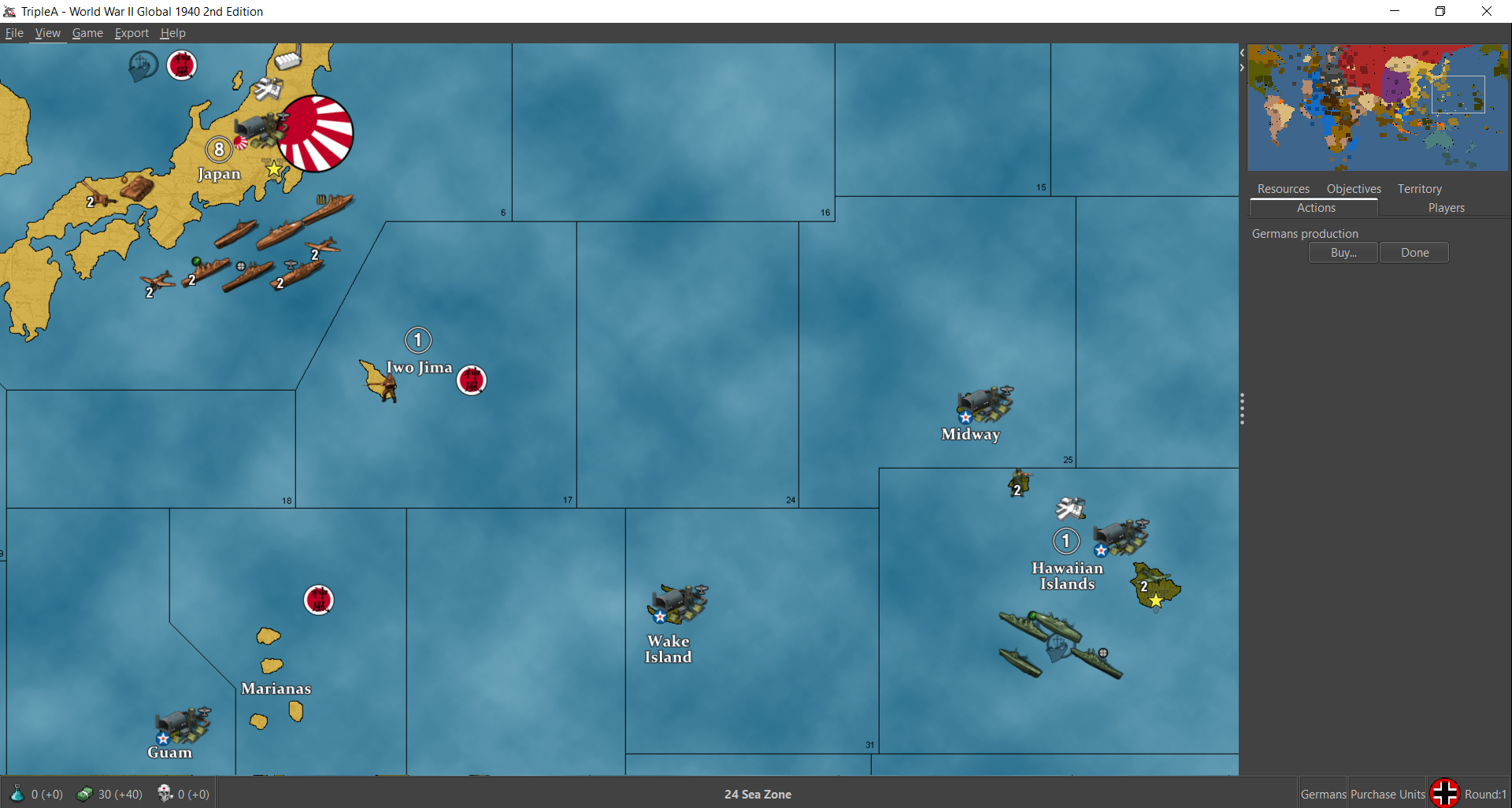
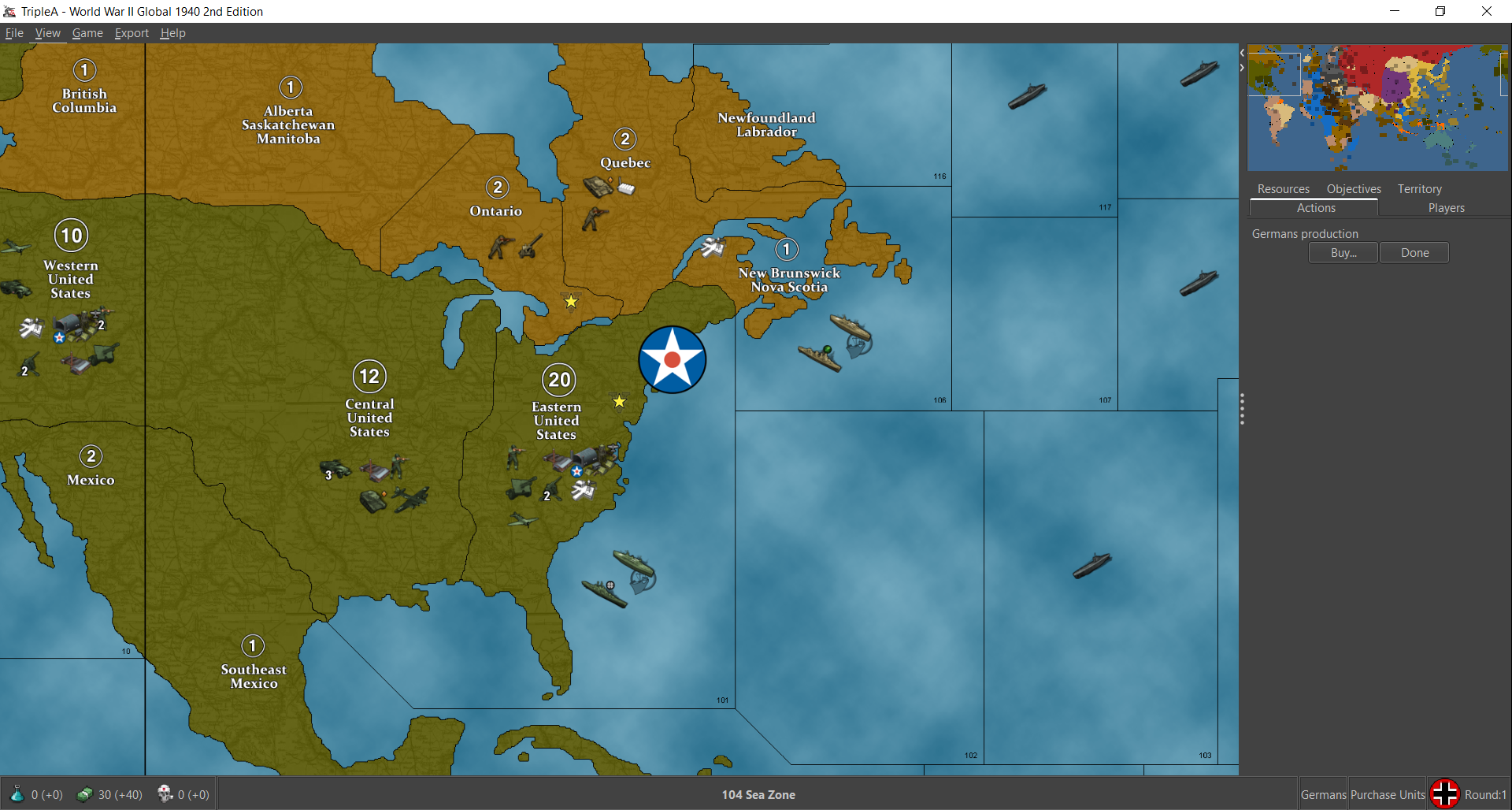
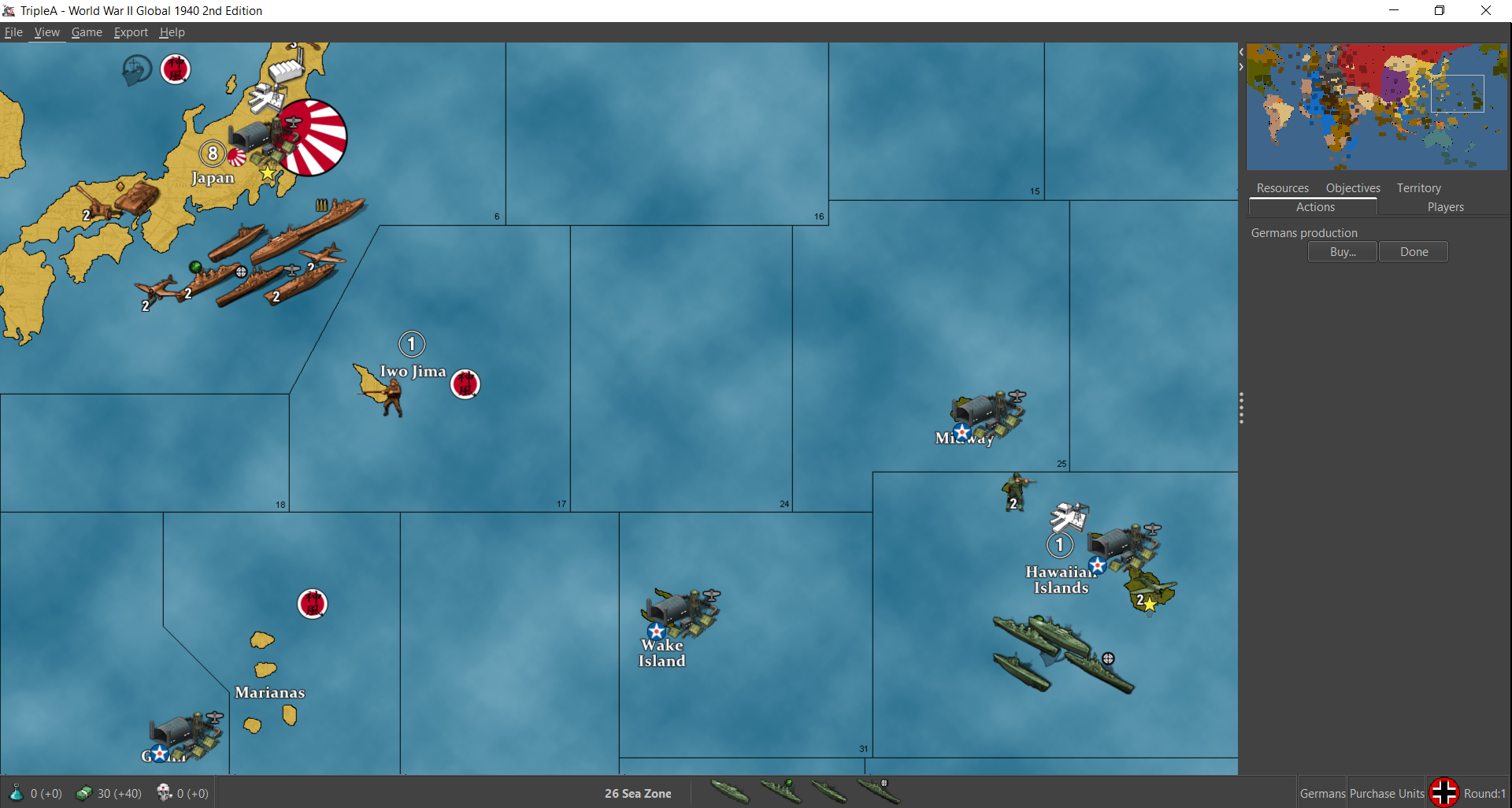
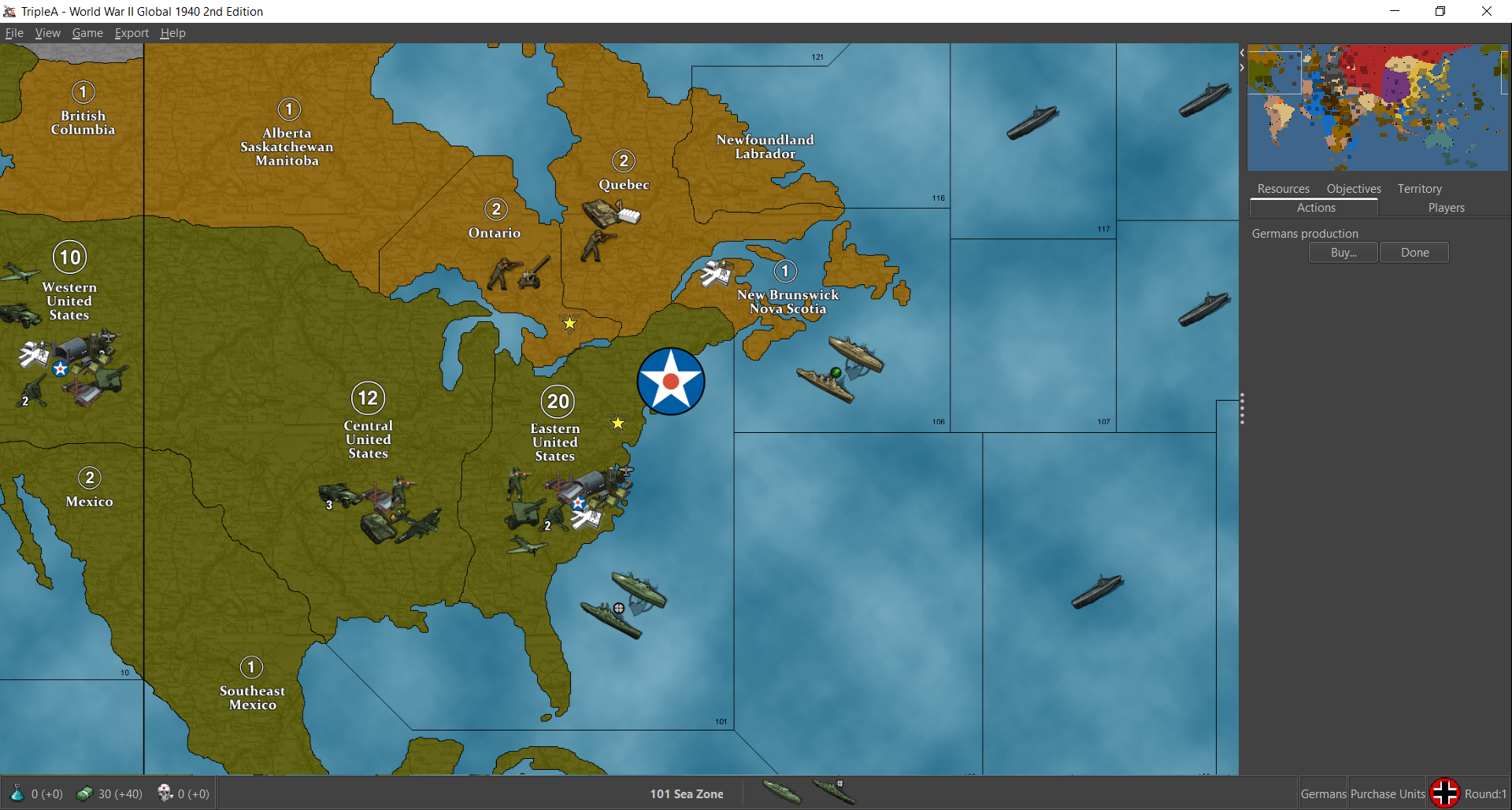
Then here they are at 100%
Showing the same set of views
So you can see how they get some foregrounding issue with the bumber cars there at 100% lol. When we do the new map we can make the centers wider so that'll be nice.
-
@black_elk Sweet ! Won't forget to dust Guam now lol
-
No doubt! hehe
This is like my third or fourth attempt at a naval base harbour unit lol.

I wanted to get something that would sorta stitch the buoy and anchor graphics together, and still look sufficiently like a 'naval' base, even if the center for the unit is displaying somewhat inland like tends to happen, least on the current map. I thought something like that might be kinda cool, with a flash of blue through the looking glass.
I encountered a weird issue in Bungs G40 map though when I went to load it up. No matter what dimensions I set for the image, it's always being resized into a smaller square. Kinda weird, didn't have that issue with the Airfield. For some reason the Harbour unit just always wants to shrink down to a 48px square. Still a mystery for me, I've been messing with it for a while now. I'm just going to move on to the next things I guess
-
@black_elk wow dude way detailed. Will rock on Big map.
That's weird with the resizing. Maybe @Cernel knows why
Edit
Just saw this at git https://github.com/triplea-game/triplea/issues/11243Never seen it before. Maybe try and make the old image the same size as the new ? Idk lol
-
Thanks!
I think I figured it out. I had another instance of tripleA open in the background, so maybe it was remembering the old size or something. I killed em all in the task manager and when I reloaded the harbours scaled up proper hehe. Looks like this now on Bung's...
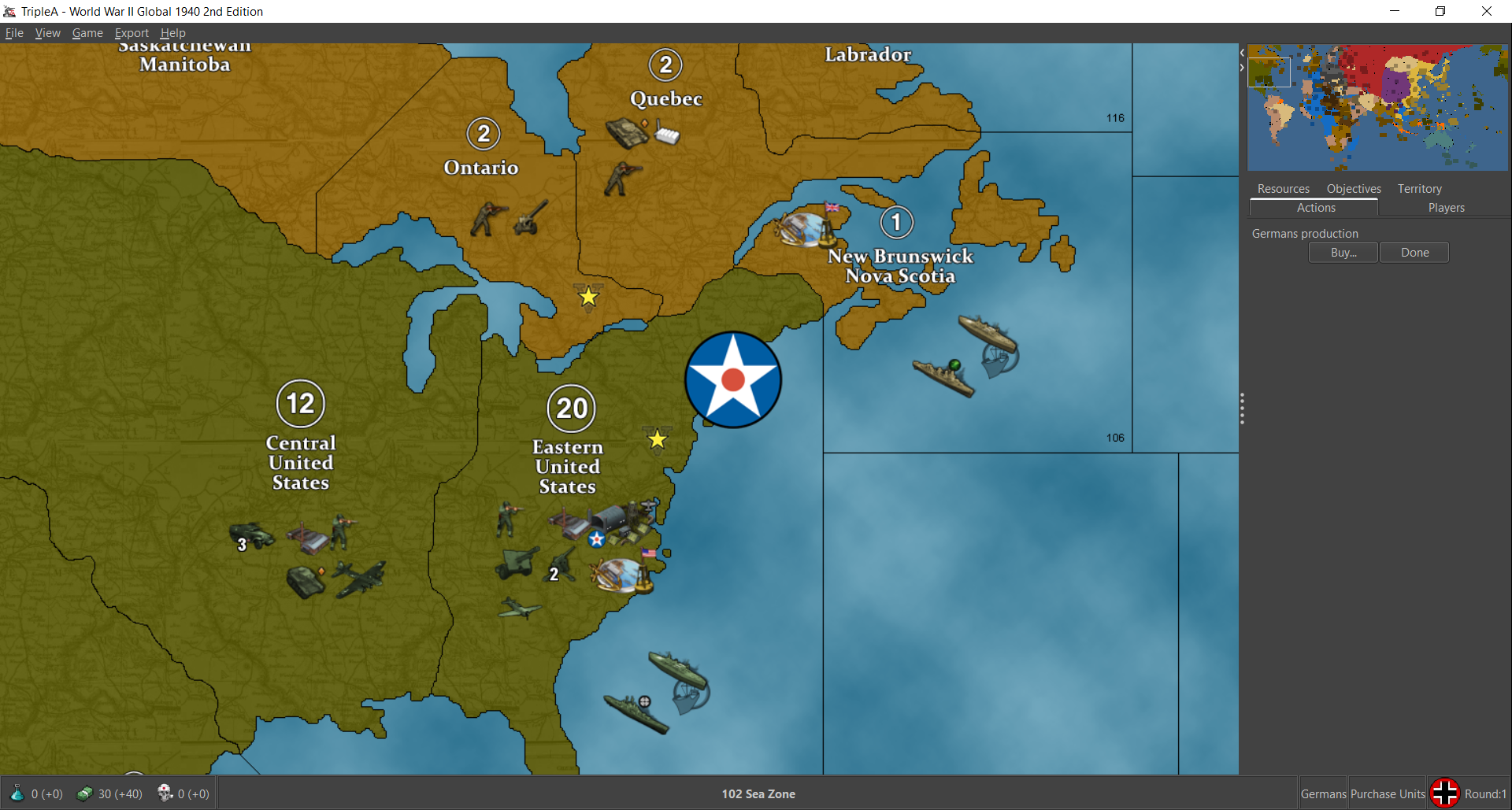
I think I might lower the anchor and raise the glass. Like even as I typed that just now, it seems like the right thing to do heheh. It would make the anchor pop a little more I bet. I'll do that tomorrow. But anyhow, I think it should do the trick for an NB with a tiny bit more noodling.
-
-
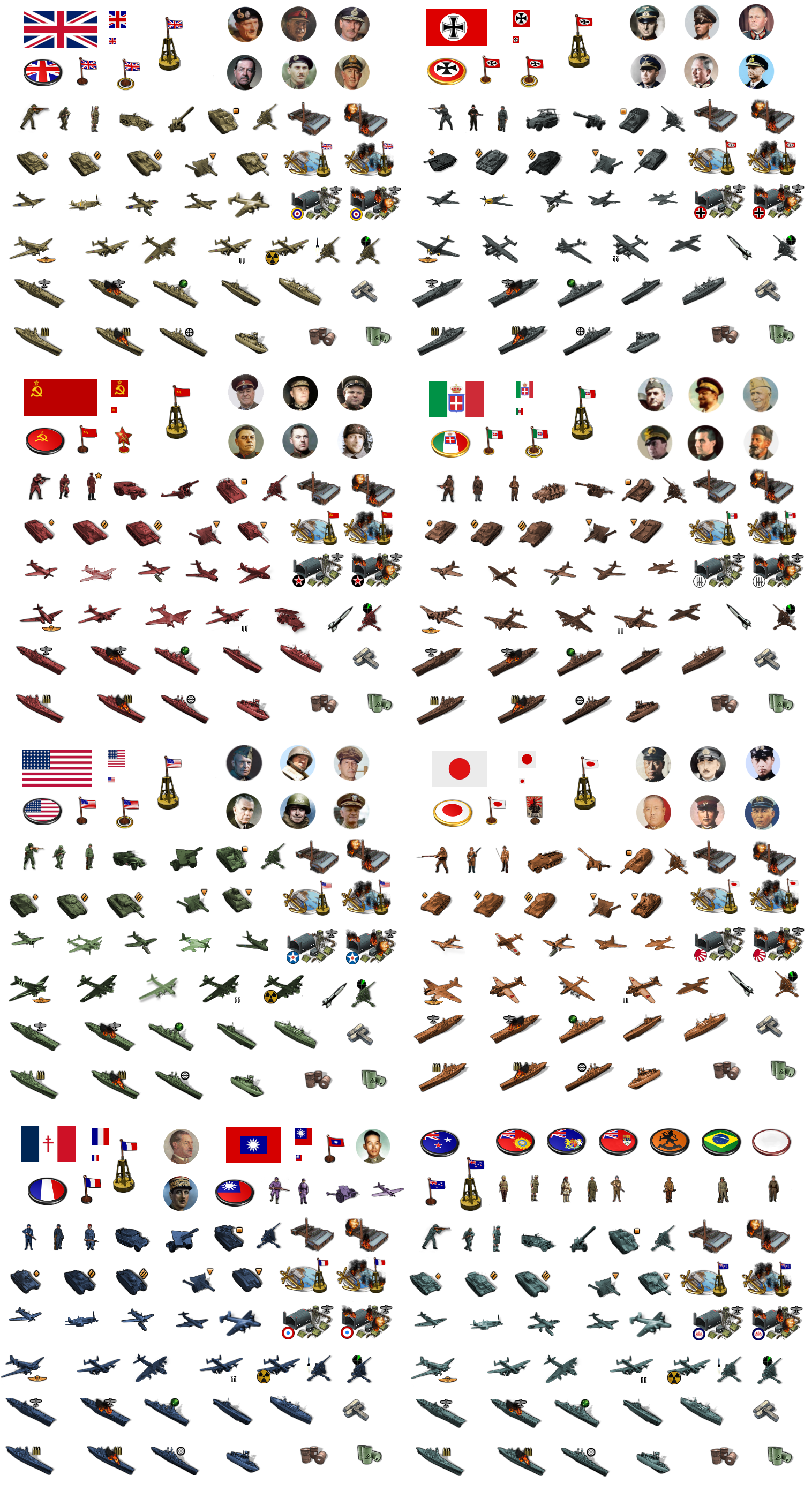
OK, I hit my stride after Turkey day festivities and managed to bang out the G40 units! hehe
Here they are separated out into the various folders...Global Units 54px Tinted:
https://www.dropbox.com/s/pqkn53r1vzjj467/units.7z?dl=0I've been playing around with them at 75% which seems to do alright with bung's centers. There's a little foregrounding and a few clips in a couple spots, but mostly it works pretty well. There's a bit of redundancy there, I think to allow for the same folder to work for Global and v5 in terms of how some of the tech units are labelled. I nixed all the stuff at 48px that I didn't have ready replacements for, so if you want the old stuff I guess you can just backup or unload it by individual nation into the folders, but this one should work for normal play if you want to check it out in preview.


I included the airbases and harbours and bunkers and whatnot. The extra units for tank types and all that stuff as well. For factories major/minor I did a downscale for the minor of 75% so it'd be noticeably smaller, then a second stack for the industrial tech advance. I used some generic labelling for extra units like tank 1, tank 2, tank 3, infantry 2 etc. Gave China a full roster just for completion, did American equipment there in the purple people eater tint, so we'd have an extra set. I was going to do the Dutch and the various neutrals too put lazed out there, but it's pretty much dialed. We can do alt tints for those later or add more stuff to it as we go along, but least it's a start.
Happy thanksgiving!
-
@black_elk
You have been busy!
Downloaded and stored, thank you for your generous Thanksgiving gift!.
A request, can you put a third chimney stack on these two images?

.
Now is it back to the map? -
No prob! Hope they're fun!
Yeah I guess it's back to maps lol. I think G40 is about ready to roll, so that's encouraging.
For sure, here ya go with a real quick third stack there hehe...


-
Thanks!
-
Right on, let me know if I missed anything. From playing around with the flag display, I think the 12x12 circular roundel is probably best, just given the current limitations for the display sizes there. Going oval would only gives us 12x9px for the smallest size, which is too small in my view, like just not really enough pixels to get the job done. So better to keep it round I'd think.
Most of the standard circular roundels look pretty good in the unit flag display. I gave the Soviets a Red Star for their ABs so that may stand out for now, but I think it gives those ABs some charm.
The only thing I noticed that I really want to fix on the next pass has to do with the Naval Units at flag display size small. The flag always displays on the lower righthand corner of the unit field, so on the right-facing Allied ships, the 12x12 small flags looks like they're sitting on the bows of ships. Basically I want to extend the field for those naval units by like 12px or whatever we can manage, so that the roundel will be more off to the right instead of smacking the Allied naval units on the nose lol.
I think I do prefer the Oval puck roundels for the capital markers the more I sit with them. Just for a little more visual variety in the colors and for the national flare. Like Italy looks nice with that splash of Green and Red I find. I included the Flag Oval roundels as unit images in the folders, because I think it'd be cooler if these were treated like capturable units rather than permanent/fixed map decorations.
Doing them as capturable units the display image could change dynamically when a capital is taken, e.g. Moscow becomes the Iron Cross roundel if taken by Germany, or vice versa, if Berlin falls to show then we get a Sickle and Hammer there or Stars and Stripes, or whatever. Control marker flags would work the same way, basically like it's handled in Iron War. So that when a TT changes hands the control flag changes to the reflect the current "owner." I think that'd be nice.
-
@black_elk said in Proposed Map: Domination 1941:
Moscow becomes the Iron Cross roundel if taken by Germany
H yea ! Love it ! lol
-
@black_elk
I agree 12x12 round roundel is the way to go.Adding +12px to naval units is a nice to have, hold off and lets see if we can persuade a new Dev to add a new feature to the map.properties file to position the flag with coordinates, so not in the corner.
Currently he is working on this (Its not Justins group, but ArieLevental on GitHub)
https://forums.triplea-game.org/topic/3311/student-group-studying-triplea/2?page=1Capturable Capital oval roundels infrastructure units is on the TODO list.
"I think that'd be nice." Yes it would be nice.
-
Sounds good! That'd be cool.
It's a relatively quick fix if they can't pull it off. I think the canvas can go to like at least 96px wide right? Basically Allied ships and Axis bombers are the only units that clip the flag display in the lower right. For display Flags "size large" the roundel graphic is backgrounded, but still reads too large for me. It works better with some roundel designs than others there, depending on the color of the outer ring or whatever, but mostly I think it's not a very useful view at that size. Something like a 18-24px flag roundel would be best I think. Larger to give more visual information at that super tiny scale, but still small enough not to clip too hard into the unit, if it were to remain in the foreground.
The other reason it would be nice to select the flag display location is to avoid overlap with any other symbols included in the unit graphics, like the radar symbol or heavy bomber symbol etc. I'd think it would be nice to center the flag for most units, basically so it looks like it's right below the unit instead of off to one side. I think that would be cleaner and show less overlapping or clipping for the tiny flags.
Like ideally we could just extend the field from 54px tall to 68px tall and stick the flag dead center at the bottom. This would be nice for unit flipping too, since then the small flag wouldn't move position relative to the unit when the image is flipped.
I think a good feature to focus on would be that one - the flip. Something that allows us to dynamically flip units in-game, because that's a feature that the players could really engage with I bet. Like I think if it existed, players would probably use that one all the time.
The coolest would be if we could flip units based on the TT. But even if it was a universal flip for all the units by nation, I can still see that being a lot of fun during gameplay. Some view features are a lot more useful than others, map scaling and unit scaling for example, those are super useful, the other stuff in the view tab is more like set it and forget it based on the preferred view. But a Unit flipper would be hotkey worthy. I think players would dig it.



Hello! It looks like you're interested in this conversation, but you don't have an account yet.
Getting fed up of having to scroll through the same posts each visit? When you register for an account, you'll always come back to exactly where you were before, and choose to be notified of new replies (either via email, or push notification). You'll also be able to save bookmarks and upvote posts to show your appreciation to other community members.
With your input, this post could be even better 💗
Register Login