Proposed Map: Domination 1941
-
@beelee yeah that's pretty sick right there! I mean the big thing we got going for us is that our infantry can scale, so we're not as locked in to sculpts at 1:72 or 1:96 or whatever with chips and stuff knocking over. I think a Micro A&A Global with tiny ass sculpts (more like Risk for the inf say) would have been cool for the official products. But instead they spent several years pushing those larger models for the tactical games, that didn't really have anything to do with the big board games. Of course I dream of giant Cyanite Magneto boards for sure! Heheh but on the table top, you'd need a pretty big table. I guess if going this large, you could probably do a physical print just by juicing the dpi though, so that's another perk of making it pretty huge.
No doubt, Hepster always had cool ideas. I seem to kinda come late to the party perpetually. Like it was cracking off there for a while before the 20s, but then world end plagues and such went down I guess. Hopefully everyone is alright and just chilling working cush jobs or whatever. But it's always been like this I suppose. Like whoever's motivated at the moment, just kinda gotta let it ride and work with what ya got hehe. Hopefully we get something that Kurt enjoys for a Domination plan along the way though.
-
Wow it took that quy 4 days @ 8 hours per day = 32 hours to do the outline.
@black_elk how long did it take you to do the outline?
Also your map is bigger 16000x9000px vs 11000 x 7200
Im hoping that we can get others to contribute some textures that we can all share and some terrain art as well. I have some terrain art coming this week.
-
Certainly faster when 90% of the work was already done lol. I mean I basically just cribbed it and enlarged added a few bits at the margins hehe. Fortunately I think Hepps and I have a pretty similar design aesthetic and general process for this sort of stuff. I can't remember exactly, but it probably took me a solid month to do the original one, like hours upon hours upon hours in Paint, and even then I started out using with the Europe 2000 baseline that Zero had already put together. It's just much faster when building on a decent foundation, no contest.
These days I can just about draw the world from memory, which comes in handy, honestly just from making silly maps for tripleA. Sometimes I fantasize about spontaneously time traveling back to Highschool just to totally ace the fuck out of that History test lol.
ps. I guess now would also be a good time to ask if there's anything in the scaling or basic contours that feels like way too off? I mean everything is a compromise on some level, when you get down to individual TTs, but now that we got a feel for the display at the high end I mean. It works for me, but I've been staring at it for hours, and also trying to take to heart some of the ways Hepps adjusted the breaks to do cool stuff with mountains. Like I think it works way better like this than the more 1900 political divisions of the first Dom, but it's still kinda 1914-18 ish in a few places. I think with some minor adjustment though, it'd be fairly quick. I'm noodler and kinda compulsive, so watch it take me forever and a day after all, like I already want to put in the Missouri river and few more things like that, but inkscape is encouraging. It should be a lot easier to modify.
I find it interesting and kinda gratifying to see the little ways it's morphed in intervening years, to suit different styles of gameplay. I got super excited for the OP just cause he mentioned Domination lol. Total Domination! I prob should have had the foresight to know it would end up back at WW2, instead of trippin' off like the Transvaal or how to pull off opium wars or a dozen capitals in Europe lol. I'm always drawn to the WW1 timeline, but it's hard. Something about the second World War is always great though, just cause everything's on the table and it all sorta works. I think Iron War had a really fun endgame, I've been playing a lot of that one, but really any A&A style board when the computer doesn't give up and you can see invasion USA or South America or whatever, as an alternative to the Allies just stomping. Most PvP games will end well before that, but it's still fun to see what sort of TT divisions end up being attractive for that, or how the map might get painted colors in different ways.
pps. @kurtgodel7 said in Proposed Map: Domination 1941:
In my proposed map there is one Japan, not three little Japans. There will be only one capital bordering the ocean, and it will border the ocean only on one side. Naval bombardment shots will be limited, as is the case in NML. (Anniversary edition rules.)
So in that example, perhaps you just collapse all the TT divisions on the main island say, or divide the Sz around it as you like. Maybe keeping the smaller islands for some 'invasion' flavor but without screwing Japan into having to cover more than 1 tile at their Capital, if you like the turtle up dynamic for them. That kinda stuff all makes sense. We got a few divisions in there for a draft, in case someone wants to do a map more pre-20th century, but basically you can just erase those lines are redraw them to suit whatever you have in mind.
-
@black_elk said in Proposed Map: Domination 1941:
ps. I guess now would also be a good time to ask if there's anything in the scaling or basic contours that feels like way too off?
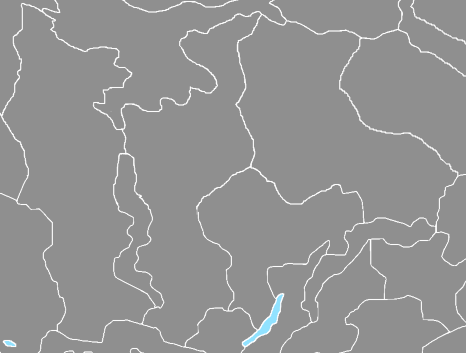
Well, in Russia there are 2-3 TT close to each other, that are big. Two should be halved, so there is a north and south, The third Im really not sure about, the big-ish one on the right, see below.
Other than that

-
@thedog Yeah I figured to bust those up a bit. I just roughed it in pretty quickly in that zone.
I'm currently closing in the gaps and giving it a pass on the pixel by pixel view. Basically I was able to use Inkscape to upscale everything, then trace bitmap on centerline down to 1 pixel. So all the boundaries will be at 1 pixel even at 16000, but doing that created little breaks (sorta where the stained glass effect is going on in those earlier drafts I posted, where the lines intersect after removing all the anti-aliasing and exporting it back out.) So basically still have to go in, fine tune it, and clean some things up. There might have been an extension to blow past that step, but I couldn't find it, and anyway I kinda enjoy this part, cause it allows me to noodle some stuff around and get back into the process with the fine toothed comb.
I'm about a third of the way through it now. It's much faster though, certainly compared to what I used to have to do, because you can see pretty quickly where there are openings and just close em out. Usually my method for this stage is to sorta go to town in GIMP or Paint, as an indexed color mode image, drawing with the pencil tool. Then what I like to do is create a decorative fill with color blocks using the paint bucket just to make sure everything is closed, it's the fastest way for me evaluate the fills, and to make sure there aren't and hanging pixels or weird isolated spots. It should be done by the end of the week I'd say. Moving at a pretty steady clip here. When it's fully dialed I will bring that back into inkscape and save out as the svg with the base layer full dialed like that at 16000. I want to get that saved, before charging too far ahead. Should be fairly easy to do any morphs or boundary corrections at that point. I'll shoot for the weekend!
All the best
Elk -
@Black_Elk
Last night I started building the xml skeleton for your map.My intention is to get Germany and Russia as unit playable sides, so people can comment on stats. Then do Japan and USA.
No timescale

Question to all, which WW2 1941 map should I use for the territory PU values that best equate to GDP values?
-
@thedog said in Proposed Map: Domination 1941:
Question to all, which WW2 1941 map should I use for the territory PU values that best equate to GDP values?
I'm not sure which one would be best but @RogerCooper might have one. i think I remember him posting a buncha of information on that at one time. Not certain though
-
@beelee said in Proposed Map: Domination 1941:
@thedog said in Proposed Map: Domination 1941:
Question to all, which WW2 1941 map should I use for the territory PU values that best equate to GDP values?
I'm not sure which one would be best but @RogerCooper might have one. i think I remember him posting a buncha of information on that at one time. Not certain though
You can use any map and just assign the production values you want. For economic statistics, see https://axisandallies.fandom.com/wiki/Correlates_of_War and https://axisandallies.fandom.com/wiki/Maddison_Database.
-
I'm skimming not reading so maybe this comment is useless.
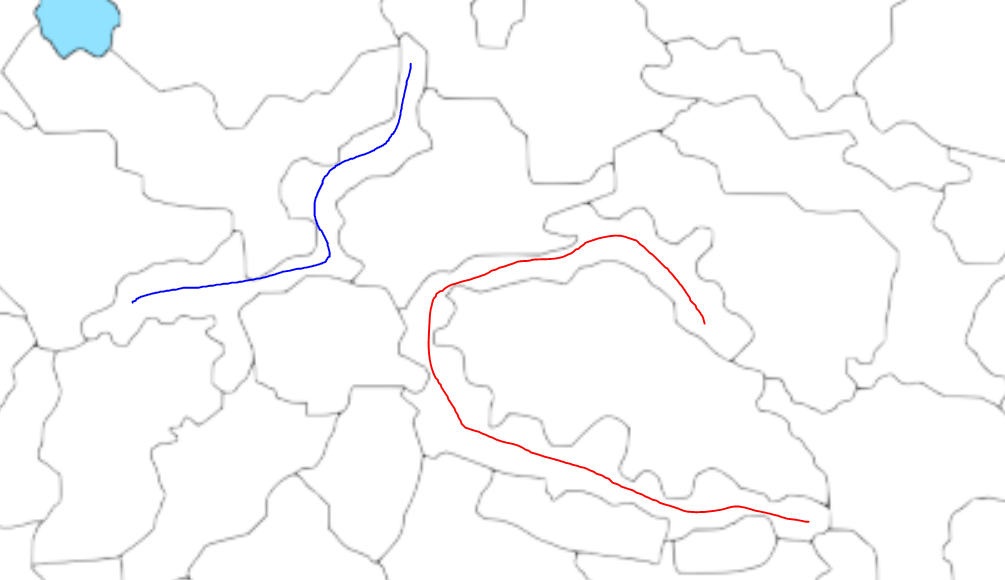
These types of territories would be interesting to fight for but from a UI perspective I don't know where you would put the unit stacks, and visually be able to tell where the units are. See red and blue for example
-
@luhhlz So those are actually mountain ranges corresponding the Himalayas basically, or extensions of that range in Kush/Tajikistan. There are a number of squiggly zones meant to suggest impassible terrain or to create some geometric choke points in that central Asian landmass that would otherwise probably just make the eyes glaze over with an endless series of similar jigsaw divisions hehe. So you have the Urals and the Altai etc, but with a few breaks and passes to mix it up I guess. Essentially spots with no units though. Some deserts look that way as well. I think they were meant to be slimmed down like that, to preserve more space for the adjacent tiles that might actually house units. On the whole, comparing it to my earlier draft, Hepp's was leaning a bit more topographical I'd say, whereas my first pass focused more on the political boundaries. So you end up with a bit of a compromise in the cartoon here. Rather than removing that work, I just tried to add some in that sliver to the far north, and in North America, so it would be a little more consistent throughout. Basically if it's long and thin and a bit wonky looking for units, it's probably meant as impassible, like a mountain range or frozen tundra or whatnot.
For the production spread (PU values of individual tiles) I'd say maybe start by assigning everything with a value of 1, see what the totals would be doing that, then adjust certain zones to create a rough parity between sides/player nations. I think trying to maintain a strict GDP analog or Industrial Production as the rule was one of the things kinda holding back the official A&A gameboards. I think PUs are better as genuine abstractions focused on gameplay, rather than as 1 million man hours of production or whatever. The Classic Mid range boards are fairly inconsistent on this stuff anyway, in terms of relative values. Also, every time Larry divided something or added a new tile in successive iterations, he tried to preserve the same regional totals, so you end up with more tiles at 1 ipc or zero ipcs, and a lower economy board that's more complex but with a lot of spaces that have no value beyond movement or connection.
In my view it's better to have the floor at 1, rather than zero, if the goal is to encourage the trading of TTs. Obviously this map is kinda ridiculous in terms of the number of tiles, whereas my old rule of thumb for the smaller scale maps, would be if "it's not worth 1, it's not really worth displaying on the map as a discrete tile." I prefer to think of PUs as generic "Strategy Points" as opposed to Industrial production, though some of that comes down to playstyle preference.
Reframing the standard acronym, I liked Industrial Production 'Commitment' (over 'Capacity') because then you can rationalize it somewhat better. Like Midway might have had an Industrial Production Capacity of fucking zilch, but that doesn't mean the US didn't still spend millions on a commitment to it's defense hehe. So I think it's a bit more flexible conceived that way.
PUs are a funny sort of gameplay conceit. I mean in wartime the reality is that it costs money to occupy new territory, so not exactly adding to the loot pile there. Like you're probably not seeing a return on that investment in conquered land for years and years, if ever, but it's a game, so it's gamey that way hehe.
If what you like is long lines of logistics and very low unit replacement to starting unit ratios, then I guess the standard paradigm works, but the result is generally a huge amount of dead space across the entire board. You'll also probably then have starting armies worth way more than the value of the entire globe, by orders of magnitude, which, while perhaps more accurate somehow in the narrow sense, also creates a more static gameplay situation -one where the strategy is based on more the starting unit totals and starting unit predisposition, rather than on purchasing new stuff (unit replacement). I like a more dynamic style of production myself, with more mobilization points or production 'bases', as opposed to say 'Factories.' The Manpower idea mentioned earlier might play into that, like where heavy equipment is built/mobilized in one way, but infantry another. But yeah, lowballing everything seemed kinda ill advised to me, like just to make sure the British Empire isn't worth more than 30 or 31 IPCs or whatever hehe.
I think Larry was too invested in the idea of Industrial Production as the metric, even though it's super vague and you can't really create a functional parity if going off the historical numbers. The Axis would always lose out, and are already punching way above their weight, even in Classic lol. In NML you have something similar going on with the CP. I don't know, I definitely have thoughts here, but don't want to derail anything. There are what, like 3-4 times as many tiles for everyone here, in some cases many more? So if the British are pulling down 30 starting income in Classic, you can ballbark it to say they'd probably need more like 90-120 here. Though I guess it depends how you want to handle the rest of the Commonwealth. Like if you're peeling off ANZAC or India to be a separate player, which was the approach in Global/IronWar. For my part, I like the older versions more, where the British had to globe trot on the brink, and make tough strategic choices about where to spend their loot or which fronts to reinforce/abandon. Starting cash is the easiest thing to modify, so you can always rebalance based on that when all is said and done. Adjusting TT PU values up or down is also relatively simple, but it's easier to put everything at 1 and build upwards from there, rather than putting the floor at zero I would think.
-
@black_elk the waitress asked my bartender buddy how much for a small glass of milk for a little kid.
He said everything cost at least a buck lol
-
These days no doubt! lol
Here so real quick, just in case I get hit by a bus or my hard drive bricks it lol, here is a draft raster at 16000...
https://www.dropbox.com/s/hejb20ttqkb91ih/TripleA_4k.png?dl=0
I closed in almost all the gaps at 1 pixel lines and killed most of the floating pixels, so work is proceeding apace.
There's really no great workaround when upscaling like this, even with inkscape's utilities, like at some point you have to dive in and draw the pixels and decide on some contours there. Some give and take obviously in deciding what to omit or abstract. Sometimes an island becomes a peninsula or whatever, or you just need to get a contour that reads without being too blocky. The idea being that when you pan out, unless it's your own back yard, that it looks close enough, or even if in your own backyard, still close enough that it's like 'yeah OK I get ya' lol.
The advantage is that when you downscale, you can expand the borders and make it actually look nice. Going from black to white or whatever blends in the relief, but for the utilities 1 pixel is the money spot. So anyway, that's the jam. Basically surveying the whole thing way zoomed in to clean it up 1 by 1, since it usually comes down to a one pixel gap. At this point I like to open 2 images in GIMP, the baseline and then an indexed color with like 14 colors with the paint bucket. If as I go along painting the map in indexed color to give myself ideas, if I see that a tile bleeds over into another when I fill, I know there's a hole somewhere. So that's sorta what I'm doing now.
Areas I added at the extreme north need another pass to settle on a sensible morph for the coastlines/islands there, but gives a sense.
At 1 pixel it's so light the image will appear white until you zoom in to like 10-15%, so the idea in the final relief would be to enlarge those borders all to 3 or more pixels, for the quick read at a glance. So like you'd open that indexed bitmap into Inkscape, no anti-aliasing, then trace bitmap. Then you use the vector to manipulate it how you like cause you can just expand the lines and such there, or doll it up on new layers.
It's too large (in pixels) to attach, but here's the one I'm working up just added to dropbox. I guess the idea would be to save the svg and the pull, and make a few bitmaps then add that to the package somewhere as just like a misc map tool or ref. You can see it's still being drafted, but pushing along alright. Gives you the scale though, so Europe a fair bit larger than Global in terms of space available.
-
Had a few hours to kill so I cleaned it up a bit and added the oceans. It's almost dialed
https://www.dropbox.com/s/jx9ajg5znjkry3s/TripleA_4k_oceans.png?dl=0
-
@black_elk I have experimented with using purely economic values for production, and it does not work. You can certainly justify giving a value to Midway to reflect the benefits of having an airfield in the Central Pacific. For the US, distance was a major hindrance, as well as the time it took mobilize. For the Germans, the failure to mobilize totally and flawed production strategies were a problem.
-
@rogercooper & @Black_Elk
Thanks for both confirming not to use GDP that has saved me time coming to the same conclusion. -
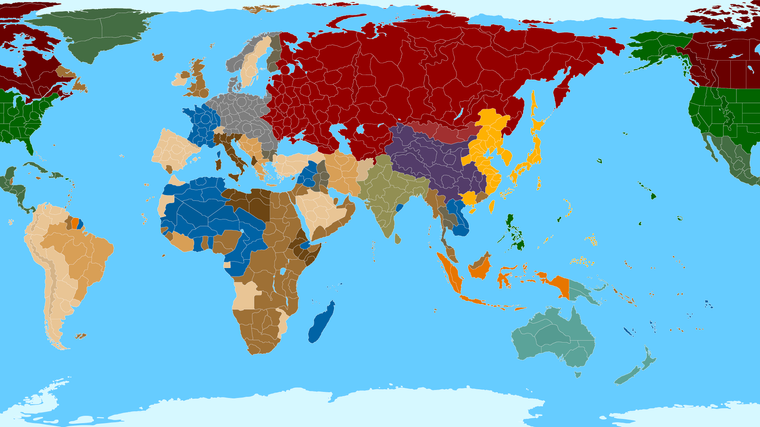
Right on! Ok so here it is with a little paintjob...
https://www.dropbox.com/s/wnwraqi1q57rnhc/TripleA_4k_painted.png?dl=0
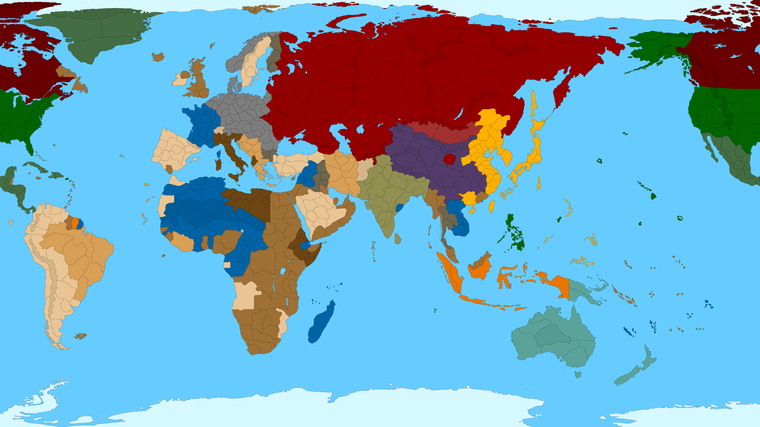
I like to do this to double check and make sure all the tiles are closed at the borders, but it also makes for a slightly better presentation. I followed a Global 1940 into 1941-ish display, with a similar color spread to the basics just for easy viewing. I made some slight adjustments in shade to indicate some features. Like a more drab Khaki for British India, teal for ANZAC, or a more Maple hue for Canada. For the mountains and impassible or pro-side neutrals etc I just knocked the shade up a tiny bit. Or like for Mongolia gave it a slight pro-soviet hue. Obviously you could do different things in the relief like with subtle patterns and such, but just for a the simple paint to get the quick read I did it with block colors. For 41 you can just imagine most of that french blue switching to Axis/Allied, or the line on the Eastern front shifting or whatever. But least it gives an impression.
You can see that the general idea was to enlarge the TTs and particularly SZ that usually need to house more stuff. So I thought perhaps to shift the Arctic ice sheet further north. Say Svalbard and sort locking further in that way, around those soviet islands north of Siberia. This gives more room for ships that just tend to stack up there the way the gameplay usually works hehe. Or anyway, it seemed like a little more room up there would be advisable, so I left it as is for now. But you could block of the arctic with an ice sheet and some frostiness, or just crop no mercy hehe. Whatever works.
Here's a quick preview at 25%, with the borders enlarged to 3 pixels before scaling RGB for a quick read.
-
@black_elk heh heh just kickin ass wherever he goes :grinning_face_with_smiling_eyes:
that big red blob in china the commies ?
-
@beelee thanks dude!
hehe yeah I mean that one's not strictly necessary, the whole thing was more impressionistic just so I could block in the tiles. But I figured it was on the HBG board, so might as well see if it worked. That's about where you'd have a stronghold, if one wanted to do a united front thing with soviet support lol. I got half way round the globe with France then remembered the thread title was more 41. But it's easy enough, most of the French Empire declared for Vichy after Paris fell, and the Japanese took over Indochina, so except for Equatorial Africa basically, you could just turn all that blue into German Gray or British Khaki, depending on the preferred start date. And of course any of those divisions could be reworked for the individual TTs. I just wanted to give us a place to start.
Provided you keep the anti-aliasing off, you can load up the big bitmap in any program like Inkscape, PS or GIMP or even MSPaint and just go to town with the paint bucket to try different ideas/timelines.
https://www.dropbox.com/s/wnwraqi1q57rnhc/TripleA_4k_painted.png?dl=0
If reworking the baseline you just want to make sure that's done at scale. 16000 with 1 pixel black lines, and keep it more indexed that way (no antialiasing or feathering) to make sure all the blacks stay black.
After you got the baseline you want you can make it pretty in relief however. Here it is with that tile in China handled more normally.
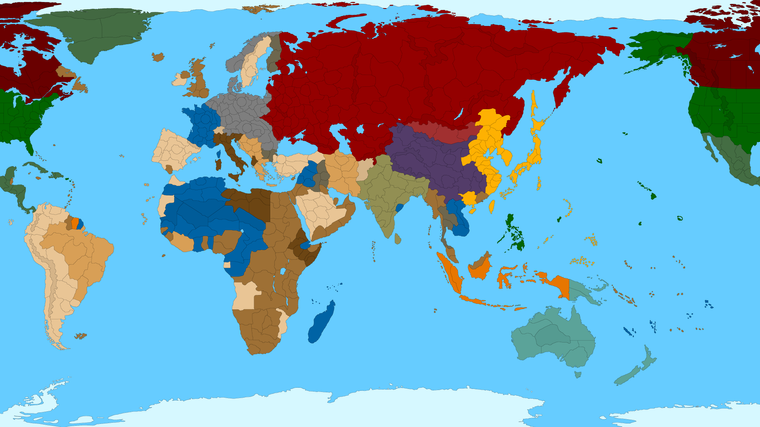
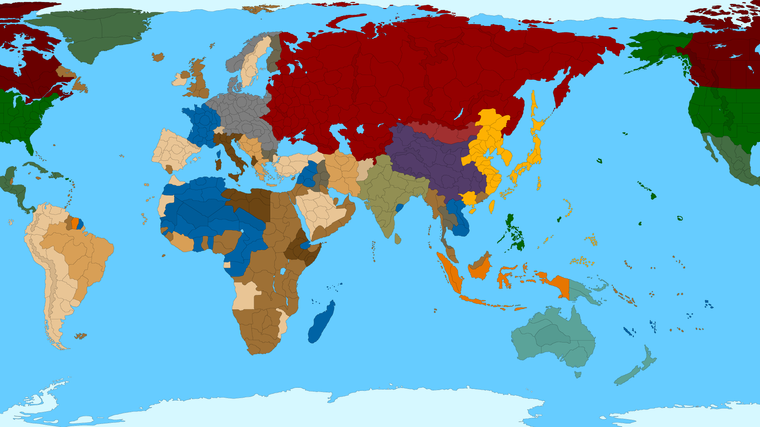
Or like above shows black border lines, but if one prefers white, you could make it like more this instead hehe. Or do a darker blue for the ocean, different color choices for the various factions. Whatever works. Just as long as that stuff is done after the baseline is created, after the grunt work with the utilities, you can go to town pretty much however you like.
-
@black_elk that is way cool ! Wasn't sure the white would look that good but from a zoom out looks pretty cool

-
@beelee Yeah it's one of those things you almost wish was a mapview feature that could be switched on the fly. Cause it basically makes it easier to tell where the boundaries are when panned out.
I kinda prefer the black myself, but I'm also a bit of a minimalist when it comes to maps hehe. Some of my aesthetic preferences are showing here in terms of color choices, and a stripped down look, but I also think it should at least look decent with the details/reliefs turned off.
So here was my quick solution to the circles. Basically I just blobbed 'em, but tried to leave enough room so that those tiles could still fit a circle at like 200 px in diameter, like about the same amount of space. You know just so it can function for 1914-18 style games too if one wanted like with a roundel paintover or whatever, but more consistent here with the rest of the board, which doesn't have any circles. So Berlin, London etc they're still kinda circular in shape of course, but not like perfect circles, more like potatoes, which I think works a bit better for this one. Obviously we can clean that stuff up a bit, but again just to give an impression.



Hello! It looks like you're interested in this conversation, but you don't have an account yet.
Getting fed up of having to scroll through the same posts each visit? When you register for an account, you'll always come back to exactly where you were before, and choose to be notified of new replies (either via email, or push notification). You'll also be able to save bookmarks and upvote posts to show your appreciation to other community members.
With your input, this post could be even better 💗
Register Login