Large Middle Earth queries
-
@redrum @Cernel Canals are in the xml in comments. The territory connections currently overriding them are under "
<!--THEESE SHOULD BE CANALS-->". I have taken many looks on many maps that had working canals, to no avail.<attatchment name="canalAttatchmentHarnen" attatchTo="sz Lower Harnen" javaClass="games.strategy.triplea.attatchments.CanalAttachment" type="territory"> <option name="canalName" value="Crossings of Harnen Canal"/> <option name="landTerritories" value="Crossings of Harnen"/> </attatchment> <attatchment name="canalAttatchmentHarnen" attatchTo="sz Upper Harnen" javaClass="games.strategy.triplea.attatchments.CanalAttachment" type="territory"> <option name="canalName" value="Crossings of Harnen Canal"/> <option name="landTerritories" value="Crossings of Harnen"/> </attatchment> <attatchment name="canalAttatchmentOsgiliath" attatchTo="sz Lower Anduin 2" javaClass="games.strategy.triplea.attatchments.CanalAttachment" type="territory"> <option name="canalName" value="Osgiliath Canal"/> <option name="landTerritories" value="Osgiliath"/> </attatchment> <attatchment name="canalAttatchmentOsgiliath" attatchTo="sz Lower Anduin 3" javaClass="games.strategy.triplea.attatchments.CanalAttachment" type="territory"> <option name="canalName" value="Osgiliath Canal"/> <option name="landTerritories" value="Osgiliath"/> </attatchment> <attatchment name="canalAttatchmentCairAndros" attatchTo="sz Lower Anduin 3" javaClass="games.strategy.triplea.attatchments.CanalAttachment" type="territory"> <option name="canalName" value="Cair Andros Canal"/> <option name="landTerritories" value="Cair Andros"/> </attatchment> <attatchment name="canalAttatchmentCairAndros" attatchTo="sz Lower Anduin 4" javaClass="games.strategy.triplea.attatchments.CanalAttachment" type="territory"> <option name="canalName" value="Cair Andros Canal"/> <option name="landTerritories" value="Cair Andros"/> </attatchment> <attatchment name="canalAttatchmentOldFord" attatchTo="sz Upper Anduin 4" javaClass="games.strategy.triplea.attatchments.CanalAttachment" type="territory"> <option name="canalName" value="Old Ford Canal"/> <option name="landTerritories" value="Old Ford"/> </attatchment> <attatchment name="canalAttatchmentOldFord" attatchTo="sz Upper Anduin 5" javaClass="games.strategy.triplea.attatchments.CanalAttachment" type="territory"> <option name="canalName" value="Old Ford Canal"/> <option name="landTerritories" value="Old Ford"/> </attatchment> <attatchment name="canalAttatchmentCarrock" attatchTo="sz Upper Anduin 5" javaClass="games.strategy.triplea.attatchments.CanalAttachment" type="territory"> <option name="canalName" value="Carrock Canal"/> <option name="landTerritories" value="Carrock"/> </attatchment> <attatchment name="canalAttatchmentCarrock" attatchTo="sz Upper Anduin 6" javaClass="games.strategy.triplea.attatchments.CanalAttachment" type="territory"> <option name="canalName" value="Carrock Canal"/> <option name="landTerritories" value="Carrock"/> </attatchment> <attatchment name="canalAttatchmentDorwinion" attatchTo="sz Celduin 1" javaClass="games.strategy.triplea.attatchments.CanalAttachment" type="territory"> <option name="canalName" value="Dorwinion Canal"/> <option name="landTerritories" value="Dorwinion"/> </attatchment> <attatchment name="canalAttatchmentDorwinion" attatchTo="sz Sea of Rhun" javaClass="games.strategy.triplea.attatchments.CanalAttachment" type="territory"> <option name="canalName" value="Dorwinion Canal"/> <option name="landTerritories" value="Dorwinion"/> </attatchment> <attatchment name="canalAttatchmentTharbad" attatchTo="sz Greyflood 2" javaClass="games.strategy.triplea.attatchments.CanalAttachment" type="territory"> <option name="canalName" value="Tharbad Canal"/> <option name="landTerritories" value="Tharbad"/> </attatchment> <attatchment name="canalAttatchmentTharbad" attatchTo="sz Greyflood 3" javaClass="games.strategy.triplea.attatchments.CanalAttachment" type="territory"> <option name="canalName" value="Tharbad Canal"/> <option name="landTerritories" value="Tharbad"/> </attatchment> <attatchment name="canalAttatchmentLastBridge" attatchTo="sz Mitheithel 1" javaClass="games.strategy.triplea.attatchments.CanalAttachment" type="territory"> <option name="canalName" value="Last Bridge Canal"/> <option name="landTerritories" value="Last Bridge"/> </attatchment> <attatchment name="canalAttatchmentLastBridge" attatchTo="sz Mitheithel 2" javaClass="games.strategy.triplea.attatchments.CanalAttachment" type="territory"> <option name="canalName" value="Last Bridge Canal"/> <option name="landTerritories" value="Last Bridge"/> </attatchment> <attatchment name="canalAttatchmentSarnFord" attatchTo="sz Baranduin 2" javaClass="games.strategy.triplea.attatchments.CanalAttachment" type="territory"> <option name="canalName" value="Sarn Ford Canal"/> <option name="landTerritories" value="Sarn Ford"/> </attatchment> <attatchment name="canalAttatchmentSarnFord" attatchTo="sz Baranduin 3" javaClass="games.strategy.triplea.attatchments.CanalAttachment" type="territory"> <option name="canalName" value="Sarn Ford Canal"/> <option name="landTerritories" value="Sarn Ford"/> </attatchment> <attatchment name="canalAttatchmentBrandywineBridge" attatchTo="sz Baranduin 3" javaClass="games.strategy.triplea.attatchments.CanalAttachment" type="territory"> <option name="canalName" value="Brandywine Bridge Canal"/> <option name="landTerritories" value="Brandywine Bridge"/> </attatchment> <attatchment name="canalAttatchmentBrandywineBridge" attatchTo="sz Baranduin 4" javaClass="games.strategy.triplea.attatchments.CanalAttachment" type="territory"> <option name="canalName" value="Brandywine Bridge Canal"/> <option name="landTerritories" value="Brandywine Bridge"/> </attatchment> <attatchment name="canalAttatchmentMithlond" attatchTo="sz Lhun" javaClass="games.strategy.triplea.attatchments.CanalAttachment" type="territory"> <option name="canalName" value="Mithlond Canal"/> <option name="landTerritories" value="Mithlond"/> </attatchment> <attatchment name="canalAttatchmentMithlond" attatchTo="sz Gulf of Lhun" javaClass="games.strategy.triplea.attatchments.CanalAttachment" type="territory"> <option name="canalName" value="Mithlond Canal"/> <option name="landTerritories" value="Mithlond"/> </attatchment>"For the world is changing: I feel it in the water, I feel it in the earth, and I smell it in the air."
-
@alkexr Those look fine to me, and should work.
I just tested the Harnen one, and works for me.
Also, despite being called canals, those things are actually booms. I wonder if that is the matter, since you say "THEESE SHOULD BE CANALS", while you should say "these should have canals (attached to them)".
Also, for display, I suggest refining the names, by removing the " Canal" part at the end of all canalName values, so that it reads more naturally; unless, maybe, there are some specific references, from the lore, you want to mention.
And wouldn't it be better dividing ships between those able to navigate rivers (if you control the crossings) and those that just never can (because they are too big)? That is possible too. Not sure if like caravels should be actually able to move through all those rivers.
Also maybe all or more nations should be able to produce ships. The fact that they can't place any at start or they never bothered having any so far doesn't mean that they couldn't build some if they want. Like here you make your own history; so why the freefolks should be unable to produce some ships, if they want to?
-
@alkexr Look fine except they have the old "attatch" spelling that needs fixed. If you fix the spelling and uncomment them then you should see the function to prevent ships crossing between the indicated sea zones unless the given land territories is allied controlled.
-
@redrum The ones he has in the xml are actually spelled by latest; probably underwent the mass change.
-
@cernel Yeah, I see that now.
@alkexr I uncommented the canals and they seem to work fine. I added High Elves ships to the sea zones next to Crossings of Harnen and they then can't move through. But if I place Harad ships then I can move through. I think your confusion is that you ALWAYS need territory connections even if you have canals. Its not an either or type deal. Canals essentially block connections unless satisfied, they don't create/define connections. Here is the working XML: 0_1528151820768_Large_Middle_Earth.xml
Here is the PR to fix it: https://github.com/triplea-maps/large_middle_earth/pull/2
TripleA Developer with a Passion for AI: https://forums.triplea-game.org/topic/105/ai-development-discussion-and-feedback
-
@redrum Yeah, that's my guess, as well. But, if so, it's more of a TripleA fault, as it is really the name that's wrong/misleading. It's called canal, but it is a boom. Like if you add the Suez canal, you are not actually digging a canal there, but rather sort of the opposite. So maybe the problem is that he understood it "correctly", literally.
For example, the suez canal is actually not the canal, but the canal is simply the normal connection, while the so called canal is not the actual / real canal itself, but whatever allowing to close / control the canal.
-
@redrum Yeah, thanks, that's what I got wrong. I won't merge that into master just yet, I plan to fix all bugs and everything and release a new major version by mid-june at the latest. I'll have a very limited amount of time during the next few weeks though.
"For the world is changing: I feel it in the water, I feel it in the earth, and I smell it in the air."
-
@alkexr Oh ok. If the other bugs are just minor XML changes, I'm glad to add them in real quick as well.
-
@alkexr Since I can imagine you lost a few hours over this thing, maybe this can help someone else in the future:
https://github.com/triplea-maps/the_pact_of_steel/pull/11@redrum @LaFayette to merge.
p.s.: It also adds the description for a related property that I'm not seeing; so, I'm assuming it was never added?
-
Err... did I say mid-june? I meant july... oh well. Seems I'll have more work next week than I thought...
-
@alkexr if you are planning on re-envisioning this map.
I might suggest giving a few things some consideration.
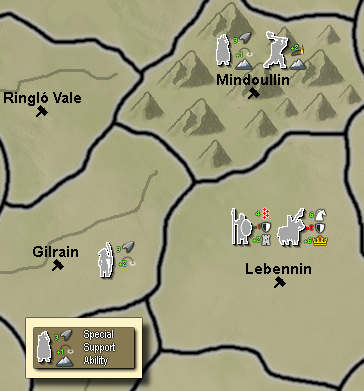
With the wild myriad of different things going on, much of this map seems over whelming when trying to play it. Some visual cues could really enhance the experience.
Here is a quick mock up of an idea...
"A joyous heart sours with the burden of expectation"
Hepster -
@hepps I'm not (yet!) able to draw discernible pictograms of this size. But if you draw one for each special/ability/support, I'll put them on the unit images. These could also replace most of the text in tooltips. But I don't think numbers are that necessary to show on the map. The pictograms will be a nice cue as to what the unit is for, but if you want really detailed information like exact att/def/mov stats and such, well that's what consulting the tooltips is for. Aslo this many numbers would be rather overwhelming on the map, especially in areas where there are like 6 unit types per territory, not 2.
Also, I see that the beautification process is getting somewhere - this new Mindoullin is definitely not the northern dwarven lands you showed us before

If we indeed do decide to go down this path, then it's definitely not going to be done by mid-june. But then I would also improve territory names, add lotr-specific music, establish the means for procedurally generating tooltips (yeah that's a tough one), and two important gameplay changes:
- removing invisible crossings around the Undeeps and Tolfalas
- a big one that I've so far been reluctant to do: simplifying the territory effect mechanics while roughly keeping the magnitude of effects
-
@alkexr Yup. I generally add more info than less as it is easier to remove things than it is having to go back and add them.
But I think I may have gotten on a roll yesterday.

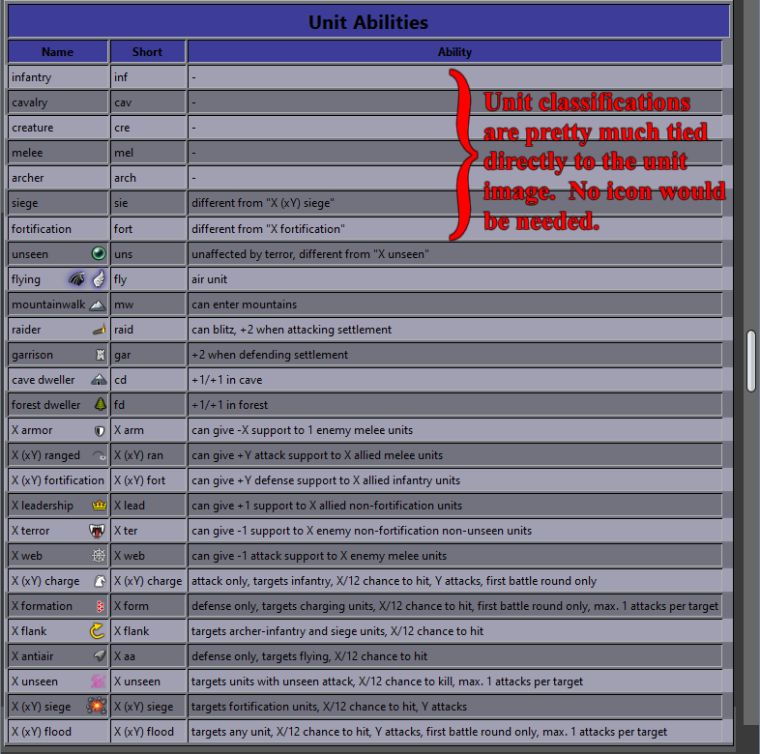
I believe I have everything you would need. Just say the word and I will customize the entire unit list.
the Territory names are pretty straight forward as well... there are a lot of them... but it isn't terribly difficult to do.
-
@hepps Don't bother with territory names. I can now procedurally generate them with like... 5 clicks?
 But If you feel like doing the units, I would appreciate it. Also, if you have ideas for better production / unit production pictograms, don't hold yourself back
 "For the world is changing: I feel it in the water, I feel it in the earth, and I smell it in the air."
-
Here are the icons... perhaps it is best if you implement them as I am not sure how you would like to use them.

-
Development of 1.3 version on github: https://github.com/triplea-maps/large_middle_earth/tree/version-1.3
For the first time, I will use github during development, not only for uploading the finished work. You can track the progress, download "unstable" versions for testing, give feedback or even contribute directly. -
@alkexr Wish I could up vote your post more than once. Though now you'll have to teach all the other mapmakers how to
-
@hepps While not currently possible, aside from making an entire mapskin for it (which would anyway require going through the menu to click), it would be probably better if the user can switch between plain units and units with those things beside. My guess is that the best would be those details showing only for the units in the territory you have the mouse over.
Also better considering them while having an 1 magnitude stack number. -
@cernel Sure it possible. All you would have to do is to create 2 separate unit lists and put a user action in at the beginning of the game to decide if you want to use the unit set with icons... or without.
-
@hepps Don't forget to add a unit set for every language, too.
Actually, with unit icons it wouldn't be unreasonable. I mean the details, not the languages.



Hello! It looks like you're interested in this conversation, but you don't have an account yet.
Getting fed up of having to scroll through the same posts each visit? When you register for an account, you'll always come back to exactly where you were before, and choose to be notified of new replies (either via email, or push notification). You'll also be able to save bookmarks and upvote posts to show your appreciation to other community members.
With your input, this post could be even better 💗
Register Login