Image Icons


-
@beelee Save games worked fine for me. If you have a save game that causes an error, please upload it.
-
@redrum here's what i get:

idk if a save will work because I haven't updated at git yet. I'd have to send the new xml as well
-
@beelee I think there was a pre-release build or 2 that had a versioning issue. Can you try downloading the latest pre-release now and re-load the save: https://github.com/triplea-game/triplea/releases/tag/1.9.0.0.8866
-
@redrum yea 8870 is working : )
-
I think it one of the most important aspects here is to keep some sort of artistic uniformity and style, so that one resource picture does not look cartoon-like and another one looks realistic. Hepps line of pictures are in my mind nice looking and a good standard starting point that could go along with WW maps as well as other themed maps from other eras and universes. Mapmakers can then choose to use other images if they want/need.
Another aspect is colors. I would say that most professional games try to keep the resource colors of the most used resources distinctive and different. Like Yellow Gold, Green Food (Apple), Brown Wood (Lumber) or a color scheme like Yellow Gold, Red Meat, Green Tre/Wood. I would say that TripleA should think about what the most used resourses are, maybe PUs, Tech-tokens, Fuel etc. should be kept distinctively different.
I would also advocate for 32x32 as max size. If pictures were larger, then they should at least not expand the bottom bar. This is kind of the way the unit pictures work in the battle window, which is fine imho. I also think it is fine with 32x32 flags that fill out the bar. Players are free to make the flags, and also the resource pictures with transparent outlines and space if they want. They could just make them somewhere between tiny and 32x32. Mapmakers should be able to have a bit larger pictures than 24x24 at least. I would also support if Hepps presented us with a new line of standard resource pictures that were in size between 24x24 and 32x32

-
This is fun and exciting!
Did a little tooling around....
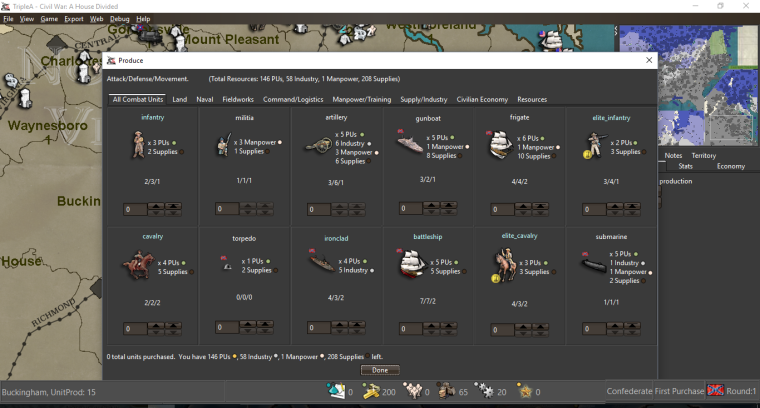
This will be such a cool feature!!!
I agree with @Frostion that a simplified colour system would be ideal for the standardized resources we package with the engine. Of course each individual map maker can customize to suit their own tastes.... but keeping the "stock" images to a generally accepted standard is a great idea.
One thing we could consider is doing away with the silly little "x" before the first resource in the purchase window... I really don't think there is any question as to what the resource counts mean in there. The "x" just seems to be an unnecessary redundancy that occupies space.
-
@Frostion Agree. We should look to have a consistent style and size of the default icons. Identifying the most used and having them be somewhat distinct would also be nice.
@Hepps I was actually thinking of taking it a bit further than you did. I'm interested in if we move towards using resource icons everywhere to reduce the amount of text displayed how it would look. I think there are a number of games that always use resource icon and just the name in tooltips. I think that humans in general have an easier time identifying color/image vs text. I'd be interested in how it would look if just resource icons were used in the purchase window.
Default Resource Classes
- Primary: PUs, techTokens
- Secondary: SuicideAttackTokens, Fuel/Oil, Iron/Steel, Production/Industry, Manpower, Leadership, Supplies, Gold, Wood, Stone, Food
- Other: Rubber, Aluminum, Tungsten, Chromium, Coal, Uranium, Horses, Copper, Research, Culture, Faith
-
Maybe a forced change to only display resource icons during purchase (if the map folder even has its own resource icons available) is a bit drastic for some veteran players. Could it be an engine option? Like with the unit flags?
I agree with the removal of the "x" btw.
-
@frostion Its an option. Though given that 95% of maps have really just 1 resource (PUs) not sure that the average/veteran player will be impacted much. And I think maps that do have multiple resources would almost all benefit from moving to icons. My thought is drive at making resource icons the default and then if necessary provide an option for displaying text if enough folks want it.
-
@redrum Optional text sounds good.
-
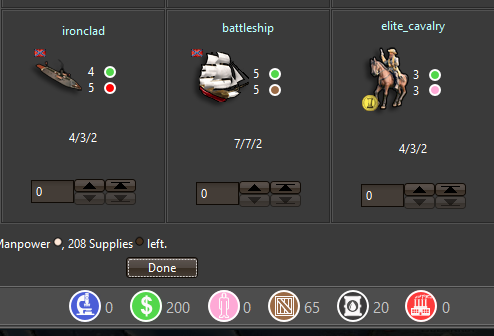
Kind tooling around. Kinda neat being able to foresee simplified versions for resources as well.
"A joyous heart sours with the burden of expectation"
Hepster -
@Hepps Could you make the dollar Yellow? For gold and reserve the green for food? (like an Apple)
If you made a new icon set it could maybe be an optional download or something to use in future maps? I kind of like the small drawings better, although these round ones are pretty distinct.
Edit: And have you tried with black instead of white as outline inside the pictures?Map maker of: Star Wars: Galactic War + Star Wars: Tatooine War + Caribbean Trade War + Dragon War + Age of Tribes + Star Trek: Dilithium War + Iron War + Iron War: Europe + Warcraft: War Heroes
-
@frostion Just tooling around. I can make any adjustments. The idea was just to generate some idea's.
The current one's we have are pretty detailed, so I thought if we could get a very basic set done to be included with the game... it'd give map makers at least a set to work with to implement quickly and easily.
Yah I can switch the green out for food. No biggy. I'm just having some fun.
-
@hepps Yeah, distinctiveness is good. But they seem to conflict with the general style of TripleA. I think probably that they are too white or something.
TripleA Developer with a Passion for AI: https://forums.triplea-game.org/topic/105/ai-development-discussion-and-feedback
-
@redrum Yah I haven't really toyed with them all that much other than to draw them and merge them into an example.
-
@redrum I am just trying to keep the creative side on pace with the developmental side.

-
@hepps I like the idea of icons/symbols instead of images. As long as they don't clash too much with existing styles.
-
@general_zod said in Image Icons:
@hepps I like the idea of icons/symbols instead of images. As long as they don't clash too much with existing styles.
Agreed. As I said... this is just me.... being me. I tend to take a feature and then dink around while it is in development to get some idea's as to how to use this down the road. In this case I just figured I'd post some of my artistic meanderings as it really costs us nothing. If we end up with something we can use as a basic package (which we could then include into the POS 2 game) then we come out ahead with a tool just to show people what can be done. Normally all of these experimental designs never see the light of day.
-
-
@redrum
Will you change the picture pulling of the bottom bar, and make the bar pull the non-"_large.png" images?I tested a pre-release, and right now it seems that the bottom bar uses the same _large.png images as the purchase screen. It would make little sence to have the bar pull pictures called something like PUs_large.png, as those bar icons would actually be small pictures, and at the same time have the purchase window pull large icons and have these not be called large.
I would suggest having the large icons used by the purchase window be called PUs_large.png (Approximately 48x48 pixels)
And have the smaller bar icons be called PUs_small.png or just PUs.png (Approximately 24x24 pixels)
And if we would ever think about using the images to display prices in the purchase screen (as @Hepps showed us), then have these icons be called PUs_tiny.png or PUs_small.png (Approximately 12x12 pixels)






Hello! It looks like you're interested in this conversation, but you don't have an account yet.
Getting fed up of having to scroll through the same posts each visit? When you register for an account, you'll always come back to exactly where you were before, and choose to be notified of new replies (either via email, or push notification). You'll also be able to save bookmarks and upvote posts to show your appreciation to other community members.
With your input, this post could be even better 💗
Register Login