Terra Firma 1939
-
Your Terra Firma looks pretty good, I bet an issue with that Europe map was just the variance in territory size making movement in certain areas really weird.
I'm going by the text, but if these territories are the size I think they are, they won't fit very many units. You probably want to call the Thailanders "Thai"
-
@oda Not really important, but the name "Terra Firma" sounds strange to me. It definitely doesn't make me guess in any ways that's a WWII game; rather something like a FFA with a big continent in the middle to contest.
-
@oda said in Terra Firma:
Though this is the first map I plan to release to the public, it's the third map I've made so far. Earlier last year, I produced a 1000+ province map of just Europe, complete with around 20 factions and 25 unit types. The map is mostly finished, but was designed for TripleA 1.8. Rather than expend the energy updating that map, I decided to produce Terra Firma, which toned down the province density but scaled up to a global scale.
Can you post your a link to your old map. I can easily convert it to version 1.9.
-
It's an nice looking map. Just to echo @redrum a bit. Since you said it's based on WAW map. I really hope you enlarged the overall image. Or your in for some trouble on overcrowding issues. Especially if you have large unit rosters.
Yep, like @Cernel says, the name doesn't even remotely make me think of a ww2 map. Might be a good idea to rename it.
-
Thanks for the feedback, everyone. Over the past few days I have completed around %60 of the PU's placements all of the starting diplomacy, and a little more of the unit art. Now to the feedback:
I completely agree that the map is on the small side. The original dimensions of the map were around 30,000x11,500. This gargantuan size brought the polygon and center pickers to a hold, even after upping the allocated memory for these programs. I settled on a final dimension of around 15,000x6,000. Although this is less than ideal, most of the provinces can hold a good few units before they start to overflow.
Also, I'd be more than happy to change Terra Firma's name. My Europe map was called EuroTest, so I am perhaps not the most proficient when it comes to naming. My thought behind Terra Firma is that it is a really, really big map of the entire world. If anyone has a better idea for a map name, please let me know.
-
-
@oda Since you are splitting the WAW map even more, maybe "War Torn World".

-
Instead of Terra Firma, you could have Terris ad bellum ("Earth at War")
-
@rogercooper Interesting idea. Though not sure having a Latin name for a WW2 game makes a ton of sense.
-
@rogercooper I believe that is not a correct translation, especially since "terris" is the dative plural; so that would mean "at the earth(s)", and I'd leave Pulicat give suggestions here, since he is a professional, and I would not be 100% sure to get it right. Also "ad" means mainly "to", not "at" (you use it to mean going at war, not to mean being at war).
An easy one would be "bellum in terris" (war on Earth(s)), but Latin sounds kind of funny for WWII. -
@cernel also true lating doesn't have spaces or lower cases or "u", so you would have the game info name as:
BELLVMINTERRIS
("war on earths", meaning "war on Earth") -
I think something like "Terra Firma 1939" or whatever starting year is would get the point across sufficiently on what the map is.
Yeah I've had some issues on large maps too. In addition to increasing memory as well.
-
Alright, I'm a good way into the unit placements and I agree that I'd like to scale up the map. I tried increasing the current map size by %50 to an approximate size of 22,000 x 9,000. The exported image is 1,843KB. Before starting the center picker, I allocated the maximum memory, 4096MB via the map maker. When I ran the new map through the center picker, the program loaded a blank image and gave me the following error:
Centers : C:\Users\Oda\triplea\downloadedMaps\TerraFirma1939\centers.txt
Exception in thread "Image Fetcher 0" Exception in thread "AWT-EventQueue-0" java.lang.OutOfMemoryError: Java heap space
at java.awt.image.DataBufferInt.<init>(Unknown Source)
at java.awt.image.Raster.createPackedRaster(Unknown Source)
at java.awt.image.DirectColorModel.createCompatibleWritableRaster(Unknown Source)
at sun.awt.image.ImageRepresentation.createBufferedImage(Unknown Source)
at sun.awt.image.ImageRepresentation.setPixels(Unknown Source)
at sun.awt.image.ImageDecoder.setPixels(Unknown Source)
at sun.awt.image.PNGImageDecoder.sendPixels(Unknown Source)
at sun.awt.image.PNGImageDecoder.produceImage(Unknown Source)
at sun.awt.image.InputStreamImageSource.doFetch(Unknown Source)
at sun.awt.image.ImageFetcher.fetchloop(Unknown Source)
at sun.awt.image.ImageFetcher.run(Unknown Source)Is there any way around this? I am using Windows 10, with 16GB memory. I'll be happy to provide more info is needed, or post this question somewhere else on the forums if this is the wrong place for it. Thanks.
-
@oda Can you attach your exported image or map zip here so I can try to reproduce the problem?
-
@redrum Here's a link to the new, larger map.
There's no game file in there yet, so it's currently unplayable.The old game file is in, my mistake.https://www.dropbox.com/s/eic7uhmndvhlrfl/TerraFirma1939.zip?dl=0
-
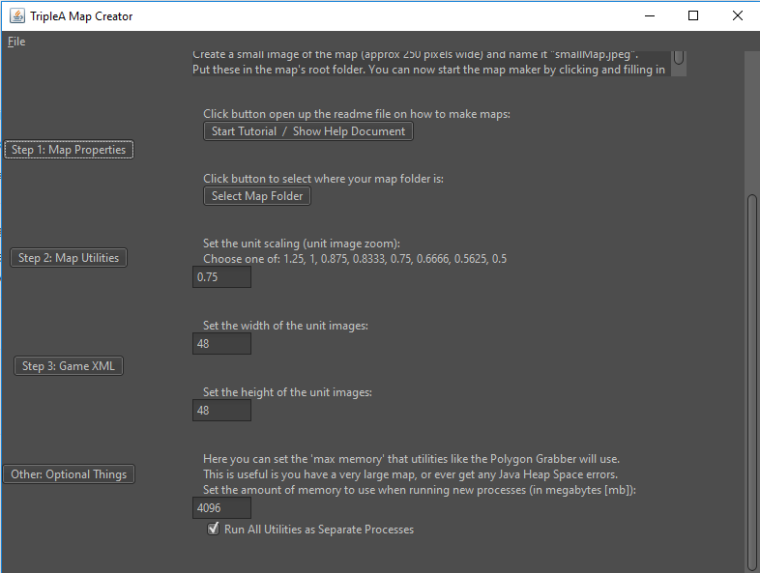
@oda Hmm. I was able to set the map creator memory to 4096 and then run the center picker with your map image without any errors. Can you make sure you have 64 bit TripleA and Java? Also what version of TripleA are you using?
Memory Setting:
-
@redrum I'm not sure what "utilities like the Polygon Grabber" in the description means. If that means all mapmaking utilities get that setting, then probably better to say "any mapmaking utilities herein"; if not, I'd specify better which ones get it. Otherwise, people might wonder if the specific utility they are using is effected by that or not.
For example, one might wonder if that applies to the center picker too (I'm sure it does). -
@oda Really, if you already did it and are increasing all by 50%, you are better off dropping your data in a excel sheet and multiply all by 1.5.
Also, if you are splitting WAW, I would go for a +100% at the very least. Heck, I would go for that even without splitting!
-
@cernel Are you saying polygons and centers data, multiplied by any factor will effectively enlarge map?
-
@general_zod I'm not saying that, since it won't change your relief and base tiles. Aside from that, yes, as long as you multiply all coordinates in all places.




Hello! It looks like you're interested in this conversation, but you don't have an account yet.
Getting fed up of having to scroll through the same posts each visit? When you register for an account, you'll always come back to exactly where you were before, and choose to be notified of new replies (either via email, or push notification). You'll also be able to save bookmarks and upvote posts to show your appreciation to other community members.
With your input, this post could be even better 💗
Register Login