Terra Firma 1939
-
@redrum Here's a link to the new, larger map.
There's no game file in there yet, so it's currently unplayable.The old game file is in, my mistake.https://www.dropbox.com/s/eic7uhmndvhlrfl/TerraFirma1939.zip?dl=0
-
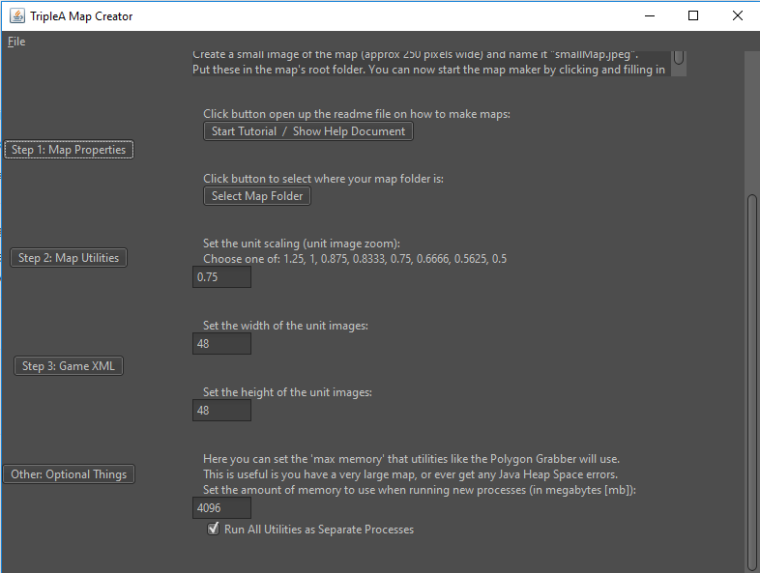
@oda Hmm. I was able to set the map creator memory to 4096 and then run the center picker with your map image without any errors. Can you make sure you have 64 bit TripleA and Java? Also what version of TripleA are you using?
Memory Setting:
-
@redrum I'm not sure what "utilities like the Polygon Grabber" in the description means. If that means all mapmaking utilities get that setting, then probably better to say "any mapmaking utilities herein"; if not, I'd specify better which ones get it. Otherwise, people might wonder if the specific utility they are using is effected by that or not.
For example, one might wonder if that applies to the center picker too (I'm sure it does). -
@oda Really, if you already did it and are increasing all by 50%, you are better off dropping your data in a excel sheet and multiply all by 1.5.
Also, if you are splitting WAW, I would go for a +100% at the very least. Heck, I would go for that even without splitting!
-
@cernel Are you saying polygons and centers data, multiplied by any factor will effectively enlarge map?
-
@general_zod I'm not saying that, since it won't change your relief and base tiles. Aside from that, yes, as long as you multiply all coordinates in all places.
-
And the map.width and height. Tho, I'm not suggesting this; only for the things you spent some times, like manual placement (and manual placement would be correct only if you also multiply your units size, since they are drawn from a corner of them).
-
Interesting work around. But it sounds like a large task in it self. But probably less so than redoing polygons and centers.
I wonder if it will match up exactly since enlarge image tends to skew the borders throughout the map.
-
Thank you so much for all the help. I uninstalled the previous edition which I had (1.9.0.0.9862) and reinstalled v. 1.9.0.0.9687. This fixed the issues I was having with the center picker. I'm in the process of converting my center.txt into a .csv so I can double the values of the x,y coordinates in excel. Will the same process yield the same results for the polygons or would it be better to run the polygon finder and fix up any errors?
Also, I'm going to try for a %100 increase rather than a %50 increase in total size. Hopefully that makes for the most playable experiance. In terms of progress, on the small scale I have placed units for most minor nations, and only have the major powers to complete. After that, I just need to work on balance and fool around with the ruleset. With any luck, this project should not take too long until I'm comfortable offering an early public release. Thanks again, everyone.
-
Please post here if the multiplying of coordinates works out (polygons, centers, placement) . This can be a huge shortcut in map making. When it comes to changing map sizes.
Although as @cernel mentions above the image for base tiles use must be enlarged accordingly. Pixilation usually occurs during change of image size, which screws with the polygon application. But that step can be bypassed from the sounds of it, if an already pre-existing polygons file exists for the image in question.
-
@general_zod I just doubled the size of the map using csv's and excel. It takes a bit of work, but so far it's working alright. I'll be sure to post if something ends up breaking.
I used GIMP's scale tool without interpolation to enlarge the image with limited pixelation.
-
I've been working through some of the issues with this map, but I'm at a place where I'd appreciate some feedback. Attached is a working copy of the map. Although it is functional and playable, it requires a complementary spreadsheet to handle the politics at the moment. It's far from being done, so please let me know what you think!
What I'd appreciate most is:
- Any missing land/sea connections
- Feelings on capital placements
- PU balance
- Unit balance (costs? stats?)
- Starting units
A full list of known bugs and planned goals are on the front page. Thanks!
https://www.dropbox.com/s/wyj3wnr8qpols4u/TerraFirma1939.zip?dl=0
-
@oda Wow! That's a pretty impressive map and seems like a pretty solid start. The size of the territories at 100% is actually pretty decent and allows you to zoom out for some of the less populated areas. Doubling was definitely a good idea as otherwise, territories would have been way too small. One of the challenges though will be that you do have significant variance in the size of territories which can cause especially air units to be able to travel vast distances in say central Russia or central Africa because the territories are so huge.
Feedback:
- You should rename all your sea territories to either start with or end with "Sea Zone" to fix all your islands that are completely in a single sea territory
- Probably want to make default unit size a bit bigger as at the current default of 50% the units are really hard to see
- Its tough to tell unit nationality and pretty much must have unit flags on but they are pretty tough to see so a bit larger flag images would be good
- Some of the darker nations make it tough to see borders and PU values
- Probably better to not show territory names on the map since they are just random numbers at this point
- Diplomacy is an interesting approach but having Russia or USA join the Axis would be insane given how strong a swing that would be. Probably need to make diplomacy a little less random in order to ever have a reasonably balanced map.
- Until you have a fairly stable rule set and diplomacy, I wouldn't worry too much about balance.
- Having a 2 PU unit with the incomes you have will lead to an enormous amount of units. Might want to consider slightly more expensive unit set to avoid crazy amounts of spam.
- Factories are really cheap and gonna end up spamming them everywhere. Probably should increase cost though if you are gonna move towards a deeper infrastructure model then might not matter.
- Russia is way too strong and Germany is probably too weak. As the game sits now, its whichever side Russia joins wins.
- Probably should consider breaking up the UK some as otherwise they can spend a crazy amount of PUs in say India/Australia/Africa which isn't at all realistic. Might want to check out Total World War for some ideas.
- London placement seems odd as it isn't touching the sea which then leads to the UK not being able to place very many ships in the North Sea area
- Given the size/complexity of the map probably better to move the 'purchase' phase later in each nation's turn.
- Your desired features list is awesome and would help bring some more "life" and "uniqueness" to the map
-
Hello, everyone. Here is a quick progress update for Terra Firma 1939. Over the past few days, I have added the complete unit roster which consists of around 40 units. The game will follow a d20 system and have custom support attachments to better suit the system.
I have also added a custom infrastructure to complement the large number of provinces. Now, you need to specialize your industry for each province. While general units like infantry are available at any industrial center, advanced units like heavy bombers or Self-Propelled Artillery are specialized to their own types of factory upgrades. Now, players can directly deny their opponents the ability to build certain units by conquering their vital factories. Further, players can choose to develop certain factories into civilian infrastructure, giving up military production in return for an increase in PUs/turn. I am attaching a copy of an excel sheet that details these additions. I would love to hear what you all think about this system. Thanks!
https://www.dropbox.com/s/jtinnr9nqkb1cmm/Terra Firma 1939 Rules.xlsx?dl=0
-
The production system sounds cool. Should work well on such a large map. TWW uses something similar, but yours takes it little further.
I hope the d20 work out well. I've tinkered with d20 and d18 as well. They have advantages but a couple disadvantages too.
You should post a link to updated map as well. Unless the previous is updated?
-
@oda Looks pretty good to me and a pretty good variety overall. If you haven't already I'd definitely take a look at Total World War and Civil War as they probably are the existing maps that have done a sort of similar infrastructure system like you are looking to do. There is also Global Dominance that @Hepps is working on that has a pretty extensive unit system that is detailed here: http://tripleadev.1671093.n2.nabble.com/Global-Dominance-td6926896.html
I'd still advise against a cost 2 unit as you'll end up with insane amounts of spam unless you have another way to deal with that. Motorized with 3 move and 6 PU cost also just out as crazy strong. Movement on large maps tends to be very valuable.
-
Thanks for the feedback. Here's an upload of the most recent version of the map. Unit prices have been re-worked and the infrustructure system has been implemented. Enjoy!
https://www.dropbox.com/s/2hwv1lgcqgkz232/TerraFirma1939.zip?dl=0
@redrum, thanks for all the great feedback earlier. I agree with all the points you made about the past map. I'll be implementing them in the coming iterations.
EDIT: Just found an error with hArtillery and Artillery in the same province in battle. Working on it now. It seems like the error is from two support attachments supporting the same unit. Is there a way around this? Here is the current Null Pointer Exception:
Error: java.lang.NullPointerException
java.lang.NullPointerException
at games.strategy.triplea.delegate.DiceRoll.getSupport(DiceRoll.java:657)
at games.strategy.triplea.delegate.DiceRoll.getUnitPowerAndRollsForNormalBattles(DiceRoll.java:433)
at games.strategy.triplea.delegate.DiceRoll.getUnitPowerAndRollsForNormalBattles(DiceRoll.java:407)
at games.strategy.triplea.oddsCalculator.ta.OddsCalculatorPanel.setWidgetActivation(OddsCalculatorPanel.java:731)
at games.strategy.triplea.oddsCalculator.ta.OddsCalculatorPanel.<init>(OddsCalculatorPanel.java:176)
at games.strategy.triplea.oddsCalculator.ta.OddsCalculatorDialog.<init>(OddsCalculatorDialog.java:60)
at games.strategy.triplea.oddsCalculator.ta.OddsCalculatorDialog.show(OddsCalculatorDialog.java:28)
at games.strategy.triplea.ui.TerritoryDetailPanel.lambda$initLayout$1(TerritoryDetailPanel.java:62)
at games.strategy.ui.SwingComponents$1.actionPerformed(SwingComponents.java:144)
at javax.swing.SwingUtilities.notifyAction(Unknown Source)
at javax.swing.JComponent.processKeyBinding(Unknown Source)
at javax.swing.KeyboardManager.fireBinding(Unknown Source)
at javax.swing.KeyboardManager.fireKeyboardAction(Unknown Source)
at javax.swing.JComponent.processKeyBindingsForAllComponents(Unknown Source)
at javax.swing.JComponent.processKeyBindings(Unknown Source)
at javax.swing.JComponent.processKeyEvent(Unknown Source)
at java.awt.Component.processEvent(Unknown Source)
at java.awt.Container.processEvent(Unknown Source)
at java.awt.Component.dispatchEventImpl(Unknown Source)
at java.awt.Container.dispatchEventImpl(Unknown Source)
at java.awt.Component.dispatchEvent(Unknown Source)
at java.awt.KeyboardFocusManager.redispatchEvent(Unknown Source)
at java.awt.DefaultKeyboardFocusManager.dispatchKeyEvent(Unknown Source)
at java.awt.DefaultKeyboardFocusManager.preDispatchKeyEvent(Unknown Source)
at java.awt.DefaultKeyboardFocusManager.typeAheadAssertions(Unknown Source)
at java.awt.DefaultKeyboardFocusManager.dispatchEvent(Unknown Source)
at java.awt.Component.dispatchEventImpl(Unknown Source)
at java.awt.Container.dispatchEventImpl(Unknown Source)
at java.awt.Window.dispatchEventImpl(Unknown Source)
at java.awt.Component.dispatchEvent(Unknown Source)
at java.awt.EventQueue.dispatchEventImpl(Unknown Source)
at java.awt.EventQueue.access$500(Unknown Source)
at java.awt.EventQueue$3.run(Unknown Source)
at java.awt.EventQueue$3.run(Unknown Source)
at java.security.AccessController.doPrivileged(Native Method)
at java.security.ProtectionDomain$JavaSecurityAccessImpl.doIntersectionPrivilege(Unknown Source)
at java.security.ProtectionDomain$JavaSecurityAccessImpl.doIntersectionPrivilege(Unknown Source)
at java.awt.EventQueue$4.run(Unknown Source)
at java.awt.EventQueue$4.run(Unknown Source)
at java.security.AccessController.doPrivileged(Native Method)
at java.security.ProtectionDomain$JavaSecurityAccessImpl.doIntersectionPrivilege(Unknown Source)
at java.awt.EventQueue.dispatchEvent(Unknown Source)
at java.awt.EventDispatchThread.pumpOneEventForFilters(Unknown Source)
at java.awt.EventDispatchThread.pumpEventsForFilter(Unknown Source)
at java.awt.EventDispatchThread.pumpEventsForHierarchy(Unknown Source)
at java.awt.EventDispatchThread.pumpEvents(Unknown Source)
at java.awt.EventDispatchThread.pumpEvents(Unknown Source)
at java.awt.EventDispatchThread.run(Unknown Source) -
@oda For support attachments, you MUST set bonusType so the engine knows whether support attachments should stack or not. For example, let's say you have an infantry, an artillery, and a hArtillery. Should the infantry receive support from just one of them or both of them? If they have the same bonusType then it'll only get the highest support from 1 support unit out of all support units that have that same bonusType.
Most likely you want to have a couple groups of bonusType so that a single infantry can't receive support from like 10 units. So glancing at your units maybe you have the following bonusTypes: support, command, artillery, and bomber. So 1 unit can receive support once for each bonusType but not from multiple units in the same bonusType.
POS2 XML:
bonusType values: the name of the bonus, any string. any bonus with the same name will not stack, any bonus with a different name will stack -
@redrum Ah, thanks for the help. I can't believe I missed that in the documentation. Here's an updated link for anyone interested:
https://www.dropbox.com/s/2hwv1lgcqgkz232/TerraFirma1939.zip?dl=0
-
@oda Overall, definitely a step in the right direction. I think you have at least a good core unit set now and the infrastructure portion is pretty interesting. I think just layering on a few more of the features you have planned then starting to get some games going to test balance is a good approach.
If you have any questions on the XML or would like feedback on any particular areas just let me know.
-
 T TheDog referenced this topic


Hello! It looks like you're interested in this conversation, but you don't have an account yet.
Getting fed up of having to scroll through the same posts each visit? When you register for an account, you'll always come back to exactly where you were before, and choose to be notified of new replies (either via email, or push notification). You'll also be able to save bookmarks and upvote posts to show your appreciation to other community members.
With your input, this post could be even better 💗
Register Login