Error starting PBEM game...
-
Hello all,
I have recently tried starting a play-by-email with my friends and while the dice server test was successful, I have had no luck actually starting the game using the Gmail or Hotmail option. Below is the error I repeatedly receive and I am not sure what to do. Any help is appreciated!

-
You were using the Gmail and Hotmail presets, right?
As PbEM isn't very popular, so there's a chance the presets no longer work right out of the box, which is probably happening to you.
For Gmail you'd have to enable access for "less secure apps" to be able to have it working in the first place, something that wasn't necessary when this feature was implemented.
But as your error happens with Hotmail as well, that's not the general issue here.Do you know which version of java you're using?
You can check by Going toEngine Preferences>Gameand enablingShow Console.
This will open a console window (probably in the background). Press clear and then on properties, and paste the output here. -
SYSTEM PROPERTIES
awt.toolkit=sun.awt.windows.WToolkit
exe4j.consoleCodepage=cp0
exe4j.isInstall4j=true
exe4j.launchName=E:\TripleA\TripleA.exe
exe4j.moduleName=E:\TripleA\TripleA.exe
exe4j.semaphoreName=Local\e:_triplea_triplea.exe0
exe4j.tempDir=
exe4j.unextractedPosition=0
file.encoding=Cp1252
file.encoding.pkg=sun.io
file.separator=
install4j.appDir=E:\TripleA
install4j.exeDir=E:\TripleA
install4j.launcherId=33
install4j.swt=false
java.awt.graphicsenv=sun.awt.Win32GraphicsEnvironment
java.awt.printerjob=sun.awt.windows.WPrinterJob
java.class.path=E:\TripleA.install4j\i4jruntime.jar;E:\TripleA.\bin\triplea-game-headed-1.9.0.0.13066-all.jar
java.class.version=52.0
java.endorsed.dirs=c:\program files\common files\i4j_jres\1.8.0_144\lib\endorsed
java.ext.dirs=c:\program files\common files\i4j_jres\1.8.0_144\lib\ext;C:\WINDOWS\Sun\Java\lib\ext
java.home=c:\program files\common files\i4j_jres\1.8.0_144
java.io.tmpdir=C:\Users\Myself\AppData\Local\Temp
java.library.path=C:\Program Files\Microsoft MPI\Bin;C:\Program Files (x86)\Common Files\Oracle\Java\javapath;C:\Program Files (x86)\NVIDIA Corporation\PhysX\Common;C:\ProgramData\Oracle\Java\javapath;E:\bin;C:\GNAT\GPL_2006\bin;C:\Program Files\Common Files\Microsoft Shared\Windows Live;C:\Program Files (x86)\Common Files\Microsoft Shared\Windows Live;C:\WINDOWS\system32;C:\WINDOWS;C:\WINDOWS\System32\Wbem;C:\WINDOWS\System32\WindowsPowerShell\v1.0;C:\Program Files (x86)\ATI Technologies\ATI.ACE\Core-Static;C:\Program Files (x86)\Windows Live\Shared;E:\ATI Technology\ATI.ACE\Core-Static;C:\Program Files (x86)\AMD\ATI.ACE\Core-Static;C:\Program Files (x86)\QuickTime\QTSystem;C:\WINDOWS\System32\OpenSSH;C:\Program Files (x86)\HID Global\ActivClient;C:\Program Files\HID Global\ActivClient;C:\Users\Myself\AppData\Local\Microsoft\WindowsApps;%DASHLANE_DLL_DIR%;c:\program files\common files\i4j_jres\1.8.0_144\bin
java.runtime.name=Java(TM) SE Runtime Environment
java.runtime.version=1.8.0_144-b01
java.specification.name=Java Platform API Specification
java.specification.vendor=Oracle Corporation
java.specification.version=1.8
java.vendor=Oracle Corporation
java.vendor.url=http://java.oracle.com/
java.vendor.url.bug=http://bugreport.sun.com/bugreport/
java.version=1.8.0_144
java.vm.info=mixed mode
java.vm.name=Java HotSpot(TM) 64-Bit Server VM
java.vm.specification.name=Java Virtual Machine Specification
java.vm.specification.vendor=Oracle Corporation
java.vm.specification.version=1.8
java.vm.vendor=Oracle Corporation
java.vm.version=25.144-b01
line.separator=os.arch=amd64
os.name=Windows 10
os.version=10.0
path.separator=;
sun.arch.data.model=64
sun.awt.enableExtraMouseButtons=true
sun.boot.class.path=c:\program files\common files\i4j_jres\1.8.0_144\lib\resources.jar;c:\program files\common files\i4j_jres\1.8.0_144\lib\rt.jar;c:\program files\common files\i4j_jres\1.8.0_144\lib\sunrsasign.jar;c:\program files\common files\i4j_jres\1.8.0_144\lib\jsse.jar;c:\program files\common files\i4j_jres\1.8.0_144\lib\jce.jar;c:\program files\common files\i4j_jres\1.8.0_144\lib\charsets.jar;c:\program files\common files\i4j_jres\1.8.0_144\lib\jfr.jar;c:\program files\common files\i4j_jres\1.8.0_144\classes
sun.boot.library.path=c:\program files\common files\i4j_jres\1.8.0_144\bin
sun.cpu.endian=little
sun.cpu.isalist=amd64
sun.desktop=windows
sun.io.unicode.encoding=UnicodeLittle
sun.java.command=E:\TripleA\TripleA.exe
sun.jnu.encoding=Cp1252
sun.management.compiler=HotSpot 64-Bit Tiered Compilers
sun.os.patch.level=
user.country=US
user.dir=E:\TripleA
user.home=C:\Users\Myself
user.language=en
user.name=Myself
user.script=
user.timezone=America/Chicago
user.variant= -
Hmm okay, doesn't look like it's a java related issue.
Using your hotmail account (hotmail.com, live.com, outlook.com etc.): Instead of selecting hotmail, try selecting generic SMTP and insertsmtp.live.comin the host field, and465in the port field. Then check the box saying "Use TLS encryption", and try again using your email and password to authenticate.
If this doesn't work as well try using port25instead and uncheck the "Use TLS encryption" checkbox again. The latter case should either work, or give you a different error message. In any case you should report back if it worked. For gmail the same thing should apply, as long as you enabled less secure apps, and usingsmtp.gmail.comas host instead. -
Received this error. I also tried gmail with the less secure app option and received an error as well.
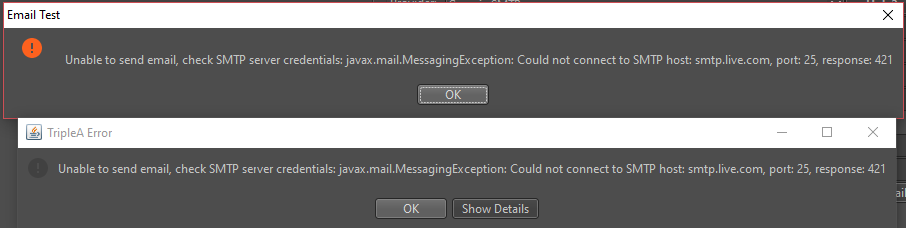
-
Hmm still nothing obvious (for me at least).
Maybe @redrum @ssoloff or @LaFayette have an idea.
In the meantime: If you get the error dialog with the "Show Details" button, press it and post the console output here.
The more information we have, the more likely it is we will be able to resolve your issue, but for now I have run out of ideas. I'll try to think of something.You can also give PbF a chance if you want. It'll work almost identical, with the difference that instead of sending each other an email, you send each other a forum post (which you can subscribe to, so you get an email notification as well).
If you have any questions, this forum has most of the answers ^^ -
This is the code from the console regarding the most recent errors, thank you for your help!
Jan 20, 2019 6:47:32 PM games.strategy.engine.framework.startup.ui.editors.EmailSenderEditor lambda$testEmail$4
SEVERE: Unable to send email, check SMTP server credentials: javax.mail.MessagingException: Could not connect to SMTP host: smtp.gmail.com, port: 25, response: 421
java.io.IOException: javax.mail.MessagingException: Could not connect to SMTP host: smtp.gmail.com, port: 25, response: 421
at games.strategy.engine.pbem.GenericEmailSender.sendEmail(GenericEmailSender.java:196)
at games.strategy.engine.framework.startup.ui.editors.EmailSenderEditor.lambda$testEmail$4(EmailSenderEditor.java:167)
at java.lang.Thread.run(Unknown Source)
Caused by: javax.mail.MessagingException: Could not connect to SMTP host: smtp.gmail.com, port: 25, response: 421
at com.sun.mail.smtp.SMTPTransport.openServer(SMTPTransport.java:2197)
at com.sun.mail.smtp.SMTPTransport.protocolConnect(SMTPTransport.java:740)
at javax.mail.Service.connect(Service.java:366)
at games.strategy.engine.pbem.GenericEmailSender.sendEmail(GenericEmailSender.java:188)
... 2 more -
@RoiEX Could be a TLS proxy causing issues, as we've seen in the past. Although I would have expected that to cause the dice server test to fail, as well.
According to this SO answer, several people reported Avast prevented TLS-enabled JavaMail from working. Temporarily disabling A/V while running the email test may be a good thing to try.
-
@ssoloff I probably shouldn't say anything but i will anyway
is 32 and 64 conflicting ?
\WINDOWS\System32\WindowsPowerShell\v1.0;C:\Program Files (x86)\ATI Technologies\ATI.ACE\Core-Static;C:\Program Files (x86)\Windows
java.vm.name=Java HotSpot(TM) 64-Bit Server VM
-
@LevHunter said in Error starting PBEM game...:
@RoiEX
...
SEVERE: Unable to send email, check SMTP server credentials: javax.mail.MessagingException: Could not connect to SMTP host: smtp.gmail.com, port: 25, response: 421
java.io.IOException: javax.mail.MessagingException: Could not connect to SMTP host: smtp.gmail.com, port: 25, response: 421
at games.strategy.engine.pbem.GenericEmailSender.sendEmail(GenericEmailSender.java:196)
at games.strategy.engine.framework.startup.ui.editors.EmailSenderEditor.lambda$testEmail$4(EmailSenderEditor.java:167)
at java.lang.Thread.run(Unknown Source)
Caused by: javax.mail.MessagingException: Could not connect to SMTP host: smtp.gmail.com, port: 25, response: 421AFAIK gmail needs port 587 for SMTP/TLS.
-
@Panther True, but that should be the default setting already, so I wanted to try out the other ports to be sure.
-
@ssoloff I temporarily disabled avast to no avail. :confused_face:
-
@Panther This worked! I simply checked the box saying "Enable encryption" and that did it.
-
However, now I am running into a problem where I cannot select the "start" button.. :grinning_face_with_sweat:
-
@LevHunter Then you probably forgot to fill out something (like the dice server or the subject etc.)
-
@beelee said:
is 32 and 64 conflicting ?
Good eye, but probably not. In this case, it appears a bundled JRE is being used (see the value of the
java.homeproperty), so it doesn't matter what other JREs the user has installed on the system--the TripleA launcher will always use that bundled JRE. (As has been observed by others, this tends to be a Bad Thing, and is being discussed in https://github.com/triplea-game/triplea/issues/4358. -
@RoiEX Yep, found that out almost immediately after sending that. I thought I deleted that second reply, but all is working now. Thank you all for your help.
-
I Recently had the same frustrating error using a GMAIL account to Play by email (PBEM) after having not played for a few years.
I found my problem was rooter in Gmail changing how they managing 3rd party software accessing their product, previously you could enable a "low" security option that permitted 3rd party access. At some point Google has changed this to requiring app specific 16 character passwords that google generates for you; these can only be used if you enable 2-way log in authentication. Once done you can set up your 16-character custom code and use GMAIL for TripleA.
Here are the steps to follow:
1 - Enable 2-step authentication on you Gmail account. This can be accessed in your Gmail security section.
2 - Once enabled search, log into you google account settings and search for "App passwords", this opens up the Apps passwords section of your account security section.
3 - Click "select App" button, from here and then select "Other custom name". Type in the app name (I just used TripleA), then click the "Generate button". A 16 character code will be generated, "Copy" this code.
4 - Back in the TripleA PBEM start page use the copies 16 character code as password for your associated email login.
Hope this works for you.
All the Best.
The Apprentice.,



Hello! It looks like you're interested in this conversation, but you don't have an account yet.
Getting fed up of having to scroll through the same posts each visit? When you register for an account, you'll always come back to exactly where you were before, and choose to be notified of new replies (either via email, or push notification). You'll also be able to save bookmarks and upvote posts to show your appreciation to other community members.
With your input, this post could be even better 💗
Register Login