Map colors in map.properties
-
Mysterious problems
 I don't have any clear answers, but some experience.
When editing the txt and xml files, be sure that you actually save/overwrite so that you use the new file.
Also, if you have made a new version of a map by copy/pasting the intire map into the same map folder, just changing the name of the maps directory or zip, then it is a good idea to completely (but temporarily) move the original map out of the maps folder. Then you can avoid the new map occasionally actually drawing from the old map's settings and files. Your problem might be related to code inside your new xml, where map name is maybe identical to the original map.
-
@RobbyPants Yeah, pretty sure your xml is just looking to some other folder (zipped or not) than the one you are working on.
Just be sure that your xml entry in the "mapName" property is in line with the name of the folder you are working on, and there are no other folders with compatible names (there are a number of ways the map folder can be named and structured).
Also, are you sure you want to use Revised for a fantasy game?
-
Thanks everyone.
Yeah, I set the owners of each territory in the XML file.
@Cernel said in Map colors in map.properties:
@RobbyPants Yeah, pretty sure your xml is just looking to some other folder (zipped or not) than the one you are working on.
Just be sure that your xml entry in the "mapName" property is in line with the name of the folder you are working on, and there are no other folders with compatible names (there are a number of ways the map folder can be named and structured).
Also, are you sure you want to use Revised for a fantasy game?
I think this is the heart of my problem. The approach I took was to copy the world_war_ii_revised-master.zip file, unpacked it, and renamed the thing "fantasy". So, I think you're right that I probably have some lingering reference in there to the revised directory. Probably the quickest way to test that would be to remove the revised zip from the downladedMaps/ directory to see if the fantasy one stops working.
Looking at the bottom of the XML file, I do see this:
<property name="mapName" value="world_war_ii_revised" editable="false"/>So, I have to figure out what to set that too, and I'll probably be fine.
Regarding if I want to use the Revised rule set for a fantasy game: I guess I don't know. The only experience I have with these sorts of things is with the Classic, the Classic v3, and the Revised rule set of Axis and Allies. I don't know about any better alternatives.
-
@RobbyPants Yes you have to ensure all references to the original you are copying are changed in the XML.
The folder name itself.
At the top of the XML
And at the end of the XML
-
I figured it out!
So, I saw that mapName property yesterday, changed it to "fantasy", and it complained about not being able to find the directory. I removed the world_war_ii_revised-master.zip from the directory, and sure enough, my fantasy map wasn't working.
What I was missing was the -master suffix at the end of the zip. I saw that as a naming convention for zips that contained more than one game and didn't realize it was an important part to the game parsing behavior. So, after adding "-master" to the end of my zip (and corresponding properties file) and setting the mapName to "fantasy", it works!
Thanks for your help, everyone. I was on the right track yesterday, but needed a nudge in the right direction.
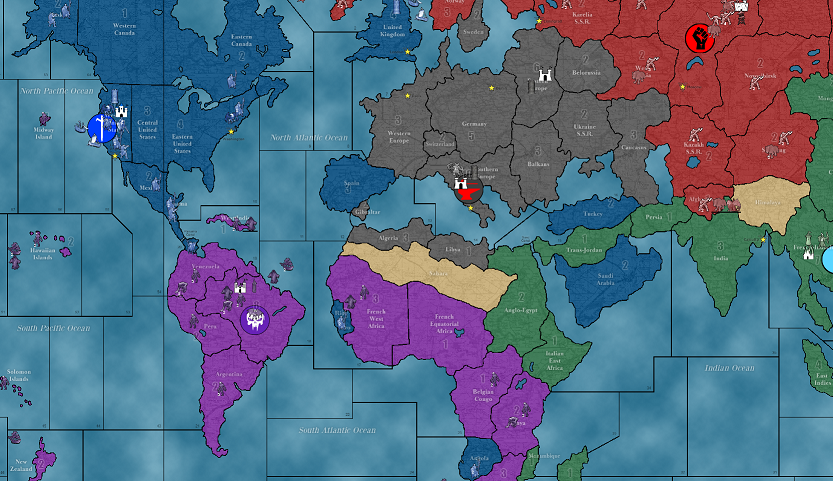
Now to populate the rest of the map and test this thing out!
-
@RobbyPants I meant the map drawing. Revised ruleset as basis is pretty much mandatory.
-
When populating, I hope you know that you can do this ingame via editing, then save the current game as a new XML file, then open original and new XML and copy/past the new starting units over
 ???
??? -
@Cernel said in Map colors in map.properties:
@RobbyPants I meant the map drawing. Revised ruleset as basis is pretty much mandatory.
Ah. Yeah, it's mostly a labor of love at this point. I didn't want to get into the ins and outs of actual map editing. Once I'm happy with this thing and how the units behave, I might give legit map editing a go.
@Frostion said in Map colors in map.properties:
When populating, I hope you know that you can do this ingame via editing, then save the current game as a new XML file, then open original and new XML and copy/past the new starting units over
???Ooh! That is nice to know. Thanks! I've been largely just looking at the map and editing the XML by hand. I'll save a copy of the XML and give this a test.
-
@RobbyPants it is of course just sections of the code from the XML you "export" (the wording in the menu). You can copy over and use the starting units, the starting territory ownerships, the political situation etc. It is much faster than manually editing the XML. I would not use the intire XML you save in game, just the starting situation.
-
@Frostion said in Map colors in map.properties:
@RobbyPants it is of course just sections of the code from the XML you "export" (the wording in the menu). You can copy over and use the starting units, the starting territory ownerships, the political situation etc. It is much faster than manually editing the XML. I would not use the intire XML you save in game, just the starting situation.
That makes sense. I backed up my old XML just in case, and used the exported one, which failed to parse. So, I then when and copy-pasted the unit placement tags into my old one, and it worked well. Now I'm onto tweaking and testing.
Thanks for the help, everyone!
-
FWIW, on your local file system you can also have map in an expanded format. That same expanded format is exactly the same as what gets checked in to github. For example, compare the files hosted here:
https://github.com/triplea-maps/total_world_warTo how I have the map not zipped below:
Command line view showing 'downloadedMaps' folder contents, note the 'total_world_war' map is a folder and not a zip:

Same, downloadMaps folder from finder:
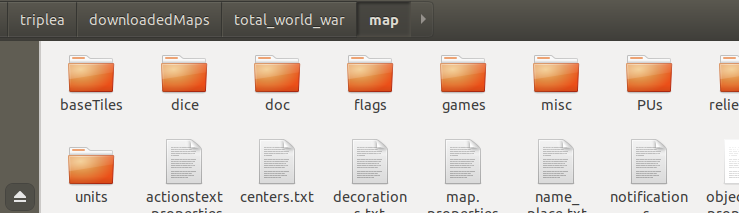
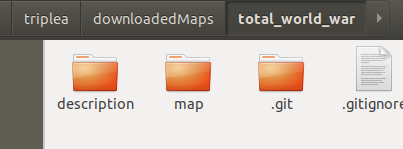

-
@RobbyPants Drawing a simple fantasy map of revised dimensions and running the various utilities to get all the stuff is really something you can do within 12 hours (and likely 3 to 6 hours). It won't have relief tiles, as there we start going into artistic field, but games can look good also without relief, and it will definitely feel more polished anyways. I suggest drawing the borders 2 pixels tick and running the connections finder at 4 pixels tick (so that you will have no missing connections and will just need to check for crossed borders to remove wrong connections).
-
@Cernel said in Map colors in map.properties:
@RobbyPants Drawing a simple fantasy map of revised dimensions and running the various utilities to get all the stuff is really something you can do within 12 hours (and likely 3 to 6 hours). It won't have relief tiles, as there we start going into artistic field, but games can look good also without relief, and it will definitely feel more polished anyways. I suggest drawing the borders 2 pixels tick and running the connections finder at 4 pixels tick (so that you will have no missing connections and will just need to check for crossed borders to remove wrong connections).
Thanks. I might on some weekend when I have the time for that. Right now I'm tweaking how asymetric I want to make the units of the different factions. I think I went a titch too far and am dialing that back.
-
@RobbyPants Another suggestion may be that you search in internet for free fantasy maps, so you can draw it shadowing that, then use that map as the base for the relief thereafter, that can achieve very good results at relatively modest graphical skills.
-
@Cernel said in Map colors in map.properties:
@RobbyPants Another suggestion may be that you search in internet for free fantasy maps, so you can draw it shadowing that, then use that map as the base for the relief thereafter, that can achieve very good results at relatively modest graphical skills.
For my, my concern is more the time it would take to make the tiles and being able to make a map that's "good". I'm not so worried about the difficulty of it.
The thing I like about the Classic and Revised WWII maps is that they have some natural choke points, and the value of certain territories leads the factions into fighting over them. I kind of like looking at the differences between the two maps because of that. I want to make sure that any map I make would be interesting to play and not come off like a chessboard in the middle of an ocean.




Hello! It looks like you're interested in this conversation, but you don't have an account yet.
Getting fed up of having to scroll through the same posts each visit? When you register for an account, you'll always come back to exactly where you were before, and choose to be notified of new replies (either via email, or push notification). You'll also be able to save bookmarks and upvote posts to show your appreciation to other community members.
With your input, this post could be even better 💗
Register Login