TripleA Logo TripleA Forum
    • TripleA Website
    • Categories
    • Recent
    • Popular
    • Users
    • Groups
    • Tags
    • Register
    • Login

    [Fixed] Small Maps Not Displaying Correctly in Prerelease

    Scheduled Pinned Locked Moved Bug Reports
    8 Posts 3 Posters 2.5k Views 3 Watching
    Loading More Posts
    • Oldest to Newest
    • Newest to Oldest
    • Most Votes
    Reply
    • Reply as topic
    Log in to reply
    This topic has been deleted. Only users with topic management privileges can see it.
    • RogerCooperR Offline
      RogerCooper
      last edited by LaFayette

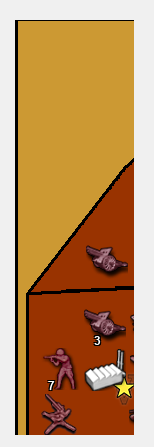
      Small maps are not displaying correctly in version 15781. For example, when I run MiniMap I only see
      cfe4efdc-9beb-411e-888a-c636354cf289-image.png

      This behavior occurs on other small maps (e.g. Small Balanced) but not on larger maps.

      1 Reply Last reply Reply Quote 0
      • RoiEXR Offline
        RoiEX Admin
        last edited by

        @RogerCooper Could you give a little bit more detail on this? Like a before Screenshot for example? Or point out what should be different for example?

        Right now I'm just loking at a map that seems to be weird, but can't spot an obvious problem

        1 Reply Last reply Reply Quote 0
        • RoiEXR Offline
          RoiEX Admin
          last edited by

          Nevermind, I see what you mean, well yes that's not supposed to happen at all.

          1 Reply Last reply Reply Quote 0
          • RoiEXR Offline
            RoiEX Admin
            last edited by

            https://github.com/triplea-game/triplea/pull/5180 should fix this

            1 Reply Last reply Reply Quote 2
            • RoiEXR Offline
              RoiEX Admin
              last edited by

              Ok, this issue is fixed in 2.0.15783

              B 1 Reply Last reply Reply Quote 2
              • B Offline
                beelee @RoiEX
                last edited by

                @RoiEX impressive response time. That issue had no chance against RoiEX 🙂

                RoiEXR 1 Reply Last reply Reply Quote 1
                • RoiEXR Offline
                  RoiEX Admin @beelee
                  last edited by

                  @beelee

                  Thanks 😅

                  Well once I saw the issue I was already pretty sure what was going wrong. Basically the map was offset a little bit, but gets cropped at the position where it should end.
                  So all I had to do was to ensure small maps always are drawn in the top left, which turned out to be a one-line change. Also I was discussing a couple of things with some friends during that time (online) so I used that time super effectively ^^

                  B 1 Reply Last reply Reply Quote 1
                  • B Offline
                    beelee @RoiEX
                    last edited by

                    @RoiEX heh heh

                    One line changes can blow away hours of work sometimes. Like well f it delete all that other stuff and just do this :beaming_face_with_smiling_eyes: Not saying that was the case here, just an example of the Power of 1 line 🙂

                    1 Reply Last reply Reply Quote 1

                    Hello! It looks like you're interested in this conversation, but you don't have an account yet.

                    Getting fed up of having to scroll through the same posts each visit? When you register for an account, you'll always come back to exactly where you were before, and choose to be notified of new replies (either via email, or push notification). You'll also be able to save bookmarks and upvote posts to show your appreciation to other community members.

                    With your input, this post could be even better 💗

                    Register Login
                    • 1 / 1
                    • First post
                      Last post
                    Powered by NodeBB Forums
