TripleA Logo TripleA Forum
    • TripleA Website
    • Recent
    • Popular
    • Register
    • Login

    Versions Not Updating Despite YAML version no. change.

    Scheduled Pinned Locked Moved Player Help
    16 Posts 3 Posters 2.3k Views 2 Watching
    Loading More Posts
    • Oldest to Newest
    • Newest to Oldest
    • Most Votes
    Reply
    • Reply as topic
    Log in to reply
    This topic has been deleted. Only users with topic management privileges can see it.
    • PantherP
      Panther Admin Moderators Lobby Moderators @Joe G
      last edited by

      @Joe-G Hey Joe. The last PtV-yaml-update is from 8 days ago, when it changed from 3 to 4. Are you referencing this one?

      Don't always trust TripleA when it comes to rules questions. Know the rules before you start … and better check what TripleA has done.

      1 Reply Last reply
      Reply Quote 0
      • PantherP
        Panther Admin Moderators Lobby Moderators @Joe G
        last edited by Panther

        @Joe-G
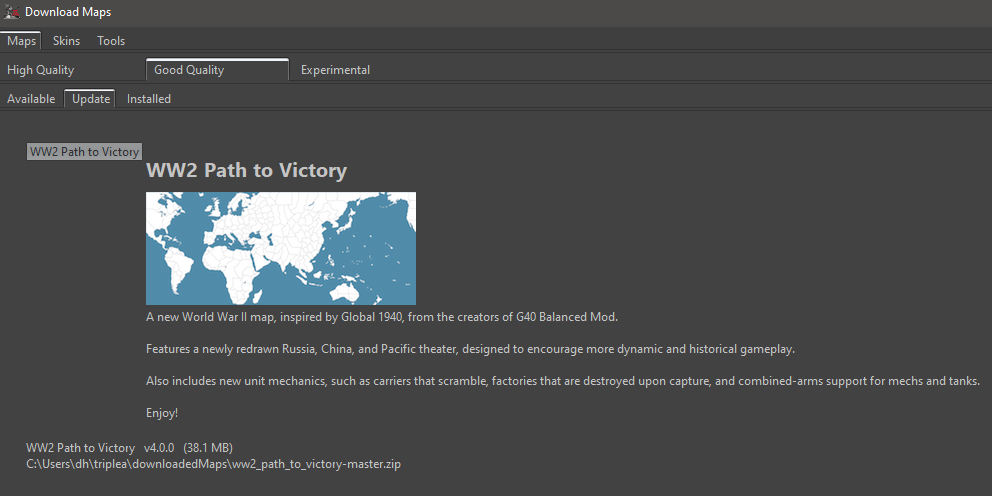
        So I have manually edited the properties file back to 3.0.0 to test.
        This is what I get:
        update.PNG

        However as I never wait for YAML-updates to manage my maps, I am not aware of an auto-prompt once a map has been updated YAML-wise.

        So in case the user should be automatically prompted we might have a bug.
        In case an auto-update prompt for maps has not been implemented yet, we might have a feature request.

        I move this topic to Player Help for now, until this has been analyzed.

        Don't always trust TripleA when it comes to rules questions. Know the rules before you start … and better check what TripleA has done.

        Joe GJ 1 Reply Last reply
        Reply Quote 0
        • Joe GJ
          Joe G @Panther
          last edited by

          @Panther its not an auto-update. . . i misspoke.

          I'm just trying to make it so that the "Update" option appears when i go to the map on the "Download Maps" folder.

          PantherP Joe GJ 2 Replies Last reply
          Reply Quote 0
          • PantherP
            Panther Admin Moderators Lobby Moderators @Joe G
            last edited by

            @Joe-G In that case it should work fine. Provided the version number in the properties file is lower than the version number in the current yaml.

            Don't always trust TripleA when it comes to rules questions. Know the rules before you start … and better check what TripleA has done.

            1 Reply Last reply
            Reply Quote 0
            • Joe GJ
              Joe G @Joe G
              last edited by

              the problem is that the map simply doesn't show up when i click on the "Installed Maps" tab in the "Download Maps" window. . . My other installed maps show up, but not WW2 Path to Victory (even tho I definitely have the map installed in my tripleA folder)

              PantherP B Joe GJ 3 Replies Last reply
              Reply Quote 0
              • PantherP
                Panther Admin Moderators Lobby Moderators @Joe G
                last edited by Panther

                @Joe-G It will show up in "Update" instead of "Installed". See my above screenshot.

                Don't always trust TripleA when it comes to rules questions. Know the rules before you start … and better check what TripleA has done.

                1 Reply Last reply
                Reply Quote 0
                • B
                  beelee @Joe G
                  last edited by

                  @Joe-G
                  sorry if this is a stupid question but did a pull request show up and then was approved after you did the updated yaml version ?

                  1 Reply Last reply
                  Reply Quote 0
                  • Joe GJ
                    Joe G @Joe G
                    last edited by

                    yes. the yaml was definitely updated. no problem there.

                    Joe GJ 1 Reply Last reply
                    Reply Quote 1
                    • Joe GJ
                      Joe G @Joe G
                      last edited by

                      i still can't get the map to show up in the "Installed" OR "Update" tabs of my DownloadMaps window.

                      PantherP Joe GJ 2 Replies Last reply
                      Reply Quote 0
                      • PantherP
                        Panther Admin Moderators Lobby Moderators @Joe G
                        last edited by

                        @Joe-G Can you please provide a screenshot?

                        Don't always trust TripleA when it comes to rules questions. Know the rules before you start … and better check what TripleA has done.

                        1 Reply Last reply
                        Reply Quote 0
                        • Joe GJ
                          Joe G @Joe G
                          last edited by

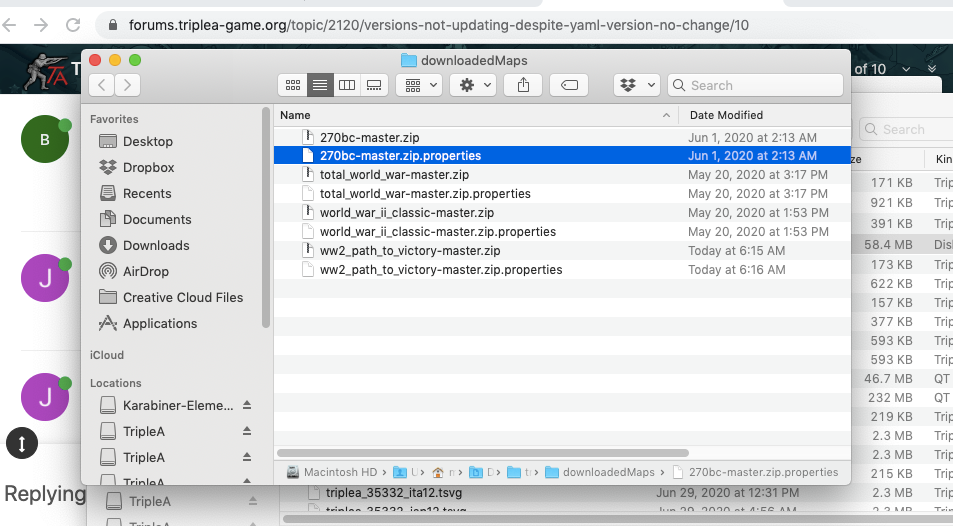
                          here is the downloadedmaps folder Screen Shot 2020-07-11 at 6.18.34 AM.png

                          And here is what the "Download Maps" folder looks like:
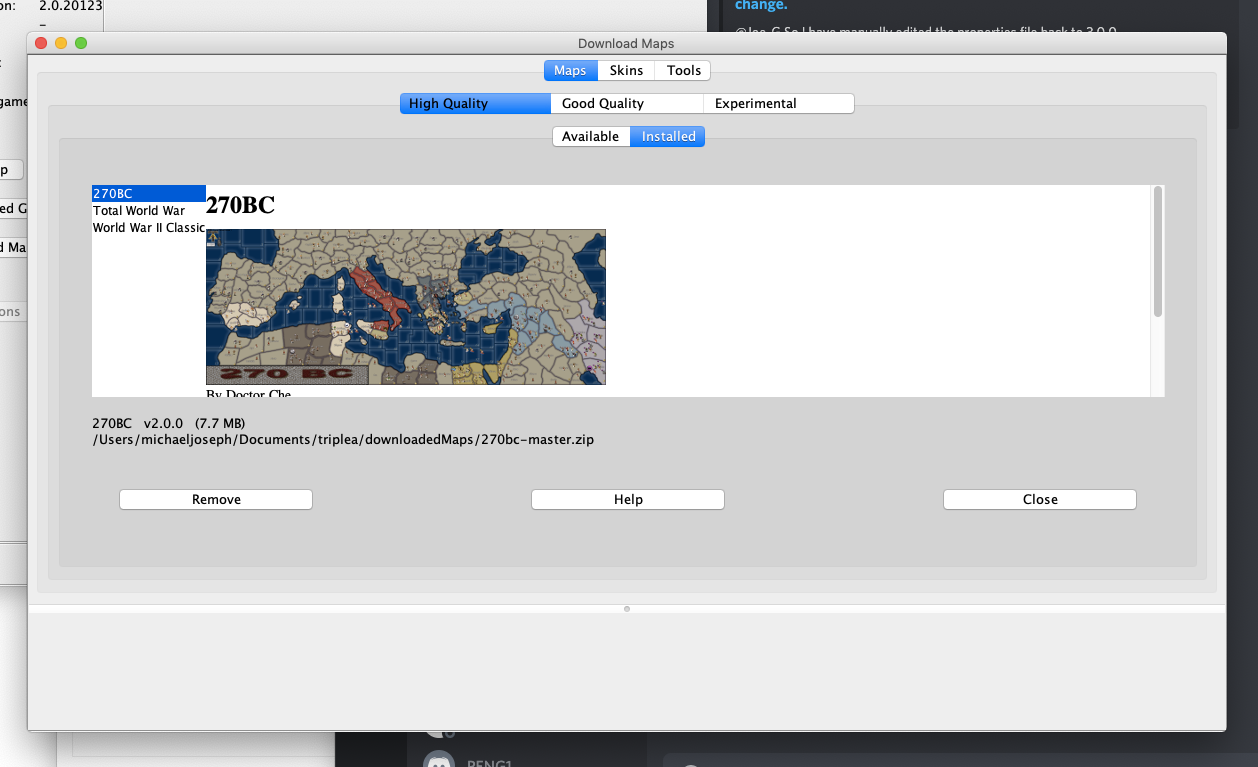
                          Screen Shot 2020-07-11 at 6.19.59 AM.png

                          PantherP 1 Reply Last reply
                          Reply Quote 0
                          • PantherP
                            Panther Admin Moderators Lobby Moderators @Joe G
                            last edited by Panther

                            @Joe-G OK, the Path to Victory map is in the Good-Quality section, not in the High-Quality section.

                            Don't always trust TripleA when it comes to rules questions. Know the rules before you start … and better check what TripleA has done.

                            Joe GJ 1 Reply Last reply
                            Reply Quote 1
                            • Joe GJ
                              Joe G @Panther
                              last edited by

                              @Panther ah!

                              Joe GJ 1 Reply Last reply
                              Reply Quote 0
                              • Joe GJ
                                Joe G @Joe G
                                last edited by

                                @Joe-G thanks panther.

                                PantherP 1 Reply Last reply
                                Reply Quote 0
                                • PantherP
                                  Panther Admin Moderators Lobby Moderators @Joe G
                                  last edited by

                                  @Joe-G You are welcome.

                                  Don't always trust TripleA when it comes to rules questions. Know the rules before you start … and better check what TripleA has done.

                                  1 Reply Last reply
                                  Reply Quote 1

                                  Hello! It looks like you're interested in this conversation, but you don't have an account yet.

                                  Getting fed up of having to scroll through the same posts each visit? When you register for an account, you'll always come back to exactly where you were before, and choose to be notified of new replies (either via email, or push notification). You'll also be able to save bookmarks and upvote posts to show your appreciation to other community members.

                                  With your input, this post could be even better 💗

                                  Register Login
                                  • 1 / 1
                                  • First post
                                    Last post
                                  Powered by NodeBB Forums