Help: National Objectives are removed when editing name of map file
-
Hello,
New to the forum, but I believe this is the right place to post this question. I wanted to make minor modifications to an existing game .xml file. ww2global_balanced2_0.xml. I was able to make all the mods to the game I wanted, except when I modified the <game> <info name="some string" version="someversion"> line, the National Objectives were no longer showing on the UI panel.So I tried copying the original ww2global_balanced2_0.xml file to ww2global_balanced2_1.xml and made a single change...added a 1 to the name, i.e. "...Balanced Mod31". The game loads fine, but again no National Objectives.
I can play with my new ruleset, but I have to use the name "...Balanced Mod3" to get the objectives, which forces me to remove the old file.
I don't understand how the game engine "knows" that the objectives are associated with the specific string "Mod3" since searching for that string is not found anywhere else in the .xml file.
Any suggestions would be appreciated.
Cheers,
--Jim -
@Jim-Parker If you are making a mod of a map (meaning you are doing nothing else but adding the xml of your mod, referring to an existing map whose skin you are not changing), you can't have the Objectives tab.
If you are making a map or modifying a map, then you need an objectives.properties in main folder, with entries in the form of:
A.B;C=D
where:
A= the info name with underscores instead of spaces
B= the player name for the objective
C= the full name of the objective (like "objectiveAttachment1")
D= the description in the Objectives tab -
@Cernel : Thank you! That was the subtlety that I was missing. Works now.
Cheers,
--Jim -
OK, I'm having a similar problem. I just uploaded my new World War II v3 1941 Balanced Mod to the TripleA servers, and the map itself works fine, but the Objectives panel is not displaying. I am able to see the Objectives panel when I run the game privately on my hard drive, but when I use the version downloaded through tripleA, the panel disappears.
Here are the first few lines of my objectives.properties file:
World_War_II_v3_1941_Balanced_Mod.TABLEGROUP.01;Germans=objectiveAttachment1;objectiveAttachment2;objectiveAttachment3
World_War_II_v3_1941_Balanced_Mod.TABLEGROUP.02;Russians=objectiveAttachment1;objectiveAttachment2;objectiveAttachment3
World_War_II_v3_1941_Balanced_Mod.TABLEGROUP.03;Japanese=objectiveAttachment1;objectiveAttachment2;objectiveAttachment3;objectiveAttachment4;objectiveAttachment5;objectiveAttachment6
World_War_II_v3_1941_Balanced_Mod.TABLEGROUP.04;British=objectiveAttachment1;objectiveAttachment2;objectiveAttachment3;objectiveAttachment4;objectiveAttachment5
World_War_II_v3_1941_Balanced_Mod.TABLEGROUP.05;Italians=objectiveAttachment1;objectiveAttachment2;objectiveAttachment3;objectiveAttachment4
World_War_II_v3_1941_Balanced_Mod.TABLEGROUP.06;Americans=objectiveAttachment1;objectiveAttachment2;objectiveAttachment3;objectiveAttachment4;objectiveAttachment5;objectiveAttachment6;objectiveAttachment7;objectiveAttachment8;objectiveAttachment9
World_War_II_v3_1941_Balanced_Mod.TABLEGROUP.07;Chinese=objectiveAttachmentBurmaRoad;World_War_II_v3_1941_Balanced_Mod.Germans;objectiveAttachment1=<div style="color:black"><b>Scandinavian Iron: +5 PUs</b></div> if Axis control 2+ of Norway, Finland, and NW Europe
World_War_II_v3_1941_Balanced_Mod.Germans;objectiveAttachment2=<div style="color:black"><b>Eurasian Wheat: +5 PUs</b></div> if Axis control 2+ of Karelia, Ukraine, Caucasus
World_War_II_v3_1941_Balanced_Mod.Germans;objectiveAttachment3=<div style="color:black"><b>Archangel-Astrakhan Line: +5 PUs</b></div> if Axis control 2+ of Archangel, Moscow, and Kazakh S.S.R.And here are the first few lines of my map file:
<?xml version="1.0"?>
<!DOCTYPE game SYSTEM "game.dtd">
<game>
<info name="World War II v3 1941 Balanced Mod" version="1.0"/>
<loader javaClass="games.strategy.triplea.TripleA"/>
<triplea minimumVersion="1.7"/>
<map>
<!-- Territory Name Definitions -->
<territory name="Afghanistan"/>Any thoughts?
-
Hi Jim
You need to change the "objectives.properties" also. It needs the new name for all the objectives.
It's located after you open "map" Same place "games" is
wow I'm way off base tonight
 Cernel already clued you in
 -
ok back on track i hope
Try dl your objectives properties from triplea one and make sure it's the same as the one you are using.hmm...does the objectives tab show up at all ? next to action and edit ...
-
@beelee Yes, it's definitely the same file from tripleA, and, no, the objective tab is not showing up at all anymore.
-
yea I just DL your map. Not showing up for me either. Everything looks ok. You could try renaming mapName
<property name="mapName" value="world_war_ii_v3" editable="false"/>
but I don't think that is it. Might need to ask Dan. Maybe something happened during the triplea upload
-
so when you first open your zip your map is called "1941balancedmod-master"
I'm not sure if that needs to match the "mapName" or not. without the -master obviously
-
@beelee I think you might have it with the 'mapName' property. The game uses that to know from where it should be loading files.
-
@Jason-Green-Lowe As per
https://github.com/triplea-maps/1941balancedmod/blob/master/map/games/WW2v3-1941balmod.xml"World War II v3 1941 Balanced Mod" is a game of the "world_war_ii_v3" map.
Therefore, the objectives to display are taken from that map, not from the "1941balancedmod" map, that is completely useless, skin wise.
If you want "World War II v3 1941 Balanced Mod" to be a game of the "1941balancedmod" map, you need to have this name as its "mapName" property value.
In my opinion, it would have been better for this game to have been part of the "ww2v3_variants" map (you just would have needed to have that as the "mapName" property value and add your objectives related coding to that map).
-
All right. I appreciate that you have strong feelings about how this map should have been packaged, but I don't have any opinion about that, and I'm staying neutral on that topic.
What I would like to do is release my map to the public in a form that allows players to see the objectives in real-time. That's my goal. So, given my goal and the way everything is set up right now, what is the exact text string that I should use for mapName?
Should mapName be:
World_War_II_v3_1941_Balanced_Mod
1941balancedmod
something else? -
The mapName in your xml (Line 2195) at the moment is:
<property name="mapName" value="world_war_ii_v3" editable="false"/>It should instead be
<property name="mapName" value="1941balancedmod" editable="false"/>It must match the mapfolder-name.
-
@Panther said in Help: National Objectives are removed when editing name of map file:
1941balancedmod
OK, that's not entirely the correct answer, because I changed the mapName to "1941balancedmod" and now the game won't load -- I get an error saying "Map missing: 1941balancedmod, could not join game. Would you like to download the map now?" And then if I try to download the map, it can't find it.
-
Don't you also need the map name on line 4 to be the same as well?
-
@ff03k64 No. Line 4 sets the name that appears in the "Select Map" list within TripleA, here it is
<info name="World War II v3 1941 Balanced Mod" version="1.0"/> -
@Jason-Green-Lowe
Interesting. I was able to load your map after I had applied the change.
I did that locally, of course. -
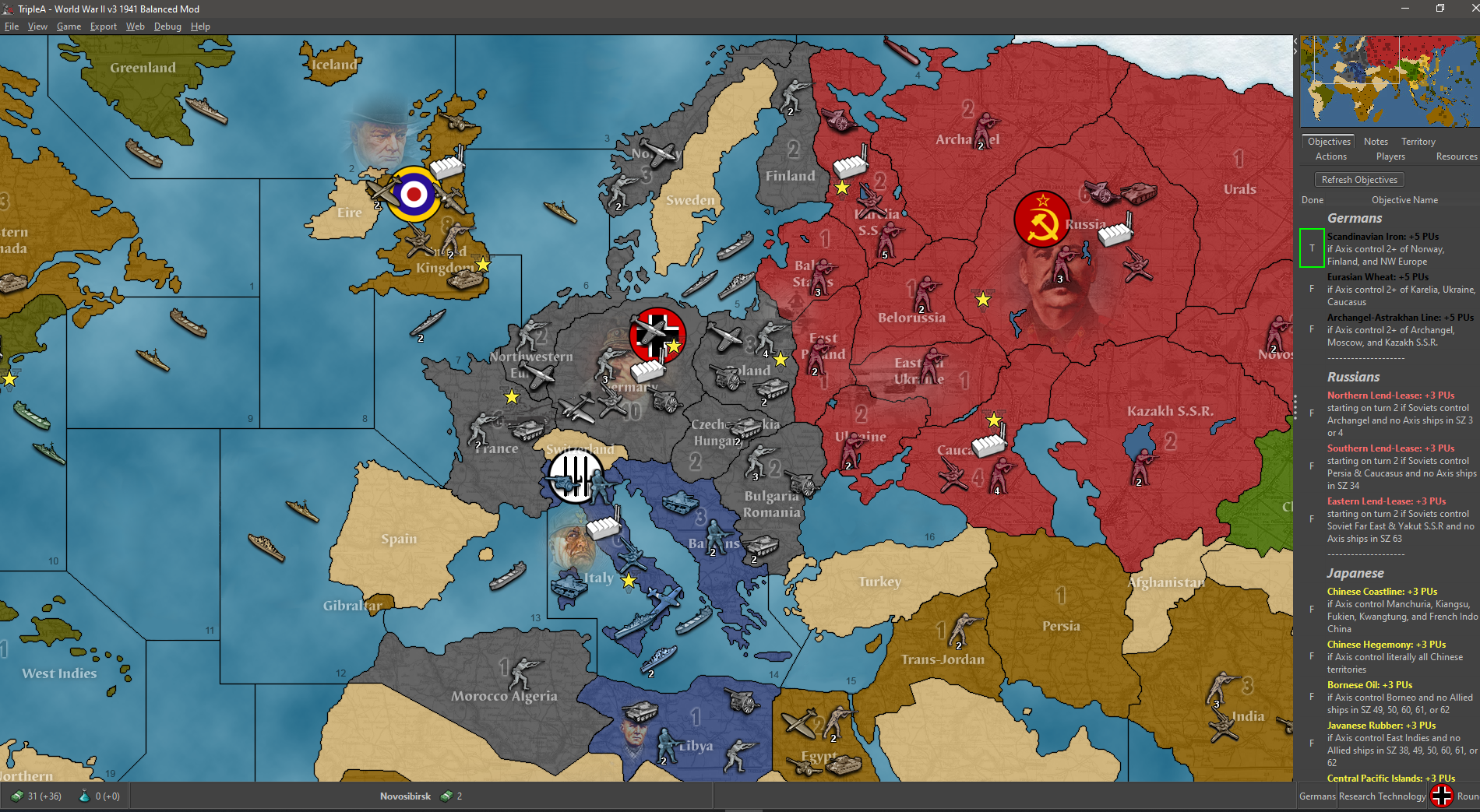
-
Excellent! I'm glad it's working for you, at least.
I took your advice and edited github so that the string is "1941balancedmod" everywhere. So now that's the string I'm using for the info name, the mapName, and the repo folder name.
Unfortunately, it's still not working on my downloaded version. What was the exact change you made locally?
-
@Jason-Green-Lowe said in Help: National Objectives are removed when editing name of map file:
Excellent! That is exactly the intended effect. I took your advice and edited the name everywhere to be "1941balancedmod." So now that's the string I'm using for the info name, the mapName, and the repo folder name. It's a little ugly in that now it shows up as "1941balancedmod" on the select map screen, but at least it works.
Here it appears like this:




Hello! It looks like you're interested in this conversation, but you don't have an account yet.
Getting fed up of having to scroll through the same posts each visit? When you register for an account, you'll always come back to exactly where you were before, and choose to be notified of new replies (either via email, or push notification). You'll also be able to save bookmarks and upvote posts to show your appreciation to other community members.
With your input, this post could be even better 💗
Register Login