Proposed Map: Domination 1941
-
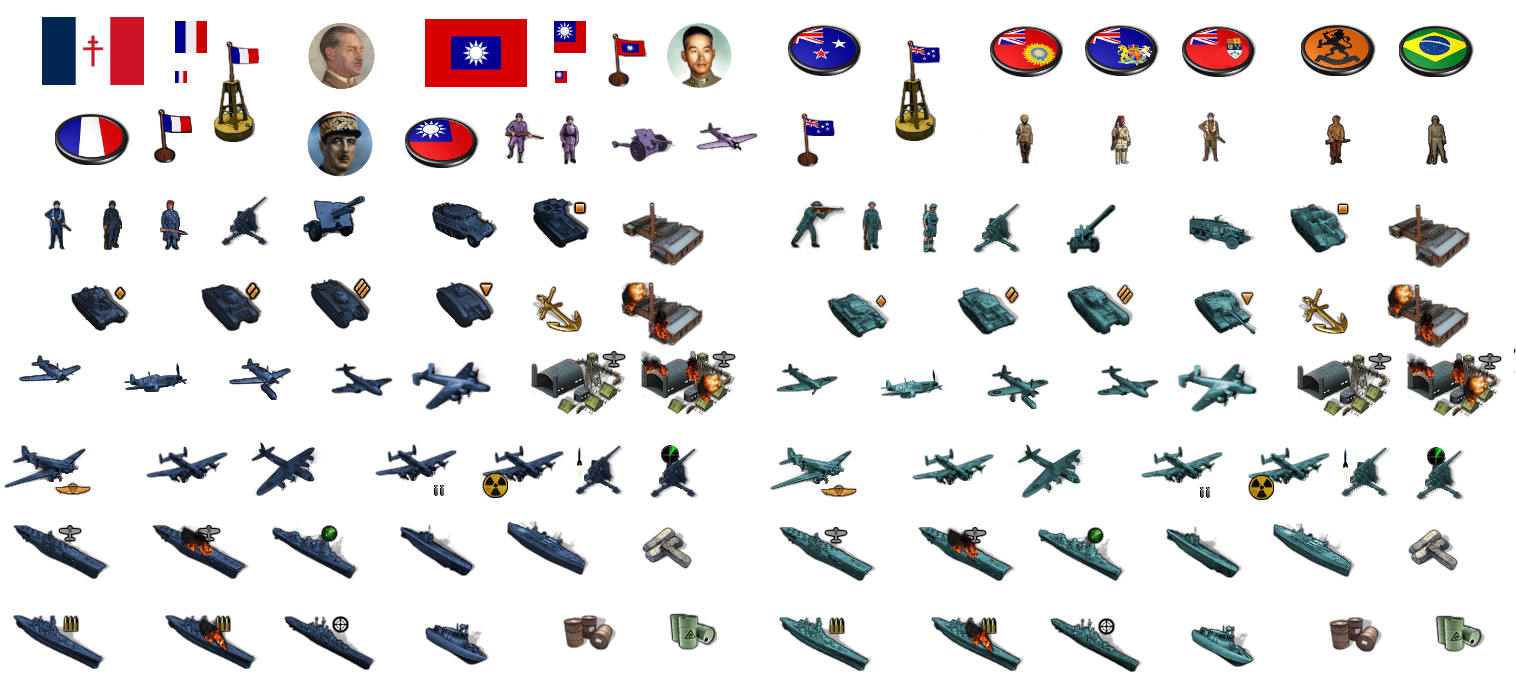
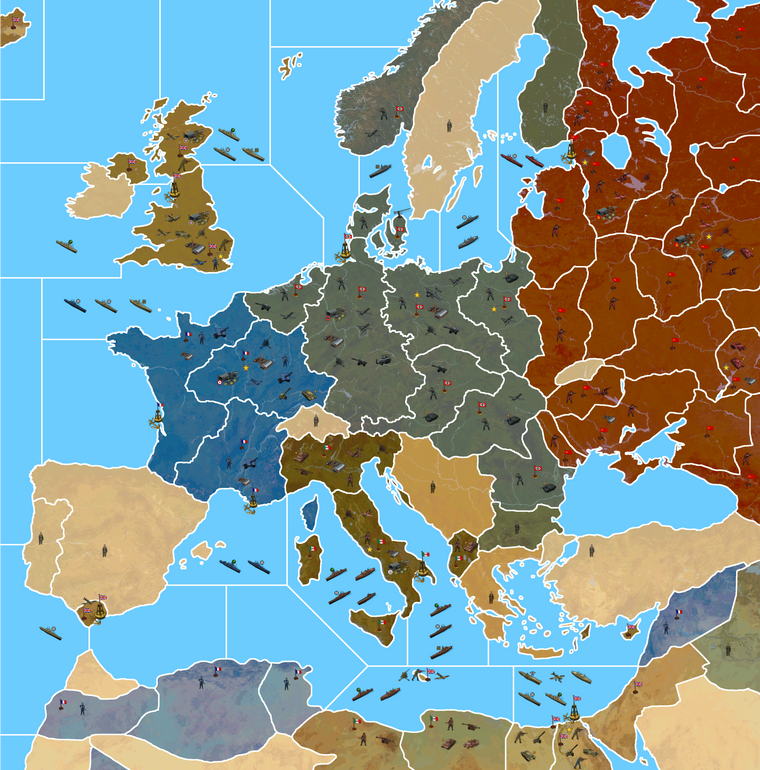
Ok here's a quick tint for the little guys... and then a detail of Europe showing the units at 125%. The French dude is only like half surrendering now lol
Again with the image indexed to save on space for the boards.
I didn't include the roundel pucks this time, but just the flags and an upscaled V star for the Victory cities. I'll make a better one for the VCs at 54px when I get a minute. Overall I think it looks pretty good with units at 125%. They're still large enough for the map at 50% zoom out I think, though I don't know about panning out much more.
I do worry a bit that players may grumble though, like "Honey I shrunk the units" lol, but not sure if there's much to be done for that with the ceiling at 68px. Only thing I can think of is to have some kind of SD/HD package as an alternative to the 4K one, where the map isn't quite as large. I would think that most Global players would use smaller units in their display anyway, but they probably also don't really need the map at 100%, which is a pretty close-in zoom for the actual gameplay. I'd think most would downscale the map to at least 80% or something like that, so 16816px might just be overkill for the G40 playscale. Like if it's a ultra high def in the res, but for lo-fi upscaled units, not sure if it'd be worth the tradeoff there for most?
Reducing the map scale by 25% so the units can be at 100% by default, instead of 125% and still look like the below might be better. Because then at least players could upscale the units to 110% or 125% from there, instead of starting out at the upper limit on unit sizes. I also like the option for players to revert to current standard units if they wanted to, but at 48px they'd be way too small for the 16816px map. Even though I think these units look a lot better, some people are resistant to change, so I'd be nice to have something that could do double duty hehe. Not sure what approach is best. What do you guys think?
I might be overthinking it, perhaps it'll look fine, but it's hard to know hehe. Like my laptop is 1080p, so it's hard to gauge hehe. For me the below looks pretty good at around 75%, which is how I imagine players would want to game. Like pan out to 50% for the quick survey but making the moves at like 75%-80% or something in that range.
-
@black_elk
For Global the TT are very big and the unit default will probably be 125%, so 68px high, the place.txt will have to match the 68px, so could be anywhere from 70px upwards to say 80px depending on whoever picks up the Global batton to code it.For comparison The Shogun & The Shogun Advanced with 68px high units, I play at 60%-ish zoom.
For my 1941 Command Decision the one with lots more TT, I am hoping to use 100%, so 54px high, with the place.txt at around 56px-ish+.
Both versions will still have the same overflow issues for Gibraltar and Malta and the Pacific islands.
ps.
I also like the option for players to revert to current standard units if they wanted to, but at 48px
We will have to ask the Devs to add two more unit sizes 137% and 150% and then map makers can use the standard 48px units on your map.
pps.
Im really liking the relief layer especially the grey rivers and lakes. -
@black_elk said in Proposed Map: Domination 1941:
I kinda pause the work on the map to just try to get a handle on the unit stuff, but we can tweak it for the marshes or make it as large or small as one wanted, or eliminate it entirely as Cernel suggested. But maybe something like this where we just pull a bit to the left and a little taller. Basically trying to keep as much room for Belarus and Bryansk and Ukraine for stacking.
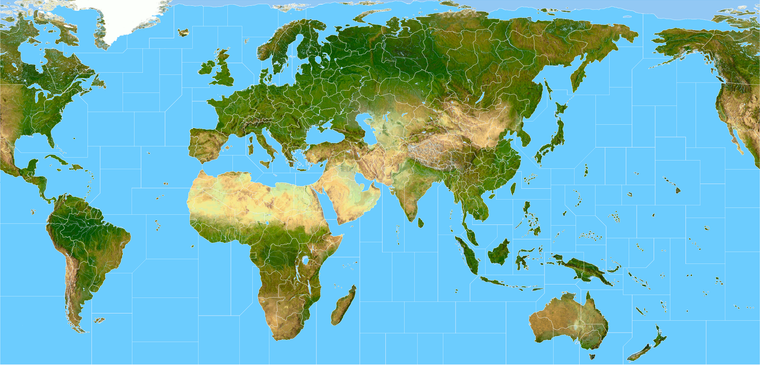
https://www.dropbox.com/s/4740bj0l87sbb57/World_War_II_Global_1940_baseline.png?dl=0
Fidelity to the OOB game board is the only reason it's there. The thought being that players familiar with OOB G40 or Bung's current G40 map in tripleA, should be able to open this one, parse it relatively quickly to see how it's the same, without being too disoriented. OOB the Marshes tile is quite large both on the board and in Bung's, like it's bigger than Morocco lol, even though it doesn't need to house any units lol, and it extends to cover basically the whole border between 'Western Ukraine' and Belarus, which is maybe not aces for the labelling but is nevertheless what the game board does. I'd ditch it with a 4 point but then worried that might just confuse people. Like they'd see it's gone and think hmmm. I mean I did ditch Yukon but that was more cause I didn't like the grayed out look from the tile that only exists in 1st ed. People would just go by the Second Ed board by now, so didn't really seem needed, though you could add it back like in the earlier draft if one wanted I guess. To me the above felt (as many things do) like a sensible enough compromise for the marshes. Like if you wanted to have it just big enough to fit a few unit types you could maybe still squeeze em in there, but it didn't seem like a huge priority for the G40 scale game hehe.
Not sure if the topography is a good call. Looks cool but it has some big drawbacks.
Definitely the marshes should not be there if you have topography: that would mean at least half of Kiev is in the marshes!
And Moscow is seemingly in Belarus and actually about at the tripoint of Novgorod, Archangel and Belarus, whereas it is actually in no one of these territories and not even in any territories adjacent to any one of them!
About this, what I believe is your Russia territory is adjacent to Archangel in your drawing, whereas it has not to be (Smolensk or Vologda in between).
Besides, topography is unfortunately a poor choice even in a consistently drawn map unless you can get a good topographical period map. It looks like you are using the contemporary topography, instead. For example, the Rybinsk Reservoir didn't even exist in 1940.
I'm not saying you should fix any of these, as that would imply some very weird and cramped drawing.
-
@cernel has made some good points.
The Domination 1941 map and topography layer could be paired, as long as territoryEffect are not used, bearing in mind Cernels comments?
As for my 1941 Command Decision map, the one with lots more TT, it has territoryEffect (Tundra, Forest, Desert, Urban etc) , so I will not be using the topography layer. However the relief layer with the excellent grey rivers and lakes, plus some graphics to represent Tundra, Forest etc will be used

-
Good eye! I must have erased a line or just never had one down in the first place. I guess we'll have to contort a few of those TTs so it matches the global.
I mean it seems to me that it's always pretty much the same issue there, where the OOB board and TT connections have Moscow/Russia pretty far out of position. Like to make it work, I'm just going to have to carve into the Russian TT even more with Moscow creeping east I guess lol.
Yeah the terrain is a bind, if you take close look, esp in the areas where there's a lot of warp on the map, it's probably not going to match up exactly with the reality. And certainly it's a modern terrain, like it's literally just the one from the wiki that I warped into shape hehe.
I don't mind so much when the terrain is knocked back and painted over, because then it just becomes more ambient, like wallpaper or something. Like I'm sure we could just erase whatever river fork or stretch of forest or misplaced tiny body of water that's throwing it off, and by the time it's painted over and crowded out with units, I'd think people would be less inclined to scrutinize what's happening underneath with the terrain peeking through. I'd say a little hammering with the eraser and some dodging with the clone stamp, or just crank up the opacity with the paint layer and we could probably get away with whatever. Less being more on that one probably.
Anyhow, here's a quick paintjob for the Dom one with the units at 100%.
Not suggesting this as a distribution of forces or anything. Just a visual example. My paintover had 1940 from one of the earlier paintjob, so for 41 it would look rather different, France having already fallen and such. I'd think for Italy to collapse a few of those lines as discussed on previous pages, to house more units and fit the vibe better. I just dropped a few infantry around to ballpark the centers, and to help see which TTs would need the beef up depending on how many starting units you want to see on the board, or how heavy you want to stack with different unit types at the outset hehe. But gives a sense for the unit display at that scale. Again indexed for the space saver.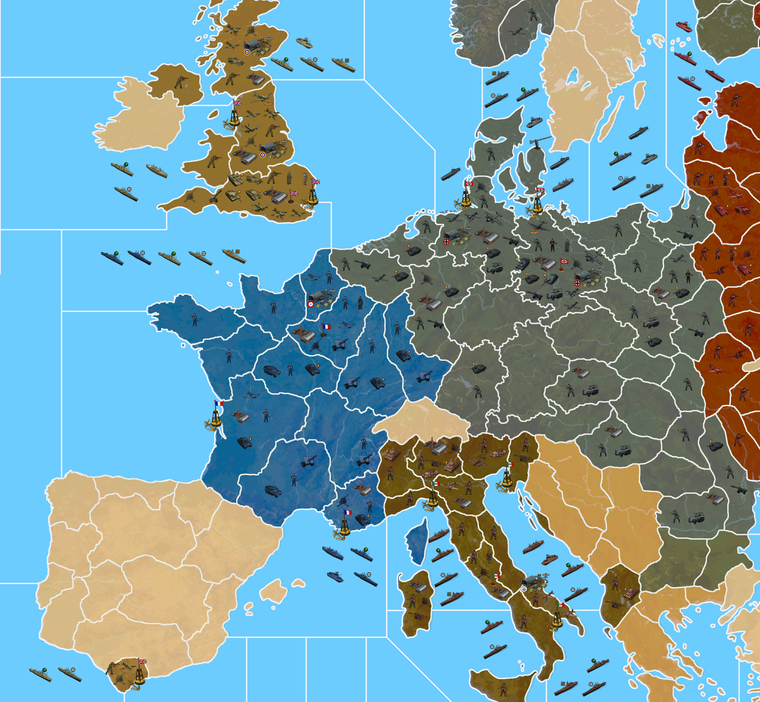
Ps. Just looking at the current G40 map. On that one with the details on there is a repeating pattern of what looks like a roadmap or areal survey view, but it definitely has a tight repeat. Like you can see the same dark shape again and again in virtually every territory in Asia. I think if we can get a ballpark terrain that works well enough in relief, that'd still look a lot sweeter than what's available right now hehe. If anyone has a kickass terrain map from the 1940s, we could maybe just insert a regional vignette where it makes sense. Like once it's painted over, we could probably get that to blend alright. Any of the Soviet TT borders could be reshaped too, I was hammering pretty fast there. The stuff Cernel mentioned, I'll try to knock out this week, so at least it's less distracting in that area of Russia hehe.
Catch ya in a few!
-
@black_elk I think Luxembourg can be part of Belgium rather than Alsace-Lorraine.
-
@black_elk I wonder for the G 40 map if Gibralter could be a bit bigger ? Or maybe it already is ? Could take the adjacent TTy and go halfway to a third at center than halfway. So not a true arc.
Obviously a distortion but for game play would be a plus. Just a thought

-
Makes sense, like big enough for the airbase at least right hehe.
I'll bang it out tomorrow along with Luxembourg and the Smolensk/Vologda connect.
I'm not entirely sure what the best way to handle Russia is. I mean OOB has that tile and everything around it much further east/right than it would be. To have Moscow roughly above the sea of the Azov and not too much further right than that would be nice, but OOB it's like almost at the Caspian, or else North is at 45% angle there, or something's going down there hehe. I'd think the simplest is to just blob it a bit, and erase a few rivers or redraw the bounderies over them or something like that to play it down a bit.
Right now the relief is just a combination of the Terrain map and a layer painted on top of it at 75% opacity. I used my simple paintjob draft for that to give an example, though in game you'd just have a transparency layer at 75% on top of the terrain, which tripleA would then paint over to provide the displayed ownership color. Turning off map details would then remove the terrain and the transparency layer to show the titles with the HEX color at 100% opacity. I'm not sure, but I think we're limited to just 1 layer in relief right? My thought would be to keep it relatively simple so it looks clean, and so the relief isn't changing too much of the hue/value from the assigned HEXs. I was pretty happy with how it help up doing the terrain underneath thus far, like it gives a little bit of variety to break things up visually, but not as stark or abstract as a repeated pattern or tessellation fill like we have going on in the current G40 map. I figure we'll just keep chipping away at it, till the oddball elements are dialed back, and it feels good enough for government work lol
-
@black_elk said in Proposed Map: Domination 1941:
but I think we're limited to just 1 layer in relief right?
Well ...
Some clever soul thought of doing this;
Create another layer of relief tiles that match/overlay the relief tiles.
This is achieved by the coordinates being in the decorations.txt
Clever huh.See the Total World War: December 1941 3.0 map
It has baseTiles, reliefTiles and misc folder full of tiles. -
Right on!
I was playing with the border feathers and beefed up Gibraltar a bit to fit another center big enough for that AB. I guess it could be even larger, just like monster mode hehe. I figured units could also spill into Spain if players start stacking super heavy there. Also shifted the TT called Urals OOB right quick, so that it would include at least a portion of the range at the top heheh. I'll tweak the Dom map so it follows when I get a minute. I also want to ditch some of the drawn on lakes and such, since they're not really necessary anymore. They were more to help me ballpark the under relief. Got pretty close, but now I think they can get nixed so as not to distract.
https://www.dropbox.com/s/4740bj0l87sbb57/World_War_II_Global_1940_baseline.png?dl=0
Here's a quick relief.
https://www.dropbox.com/s/nqanzab6s6zssl9/World War II Global 1940 feathered borders.png?dl=0
I was thinking borders at around that width looked pretty good. What do you think?
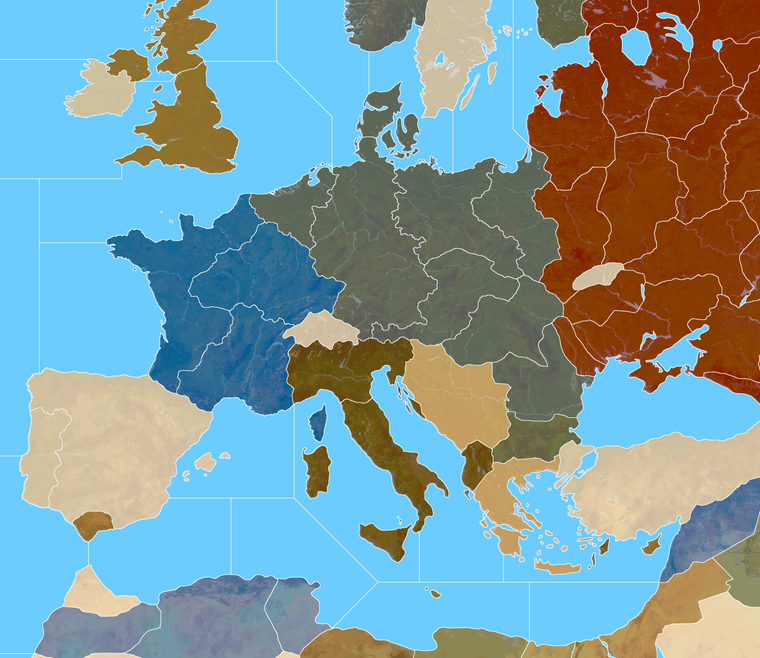
Here's the Domination baseline with those corrections. My approach to the Russia TT was to just try to make it kinda stretch armstrong in a few directions, but I think it'll probably have to do. We can just noodle what's underneath to make it feel more dialed.
Domination Baseline
https://www.dropbox.com/s/khxkql58g73q1n3/Domination_1940_baseline.png?dl=0
Here is painted at 75% opacity with the feathered borders
https://www.dropbox.com/s/30n486kglekoo4x/Domination painted feathered opacity 75.png?dl=0
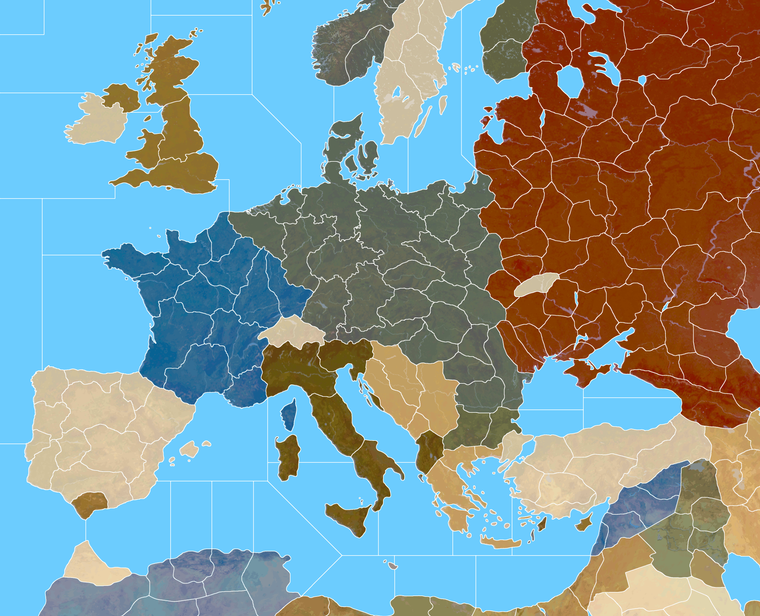
And here's a quick detail of that on Europe. I thought Italy into 4 tiles might be kind of interesting. What do you think?
-
@black_elk
So players can see the borders at 25% zoom, that looks good.Mainland Italy with 4 TT looks good.
-
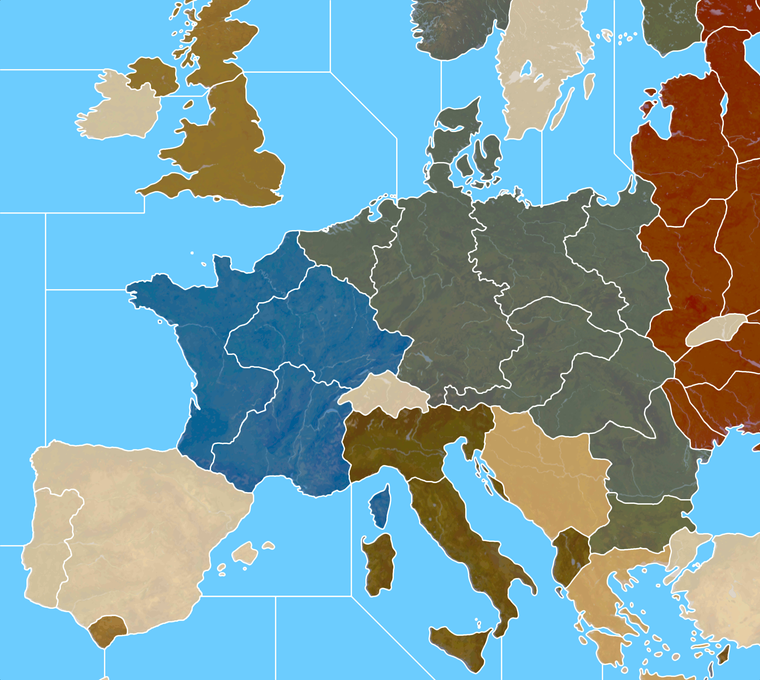
It's interesting with the thinner line, if I do noise reduction/anti aliasing, then zoomed out the white takes on the some color information. So like some of the lines in Russia appear a bit orange, when at max zoom. At closer zooms the effect goes away. By going up an extra pixel that's tamped down a bit.
I didn't notice it at scale, but the preview on the boards is showing it for me in the images in the post above.
Here it is bumped up 1px with a similar view to that G40 above. I think it might register cleaner at 25% that way.
-
@black_elk
Yes interesting, now looking even better.Can you still see the white lines at 10% Zoom?
The above, how many px wide are the white lines? -
Yeah so I took the 1px baseline, grew selection by +2 px, to create a 5px white line. Then I did noise reduction strength 4 to soften the edges.
Doing it that way I can still see the border lines down to 6%.
Here's a quick example of the Dom Europe that way. Basically the lines a bit beefier at 100% but I think it's probably worth the trade off for the max zoom out.
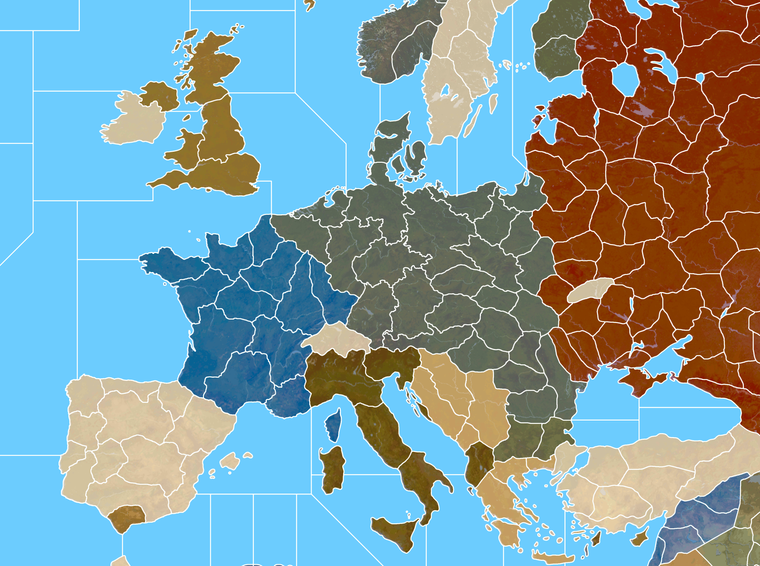
Here's the big one in case you want to double check the zoom out at 10%. I think it should hold. Like in GIMP I can see the lines down to 3.6% before they disappear.
https://www.dropbox.com/s/153e600c5768y3x/Domination_1940_painted_terrain_feathered 5px.png?dl=0
-
@black_elk
All good.
100% zoom will be for 4K screen
Us mere mortals will be using zoom 60% or less.So the above will fit both types of users.
-
Ok sounds good. Here are the tinted units...
If you guys are cool with that for a look, I'll start breaking it apart and assembling the images into unit folders.
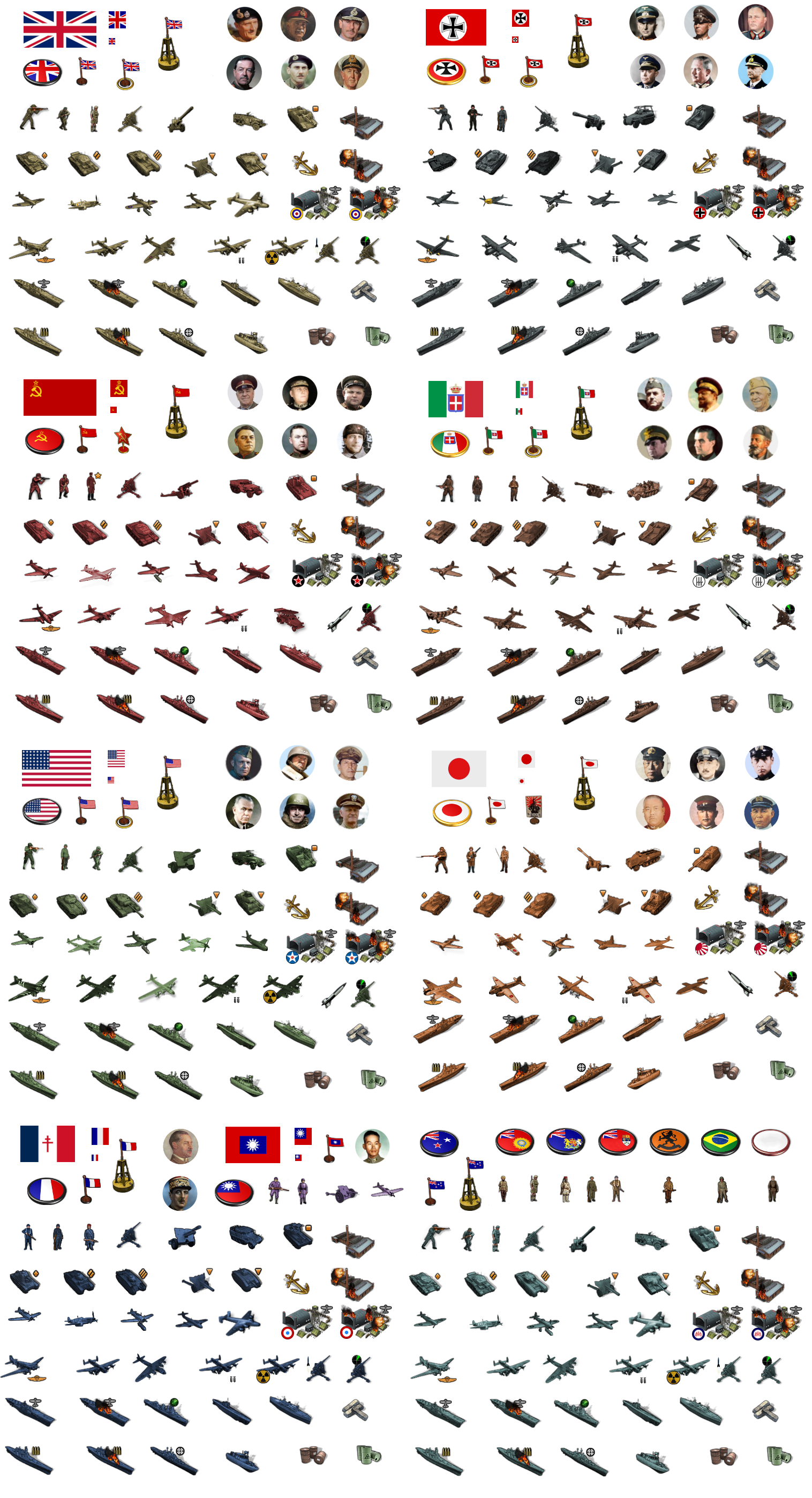
There's more material there than would be strictly necessary for G40, but I figured we could just past a sticker image with everything together into the main units folder as well, in case people want to modify it or add stuff G40 expansion type stuff. Also since it's pretty handy for colorizing.
-
@black_elk
A request, 1941 Command Decision has "Anti-Tank" units, please could you had them in for tinting?Allies

.
Axis

If not these then something similar.
-
Sure, do you want me to add the inverted triangle? That was Frostion's anti-tank first strike icon. He has it above for his tank destroyers.
He used the tiny square for SP Artillery, I was thinking about adding it to the standard art for all nations to help identify the units.
Another option might be a dude with a bazooka or anti-tank rifle, if you wanted it to have more of that sort of flare. I do feel like our plastic army is kinda missing that dude, since he's such a classic lol.
Here give me a few minutes, I'll do a quick tink for the anti-tank gun for everybody.
ps. Ok I updated the image above. Let me know if that works for ya
-
@black_elk said in Proposed Map: Domination 1941:
Sure, do you want me to add the inverted triangle?
No thanks, as long as the Anti-Tank guns point left-down & right-down and the artillery points up thats good for me.
I do have Artillery-Hvy and Artillery-Lgt, but you could leave that for later? The Artillery-Hvy could do with an extra icon, maybe 3 explosions a bit like the Armor-Hvy.
Also, Industry-Hvy, Industry-Med, Industry-Lgt and Bunkers are you thinking they should all be a concrete colour, that is the same for all nations?
ps. The bazooka or anti-tank rifle and mortars, I think is more for tactical games, like in the Russo-Finish war/Winter War.
pps. Re the triangles leave them in for consistency, then they all look like a set.
-
Sounds good. The little icons are pretty easy to erase or switch if we can come up with something better. For G40 I wasn't going to use them for the ground, cause there's only 1 type of armor there anyway hehe, but they did seem kinda handy for distinguishing between light medium and heavy types in Frostion's game, or if people want to do expansion type stuff for G40. I do like his symbols for the naval units though, since it makes the ship types a bit easier to pick out at a glance.
Haha right on! If I get a wild urge I might do a bazooka dude or a guy tossing a grenade or revive the old dude with the pistol, just to round out the plastic army men vibe, even if they don't get used lol, but I think we got enough to handle the standard game hopefully



Hello! It looks like you're interested in this conversation, but you don't have an account yet.
Getting fed up of having to scroll through the same posts each visit? When you register for an account, you'll always come back to exactly where you were before, and choose to be notified of new replies (either via email, or push notification). You'll also be able to save bookmarks and upvote posts to show your appreciation to other community members.
With your input, this post could be even better 💗
Register Login