How to DL Maps Directly From Github
-
here is an example.
https://www.axisandallies.org/forums/topic/39844/global-40-expansion-boxes?page=1
This is where most of the maps are listed. Choose the correct repo for the map you want to DL.
https://github.com/triplea-maps
I would also suggest keeping 2.5 stable as well as a 2.6 prerelease.
2.5 will allow you to DL most maps directly.
@RogerCooper @Stu_the_K is looking for the Classic game where russia goes first. Do you have it ?
He would also like any tips on making the AI more challenging.
-
@beelee That would be https://github.com/triplea-maps/world_war_ii_classic
To have more challenge when playing the AI, you try the following.
- Play only one country, so you have AI allies
- Give bonus income each turn, using the Resource modifiers button on the starting screen. Percentages usually work better.
- Make sure to use the Hard AI if there are complex interactions in combat.
- If you want a lot of aggressiveness and combat does not have complex interactions or multi-hit units, use the Fast AI
- Play the disadvantaged side. For example, in most World War 2 scenarios, Russia is in trouble, making it fun to play.
- Avoid scenarios which don't have capitals, as the AI will lack focus. If creating a scenario, put capitals in, even if they have no direct effect on play.
-
Thanks for the tips. I got 2.6 up and running, but the “classic” version has Russia unable to attack on the first round and I couldn’t find any way to turn that off. The original version is the only version I’ve ever played. Is there any way to allow Russia to attack on turn 1 or is there some map download that has that?
I haven’t played in years but I typically would play just one country against a hard ai.
-
Hi @stu_the_k
Classic can be played both ways. Within the game notes is the following:
Movement By Territory Restricted = Russia will not be able to make any movements during the first Combat Movement Phase of Round 1 (they will be able to do noncombat movement though).
It is kind of hidden within the notes, so its hard to find, and the game option does not really explain what it does.
Hope this helps!
Cheers...
-
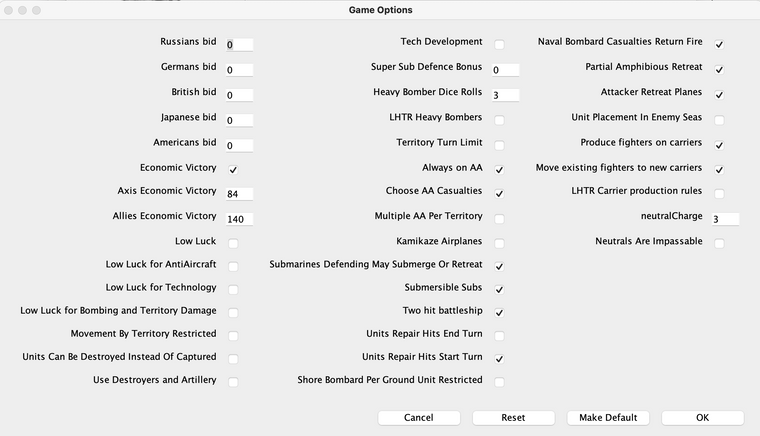
@wc_sumpton Thanks for the replies, but here I am in the game settings for Classic and I can't find where to turn Russia restricted on or off.
-
@stu_the_k World War II Classic
If "Movement By Territory Restricted" is on, Russians cannot attack on round 1 (or else they can).
-
@stu_the_k I just tried it and for me the default has it turned off same as your picture and it allows russia to attack rd 1
When i turn it on, it doesn't allow it
-
@beelee
It must have been on before and I didn't notice it was on. That said, even if it was on I wouldn't have known what that meant as Russia wasn't restricted by territory (i.e. one of their areas was not allowed to attack) but they were restricted by country. But, I guess it is what it is. Going forward, I assume the rules for the map will say what restrictions are in place.I do have one other question: Is there a way to slow down how fast at the AI moves though the various phases of a turn and the battles? I know I can go back and review it from the left panel, but that is a bit of a pain. If I could just add a second or two during the phases and battles (or better yet, be able to easily pause it whenever I wanted) I could see what was happening much easier.
-
@stu_the_k
Either before the map is loaded, select
Engine Preferences then see the Setting image below
or
in Game/map
Game> Engine Settings
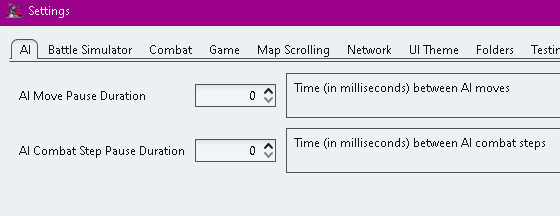
.
For both options increase the AI Move Pause Duration and/or AI Combat Step ..
as required. -
@thedog Fantastic! Thanks
1



Hello! It looks like you're interested in this conversation, but you don't have an account yet.
Getting fed up of having to scroll through the same posts each visit? When you register for an account, you'll always come back to exactly where you were before, and choose to be notified of new replies (either via email, or push notification). You'll also be able to save bookmarks and upvote posts to show your appreciation to other community members.
With your input, this post could be even better 💗
Register Login