Achievable improvements to the Triplea User Interface
-
What screen resolutions are you displaying TripleA at ?
-
Does anyone use 1440p or higher ? I would be interested in a Screenshot of the main interface.
-
Does anyone use less than 1080p ?
- With the Win10 taskbar displayed on the side, the space available for the Triplea window is only 1840x1080.
-
-
@beelee said in Achievable improvements to the Triplea User Interface:
I thought they got rid of ctrl z with the last stable. you can still go full screen
I don't know what you are referring to. Ctrl-z does nothing on v2.5.
Is there or was there ever a fullscreen mode in a version of tripleA ? -
@butterw
On my laptop I play 1600x900, on my desktop 1080p, in both cases I have the windows 10 task bar on show, but use "small taskbar buttons".
.One option
-
can the TripleA menu bar be merged onto the TripleA title bar?
-
can the TripleA status bar can be made narrower?
-
Remove the mini map
-
Make the right hand sidebar as narrow as possible
-
Add History to the tabs, remove Territory tab (see below)
The main map screen could be controlled by;- with the mouse scroll wheel for zoom in/out (currently has two other variants)
- left click hold and drag to move map
- right click on a territory/sea zone to show as a pop up the territory info
the above clicks are swappable for left and right handed players
-
Ctrl+F1 to Ctrl+F4, "mark" the map F1 to F4 returns the screen to those "marked" screens
-
F5 same as Ctrl+F find a territory
-
F6 cycles through all your Factories
-
F7+ etc
-
F11 Enter exit full screen mode
Edit:
A pause button, maybe F12, to stop TripleA from executing so you can look at what is happening, useful for debugging problems. -
-
@butterw said in Achievable improvements to the Triplea User Interface:
I don't know what you are referring to. Ctrl-z does nothing on v2.5.
Is there or was there ever a fullscreen mode in a version of tripleA ?@beelee Looking at Github, the Ctrl-Z hotkey to hide the (right) sidePanel was removed in v2.5, because it needed a fix. It was a hidden feature never mentionned in release notes, or even in the HelpMenu.
I just re-invented the feature, which suggests it wasn't such a bad idea after all. This isn't real fullscreen though.I'm realizing there are many hotkeys, some of them very useful but they are mostly hidden.
in ui/HelpMenuHelp > Movement/Selection Helpshould be renamed toHelp > Movement/Selection Hotkeysand needs to be made much more readable. I would suggest using a table per section and using larger text.WASD controls also existed but were removed, if I understand correctly because of the addition of the
Fkey. WASD wouldn't have been that useful for me, because I don't use a US Keyboard, but some left-handed control scroll key would be good to have as an option.To sum it up the Hotkeys are currently not user configurable, which leads to too many hotkeys, no single-list and hard to discover hotkeys. Streamlining hotkeys would significantly improve the ui.
-
@thedog said in Achievable improvements to the Triplea User Interface:
can the TripleA menu bar be merged onto the TripleA title bar?
That's likely difficult to do.
- can the TripleA status bar can be made narrower?
The player flag from the map is actually a sizing element. Assuming a 24x24 size player flag, the status bar ends up being about 30 pixels high, which is not unreasonable if its used as the main toolbar/info display.
-
@butterw said in Achievable improvements to the Triplea User Interface:
Assuming a 24x24 size player flag, the status bar ends up being about 30 pixels high
Ahh, that explains it, my flags are 32x32, I will shrink them to 24x24.
-
@butterw I would prefer to run TripleA (and most other applications) in windowed mode. I happily give a little screen space for easily switching programs.
-
@rogercooper Triplea will use windowed mode by default, a hotkey (F11) will allow to switch to fullscreen mode.
On windows you can switch applications with Alt-Tab or Win-tab.
-
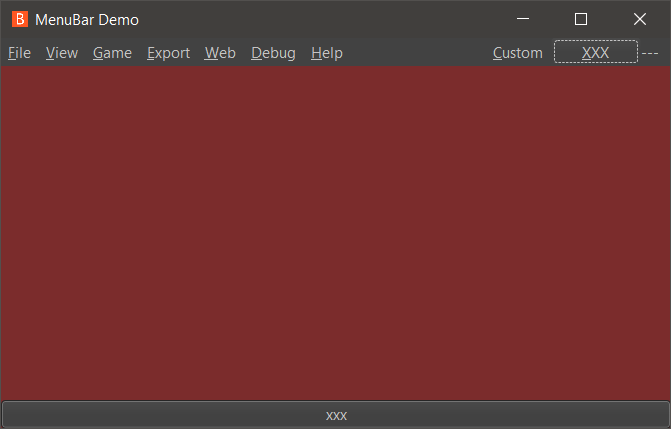
- It's possible to make use of spare space in the menuBar and Bottombar.
This is the default Substance Graphite LookandFeel on my system. I've added a "Custom" menu to the right and also a "xxx" button and a "---" Label.
-
@butterw
Or maybe remove the Menu Bar and replace with the main map screen?The menu bar could be activated with something like;
- A right click
- Left and a Right click held together.
- Alt+M
- or?
For a pop up menu?
-
@thedog
I expect some of the features discussed in this thread are achievable, some may even make it in a future TripleA release. Some have likely been tried previously and have failed. It's good to consider alternatives.
From a technical standpoint, the right hand side menu is an easy to add feature, my question is can it be useful, what can be put in it ?
A dynamic menu would be more difficult to handle, but maybe not impossible.
It's possible to add hotkeys:
https://github.com/triplea-game/triplea/pull/9296/files
but the interface shouldn't overly rely on them.I will make a test build of my screen layout demo once it has progressed a bit for feedback (it is still in the early stages).
-
I agree with putting the menu headings in the the right hand panel, as this would not change the space used in the the right hand panel, but with modifications as below;
- Web & Help should be merged into one heading Help. Missing from here is About with the TripleA version and Java versions.
- Export & Debug should be merged into one heading Export
Then the menu heading will be short enough to not expand the right hand panel.
-
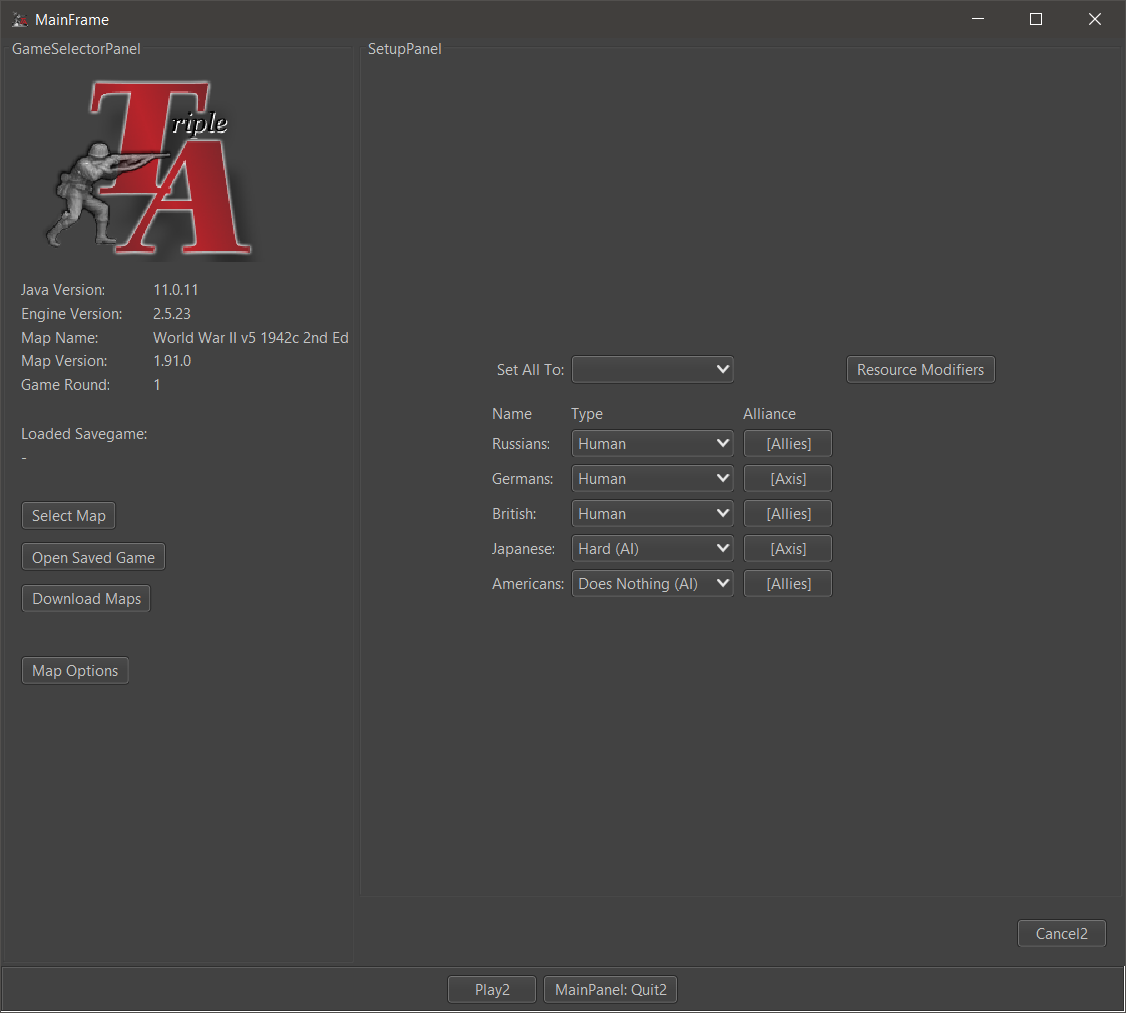
Remember Players feature
This not yet implemented feature would add a checkbox to remember the players set during the same session (until the map is changed).
This is useful when testing maps locally. Currently, each time you leave a game you have to setup the players again (they go back to the default value specified in the xml. This default value isn't specified in most maps, in which case the default value Human is used).
- Web and Help menus should be merged.
-
@butterw
Debug needs to able to Export, hence it should go under the Export heading.At the moment for Debug you have to Ctrl+A and Ctrl+C to Select All and Copy to a text editor like Notepad++.
-
@thedog
Debug Menu seems to be empty but still present in v2.6. So I'm not sure what the current plan of the dev-team is with regard to the Debug menu and console
-
@butterw
I think you have to do Game> Engine Settings> Testing Tab> Show Beta Feature = TrueTo see the Hard AI logs, you will need a restart of TripleA.
I think it will become a feature, as map makers use it to debug their scenarios and to work out what the AI thinks is of value to purchase in the purchase phase.
-
@butterw Re: remember players
A checkbox is unnecessary, the game could just remember the last setting.
The remember players was built into a swing based rewrite but we then opted to try and stick with an attempted JavaFX rewrite which then was put to the side.
One issue is the select players screen is written 3 times in the code. You could implement the feature thrice if you really wanted.
3.0 would very likely rewrite the initial UIs. I don't think there will be a 2.7, so it would make sense to focus UI redesign of the launch screens to be folded into 3.0. This is something to be debated in the 3.0 thread that is up.
-
@lafayette
Correct, the checkbox isn't needed, the game should just remember the current players (the players can be set to default to reset, and a new map will load its own defaults).
This is a useful feature, I'm hope it is included in v3.0, when the code for the launcher finally gets refactored. -
@butterw Hard to say, the goal of 3.0 is going to be to rewrite the engine. It would be logical to have, the main priority is getting the design right so that we can update TripleA in a reasonable manner and get 3.0 launched before 2023.
-
Correction/clarification, the main goal of 3.0 is going to be to massively restructure the engine without rewriting it all, FWIW.. there is a significant difference in the two approaches.



Hello! It looks like you're interested in this conversation, but you don't have an account yet.
Getting fed up of having to scroll through the same posts each visit? When you register for an account, you'll always come back to exactly where you were before, and choose to be notified of new replies (either via email, or push notification). You'll also be able to save bookmarks and upvote posts to show your appreciation to other community members.
With your input, this post could be even better 💗
Register Login