TripleA Logo TripleA Forum
    • TripleA Website
    • Categories
    • Recent
    • Popular
    • Users
    • Groups
    • Tags
    • Register
    • Login

    Achievable improvements to the Triplea User Interface

    Scheduled Pinned Locked Moved Development
    130 Posts 9 Posters 74.0k Views 8 Watching
    Loading More Posts
    • Oldest to Newest
    • Newest to Oldest
    • Most Votes
    Reply
    • Reply as topic
    Log in to reply
    This topic has been deleted. Only users with topic management privileges can see it.
    • TheDogT Offline
      TheDog @TheDog
      last edited by TheDog

      @butterw
      I dont appear to be able to use the Battle Calculator as I used to, how do I activate it?

      Also it does not detect the nations in the fight and default always to the same two.

      https://forums.triplea-game.org/tags/thedog
      https://forums.triplea-game.org/topic/3741/curated-best-top-maps-triplea-guides

      B 1 Reply Last reply Reply Quote 0
      • B Offline
        butterw @TheDog
        last edited by

        Battle Calculator

        @thedog
        Battle Calculator is launched via CTRL+B or Game Menu.

        I didn't intentionnally change how it works. But it's unclear what the current ways to use it are (Probably needs to be documented ?)

        TheDogT 1 Reply Last reply Reply Quote 0
        • B Offline
          butterw @TheDog
          last edited by

          @thedog said in Achievable improvements to the Triplea User Interface:

          @butterw "There is currently no check on placement restriction"

          Im not sure what the above means.

          For example, in two of my maps I have placement restriction, an aircraft carrier cannot be placed or move into a river, whereas a Destroyer can.

          Ideally, you would get a warning when you attempt to purchase more units than you are currently able to place because of placement restrictions.

          TheDogT 1 Reply Last reply Reply Quote 0
          • B Offline
            butterw @TheDog
            last edited by butterw

            @thedog said in Achievable improvements to the Triplea User Interface:

            78344fa7-5266-4d9c-ae5a-39c6cb9ed644-image.png

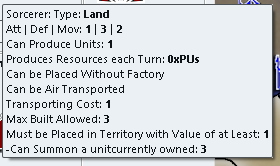
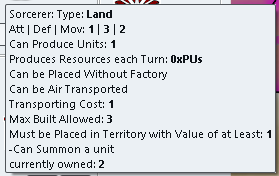
            Putting <br> at the end of the tooltip works, but its not common practice, so all maps with tooltips will need this adding.

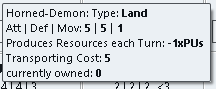
            Can the currently owned be placed before the tooltips?

            • putting it after the main tooltip, but before the appended properties tooltip would not be easy.
              TooltipProperties.java joins the .properties tooltip and the main tooltip defined in UnitAttachment.java by toStringShortAndOnlyImportantDifferences().
            • It could be put before the main tooltip, which may be a better solution:
            **2** Sorcerer: Type Land
            
            TheDogT 1 Reply Last reply Reply Quote 0
            • TheDogT Offline
              TheDog @butterw
              last edited by

              @butterw
              I used to be able to hover over a territory before a battle, press ctrl+b and it would populate the Battle Calculator with the units from the territory, this does not happen now. As mentioned it does not even detect the factions involved.

              https://forums.triplea-game.org/tags/thedog
              https://forums.triplea-game.org/topic/3741/curated-best-top-maps-triplea-guides

              B 1 Reply Last reply Reply Quote 0
              • TheDogT Offline
                TheDog @butterw
                last edited by

                @butterw

                **2** Sorcerer: Type Land
                

                Yes that would work, as the next best alternative.

                https://forums.triplea-game.org/tags/thedog
                https://forums.triplea-game.org/topic/3741/curated-best-top-maps-triplea-guides

                1 Reply Last reply Reply Quote 0
                • TheDogT Offline
                  TheDog @butterw
                  last edited by

                  @butterw said in Achievable improvements to the Triplea User Interface:

                  @thedog said in Achievable improvements to the Triplea User Interface:

                  @butterw "There is currently no check on placement restriction"

                  Im not sure what the above means.

                  For example, in two of my maps I have placement restriction, an aircraft carrier cannot be placed or move into a river, whereas a Destroyer can.

                  Ideally, you would get a warning when you attempt to purchase more units than you are currently able to place because of placement restrictions.

                  For me, I think thats a very nice to have, not a must have function.

                  As your time is precious, I would prefer to have the ability to cycle round "Production" capable Units with a hotkey.

                  https://forums.triplea-game.org/tags/thedog
                  https://forums.triplea-game.org/topic/3741/curated-best-top-maps-triplea-guides

                  B 1 Reply Last reply Reply Quote 0
                  • B Offline
                    butterw @TheDog
                    last edited by

                    As your time is precious, I would prefer to have the ability to cycle round "Production" capable Units with a hotkey.

                    Probably the unitScroller would be the closest thing, but I haven't looked at the code.
                    The issue with cycling is that it works best when the list is short (2 or 3 entries)

                    Alternatively, having a shortlist of favorite territories you can center the map on would be a good new feature

                    TheDogT 1 Reply Last reply Reply Quote 0
                    • TheDogT Offline
                      TheDog @butterw
                      last edited by

                      Yes that is a very good alternative. Its almost the same.

                      https://forums.triplea-game.org/tags/thedog
                      https://forums.triplea-game.org/topic/3741/curated-best-top-maps-triplea-guides

                      1 Reply Last reply Reply Quote 0
                      • B Offline
                        butterw
                        last edited by butterw

                        For reference, this is what the sidepanel ui looks like in v2.5 with 125% dpi:
                        alt text

                        If more than 3 different unit types are involved in a move, it doesn't fit in the sidepanel horizontally.

                        TheDogT 1 Reply Last reply Reply Quote 0
                        • B Offline
                          butterw @TheDog
                          last edited by butterw

                          Populating the Battle Calculator

                          @thedog said in Achievable improvements to the Triplea User Interface:

                          I used to be able to hover over a territory before a battle, press ctrl+b and it would populate the Battle Calculator with the units from the territory, this does not happen now. As mentioned it does not even detect the factions involved.

                          It works again when I re-add the corresponding button to the territory Panel. It comes down to the territory panel knowing the currentTerritory, and this info is required to be able to populate the panel.

                          EDIT: Apart from using up space, the issue with the Battle Calculator buttons in the territory panel is that they are also confusing. Using the buttons directly is difficult (you are really meant to use the hotkeys ?). The CTRL-A/D hotkeys only work when the Battle Calculator is open and doesn't have focus, it also not so easy to hover over a territory when the battle calculator fills the screen.

                          • In the territory panel, it would make more sense to only have 3 short buttons (CTRL+ B, A, D) on a single line with title tooltips.
                          • CTRL+A/D should be featured in the Battle Calculator rather than the territory panel and should be bound to the tripleaFrame. They should work even if the Battle Calculator has the focus.

                          The Battle Calculator is a fairly complex tool, am I missing something ?

                          General_ZodG TheDogT 3 Replies Last reply Reply Quote 0
                          • General_ZodG Offline
                            General_Zod Lobby Moderators @butterw
                            last edited by General_Zod

                            @TheDog , @butterw
                            A suggestion for a possible space saving feature or just adding real estate efficiently.

                            It probably was already mentioned previously, but not sure.

                            The toolbar at the bottom of the screen might be a nice place for tabs that are displayed as a drop down list (bottom left corner) with a down arrow clicker. When clicked on the down arrow to right side of currently displayed tab topic, the list offers more tabs.

                            Each tab can use the whole toolbar or just a majority of it so other information about current player, step, turn can still be displayed. Or not if the tab requires all space.

                            Default tab selection could be set in a properties file.

                            BTW, alot of horizontal space there.

                            General_ZodG 1 Reply Last reply Reply Quote 0
                            • General_ZodG Offline
                              General_Zod Lobby Moderators @General_Zod
                              last edited by

                              @general_zod said in Achievable improvements to the Triplea User Interface:

                              @TheDog , @butterw
                              A suggestion for a possible space saving feature or just adding real estate efficiently.

                              It probably was already mentioned previously, but not sure.

                              The toolbar at the bottom of the screen might be a nice place for tabs that are displayed as a drop down list (bottom left corner) with a down arrow clicker. When clicked on the down arrow to right side of currently displayed tab topic, the list offers more tabs.

                              Each tab can use the whole toolbar or just a majority of it so other information about current player, step, turn can still be displayed. Or not if the tab requires all space.

                              Default tab selection could be set in a properties file.

                              BTW, alot of horizontal space there.

                              @butterw said in Achievable improvements to the Triplea User Interface:

                              If more than 3 different unit types are involved in a move, it doesn't fit in the sidepanel horizontally.

                              1 Reply Last reply Reply Quote 0
                              • General_ZodG Offline
                                General_Zod Lobby Moderators @butterw
                                last edited by

                                @butterw @TheDog I found the previous discussion where this idea surfaced with some nice mockups too.

                                c5343e50-2ee8-4ae0-80bb-3a9ffb431bb0-image.png

                                https://forums.triplea-game.org/topic/464/taking-your-suggestions-for-a-new-ui/138?page=7

                                B 1 Reply Last reply Reply Quote 2
                                • TheDogT Offline
                                  TheDog @butterw
                                  last edited by

                                  @butterw said in Achievable improvements to the Triplea User Interface:

                                  Populating the Battle Calculator

                                  @thedog said in Achievable improvements to the Triplea User Interface:

                                  I used to be able to hover over a territory before a battle, press ctrl+b and it would populate the Battle Calculator with the units from the territory, this does not happen now. As mentioned it does not even detect the factions involved.

                                  It works again when I re-add the corresponding button to the territory Panel. It comes down to the territory panel knowing the currentTerritory, and this info is required to be able to populate the panel.

                                  EDIT: Apart from using up space, the issue with the Battle Calculator buttons in the territory panel is that they are also confusing. Using the buttons directly is difficult (you are really meant to use the hotkeys ?). The CTRL-A/D hotkeys only work when the Battle Calculator is open and doesn't have focus, it also not so easy to hover over a territory when the battle calculator fills the screen.

                                  • In the territory panel, it would make more sense to only have 3 short buttons (CTRL+ B, A, D) on a single line with title tooltips.
                                  • CTRL+A/D should be featured in the Battle Calculator rather than the territory panel and should be bound to the tripleaFrame. They should work even if the Battle Calculator has the focus.

                                  The Battle Calculator is a fairly complex tool, am I missing something ?

                                  Yes the Battle Calculator is a complex and has these uses;

                                  1. A new player finds it invaluable to get an idea of if they have a chance of winning or losing a battle.
                                  2. A veteran player will still use it occasionally
                                  3. A map maker will always use it to help balance their units, they are also the ones that will add and subtract units.
                                  4. The Territory add and subtract units is for map makers to help balance their scenario.

                                  The Battle Calculator works well if the variables are simple, ie. just attack and defence values with D6. But is less accurate when you have larger dice, territory effects, supportAttachment like Command, artillery support etc.

                                  To sum up hover over a territory and ctrl+b is its main use, the rest is for the map maker.

                                  Other readers please chime in if have other uses.

                                  https://forums.triplea-game.org/tags/thedog
                                  https://forums.triplea-game.org/topic/3741/curated-best-top-maps-triplea-guides

                                  1 Reply Last reply Reply Quote 0
                                  • TheDogT Offline
                                    TheDog @butterw
                                    last edited by

                                    @butterw said in Achievable improvements to the Triplea User Interface:

                                    For reference, this is what the sidepanel ui looks like in v2.5 with 125% dpi:
                                    alt text

                                    If more than 3 different unit types are involved in a move, it doesn't fit in the sidepanel horizontally.

                                    Could the side bar units be say halved in size, that way you might get 6 in a row?

                                    https://forums.triplea-game.org/tags/thedog
                                    https://forums.triplea-game.org/topic/3741/curated-best-top-maps-triplea-guides

                                    1 Reply Last reply Reply Quote 0
                                    • B Offline
                                      butterw @General_Zod
                                      last edited by

                                      @general_zod
                                      Thanks for the link, there are some solid ideas in there for sure. I would need to take a good look at the suggestions and see what can be done relatively easily.
                                      Using bold text, different font size, icons instead of text (toolbars), scaling down the unit icons in the side panel (@87.5% would certainly work) would be very achievable.

                                      8152d23a-2b52-468b-a388-25fdc5726aa1-image.png

                                      I'll put out a v3.5.1 patch for my build with the current minor fixes this week.

                                      TheDogT 1 Reply Last reply Reply Quote 1
                                      • TheDogT Offline
                                        TheDog @butterw
                                        last edited by

                                        @butterw
                                        Right hand panel space optimization
                                        In your map example, the right hand panel there are;
                                        Infantry x4, Artillery x1, Armour x2

                                        Those numbers (x4) could use the same method as on the main map, ie. overlaid over the top of Infantry, Artillery, Armour icons.

                                        So even more unit icons can be displayed on a row.

                                        Menu Bar
                                        Still on the trail of removing the Menu Bar.
                                        The game starts out with no Menu Bar.
                                        By pressing the Alt key it appears as a pop up overlaying the main map and the top of the right hand panel.
                                        The Alt+F V G E T H will be displayed and still work as now.

                                        For the above we need to tell the players before the game starts and perhaps at the start of each turn.

                                        https://forums.triplea-game.org/tags/thedog
                                        https://forums.triplea-game.org/topic/3741/curated-best-top-maps-triplea-guides

                                        B 1 Reply Last reply Reply Quote 0
                                        • B Offline
                                          butterw @TheDog
                                          last edited by

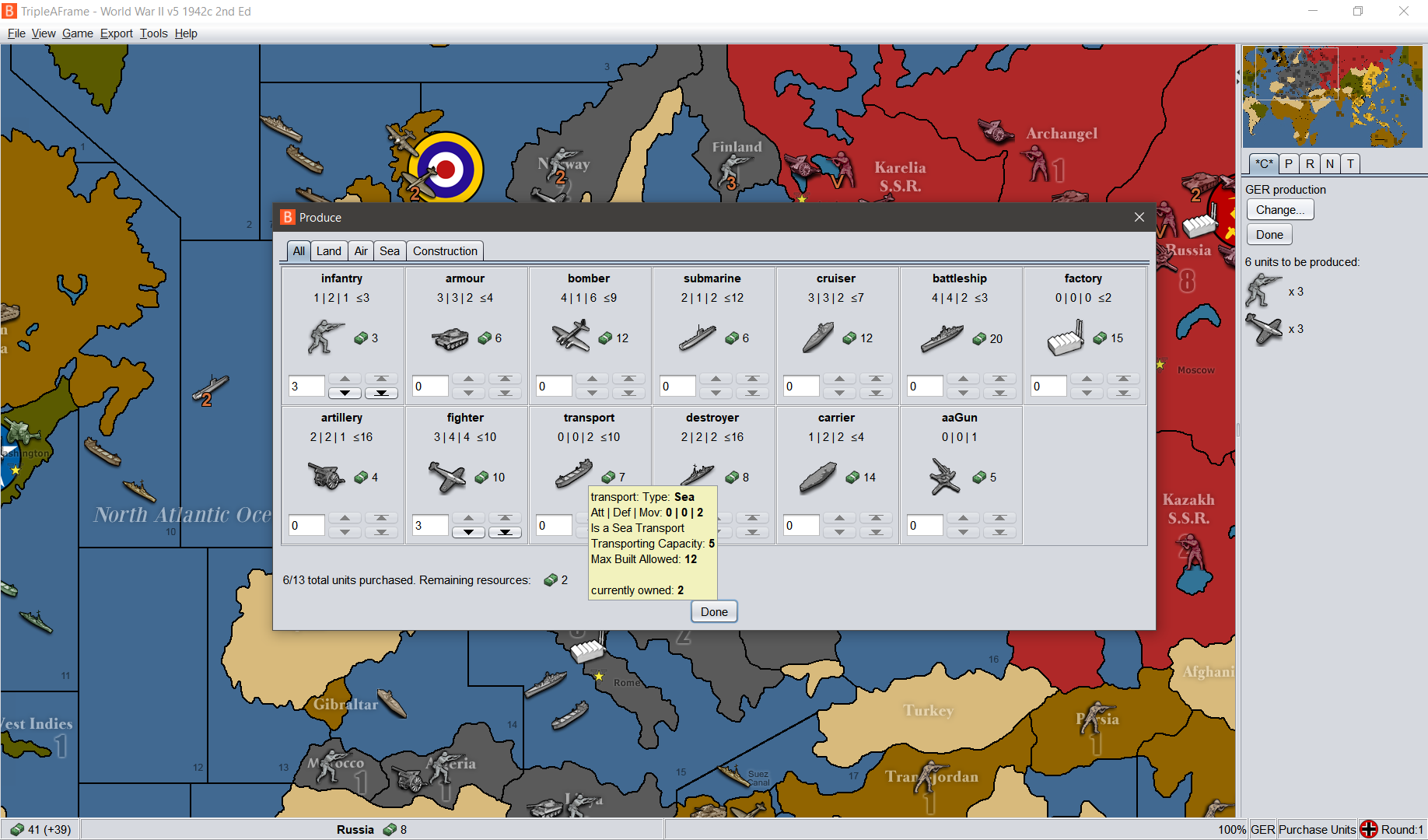
                                          Here's the v2.5.31-bu.jar fix, which reverts Battle Calc change, improves the production panel display. For evaluation purpose, the sidepanel tab titles are cut down to 1 character (but it's not fully implemented, ex: history, edit tab keep full names, etc.) the goal is to simplify the interface and keep the tabs to 1 line.

                                          Menu Bar
                                          Still on the trail of removing the Menu Bar.
                                          The game starts out with no Menu Bar.
                                          By pressing the Alt key it appears as a pop up overlaying the main map and the top of the right hand panel.
                                          The Alt+F V G E T H will be displayed and still work as now.

                                          For the above we need to tell the players before the game starts and perhaps at the start of each turn.

                                          I am away for a while, but will look at implementing the hidden menubar feature when I get back. Keep the feedback coming.

                                          • All hotkeys featured in the menu should remain active when the toolbar is hidden.
                                          • Hidden toolbar would be a user interface preference configured in (Engine) Settings.
                                          • Hotkeys would be listed in a dialog similar to MoveHelpMenu.
                                          TheDogT 1 Reply Last reply Reply Quote 0
                                          • TheDogT Offline
                                            TheDog @butterw
                                            last edited by TheDog

                                            @butterw
                                            NEW Status Bar move to the top of the screen, stops the eyes moving to the very bottom of the screen.
                                            NEW Pressing ALT, popup of the menu bar, appears under the Status Bar . The File View Game Export Tools Help, overlays the main map and the right hand panel.

                                            Right Hand Panel Tabs
                                            Action/Command Tab - In progress space saving
                                            Players Tab - NEW remove Technology section as can have 16+ players with say 4+ Alliances, see Technology Panel below
                                            Notes Tab - Removed in 2.6
                                            Territory Tab -
                                            History Tab - NEW was on the Left Hand Panel, now put in Right Hand Panel as a Tab.

                                            Pause Tab - NEW its not really a Tab, but a pause/restart button for the game, so you can look around the map, really useful for map-makers. This could be on the History Tab, but would prefer it as its own Tab, ie. with just 1 click.
                                            Hot Territory Tab - NEW up to 4 territories can be defined on this Tab and pressing the [tab] key will cycle round these four, on the main map.

                                            .
                                            .
                                            Technology Panel NEW
                                            Game> Show Technology Panel (listed near the Show Politics Panel)
                                            Was in Players Tab but can be a grid of 15 techs x 16+ nations, so needs its own menu panel, similar to the Politics panel.
                                            The axis needs to be swapped, so say 16+ Player/Nations is on the Y axis, ie up & down, with technology on the x axis like;
                                            superSub, jetPower, shipyards, aARadar, longRangeAir, heavyBomber, improvedArtillerySupport, rocket, paratroopers, increasedFactoryProduction, warBonds, mechanizedInfantry, destroyersCanBombard, reinforcedHulls, wolfPackTactics, could be 15 techs on the x axis.

                                            The order of the Player/Nations should as those listed on the Setup Panel (currently alphabetical).

                                            .
                                            .
                                            map.properties Player/Nation colours as text or background colours, should be used in the following;

                                            • Players Tab, the text of the Player/Nation
                                            • Territory Tab, the text of the Current, Original owner and Capital of...
                                            • Technology Panel, Player/Nation text
                                            • Politics Panel, Player/Nation text
                                            • Game> Game Statistic, the Player/Nation graph colours

                                            https://forums.triplea-game.org/tags/thedog
                                            https://forums.triplea-game.org/topic/3741/curated-best-top-maps-triplea-guides

                                            TheDogT 1 Reply Last reply Reply Quote 0

                                            Hello! It looks like you're interested in this conversation, but you don't have an account yet.

                                            Getting fed up of having to scroll through the same posts each visit? When you register for an account, you'll always come back to exactly where you were before, and choose to be notified of new replies (either via email, or push notification). You'll also be able to save bookmarks and upvote posts to show your appreciation to other community members.

                                            With your input, this post could be even better 💗

                                            Register Login
                                            • 1
                                            • 2
                                            • 3
                                            • 4
                                            • 5
                                            • 6
                                            • 7
                                            • 3 / 7
                                            • First post
                                              Last post
                                            Copyright © 2016-2018 TripleA-Devs | Powered by NodeBB Forums