Make Movement/Selection Help menu more readable (+Hotkeys discussion, Zoom Level display)
-
Can the hotkey list be made more readable ?
Maybe by separating the hotkeys from the description using a table and making the hotkey text larger.
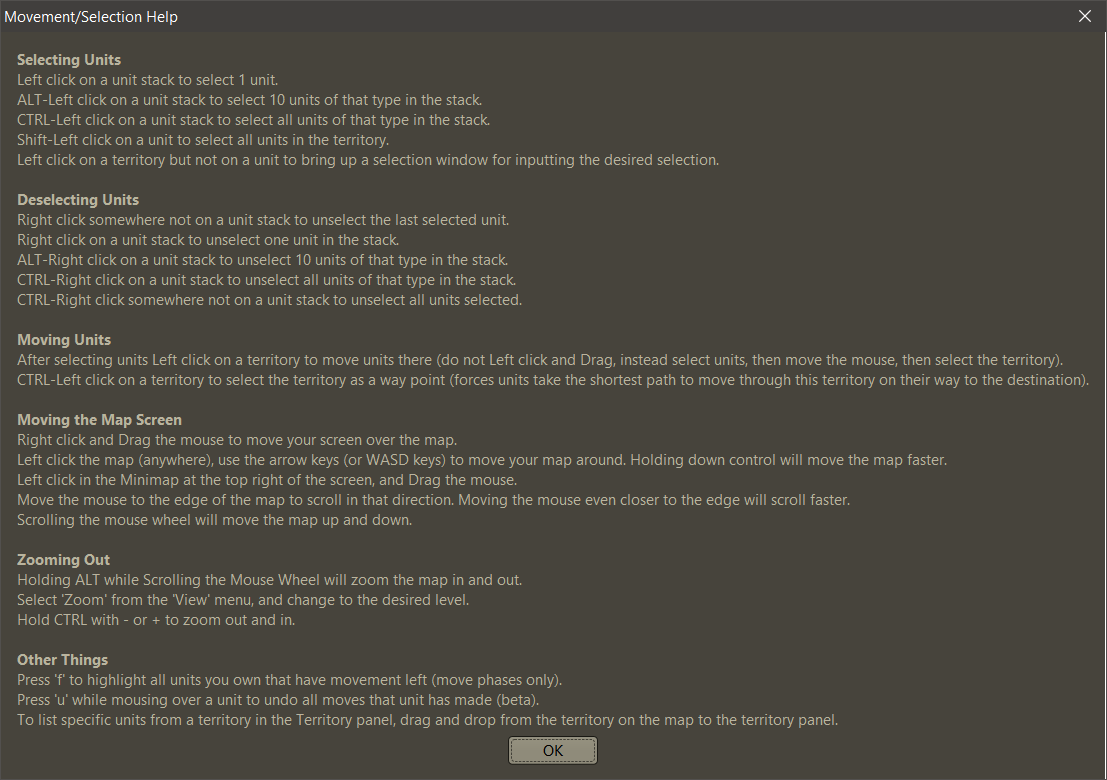
WASD keys have been removed, is this list up to date, are there new hotkeys that should be mentionned ?
Moving the maps Screen should mention it is configurable in Engine Settings.This is displayed in
Help > Movement/Selection Help:
https://github.com/triplea-game/triplea/blob/85a52f8c238ab02adc6177a8adc5a7eea6a25c69/game-app/game-core/src/main/java/games/strategy/triplea/ui/menubar/help/MoveHelpMenu.java -
@butterw Here's my attempt to make this more readable.
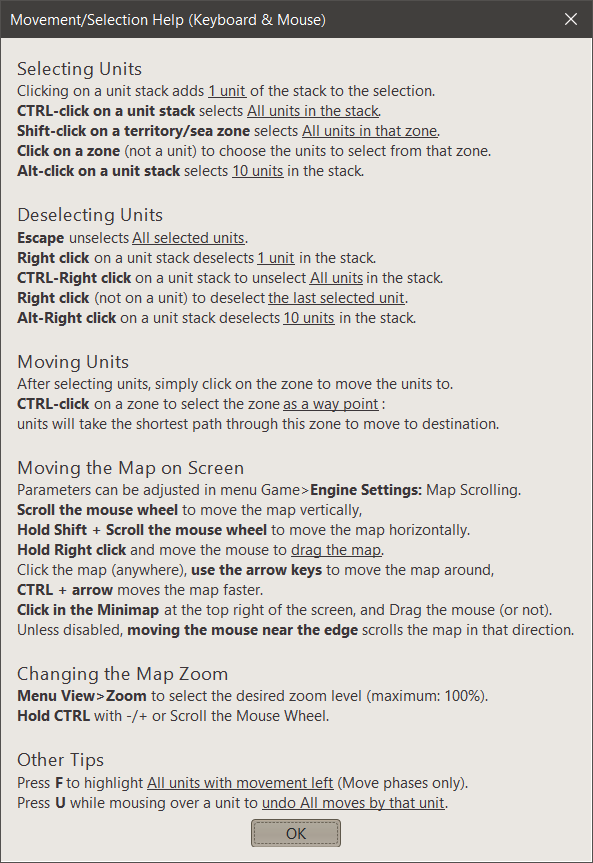
-
Corrections:
- Open View menu> Zoom, to change to the desired level. Zoom can't be greater than 100%.
- Hold CTRL with +/- or Scrolling the Mouse Wheel.
-
@butterw Some considerations before improving readability (because I think it is better to fix or improve anything, before proceeding to improve the information about it, in order not to waist the effort made):
- I would remove ALT-click and ALT-Right click because the act of selecting ten at once is too arbitrary to be a basic function (so why not 5 or 20 or whatever number). Alternatively, having both returning a prompt giving you the ability to input the number for that type only, with the default at 1. By the way, saying "select 10 units of that type in the stack" is a weird formulation, as it seems implying there may be other units of that type in some other stack in the same zone: it should rather say "select 10 units of that type in the zone".
- The Shift-click description is wrong (or at least incomplete), as that happens not only while on a unit but also while on the zone. Moreover, the concept of hovering on a unit to interact with a zone is seriously flawed because, first of all, it is normal for units to be displayed fully within the zones in which they are, so pointing at the zone would suffice (instead of redundantly pointing at both the zone and one unit in it) and, secondarily, if the cursor happens to be, at the same time, on a unit and on a zone which is not the zone where the unit currently is, the unit takes precedence over the zone, with the confusing result that you end up selecting all units in a different zone than the zone you are pointing at. The second flaw can make the function challenging to use for zones which are being overflown by unit images from one or more other zones or even render it completely unusable for a zone if the zone is completely covered by units from one or more other zones (which is mainly the case of a small island being covered by images of units which are overflowing from a nearby zone). By the way, as usual in TripleA, the description incorrectly uses the term "territory" to mean "zone" (This function works also in sea zones which are not territories.) (Saying "territory" implies that the function is supposed to work only in zones which can be owned: a pointless limitation.).
- First of all, the "Click on a territory" function is failing to clarify that it works only as long as you are not also clicking on a unit (which can be akward to get around, as clicking on a blank spot of a unit image counts as clicking on the unit). Besides, clicking on a territory (As usual, here we are talking about any zone, not only territories.) to get a prompt for choosing units is a flawed function as it won't be available if the zone is completely covered by units images. Although that not even a single pixel of a zone is non-covered by unit images is unlikely an occurrence, zones which are using all the placement coordinates assigned to them (a fairly frequent case) may be challenging to be clicked on. I believe this function should either be removed or be related to a different user action (I would suggest Ctrl-clicking on a zone (regardless of units) giving the prompt, whereas Alt-Clicking on a unit selecting all units of that type in the zone.).
- I would remove the function of scrolling the mouse wheel to move the map vertically because horizontal movement is possibly no less important (and usually it is more important as maps are more likely to wrap in that direction), so having a vertical-only function is strange and lame. By the way, I would say it is also a major case of incomplete information not to inform the user that holding Shift is what you need for the mouse wheel to move the map horizontally (As it is, it even sounds like the mouse wheel can only move the map vertically.).
- I would have the mouse wheel zooming the map without requiring to hold ALT to do so (so zooming would become the main or only function of the mouse wheel). By the way, the information is wrong, as currently you need to hold Ctrl (not Alt) (I believe @RoiEX changed it from Alt to Ctrl, but never updated the user information.) (Yes, I already reported this problem a long time ago.). Side note, the usability of this function would be much improved if the current zoom level would be displayed somewhere, so you can see it immediately as you are zooming with the mouse wheel.
-
Zooming the Map
- A display on screen when the zoom level hotkey is used would be useful. The zoom level has a default value of 100% and is constrained, it cannot exceed 100% or go lower than the full map displayed on screen.
For now, I will reorder as zooming out/in: CTRL -/+.
The zoom level display could briefly replace the zone/territory info in the status bar when the hotkey is pressed (it changes as you zoom out). - One thing to consider is that not everybody uses a US keyboard: It would be good if the +/- numpad keys were also bound. Regular +/- are not together on my keyboard and are hard to find.
- Currently the easiest way to zoom for me is to use CTRL+Mouse Wheel. However zooming the map is not a feature I have needed very frequently.
Scrolling the mouse wheel
- Using the mouse wheel to scroll vertically is easy to discover and intuitive. This is my preferred way of scrolling.
- I will include Shift-Mouse Wheel to scroll horizontally, which I had forgotten about. Too many modifiers keys is certainly confusing for casual users.
In most maps, Horizontal scroll is more useful than Vertical scroll, but I would say it is also less intuitive. I think it should be the main Modifier+Mouse wheel hotkey.
- A display on screen when the zoom level hotkey is used would be useful. The zoom level has a default value of 100% and is constrained, it cannot exceed 100% or go lower than the full map displayed on screen.
-
My mouse has;
- a scroll wheel that I can push left and right for scrolling left and right
- a scroll wheel that I can click
Do all modern mice have the above?
-
@thedog said in Make Movement/Selection Help menu more readable:
My mouse has;
- a scroll wheel that I can push left and right for scrolling left and right
- a scroll wheel that I can click
Do all modern mice have the above?
No. The standard modern mouse only has 2 buttons, and a scroll wheel which you can click. And the click on the mouse wheel is often fairly rubbish.
-
-
Territory really means zones here (land or sea, owned or not). But this is also the case for the Territory tab in the sidePanel. I'm happy to switch to zones or another word (area, region, sector ?) if there is consensus on the matter.
-
Stack really means player owned unitType.
-
I will attempt to reorganise and to some extent correct the paragraph on Selecting as I agree it is poorly worded. But I will be keeping it short to ensure readability.
-
The way I see it, the main purpose of this screen is
- to help players discover useful commands they may have overlooked.
- help players understand why behaviour they may consider odd is happening.
- Even if the Alt key isn't very useful, it must be included in this help screen if it is included in version 2.6.
Deselection with Shift-Right Click is too fiddly for me. I tend to Cancel the move completely with Esc (easier than Ctrl-Right Click) or just Undo it, before starting over.
Click a zone (not a unit) is very useful to me because it is easy to remember and can be done with only the mouse. If the zone is overcrowded with units it can indeed be troublesome to execute. -
-
The screenshot of the modified version posted previously has been updated.
I've gone with zones instead of territories because it is shorter and also more correct.
-
**Display Zoom Level on screen when shortcuts to change it are used
The zoom level info could briefly replace the zone/territory info in the status bar when the hotkey is pressed (it changes as you zoom out).
An overlay such as the one used to display "Edit Mode" would be the most visually appealing solution.
-
I have not read through all of the comments, my apologies. My general thoughts:
- walls of text are bad, this kind of help wall of text is not terribly useful
- UX better practice is to have a physical control that is visible and have a hover text (or other) to indicate the hotkey to activate that control without having to use the mouse. An analogy is a keyboard, you can discover keys once by looking at them, but once you know where they are you can type without searching for the key.
- the help menus for hotkeys etc is notoriously difficult to maintain and gets out of date.
Bottom line, having a single cheat sheet for hotkeys would be good, putting in a table would make it more legible. It would be good for this to be handled in a more centralized and automated manner in the code so we didn't have the point of maintenance to keep it all in sync. Furthermore, there is a high priority bug where in multiplayer the window focus is routinely lost and it makes the hotkeys seemingly no longer function (until you click the map), which makes the hotkeys kinda misleading/useless as they seem like they do not work.
With all that said, the strategy should perhaps be:
- handle hotkeys in a unified manner in the code
- have this hook into the help menu automatically
- update the help menu to display in a nicer format
- consolidate all of the hotkey help menu stuff into a single window
- advertise the hotkey bug existence more thoroughly pending a fix
-
**Move All Hotkeys to a single source code file
@lafayette said in Make Movement/Selection Help menu more readable:
Bottom line, having a single cheat sheet for hotkeys would be good, putting in a table would make it more legible. It would be good for this to be handled in a more centralized and automated manner in the code so we didn't have the point of maintenance to keep it all in sync.
With all that said, the strategy should perhaps be:- handle hotkeys in a unified manner in the code
- have this hook into the help menu automatically
- update the help menu to display in a nicer format
- In my view, releasing a version with "Movement/Selection Help" not up to date is not acceptable . A fix is needed for v2.6. I am submitting a Pull Request for this, it also makes the text a lot more readable.
Longer term a more streamlined approach should be put in place:
- From a development perspective, putting all current shortcuts as constants in a single code file is very simple to do and has many advantages:
- Developpers would know what all the current hotkeys are (+ their history) and could change them easily.
- Advanced Users could change hotkeys by recompiling with a custom shortcut file.
- The current hotkeys could be displayed automatically in a table, which would guarantee up-to-date info for users.
- Eventually all hotkeys may become user configurable in the GUI or a config file.
-
**make Alt-Click Selection user configurable
@cernel said in Make Movement/Selection Help menu more readable:
- I would remove ALT-click and ALT-Right click because the act of selecting ten at once is too arbitrary to be a basic function (so why not 5 or 20 or whatever number).
EDIT: This hotkey doesn't seem very useful currently. So it should either be improved or scrapped.
- Ctrl and Shift should be enough as hotkey modifiers.
- Alt is used for menu mnemonics on Windows.
how it could be improved:
Make the number of units selected/deselected with Alt-Click user configurable in Engine Settings:- Default value would be 10 like currently.
- 0 would deactivate the feature.
- A very high value would make it equivalent to CTRL-Click.
-
@butterw
Those of us with a mouse that can push the scroll wheel left and right, this already works in TripleA to scroll the map left and right. -
@thedog Assuming you didn't have to do any special configuration to achieve this, it is likely the reason why the horizontal scroll binding is Shift+Mouse Wheel.
-
Current Keyboard Shortcuts Dialogs - Dismiss (ESCAPE) - Focused Button, typically OK (ENTER/SPACE) Menu accelerators (With menu accelerator key: CTRL, META on Mac) - "Save" (CTRL+S) - "Leave Game" (CTRL+Q, Mac: META+L) This is equivalent to clicking close Window or (Alt+F4). - "Post PBEM/PBF Gamesave" (CTRL+M) ? - "Find Territory" (CTRL+F) - "Enable Edit Mode" (CTRL+E) enable/disable Edit Mode - "Politics Panel" (CTRL+W) - "Battle Calculator" (CTRL+B) - "Show history" (CTRL+H, Mac: Meta+Y) - "Show current game" (CTRL+G) exit History Mode - "Lock Map" (CTRL+L) RightSidebar Tabs - "Actions" (CTRL+C) >> should be labelled "Command" ? - "Players", (CTRL+P) - "Resources" (CTRL+R) - "Objectives" (CTRL+O) - "Territory" (CTRL+T) Territory Tab - "Battle Calculator" (Ctrl+B) - "Add Attackers" (Ctrl-A) - "Add Defenders" (Ctrl-D) - ActionButton "Done", Ends the current phase (CTRL+Enter) BattleDisplay - Confirm Casualties (SPACE) Can be disabled with "View > Settings > Game > Space Bar confirms casualties" set to false (the confirm casualty button then has to always be clicked.) UnitScroller (during Move Phase) - skipCurrentUnits (S) - centerOnNextMovableUnit (PERIOD '.') - centerOnPreviousMovableUnit (COMMA ',') - highlightMovableUnits (F) - undo Move of highlighted units (U) ZoomKeyboardShortcuts - Zoom+ (Ctrl+ EQUALS '=') - Zoom- (Ctrl+ MINUS '-') >> Numpad +/- should be added for zoom. KeyboardMapScroll - ArrowKeys: RIGHT, LEFT, UP, DOWN - to Scroll faster (hold CTRL) >> A left-hand alternative to arrow keys should be available (WASD has been removed) Alt + _Mnemonics: Menu commands. F10: Opens the File Menu Additions in 2.5.3 test build: - Ctrl+X: Toggle Sidebar -
@butterw Are those unit scroller command current relative to the latest 2.6?
Missing "ctrl+enter" to activate done button. Also, there are additional tab accelerators AFAIK (which is why ctrl+A is inconsistent). I've certainly considered to re-assign & drop some of these.
-
@lafayette said in Make Movement/Selection Help menu more readable (+Hotkeys discussion, Zoom Level display):
@butterw Are those unit scroller command current relative to the latest 2.6?
Missing "ctrl+enter" to activate done button. Also, there are additional tab accelerators AFAIK (which is why ctrl+A is inconsistent). I've certainly considered to re-assign & drop some of these.
Yes this is based on the latest v2.6 code. Every hotkey I found is listed ("Done" button is included). They are defined through a number of different methods in the code and in many different files, so if anything is missing please point it out.
Some non-menu hotkeys use both CTRL and Meta as base key.For consistency Action tab needs to be changed to CTRL+A or could be displayed as "Command" Tab to keep CTRL+C ?
SHIFT, Function keys, numerals could be used to expland hotkeys if desired.
-
@butterw There is this long time problem for live play that the space-bar is frequently used during chatting, with the result of inadvertedly confirming or even choosing prompts that suddenly appear while writing in the chat.
The most typical example are confirming (more like accepting, since the program initially selects them) casualties (which can be avoided by opting-off (in Engine Preferences)) and accepting (political or other) actions (for which I believe there is no solution).
May all occurrences of "Space" be changed to "Ctrl+Space"?
-
@cernel I'll look into it. Likely space is associated by default with dialogs on the OS (Windows), so I'm not sure there is a simple solution to this.
For sure, if there is a choice dialogs should present the most favorable option by default, and require a conscious action by the player to go against it.
Many pop-ups are just an information notification, so using space is adequate to go through those. The info should be added to the history log so that the content of any message can be checked if something was missed.


Hello! It looks like you're interested in this conversation, but you don't have an account yet.
Getting fed up of having to scroll through the same posts each visit? When you register for an account, you'll always come back to exactly where you were before, and choose to be notified of new replies (either via email, or push notification). You'll also be able to save bookmarks and upvote posts to show your appreciation to other community members.
With your input, this post could be even better 💗
Register Login