💥 1941 Global Command Decision - Official Thread
-
Latest version 35 ready for download from 1st page 1st post
Major Changes
- Scramble has been activated, to turn it off go to map option and untick Scramble rules in effect
- USSR has a new relationship Allied-USSR this means that Allied units/Bombers cannot operate from USSR TTs
- Bunkers now require Upkeep, so -1pu/turn, this is a biggy and has messed with the current balance, hopefully corrected
- 10 SZ are now 2pu Panama Canal, Britains west coast, Gibraltar_Straits, Suez Canal & Japans coasts
- HQ-Air also gets stats for a Fighter, costs 18pu
- HQ-Army also gets stats for a Armor-Med, costs 11pu
- HQ-Fleet also gets stats for a Cruiser, costs 11pu
- HQ-Submarine also gets stats for a Submarine, costs 11pu
- VCs now 29, was 31, Dakota & Texas removed as Axis are so unlikely to own these
- Victory now 21vc, was 23vc, less of a slog for Axis to achieve
WEST
- Copenhagen-Denmark & Gibraltar now 'Capitals', the AI will target/defend these as they are key TT, thanks Black Elk
- Archangelsk has a new Lend-Lease-Depot
EAST
- Burma Road in N.Burma-Yunnan has a new Lend-Lease-Depot
- Vladivostok has a new Industry-Lgt for rail links and has a Lend-Lease-Depot
TODO
- Balance
Cosmetic - Sea Zones remove top left unit placement, redo as the placement got reset will the unit size change to 100%
- Germany G1 TT overflows left, redo as the placement got reset will the unit size change to 100%
- Germany Atlantic Wall overflows left
- Terrain effects icons for each TT
.
Link to 1st post that has the download link
https://forums.triplea-game.org/topic/3326/1941-global-command-decision-official-thread -
Looking good! Nice work!
I'll fire up a new game as Axis!
Also I threw these together real quick. It's just the terrain effect images you had, but I added in the little graphic and shifted the kerning in a few spots, just to make it fit without needing the extended field.
By removing the repeated abbreviations "Atk." and "Def." in the descriptions I narrowed these graphics further, so they wouldn't push the names/PUs out of view at the bottom of the screen, when you cursor over those tiles.






I'm not sure what typeface is best. The issue with images displayed in tripleA's UI is affecting the text in these graphics the same way it does unit images in the purchase screen, or flag images in the stats bars and such. It's a bummer cause tripleA is degrading the quality of the graphics in every UI menu for some reason, anything not on the map itself. If we could fix that, then pretty much every tripleA game would immediately look way better heheh.
Anyhow just had a minute, so thought I'd save em here as a placeholder.
-
They look so good, so cool

Did you use Inkscape's kerning?
I did not know it had kerning until I googled it now.TripleA 2.6 does not have this problem as almost the whole width is used dynamically, not half like in 2.5.
-
Please note this map can only run on 2.5 and crashes on 2.6
In the past 3 weeks/releases there have been 500+ views for each of the release first 3 days, making this a very popular map or of interest.
If any Dev could look at the crash and tell me what to fix, I will gladly do so, but the crash errors are no help in tracking the problem down.
Running on 2.6 it does not even complete German turn 1 (G1), before this crash occurs. (2.5 has very minors error, but otherwise give a good game)
With TripleA-2.6+14246 I get this error;
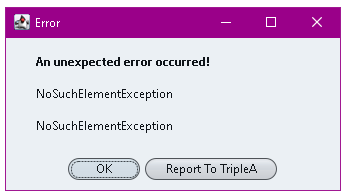
My triplea.log file with a txt extension
triplea.log.txtIn the log it mentions
329975 08:39:44.852 [Thread-12] ERROR o.t.game.client.HeadedGameRunner - nullIs this related to a networked/lobby game?
-
-
Latest version 40 ready for download from 1st page 1st post
Major Changes
- Germany is now Human to speed up loading the map otherwise no game play/xml changes and the following are visual changes
- Black Elk has removed hundreds of shadows from most units, making them look cleaner
- Black Elk's new Relief Tiles should display the Find territory clearer
- Redone the Terrain Effects banner help on the status bar, after Black Elk clued me about kerning
- TT PUs are bigger and semi transparent, so less obvious, so I might keep them
- Game Notes font back to Calibri
.
Cosmetic- Sea Zones remove top left unit placement, redo as the placement got reset will the unit size change to 100%
- Germany G1 TT overflows left, redo as the placement got reset will the unit size change to 100%
- Germany Atlantic Wall overflows left
.
TODO- Balance
- Terrain effects icons for each TT
.
Link to 1st post that has the download link
https://forums.triplea-game.org/topic/3326/1941-global-command-decision-official-thread -
Looking good! Somehow I forgot the shadows on these hehe. Just cleaned em up. Goal for me was to get a master unit set that I could flip either direction without the light source appearing to change.


Germany battleship/hit as well...


Here is a fighter for Italy. Its a greyhound

current has Japan's zero

I'll check to see if there are any other hidden shadows I missed, but I think I got most of them dialed back sufficiently. If the shadows are smaller or more underneath (like a toplit unit, rather than spotlit) it's not as noticeable to me if they flip to change orientation. I'm still hoping that a dynamic flipper might become a reality eventually, even if it doesn't yet exist, so just trying to get something that would work for that. Or if one wants the shadows back that they could be lit for both orientations using the same source/same sidelight, so it doesn't appear to invert but the lighting remains the same. Like basically you'd do the flip first, then add the shadows to everything, all in the same way. For me the no shadow look works well enough. Until we get a full on unit flipper or flag display, then could revisit that idea. I'm pretty sure the display could make the units look like the Frostion dudes with roundels and shadows, but have that be like a setting you could switch on the fly. Option unit>view "dropshadows" applies to all, unit view> flags on applies roundel pucks to all etc. and still have it look consistent that way. Right now doesn't really work though, so I think these will have to do, cause at least it would work manually.
For the relief, I see a few spots where the lakes kicked up a little choppy, but overall I think it's better than the heavy tint. I'll just have to give it another pass and blend back a few spots. Like around Egypt and in the Caucasus. Picked up a blue green and blew out those pixels I think, but otherwise it worked ok. I'll hit that one with the blur/sharpen next time. White gold lines almost work for the flash for me but I gotta zoom in for it. I don't know how to get it much more pronounced without going more midtone for the border color, but this off white seems to almost work. Like good enough for government work, at least for now haha. Next time I'll bring the lakes up from the topo so it blends better, for this one I just layered them on type and hit the edge with blur, but gets a bit closer to what I'd like.
-
Latest version 45 ready for download from 1st page 1st post
Major Changes
- reliefTiles improvements in Russia and 'canals'
- 8 units refreshed
- Stopped Axis air units from landing in Neutral TTs, as sometimes the AI would suicide them.
Pacific zone gets more to fight over
- Hawaii 5 pus, was 1 (correction)
- Singapore-Malacca 3 pus, was 1 (option to build Industry-Lgt)
- Shanghai-Kiangsu 3 pus, was 2
- Hong Kong 3 pus, was 2
- Guadalcanal-Solomon Is. 2 pus, was 1 (more attractive for AI to fight over)
- Saipan-Mariana Is. 2 pus, was 1
- Iwo Jima-Bonin Is. 2 pus, was 1
TODO
- Balance
- Terrain effects icons for each TT
.
Link to 1st post that has the download link
https://forums.triplea-game.org/topic/3326/1941-global-command-decision-official-thread -
Had a random idea, not sure if it would look cool or not, but here are some extra flags with the shadows removed. Idea might be to have these graphics display initially for some color/variety, then change over once the TT changes hands. Units and initial ownership colors would remain the same, but the flag could give some national flare. Not sure if it's worth the effort, but I nixed the shadows just in case, figured I'd save em here.
Vichy France

Romania

Finland

Hungary

Bulgaria

Free France

India

Africa

Brazil

Dutch

Mongolia

British Empire and Dominions Blue/Red Ensigns


-
Latest version 50 ready for download from 1st page 1st post
Perhaps the last release should of had a little more testing

Major Changes
- India finally gets a defence force, to slow Japans expansionism
- Calcutta 2pu was 1, and added Base-Camp
- Karachi 2pu was 1, and added Base-Camp
- Punjab 2pu was 1
- India (Britain) also has a regular supply of Indian Infantry as long as the two Base-Camps exist, this represents India's large commitment to the war.
.
TODO- Balance
- Terrain effects icons for each TT
.
Link to 1st post that has the download link
https://forums.triplea-game.org/topic/3326/1941-global-command-decision-official-thread -
Some ideas for the Battle of the Atlantic...
Britain
sz 106 Halifax: change to 1 cruiser 1 transport, moving the destroyers to sz 120 Hudson bay/N/ Ontario.
sz 109 Irish sea: also to 1 cruiser 1 transport, moving the destroyers to sz 89 Caribbean/Jamaica
sz 91 A Gibraltar: move the destroyers to sz 87 Sierra Leone.
sz 111 A Scotland: move the destroyers to sz 126 Svalbard
sz 105 Brittany: remove the UK subsUSA
sz 101 A New York: move the destroyers to sz 101 B FloridaDoing this will create the Mid-Atlantic Gap during the opening round, represented by sz 108, which would be unreachable by UK/US destroyers on their first turn combat moves. Instead of having the German Uboats concentrated in sz 108 initially, they could be spread across the Atlantic 2 moves from sz 108, so basically ending G1 in their current start position, but with those Atlantic sz under German control after. Then the idea would be that if Germany goes after the vulnerable transport targets, this would be at the coast of exposing the subs to counter attack. Giving the player an option to forego those attacks and consolidate instead within the Mid-Atlantic gap, or split the difference running riskier attacks but with fewer subs exposed on counter. Opening round for Allies would be trying to get the destroyers in position to sweep across and start closing the gap. I think this change would help, because in the current Germany kinda has to run the attacks all-in, even knowing the units will be destroyed, just to kill those British transports and the destroyers which would otherwise clear the subs/HQs by themselves on immediate counter attack. For sz 105 and sz 112 and the coastal factories that are involved in the German sub spawn, a uboat in the sz and an AAgun on the factory tile, to help indicate the association with those starting unit placements.
Germany
sz 114 Konigsberg: add 1 transport to the Kriegsmarine. With 5 elites in E. Prussia, and some other mixed units in Danzig/Pomerania to showcase the transport capacity of various unit types. These could be moved over from somewhere on the Eastern front if you want to keep a similar number of starting units. Basically to tutorialize the transport dynamic, but also gives Germany a slightly more credible threat vs England, just to keep em honest on the first turn hehe.Ideas for the Eastern Front...
Vary the composition of forces down the line, so that each tile has a different distribution of units, with some more asymmetry between the German armies and the USSR armies from tile to tile. Again could keep the same units, but just shift the locations. Moving some of these starting units to Factory tiles, would help to indicate the movement bonus from the rail in the opener. This could be a non com thing on the German side, though for USSR it would be cool to have some units pre-positioned on the rail, so they can run a counter attack or two if the Germans dud in an attack. Also a few defending soviet aircraft on a frontline TT, so players have a chance to see how they defend/scramble in the opener. In general just trying to mix it up, so the battles here showcase different compositions of forces at different scales, so the player gets to see the unit interactions more in isolation. 3 larger stacks with all the stuff could represent the big Army Groups North, South, and Center, but with the other forces in surrounding tiles more variable in terms of their unit spread. Any of Romania, Odesa, Crimea. Mariupol or Rostov could be worth 5 PUs, so there is a tile on the Black Sea capable of producing ships. Probably Rostov would make sense with a starting Medium factory, given where the line is at the outset, since it's more easily contested, but least gives Russia a way into the water there. Medium factories don't need to exist initially for Axis I don't think, but giving the option to build one would activate those sea zones, which otherwise are uncontested. Having a Russian transport in the Black Sea or the Caspian would also be cool to provide some movement flexibility for their units in the backfield. Axis have a ton of aircraft, so the Russian black sea fleet is likely to get smoked without some way to support it. I also think it could be fun in the endgame as an Axis lake, or as Allies to try and reclaim the zone to prevent that, or if they manage to blast into the Balkans from the other direction.
Anyhow, just spitballing. I had a lot of fun with the latest changes!
Nice work! -
Latest version 52 ready for download from 1st page 1st post
Major Changes
- Tool tips added P-51-Mustang "cannot use carriers" the under carriage was not strong enough
- Now there is a Politics phase, so that givesBackOriginalTerritories works, but the players do NOT interact with it.
.
WEST- Britain & USA DDs moved away from Atlantic centre
- Germany has 29 less units on the eastern front, removed for balance
- Germany added a Transport in SZ 114
- Germany 5 Inf-Elite removed & added to Konigsberg, this allows them to move 3 by rail or be used as Marines on Transport in SZ 114
- Germany added Anti-Air in Hamburg & Meckleburg to defend against Raid Bombers
- Germany now owns SZ 108 & 117
- USSR Rostov 5pu was, was 2pu, added Industry-Med, can now have ships in Black Sea
- USSR Moscow gets one Fighter, Bomber-Lgt & Anti-Air for defence
.
EAST- Connection 005 B Sea Zone" to N.Korea-Chosen removed, thanks Black Elk
- Connection 031 B Sea Zone" to Honolulu-Pearl Harbor removed, thanks Black Elk
- Japan has 2 units less on mainland China
- China has themed Inf-Conscript in Yunnan if the Lend-Lease-Depot exists every turn
- China gets 3x HQ-Army
TODO
- Balance
- Terrain effects icons for each TT
.
Link to 1st post that has the download link
https://forums.triplea-game.org/topic/3326/1941-global-command-decision-official-thread -
This map looks pretty cool.
Dunno if you guys should have +1 def on desert though, historically but also for gameplay purposes it would be cool to almost have the opposite, -1 for defense.
Overall the desert was all about maneuver warfare and static defenses failed in almost all cases for all sides unless supported by big reserves or in mountain terrain like Kesserine Pass.
It would be interesting to have an arena of the war like that. Heck id love it to be subdivided into even more territories but thats not a must. Overall though you should be able to push in the desert pretty hard and fast, whether its to secure a victory for the axis in Egypt or the allies by landings.
If not -1 then at least 0. Its just a small thing I noticed but its fine if you dont want to change this.
Consider also the no blitz option on it even though some of the fastest advances of the war happened there both by Rommel and by the counter attacking allied forces. Moving through the desert is relatively easy, just horribly unpleasant.
One cool thing would be to have a heavily fortified area in terms of say Tobruk but with enveloping territories that make it possible to completely outflank it.
This would mean stacking it early on is probably a good idea but stacking it late game could be devastating, not giving you a chance to retreat. This would in a case of -1 defense make it a kind of momentum changing territory: knowing when to move from it/around it would be the key issue.
Maybe a similar territory on the old French forts in Tunisia to give the Axis one last chance to stabilize the front?
-
I actually kinda love that idea! To have a few lanes across the board where the attacker gets the punch haha! Sounds like it could be fun.
I think the terrain thing has a lot of potential, and I like the idea of asymmetries going on there. Although I enjoy that more for attack/defense than movement. Particularly for mobile units interacting with factory rail across the terrain tiles. I think for me something like ground move +1 off the Factory spots would perhaps be more dynamic than M3 (where in the current mobile units can have that dropped by a -1 to movement from the terrain effects). Like cause then the tanks/mech could be your M3 on the ground, and Infantry off the rail tile gets an M2 (still pretty exciting over vanilla A&A hehe). What happens in the current though is that you get Infantry and Artillery that are more mobile off those factory tiles than the tanks where terrain is involved, so kind of an inversion of what I'd expect. I'd think of a situation where the tanks are hauling ass and the inf units are on the catch up. It doesn't happen everywhere, but there are enough terrain tiles that have that -1 to mobile ground that I notice quite a lot. Still, I was finding ways to adapt my playstyle, and I guess it makes a certain sense (since everything's abstract anyway) that maybe it's simpler to move infantry than their support equipment by rail, but it makes me kinda prioritize the inf/artillery out of those factories over tanks. Some sorta thing in the dessert with mech or light tanks, where I find myself not wanting to buy tanks/mech if I know they get hit with a -1 on movement. For bases I'll buy mech for the attack bonus, but usually cause they're more frontline or I just need more punch on attack, or to spend a remainder over the cost of just another infantry unit hehe.
I think for a malus to attack or defense, it's important that the unit not hit 0, where they just become pure fodder hitpoints and don't participate. So like if an infantry unit that defends at a 2, has a malus -1, that's different than if an attacking Inf that usually at attacks at 1 drops down to zero. I like the idea of just bonuses myself, the +1s instead of the -1s, but I think if terrain drops the combat effectiveness, it helps if the starting point has units that can hit on at least a 2 or more usually, so they can drop down to 1 but not get pushed out of play entirely.
Fighter aircraft attack/defend at 2 would be cool too. Even if it would probably tip the balance a bit, I think they would feel more effective for the cost. In regular combat I mean. I've noticed with scrambling on (which I kind of dig for the flavor) that some weirdness with the AI still occurs. Like where they'll scramble, but then not participate in the regular combat, or sometimes a scramble/followed by intercept which gives the dogfight but I've seen it less often there. Strat bombers on defense I've noticed some stuff as well, where it will prolong the stalemate, or might prevent taking the TT indefinitely if it's present. Anyhow just some stuff I noticed in the last game.
I dig that idea for Tobruk, and the Tunisian stronghold. I wish the AI could use air transports properly cause that'd be cool, but perhaps a transport in the Med would give some flavor there, like to reinforce N. Africa and draw down some attention from the Brits. I had a lot of fun playing as Italy, and Britain in North Africa trying to get something going and figure out what's needed to break the other team. Obviously the computer is a bit daft as some stuff more than another opponent would be, but it was pretty enjoyable over what I'm used to from A&A where it's kinda over in a flash. Italy I think could probably use a boost the Regia Marina just to stay competitive with the Brits and USA. The computer still isn't great at recognizing how key Gibraltar is to the play, so that's sort of lifeline vs the AI to manage those fronts, but I think the balance would tip pretty hard over it in PvP. Like whoever gets there and holds, kinda wins that contest hehe. Might make sense to give it something that makes the computer think it's worth a lot of TUV. Like at first I thought just raise the value to 10 or whatever, so the machine gets the picture, but I can imagine that not being great cause then you gotta a factory which might gum up the works. I wonder if an infrastructure type unit that doesn't participate in combat abd can't be destroyed, but it's worth like 10-20 PUs in TUV? Or I was thinking basically an invisible VC-type thing worth some amount in TUV to draw the computer where we want it go. Feels like anything we can do to nudge the comp to make a solid opening round would be cool. Just and idea
Look forward to checking out the new one!
Nice work! -
@black_elk said in
 1941 Global Command Decision - Official Thread:
wonder if an infrastructure type unit that doesn't participate in combat abd can't be destroyed, but it's worth like 10-20 PUs in TUV? Or I was thinking basically an invisible VC-type thing worth some amount in TUV to draw the computer where we want it go.
Idk if you can have certain units only kill/capture certain others. But if so, you could have the Air Trprt be the only unit to do so for certain invisible units.
Might encourage the AI to use them more.
-
Quick thoughts on Armor. Current has
Lgt Armor: A2 D1 M2 C6
Med Armor: A3 D2 M2 C8
Hvy Armor: A4 D4 M2 C11
Mech Infantry: A2 D2 M2 C6Med Armor is basically the familiar A&A tank from Classic, and Lgt Armor is similar in that they are both better on attack than defense.
This will create a dynamic similar to Classic A&A, where the player is somewhat discouraged from racing forward with their armor, but instead incentivized to use it mainly for pushing the deadzones behind inf/art wall.
Mech is cheaper than Med Armor here, but just as good on defense, so that unit becomes kinda the default blitz unit under the current scheme with that cost. In Revised A&A the defense of Armor was raised to A3 D3, which is the more familiar these days I think for a tank archetype. Perhaps something like this would be cool...
Lgt Armor: A3 D2 M2 C8 (the early period starter tank, classic style)
Med Armor: A3 D3 M2 C9 (the workhorse tank for the midgame)
Heavy Armor: A4 D4 M2 C10 (the endgame tank for the big moves)Then you could also do
Fighter: A2 D3 M4 C12
Tactical Bomber: A3 D2 M4 C11And the gameplay would pretty much capture the spirit of familiar A&A style dynamics to help players get oriented while still being pretty unique. I think raising the attack values for those units would create a somewhat more satisfying experience when rolling the dice too, especially if terrain effects retain that malus for the attacker. Least then the armored and air units would be able to absorb a -1 without becoming ineffective in certain terrain TTs.
Inf/Anti-Tank 4
Elite/Bunker/AAgun 5
Mech 6
Art 7
Lgt Arm 8
Med Arm 9
Hvy Arm 10
Tac B 11
Fgt 12Armor has to be pretty good to compete with infantry if its going to be double the cost. Otherwise it's hard to justify the tank buy when you can get 2 hitpoints purchasing infantry instead of 1 for the same amount of PUs, which is why I think raising the A/D values there makes sense for the armor. With a higher attack/defense value Lgt/Med armor becomes a lot more attractive, and Med/Hvy Armor will be a go to towards the endgame for sure, since they're very useful at carving up bunkers and such. The mobility advantage is already pretty strong from the rail, so to keep pace it would be nice if the tanks hit a little harder.
I think Fighters could use the boost to A/D as well, just to make up the cost there, otherwise they're pretty pricy and kinda outclassed by the mobile ground. Destroyers are pretty cheap here, so I'd be less worried about fighter umbrellas screening vs fleets. I think it would help here actually, especially if one side gets wiped and locked off the water early on, cause then the coastal fighter aircraft can pick up the slack if the navy drops the ball haha. There's no hit 4 in the air here like A&A strat Bs, so you've got a little bit harder situation to manage the naval approaches without a fleet to guard the coast. I think that's where the tactical bombers at A3 would come in handy.
For advanced aircraft like jets you could do the 3/4, 4/4, or introduce a 5 maybe. Rosters rarely show the 5 much love hehe. It might be fun for the battleship or super carrier type unit. But anyway, priced that way at 12 the reg fighter is basically the same cost as the OG fighter from 1984 at the high end of the initial roster. The attack/defense values are lower than classic there which had A3/D4 fighters, here it'd be A2/D3 but still kinda fits with asymmetry and advantage to the defender so I think that would be kinda easy to get into. Tactical Bomber unit was basically carved out as the inverse, better on attack but slightly weaker on defense A3/D2, so they'd each have a niche.
That way for the roster you won't have too many competing prices for the ground game combat units, and spending a remainder can be a bit more intuitive. Since your base fodder is cost 4 PUs for most players (Trained Inf), means that a remainder of 1-3 is sorta the novelty impulse buy. Like when you can't divide your purse neatly into infantry and have a bit left over to burn.
Anyhow just an idea. Otherwise I've been enjoying the latest revisions. Feels pretty entertaining with adjustment to China and India, and the Eastern front a bit closer. The AI still struggles a bit I think with the Italian can openers and moving off the rail factories when they could have more reach holding position, but they still put up a pretty good fight if they can hold out a few turns. Fun stuff!
-
Latest version 60 ready for download from 1st page 1st post
Major Changes
- HQ-Army now 3D was 2, now 12pu was 11
- Armor-Lgt now 2D was 1, now 7pu was 6
- Armor-Med now 3D was 2, now 9pu was 8
- Terrain Effects changed, no more 0 Atk, now less withdraw warnings
- All Combat Rounds increased to 5, was 3, now less Air Battle warning (Can be changed in Map Option)
.
TODO- Balance
- Terrain effects icons for each TT
- Germany mix TT forces so not the same
.
Link to 1st post that has the download link
https://forums.triplea-game.org/topic/3326/1941-global-command-decision-official-thread -
Have a little bit of nostalgia for the year I wasted a while back trying to mod this game, so I've been playing it a bit
There's something wrong with the download- the install name supposed to be "1941_global_command_decision" with no version number, or "1941_global_command_decision_60" with the number? I tried both and it's gives me errors both times because something in it wants the other name. I even tried making 2 installs to cover both names at the same time and it opened (i.e showed the nations, rule menu setup etc) but couldn't start. Halp!
I'm playing on 2.5, so it's not that which is the issue
-
Hi try this
https://forums.triplea-game.org/topic/3327/pvp-scenario-review-thread/26Ask again if is does not work.
-
Hey Joe! How's it going dude! What I was doing was to unzip and extract the contents, so basically moving just the folder called "1941_global_command_decision" (it's nested inside a folder with the version number when I first extract) and then put that one to my downloaded maps. I wasn't sure if it was just cause I was using 7zip, but I had the same thing going on initially, till I realized the version number was just for organizing downloads.
Oh also I have that folder of the 48px monochromes you made that Beelee sent me a little while back. I wanted to include it in the UHD global package for mods and such, since there's a ton of stuff there and all nicely labelled. I used a couple upscales from that too as the basis for 54px stuff I didn't have from Frostions, but the stuff I have there is all un-tinted I think so I was just kinda riffing after the upscale. Just to get ideas and inspiration. The ANZAC dude made a cameo appearance in the last build haha. Tried to do him up in a two tone, I'm still learning how to do that. I finally got BIMP working to do batch colorizing though, so I was thinking about going to town there at some point for the 48pxs. I was curious, probably a long shot, but if you got anything fun for units might be cool to do a massive grab bag on that one.
Anyhow good to catch ya!
ps. here's a relief with the white lines
https://www.dropbox.com/s/jewayj6tcr2u3qj/relief_1941_global_command_decision_x.png?dl=0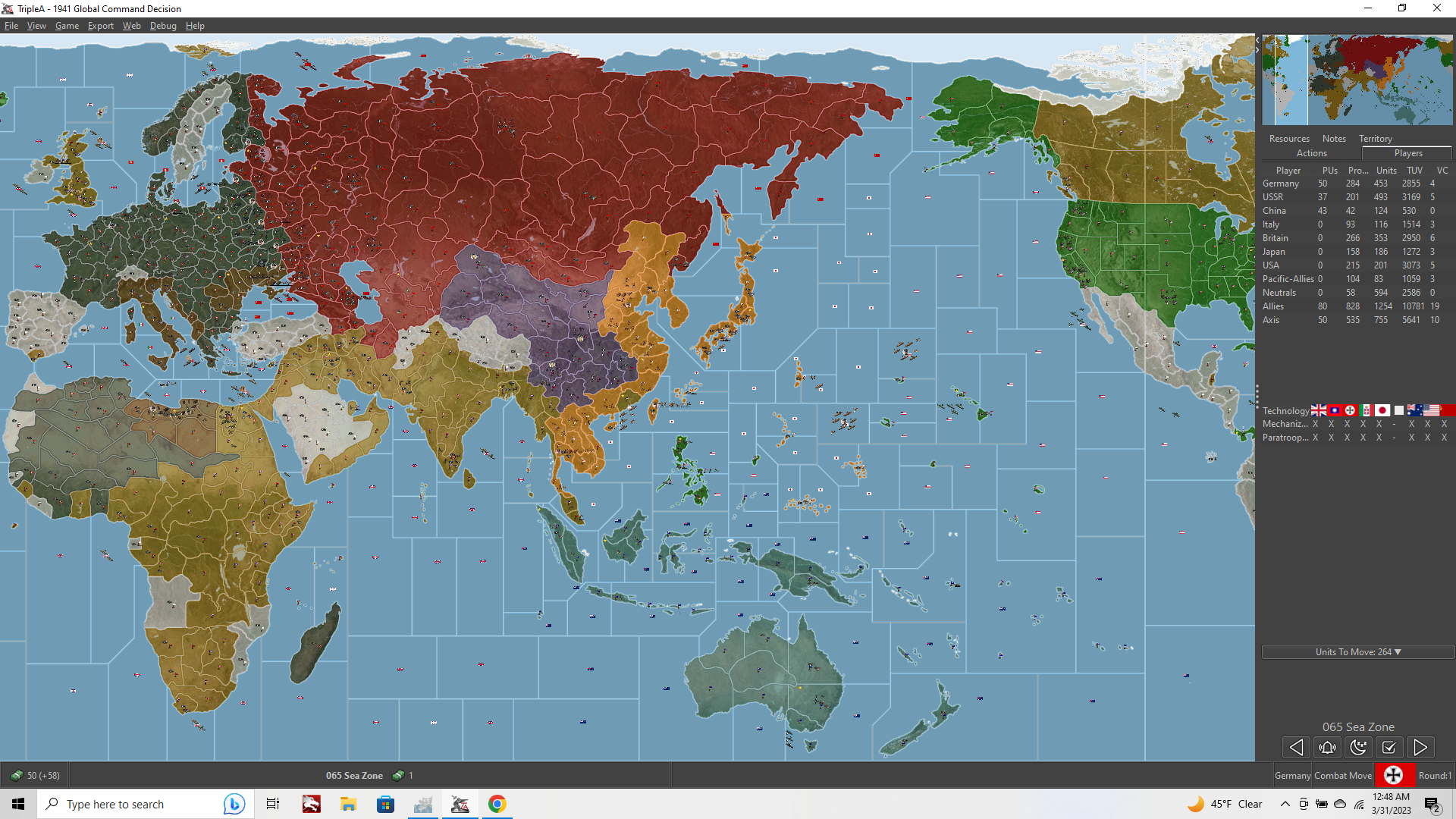



Hello! It looks like you're interested in this conversation, but you don't have an account yet.
Getting fed up of having to scroll through the same posts each visit? When you register for an account, you'll always come back to exactly where you were before, and choose to be notified of new replies (either via email, or push notification). You'll also be able to save bookmarks and upvote posts to show your appreciation to other community members.
With your input, this post could be even better 💗
Register Login