New Look and 2FA Feedback - and other issues
-
Thank you for updating the forum software and the new "look and feel". I love that everything looks straight forward and sorted.
However, one issue I noticed:
Those who use 2FA for logging in see a new dialogue ...:
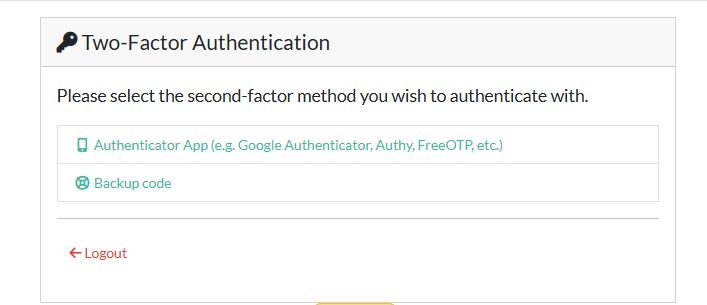
... that adds another step to the log-in procedure.
Can't we get back to entering the app-code directly? As the Backup code should be what it is: a backup.
-
And another issue: The image I posted above 8 hours ago has magically disappeared.
Klicking on the link returns a "Not Found".
Here it is again:

Don't always trust TripleA when it comes to rules questions. Know the rules before you start … and better check what TripleA has done.
-
Also it would be great, if the Favicon returned:

It used to be the TripleA logo before.
Thank you.
-
@Panther I'm in process of restoring user uploads. Should be back in about 15 minutes. I just ran a cleanup script that removed way too much! Turns out a bunch of uploads are 'orphaned' and can be cleaned up.
-
@LaFayette Thanks, does that include the Favicon, that I mentioned above?
And the user profile images obviously.
-
@Panther image restore is complete - would you mind checking if you see anything missing?
-
@LaFayette Unfortunately I can't confirm that anything is back.
The images I uploaded have disappeared, even those I uploaded later (see above),
the Favicon is still missing, most of the user profile images are missing, including mine and yours.
Almost every image that should be visible is still missing. -
@LaFayette Also I fail to (re-) upload my profile image (avatar). Whenever I try it the process stops when I hit "Crop and Upload". I have to manually close the upload dialogue-window.
-
I did hard screen refresh, i see lots of missing content now too. I'll keep looking at this..
-
I can't copy and paste images.
-
back to investigating, I got pulled away for a good chunk of the day.
-
Images are restored, but I don't see that as having come back cleanly. The attached files look like they should have been fixed but are not.
-
Will look into the copy/paste of images. I wonder if it was a plugin change. We lost a few plugins, so we're a little more vanilla right now. That is my first suspicion
-
-
@panther I think the reason those images are missing is due to restore from backup. It appears we lost about 18 hours worth of file uploads. I checked and saw older images were present, so I believe only recently uploaded images are gone.
I did attempt to restore the database from backup. As part of that would have been cutting a fresh backup before attempting the restore, but I noticed that our backup database files don't restore cleanly... So the new backup mechanism is not working.
I'm going to drop those efforts for a self-hosted backup process & I re-enabled linode backup of forums at a cost of $2.50/month.
-
@rogercooper / @panther - being unable to post images should be fixed. The restored upload folder had wrong permissions on it after the manual restore.
-
@panther Looks like the new MFA screen is an updated version.. I checked the plugin if there were any options for a default MFA choice, but found none; nor any settings under the normal profile.
Okay, with that.. i think all the major fires are out ^_^
-
@lafayette Must have been a hard day for you. Thank you for all your efforts!



Hello! It looks like you're interested in this conversation, but you don't have an account yet.
Getting fed up of having to scroll through the same posts each visit? When you register for an account, you'll always come back to exactly where you were before, and choose to be notified of new replies (either via email, or push notification). You'll also be able to save bookmarks and upvote posts to show your appreciation to other community members.
With your input, this post could be even better 💗
Register Login