Warcraft: Lordaeron Wars - Official Thread
-
@Zaroph Ah, so I understand you consider a woodland something like a low density forest or a forest something like a high density woodland? I don't really know if this is the common use, since I'm not a native English speaker (and, from what I read, the matter is not clear at all), but I tend to see the two terms as just synonyms (woodland=forest).
Without default terrains (and if TripleA would not stalemate your units), you could have all terrains giving only positive or null modifiers, and have the weakest attack/defence units, per each terrain related type (infantry/ranged/mounted/flying), just at attack/defence 0/0 (both on a same unit only if that unit is the weakest in both cases). I think that would make the most sense, lacking a default terrain, and may also be easier to compute.
Still, are you really confortable that your default att/def units values, that the battlecaulculator prompts you to use, don't actually exist? I guess, for such a game, the battlecalculator should not allow you clicking on the button until you have at least one terrain selected.
-
Sorry for the late response, I just dont really like responding in this sort of thing if I dont have a update post to make :confounded_face:
@Zaroph Ah, so I understand you consider a woodland something like a low density forest or a forest something like a high density woodland? I don't really know if this is the common use, since I'm not a native English speaker (and, from what I read, the matter is not clear at all), but I tend to see the two terms as just synonyms (woodland=forest).
I dont know the exact definitions but yeah youre spot on in the first line. I see them as rather synonymous as in theyre both areas that have trees and wild life, but the imagary I get of a forest is that it has a higher density of trees and other plants. Not many areas in WoW fit that so I would rather just use the word that to me means a low density forest.
Without default terrains (and if TripleA would not stalemate your units), you could have all terrains giving only positive or null modifiers, and have the weakest attack/defence units, per each terrain related type (infantry/ranged/mounted/flying), just at attack/defence 0/0 (both on a same unit only if that unit is the weakest in both cases). I think that would make the most sense, lacking a default terrain, and may also be easier to compute.
I think I understand and this will be something I try when I get back to doing the unit stats after I finish other stuff.
Still, are you really confortable that your default att/def units values, that the battlecaulculator prompts you to use, don't actually exist? I guess, for such a game, the battlecalculator should not allow you clicking on the button until you have at least one terrain selected.
Im not quite sure what you mean. Pressing ctrl+b on a territory brings up the battle calculator for that area and it automatically sets the terrain effect. Changing the terrain in the menu, I can see the attack/defense values change to what I expect them to be.
-
Been a month+~ since I posted an update but I've working along on my spreadsheet and it can now spit out the code for the game when I make changes to unit stats or territory effects etc. I was redrawing Quel'Thalas and the Scarlet Enclave onto the map which was a pain and made me want to temporarily stop doing work on it. I also redrew on 3 rivers that flow into the central lake so that theirs an option for speedier sea travel.
I got a working version to load in game just to see how it looks and to spot any glaring issues like an island polygon space taking up a river or sea zone, which their was a few instances of.
From playing it in game and from doing in the details, I can see some big issues to fix:
-
Decrease the unit sizes on the map. After playing with the in game unit zoom, I am thinking to make them 15%-25% smaller then what they are right now
-
Adjust the center points of zones so that the text is in a better location
-
Start doing manual placement because alot of the auto placements are pretty bad but the auto placer may yield a better result after making the models smaller
-
Some zones and terrain types dont match. I didnt want to go overboard with terrain types so I tried to fit mis matching areas to the closest type. First example: theirs many farms that litter all of Lordaeron and I was really confused on how to classify them so I just used open. Second example: A zone with a lone magic building or spire, a zone with a camp of lots of troll huts and the zone of Silvermoon City all share the terrain of Settlement. I think in this example I need some sort of minor/major settlement differentiation. Third example: theirs lots of caves as in WoW you explore them for quests and the only terrain effect I had that fit was Hillside.
-
Colours of provinces and on the map. Also, I used 2 different red hex codes for BloodElves (pure red) and ScarletCrusade (scarlet red) but they look much similar then I expected in game
I wanted to make section here about unit placement since its its own thing with several paragraphs. I did unit placement by looking at what was in the zone in WoW and approximating it to the units I used, e.g. for a troll camp they have units x, y and their chieften is z so I put in 2 units of x,y and 1 of z. But after entering the game, I think this approach of winging it was pretty bad since their lots of areas that have un even spreads of units. The biggest offender this was the Amani Trolls who after I looked at the unit count for, had a much larger number compared to the others for their size.
I think I am going to solve it by linking the PU of the zone to the number of units it starts with. For example a capital (that is worth the most PU) starts with 8 or 10 units, a major city/outpost has 6, while some far off distant camp (likely with 1 PU) has 1-3 units.
But this may still be a problem since in WoW, factions like the Scourge or Scarlet Crusade have many more zones then player factions like Forsaken do. This was also something I noticed since Dalaran barely controls anything so it feels like I had to overbloat the few provinces they did have with more units.
Some pics:
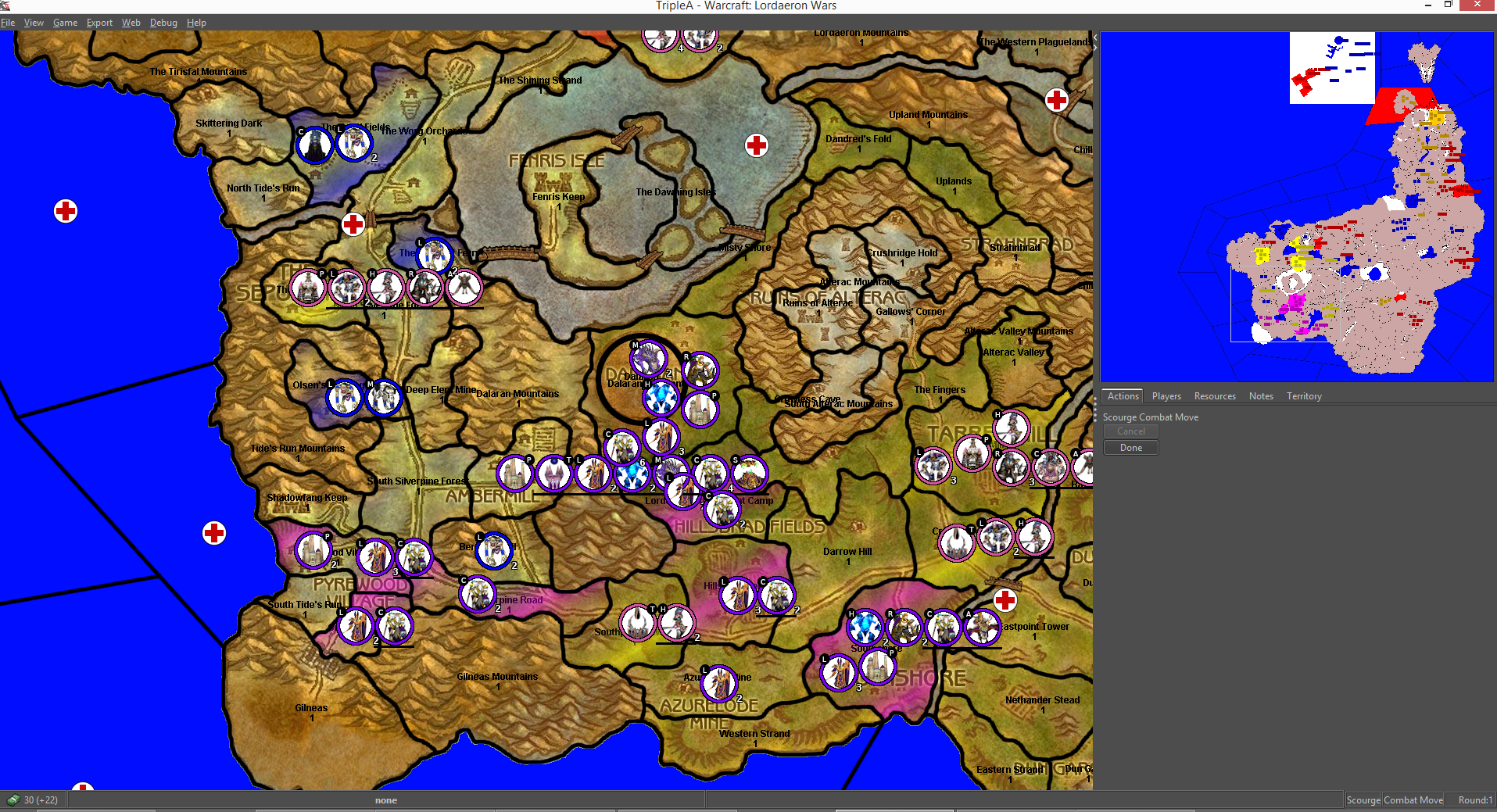
1st pic is of Silverpine Forest + Hillsbrad + Dalaran. It doesnt look as bad as the other areas because theirs less units then other places.
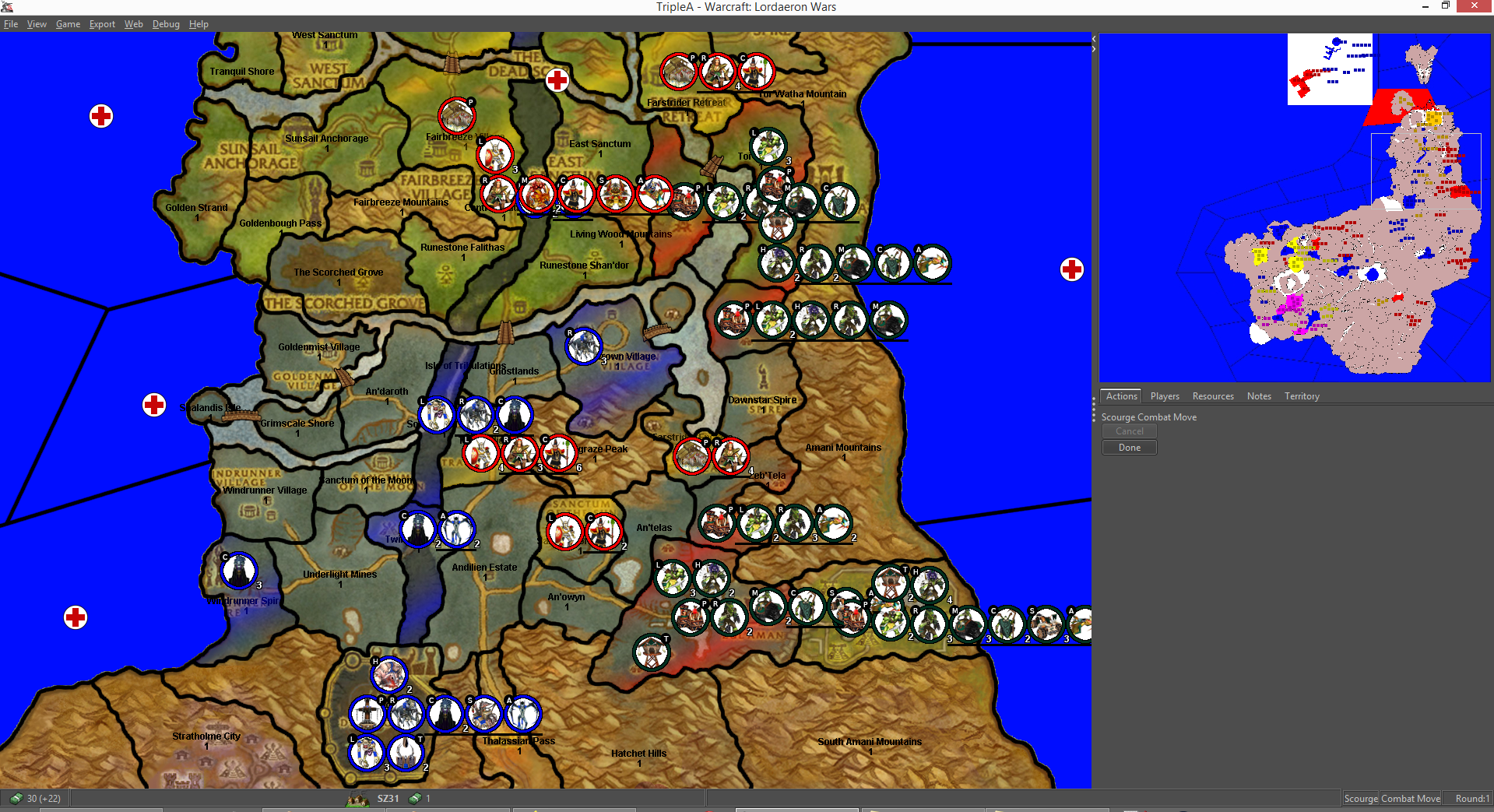
2nd pic is of Ghostlands + Eversong Woods. As can be seen and I mentioned earlier, I think I went overboard with the trolls.
And the zoomed out map
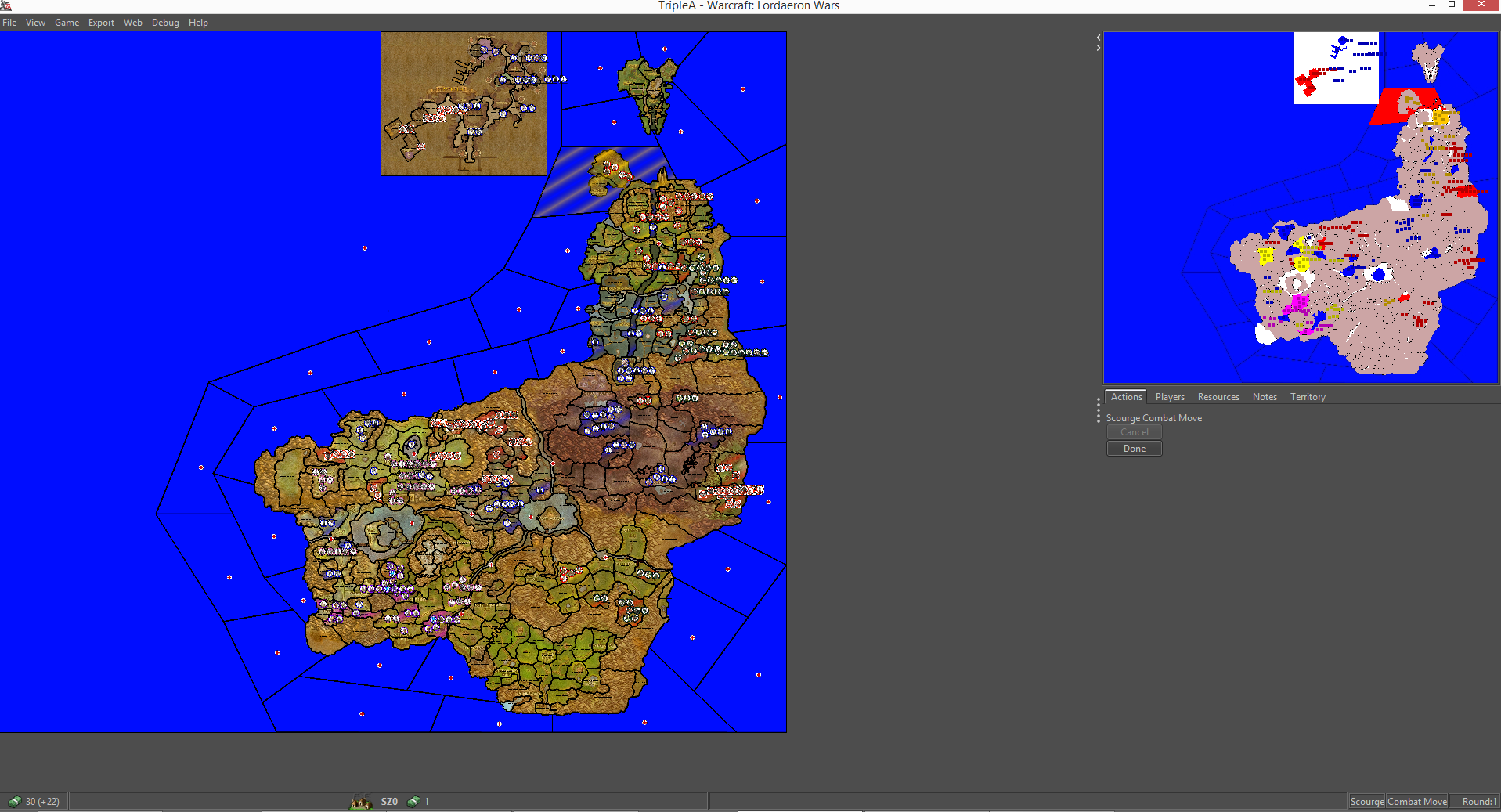
Overall its all coming together in one unseemly but hopefully "playable" map once I have taken care of issues and added some missing things like boats.
__
Thanks to Frostion for the wooden bridge models he created since I was struggling to find 1 that I liked that I could orient into different angles. -
-
@Zaroph To me it seems like that some territories are maybe a bit to small, taking into consideration that two armies consisting of several unit types and allies might stack up and go into a single territory, containing yet another big army. Maybe you should consider 50-75% larger map? Or 50% larger map and 25% smaller units?
Also, the units look good besides jagged edges of the circles. I hope you have kept all the original unit pictures without the circles. I guess that they are much larger. Then you can make much larger circles and with a graphical program scale them down to the wanted size, before or after adding unit avatars. If you need help with unit work. I will gladly help if/when I got time

PS: Map work is much more important at this stage of the creation process, as you can always return to the detail of unit pictures.
-
@Zaroph To me it seems like that some territories are maybe a bit to small, taking into consideration that two armies consisting of several unit types and allies might stack up and go into a single territory, containing yet another big army. Maybe you should consider 50-75% larger map? Or 50% larger map and 25% smaller units?
Although I agree that their are territories that are small in size which is why I was thinking of decreasing the unit size by some %, I think part of the problem is that in WoW, their are areas of interest that are typically a questing hub or some sort of camp of monsters, and between these are passing by areas with generic area appropriate monsters. So when drawing borders on the map, the territories are centred on the areas of interest and so the size of the tripleA territories ive done is limited by the size of the area of interest and whats around it. I think a good example of this is Shadowfang Keep and Pyrewood Village in Silverpine forest. Theyre both right next to each other, take up a small amount of room, bordered by the sea and mountain, but theyre very distinct areas that I wouldnt like to merge unless gameplay necessitates it.
Before making the copy of the map i posted, I tried merging similar territories together. E.g. their are 4 farms in north Silverpine Forest, 2 of them have undead and 2 of them have Wolves/Worgan in them so I merged the 2 similar ones together.
I looked for the largest conjoined map of vanillia or TBC available and this was the map I found, which included Kalimdor on the other side which I have cropped out. The size of the in-game map at the moment is 5058x4500. Since only the right half is used its more like 2500x4500. The thought of increasing the map size hasnt occured to me, but I imagine doing a large increase like 25%-75% would stretch it and make it not look nice? But I guess the only thing to do is try it in combination with a unit decrease to find a good solution.
Also, the units look good besides jagged edges of the circles. I hope you have kept all the original unit pictures without the circles. I guess that they are much larger. Then you can make much larger circles and with a graphical program scale them down to the wanted size, before or after adding unit avatars. If you need help with unit work. I will gladly help if/when I got time
After looking at other maps and considering the size of the map, I decided to make the units 50x50 pixels in size. So I set the options in the properties folder to be 50 height/50 width, and then I made the final images to be a 50 pixel diameter circle. The two sets of black edges on the circles are a single pixel in size. Would it look less jaggered if I say, made the coloured border circle 500x500 pixels and then made them 10% smaller?
PS: Map work is much more important at this stage of the creation process, as you can always return to the detail of unit pictures.
Yeah changing anything on the map leads to having to start up gimp and do editing, run the map creator in tripleA to generate the center and polygon files, whereas for the code I just pop it in easily.
-
If you really want to be true to the small areas of WoW (I like the idea
 ) and make them their own territories in TripleA, then you should really make the map like 100% bigger. You could make a map like 9000x9000 if you cut the water (if this is the intention?). I don't really think that the less sharp map image is huge problem, actually the bit blurred background might make the details less eye-catching and help the players keep focus on the units and borders. I get the impression that quite a few players actually don't like detail and sometimes turn details off all together. (you should also prepare the map to look at least decent without details turned on)
50x50 is ok unit size, but you can go as large as 54x54 without units becoming too big to show in menus and windows (larger than 54x54 will get pixels cut during various displays)
It would be much better if the units were like 500×500 and then scaled down to what you want. Gimp should do a fine job. You can also scale you original unit avatars up/down to fit the large circles and then scale it all down at ounce. When I made my Dragon War images, I added the small unit type symbols (like L and H) afterwards. Sadly I did not use Gimp when I made my units, but I used an inferior program and I am not that satisfied with he sharpness of my units and circle edges. So I actually think your units could be made to look better.
I know it is tedious work redoing stuff, but I am sure you will find the end result all worth it

-
Its been a couple months since I posted an update and truthfully I havent done any more work on the map, mostly due to being disheartened after finding the initial graphic work I did was too small.
However due to the recent world events I find myself with lots more free time and more spirit to continue so their will be more updates.
-
@Zaroph said in Warcraft: Lordaeron Wars - Official Thread:
Its been a couple months since I posted an update and truthfully I havent done any more work on the map, mostly due to being disheartened after finding the initial graphic work I did was too small.
Don't get disheartened. My first two projects had to be essentially taken back to the drawing board after my initial attempts were fraught with issues. Persisting on and seeing it to the end will more than compensate for whatever frustrations you might be feeling right now.
-
@Zaroph Melius abundare quam deficere.:smiling_face_with_halo:
-
After finding motivation over the past 2/3 weeks Ive been resuming this project by doing bits of work every now and then.
Now, the first version is almost complete. The only remaining major thing to do is finishing the notes section so that a player is clear about everything in the map.And also minor things like:
- Removing the PU values of mountains that I've missed.
- Unit placements in Gilneas, Hinterlands and East Plaguelands.
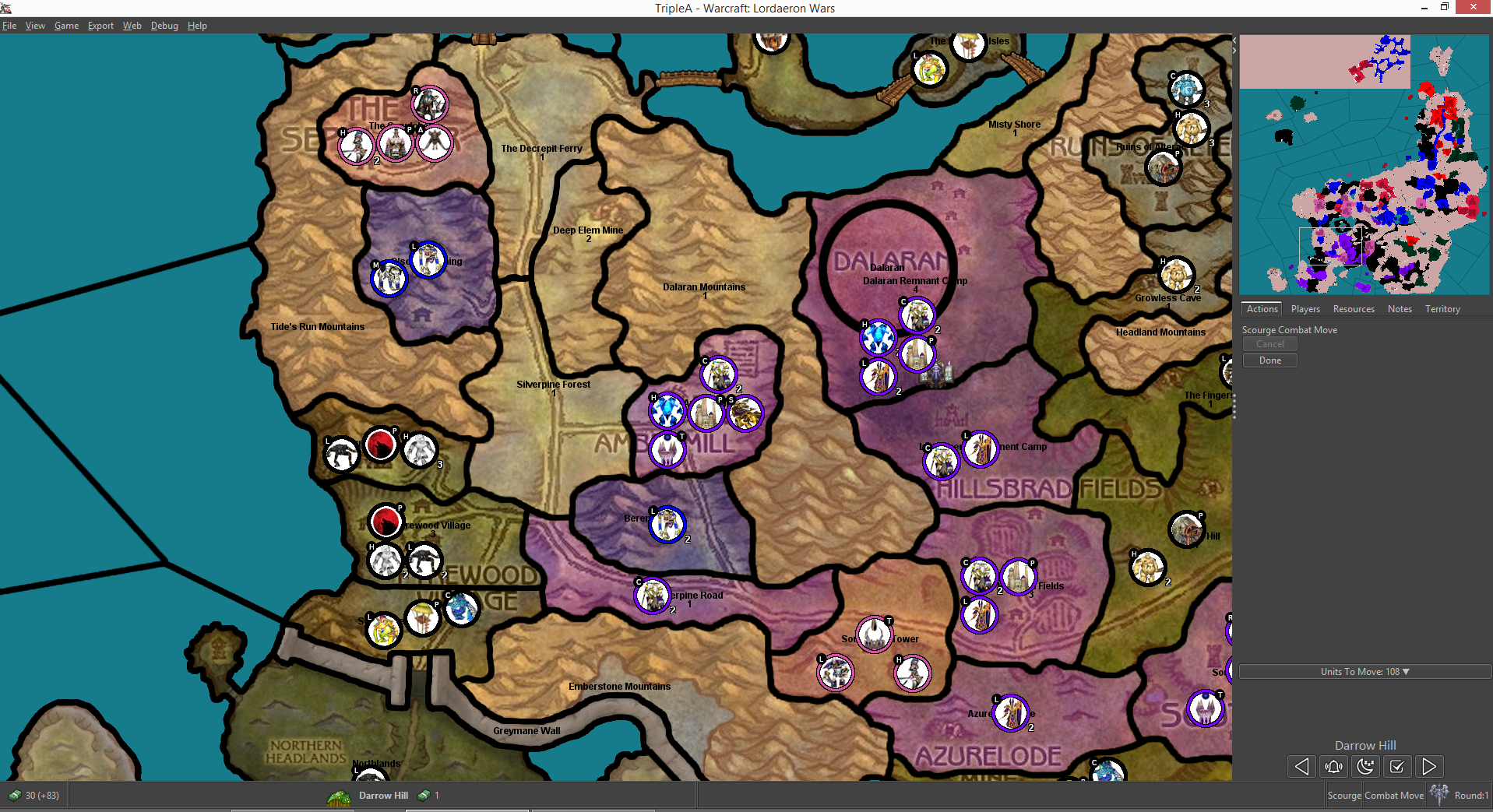
- Custom placements for a few territories so that they dont start overstacking after the first placement. (This can be seen in the top right of my second screenshot)
- Making some units for future factions that are in Lordaeron, such as Dwarves which control Dun Garok and Aerie Peak so that those territories have unit presences.
After releasing a initial 0.1a version, there are other short term goals I have in mind before hopefully proceeding to do my long term goal of doing the entire Eastern Kingdoms area:
- Look at the base line stats of units + support/targeted attacks once again since this was a depriotised thing for me since its much simpler and easy to change. My suspicion from initial testing is that after the early land grabs and fights, its difficult to relocate units to other fronts so I was thinking of having a timed event on turn 10/15 that increases the movement of units by 1.
- Probably look at sea zones again since I did them rather arbitrary and I have a feeling that some of them have poor sizes and connections.
- Add in 2 (3 if spawned by another) unique units for each faction. This is tricky in some cases, but one that I am sure on is the "Scourge" faction having a "Necromancer" unit that either creates free weak "Skeletons" per turn or interacts in some manner with the # of TUV or PU destroyed in a battle containing it.
- Add in some sort of unique mechanic for each faction. In this case, I am relatively sure on one of them: The "TrollTribes" faction will be able to select which major and minor tribes they start the game with, with an option to have them all (if a player wants to and probably for the ai) and a option that limits the numbers they can pick.
- After this, write some random events such as "Faction gains/loses X/Y/Z PU", neutral faction related events such as bandit raids spawning bandit units or murloc raids spawning murloc units on a coast territory etc.
2 Latest screenshots.
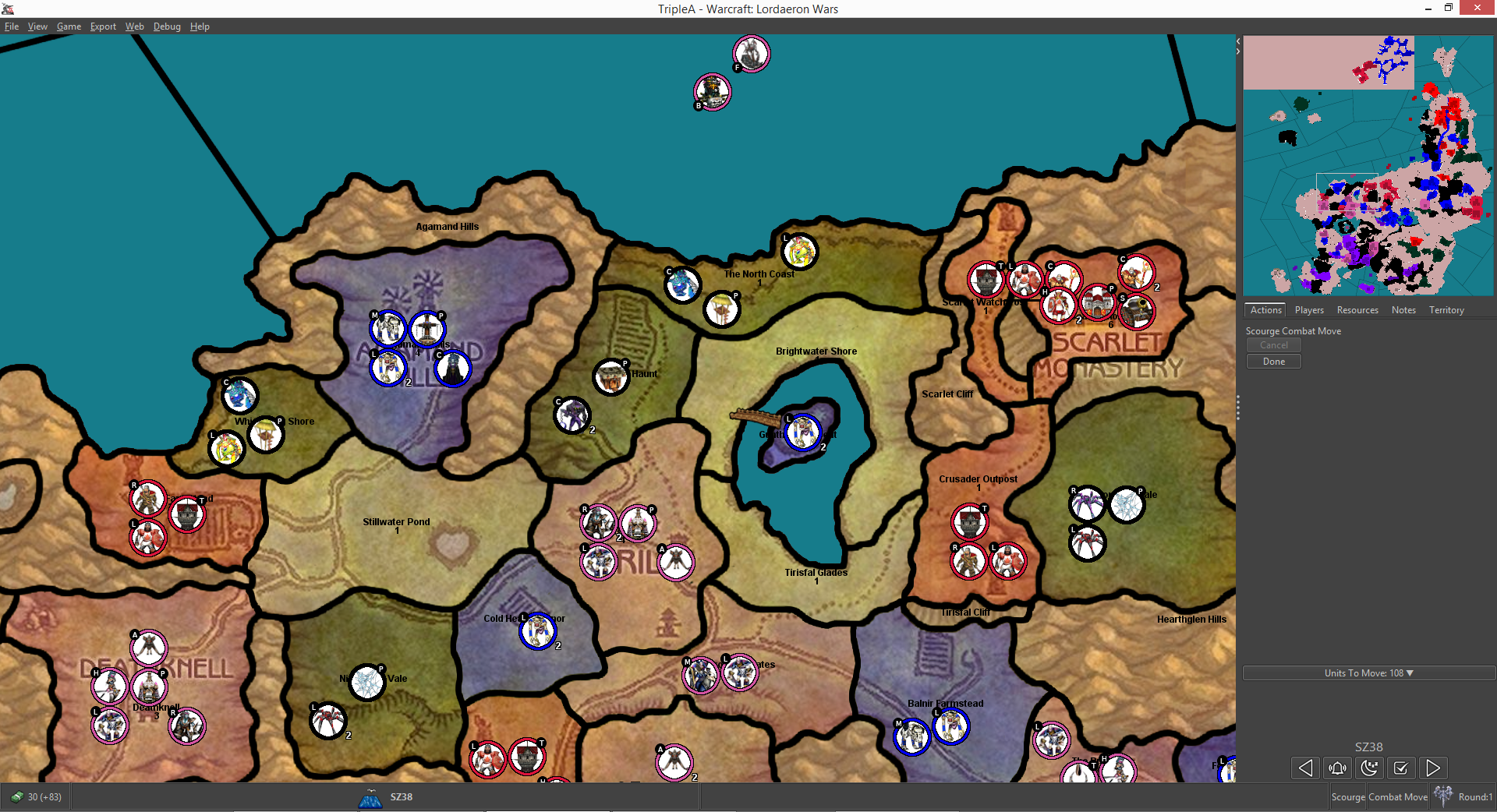
-
Is this downloadable yet? Thanks!
-
I finally got motivation to finish off the first version of this map for download. The thing that I really didnt want to do was writing the game notes out since after I did it, I didnt save it on notepad+ but for some reason it disappeared the next time I opened it so I had to do it all again.
Ill follow Frostions guide to upload it to the repository.
-
Personally I would write the Game notes in a word-processer with images if needed and save it as a png
here is the xml code
<property name="notes">
<value>
<![CDATA[
<html>
<body bgcolor="050505" align="left">
<div style="padding:10px;"text-align:justify;">
<br>
<center><img src="Game_Notes.png"/></center>
</body>
</html>
]]>
</value>
</property>and put the Game_Notes.png file here
\your_map_name-here\doc\images -
@Zaroph Great map!
The game was initially unplayable due to unit name mistakes, though they can easily be corrected. I also modified certain units from each main faction to give each of them a more unique feel.Here are the unit changes I made for each faction. Most factions have two units with major (two) modifications and two units with minor (one) modifications.
Scourge
Caster (2/10 AA Att) (-1 Power to 3)
Battleship (+1 Att) (+1 Def)
(Production) +1 Air Unit (Each Turn)
Tower (2x5 Def)Scarlet Crusade
Cavalry (+1 Def) (4/10 Charge Att)
Siege (5/10 AA Att) (+1 Att)
Light Infantry (-1 PU)
Battleship (+1 Transport)Trolls
Heavy Infantry (+1 Att) (+1 Leadership to 2)
(Production) +2 Light Infantry Units (Each Turn)
Frigate (+1 Def)
Caster (+1 Att)Dalaran
Light Infantry (2/10 AA Def) (+1 Def)
Tower (3x4 Def) (Produce 2 Units)
Ranged (3/10 AA Def)
Cavalry (+1 Att)Forsaken
Air (+1 Att) (+1 Def)
Transport (+1 Def) (+1 Transport)
Heavy Infantry (+1 Def)
Siege (-1 PU)Blood Elves
Ranged (+1 Def) (-1 PU)
Frigate (+1 Att) (-1 PU)
Air (4/10 AA Att)
Transport (+1 Att)I’m looking forward to playing the map some more.
-
@Greg-Anderson
The game was initially unplayable due to unit name mistakes, though they can easily be corrected. I also modified certain units from each main faction to give each of them a more unique feel.Which unit names had mistakes? My own folder works but it might be slightly different to the one on github.
Here are the unit changes I made for each faction. Most factions have two units with major (two) modifications and two units with minor (one) modifications.
Scourge
Caster (2/10 AA Att) (-1 Power to 3)
Battleship (+1 Att) (+1 Def)
(Production) +1 Air Unit (Each Turn)
Tower (2x5 Def)Scarlet Crusade
Cavalry (+1 Def) (4/10 Charge Att)
Siege (5/10 AA Att) (+1 Att)
Light Infantry (-1 PU)
Battleship (+1 Transport)Trolls
Heavy Infantry (+1 Att) (+1 Leadership to 2)
(Production) +2 Light Infantry Units (Each Turn)
Frigate (+1 Def)
Caster (+1 Att)Dalaran
Light Infantry (2/10 AA Def) (+1 Def)
Tower (3x4 Def) (Produce 2 Units)
Ranged (3/10 AA Def)
Cavalry (+1 Att)Forsaken
Air (+1 Att) (+1 Def)
Transport (+1 Def) (+1 Transport)
Heavy Infantry (+1 Def)
Siege (-1 PU)Blood Elves
Ranged (+1 Def) (-1 PU)
Frigate (+1 Att) (-1 PU)
Air (4/10 AA Att)
Transport (+1 Att)I’m looking forward to playing the map some more.
I was wanting to differeniate factions but I wasnt sure as to what degree to do it to. Ill probably differeniate the base units similarly to this when I get around to it.
-
@Zaroph I don't remember the exact unit names that had mistakes, but there were around a dozen of them. The only problem was that some unit names had their first letter capitalized, which caused an error.
Anyway, it isn't a big deal. I'm looking forward to playing the entire Eastern Kingdoms.
-
Over the past week I added the rest of the map and the first version is a beautiful mess.
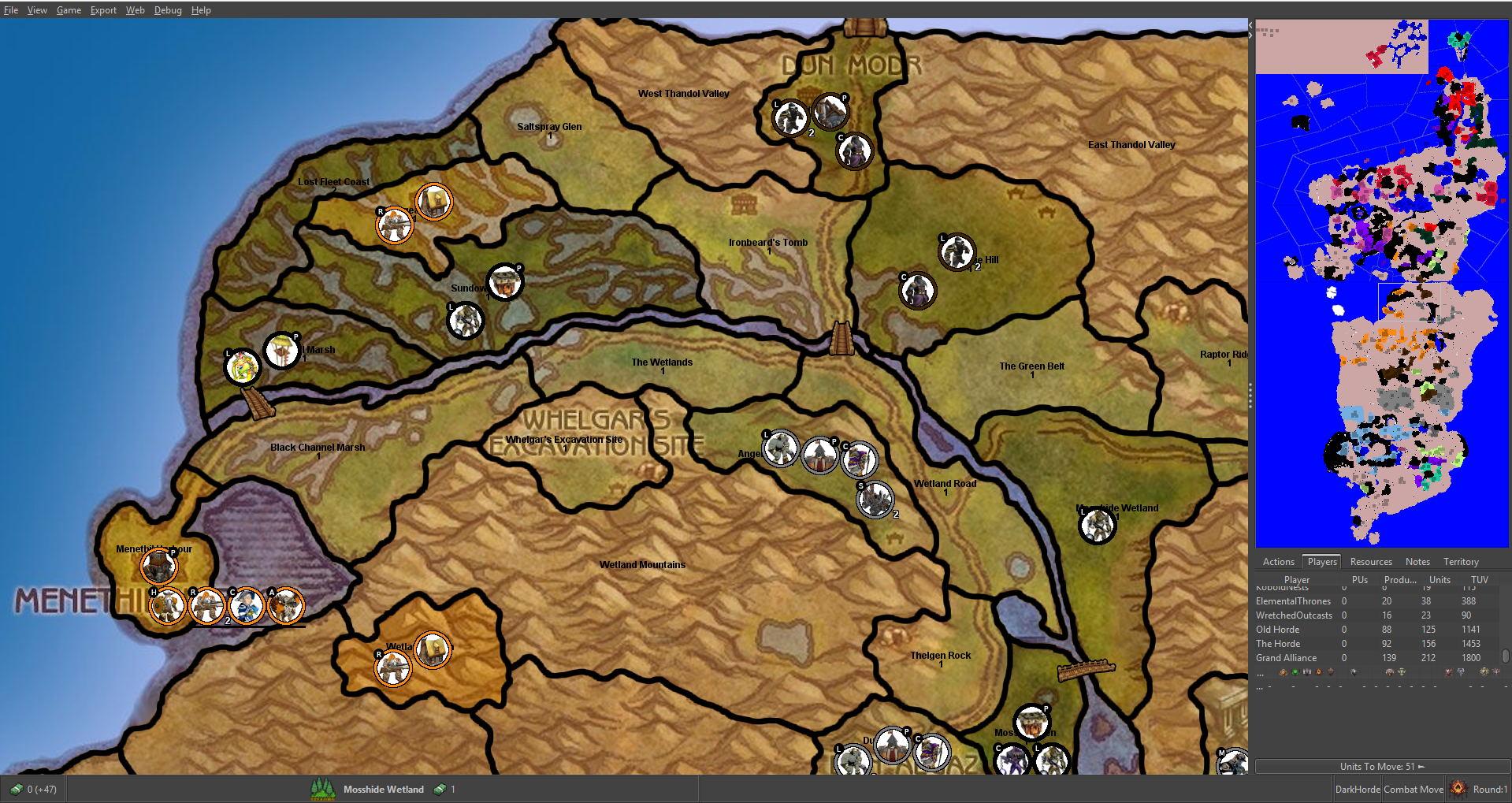
Unfortunately my 4gb memory computer struggles to run it in any meaningful time so I will probably wait awhile before working on it again since I am looking for a new graphics card for a new pc that isnt overpriced.
-
If you feel like disabling some services and freeing up some valuable RAM download as an Excel file and Disable all the "Safe" for DESKTOP services go here
http://www.blackviper.com/service-configurations/black-vipers-windows-10-service-configurations/This might tide you over till the graphics card arrives.
-
@Zaroph Looks great! Is the new version available yet?
-
If you feel like disabling some services and freeing up some valuable RAM download as an Excel file and Disable all the "Safe" for DESKTOP services go here
http://www.blackviper.com/service-configurations/black-vipers-windows-10-service-configurations/This might tide you over till the graphics card arrives.
Thanks Ill look into this though I use windows 8.1 but I imagine theres some overlap in the services.
@Zaroph Looks great! Is the new version available yet?
I rushed the map out so its missing some things like sea zones, proper transparacy, tweaks to map zones Ive come up with etc but I can link it here for you tho its incomplete.




Hello! It looks like you're interested in this conversation, but you don't have an account yet.
Getting fed up of having to scroll through the same posts each visit? When you register for an account, you'll always come back to exactly where you were before, and choose to be notified of new replies (either via email, or push notification). You'll also be able to save bookmarks and upvote posts to show your appreciation to other community members.
With your input, this post could be even better 💗
Register Login