TripleA Logo TripleA Forum
    • TripleA Website
    • Categories
    • Recent
    • Popular
    • Users
    • Groups
    • Tags
    • Register
    • Login

    2.3 is Released!

    Scheduled Pinned Locked Moved News
    50 Posts 8 Posters 16.0k Views 7 Watching
    Loading More Posts
    • Oldest to Newest
    • Newest to Oldest
    • Most Votes
    Reply
    • Reply as topic
    Log in to reply
    This topic has been deleted. Only users with topic management privileges can see it.
    • S Offline
      SilverBullet @Raziridium
      last edited by

      @Raziridium hmm, i will try that next time i come across it, thanks.

      1 Reply Last reply Reply Quote 0
      • SchulzS Offline
        Schulz
        last edited by

        Still I can't open maps in 2.4 unfortunately.

        1 Reply Last reply Reply Quote 0
        • LaFayetteL Offline
          LaFayette Admin
          last edited by

          @Schulz would you mind providing more details on what you are seeing? Are you getting any kind of error message?

          1 Reply Last reply Reply Quote 0
          • SchulzS Offline
            Schulz
            last edited by

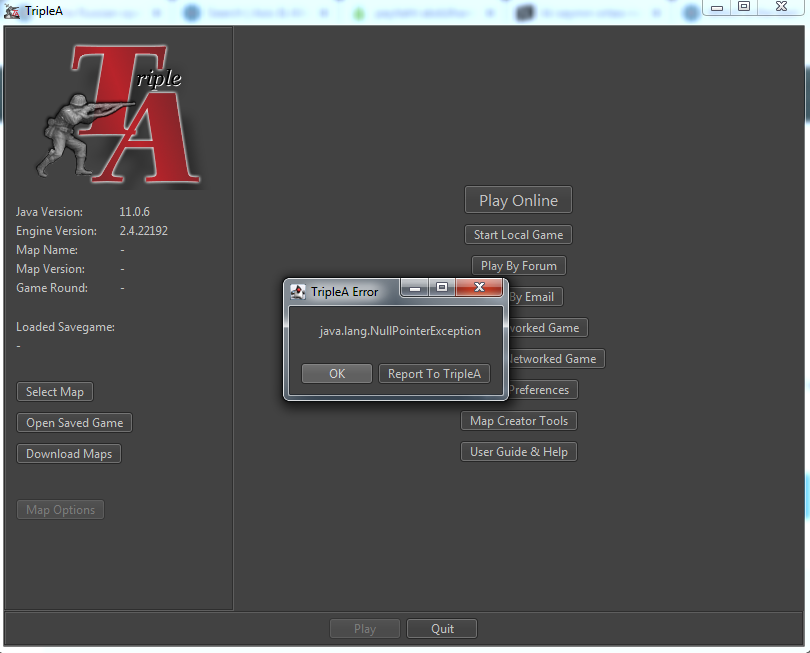
            jyjtgfrg.png

            T PantherP 2 Replies Last reply Reply Quote 0
            • T Offline
              Trevan @Schulz
              last edited by

              @Schulz can you click the "Report to TripleA" button and add a message in it linking back to this forum post?

              1 Reply Last reply Reply Quote 0
              • PantherP Offline
                Panther Admin Moderators @Schulz
                last edited by Panther

                @Schulz

                Your screenshot indicates that you did not select any map. So there is nothing to open.

                Starting from that screen:

                What happens when you klick ok?

                The message should disappear then.

                After that you can neither klick "Select Map" nor "Download Maps" ?
                Please try that and report what happens.

                Don't always trust TripleA when it comes to rules questions. Know the rules before you start … and better check what TripleA has done.

                1 Reply Last reply Reply Quote 0
                • SchulzS Offline
                  Schulz
                  last edited by

                  After clicking, it disappears but when trying to click "select map" it appears again.

                  "Download Maps" works. Load games also work too.

                  https://github.com/triplea-game/triplea/issues/8017

                  T 1 Reply Last reply Reply Quote 0
                  • LaFayetteL Offline
                    LaFayette Admin
                    last edited by

                    The error report is really useful. Did you last play a custom map @Schulz ?

                    My guess is there is a XML file in that last map that is now being loaded. The game engine will now load any XML file in a map bundle, not just the XMLs in 'games'.

                    I suspect a fix for this problem could be done pretty quickly, stay tuned. In the meantime, if you're able to select a different map, you might not see the error. Please let me know if you see the same error for any map that you select.

                    1 Reply Last reply Reply Quote 0
                    • T Offline
                      Trevan @Schulz
                      last edited by

                      @Schulz what happens if you load a saved game, play it, quit triplea, and then re-open triplea? Do you get the same error? Do you have saved games from different maps, can you try a few of the saved games?

                      1 Reply Last reply Reply Quote 0
                      • SchulzS Offline
                        Schulz
                        last edited by

                        I don't remember which map I was playing.

                        @Trevan yes, I get the same error with that way. I had save games from diferent maps, they all work fine.

                        T 1 Reply Last reply Reply Quote 0
                        • T Offline
                          Trevan @Schulz
                          last edited by

                          @Schulz The error looks like it is occurring because the last map you played isn't liked by 2.3 or 2.4. That's why I'm asking you to load a saved game, play it, and then close triplea completely and reopen it. Each time you load a saved game, it changes the last map you played. And when you exit triplea and then reopen triplea, it should try and load the map from the saved game you just played.

                          You said that you have several saved games from different maps. Did you try each one of them (load the game, play it, exit triplea, open triplea)? Did they all cause the error? What are the maps of the saved games that cause the error when you open triplea?

                          And once you've found a map that "fixes" the error, then you should be able to load maps without any problem.

                          1 Reply Last reply Reply Quote 0
                          • SchulzS Offline
                            Schulz
                            last edited by

                            All load games work.

                            T 1 Reply Last reply Reply Quote 0
                            • T Offline
                              Trevan @Schulz
                              last edited by

                              @Schulz said in 2.3 is Released!:

                              All load games work.

                              I'm not asking if the load games work. I'm asking you to load the game, then quit triplea and then restart triplea. Does that fix the problem?

                              1 Reply Last reply Reply Quote 0
                              • SchulzS Offline
                                Schulz
                                last edited by

                                It didn't fix the problem.

                                T 1 Reply Last reply Reply Quote 0
                                • LaFayetteL Offline
                                  LaFayette Admin
                                  last edited by

                                  Spent the last 4 hours investigating issues loading save games and am turning up not a lot.

                                  I'm seeing two issues:

                                  1. Stack Overflow on bot loading save
                                  2. Save game hangs

                                  (1) looks to be 'fixable' by setting XSS on the bots to match the value we have for the headed game running

                                  For (2), I've narrowed the hang down to the client side on these lines in GameDataManager.java:

                                    public static GameData loadGame(final InputStream is) throws IOException {
                                      checkNotNull(is);
                                  
                                      final ObjectInputStream input = new ObjectInputStream(new GZIPInputStream(is));
                                      try {
                                        final Object version = input.readObject();
                                  

                                  I launched a bot in 2.2 with a headed client on 2.2 and the hang happened. Sometimes the hang did not happen and I was not able to deterministically determine what that was.

                                  I'm attaching a save-game I was sent that gets a hang when you launch the game via save-game on bots.

                                  aktuell.tsvg

                                  1 Reply Last reply Reply Quote 1
                                  • T Offline
                                    Trevan @Schulz
                                    last edited by

                                    @Schulz said in 2.3 is Released!:

                                    It didn't fix the problem.

                                    Does it fix the exception showing in the UI? I've manually replicated the error by changing the code to throw an exception at the same point but I can still see select a new map to play. So this error appears to not be related to the map selection issue. Do you get a different error when you click on the "Select Map" button? What maps do you have downloaded? Can you try deleting all of them (or moving them to a different directory) and then downloading one again and see if that map can be selected?

                                    1 Reply Last reply Reply Quote 0
                                    • LaFayetteL Offline
                                      LaFayette Admin
                                      last edited by

                                      @Schulz , @Trevan , this update should help: https://github.com/triplea-game/triplea/pull/8031

                                      It looks like a map is dying in an unexpected way during parse and that is killing the whole game. Deleting all maps should be a very blunt force way of fixing that. If you download the very latest @Schulz , you should get an error message telling which XML is generating a problem and then you should be able to continue to select a different map. As-is, the validation during parse is going uncaught and I would imagine is killing the whole client.

                                      1 Reply Last reply Reply Quote 0
                                      • SchulzS Offline
                                        Schulz
                                        last edited by

                                        Even temporarily removing maps from "downloadedMaps" folder didn't help. Its all the same error message. I've downloaded most of maps from repository. I have never experiences similar thing before.

                                        1 Reply Last reply Reply Quote 0
                                        • LaFayetteL Offline
                                          LaFayette Admin
                                          last edited by

                                          @Schulz , would you mind installing the very latest and see if you get any different behavior: https://github.com/triplea-game/triplea/releases/tag/2.5.22237

                                          1 Reply Last reply Reply Quote 0
                                          • SchulzS Offline
                                            Schulz
                                            last edited by

                                            The same issue is still present unfortunately.

                                            1 Reply Last reply Reply Quote 0

                                            Hello! It looks like you're interested in this conversation, but you don't have an account yet.

                                            Getting fed up of having to scroll through the same posts each visit? When you register for an account, you'll always come back to exactly where you were before, and choose to be notified of new replies (either via email, or push notification). You'll also be able to save bookmarks and upvote posts to show your appreciation to other community members.

                                            With your input, this post could be even better 💗

                                            Register Login
                                            • 1
                                            • 2
                                            • 3
                                            • 1 / 3
                                            • First post
                                              Last post
                                            Copyright © 2016-2018 TripleA-Devs | Powered by NodeBB Forums