2.6 Release Getting Close - Need Volunteers to Help Beta Test 2.6
-
PS: thanks for checking things out in 2.6 and doing some testing!
-
@lafayette Yeah no worries. I'll try to dig up my GIT account, somehow I always get turned around over there.
Just to clarify what I think is going down in the instance Cernel mentioned...
So in the map/game World At War, the map.props has a default Unit scale of 50%.
In the version of tripleA 2.6 I grabbed last night this means that the units as they display on the WaW map are at half scale within the various battlescreens and purchase menus (Curiously the tab Unit Help, still shows an upscale of the images, but only within that window it seems.) The bottom bar I believe is showing the units downscaled and then downscaled once again from there, probably why they are showing up so very small on the WaW bottom bar. In other older maps I've also seen map.props or a place.txt that has the units being reduced in scale in that way.
For the two maps I made more recently which were targeting a higher resolution display, the 1941 Global Command Decision, and the UHD World War II Global, you can see how it holds up going the opposite direction in map.props. So using unit/flag graphics at the largest dimensions I could make them before they'd clip (basically 54px, by about 96px.) In the UHD beelee set units at 125% so you'll see the various battlescreens or bars upscaling rather downscaling as they do in WaW, when that one is launched.
I tend to always have the same issues hosting in the lobby, getting lost in the port forwarding maze every time I move hehe. Like if Xfinity is foisting a new router on me, or windows or norton decides they want to grief me. My quickie solution, which I'd guess others probably turn to as well, would have been just to host via the bots, but I think the map repo there is the 2.5 collection when launching from the lobby bots, so I wasn't able to try it on the fly with the UHD or GCD yet. The place.txt for the former is at 125% for the 54px units graphics, the latter 100% for the 54px unit graphics. For games with 48pxers for units I had been downscaling my display to 1080/1200p, which is sorta the only way I found to keep things looking legible, tradeoff is some hotfuzz there with the blur.
-
Oh also for WaW specifically, so because the place.txt and props for that one have 50% unit view in the map display (now carried over into the other UI windows) players I think would have a tough time just manually changing the Unit zoom to say 100% to shore it up. Doing so will restore the battlescreen views, but also make the units on the Map display too large to fit the place. Basically the units will crowd and overlap to the point that the player can't really see what's going anymore.
Here are some screens of WaW mentioned above, again images downscaled from 1600p to 1080p in GIMP just so I could attach them here.
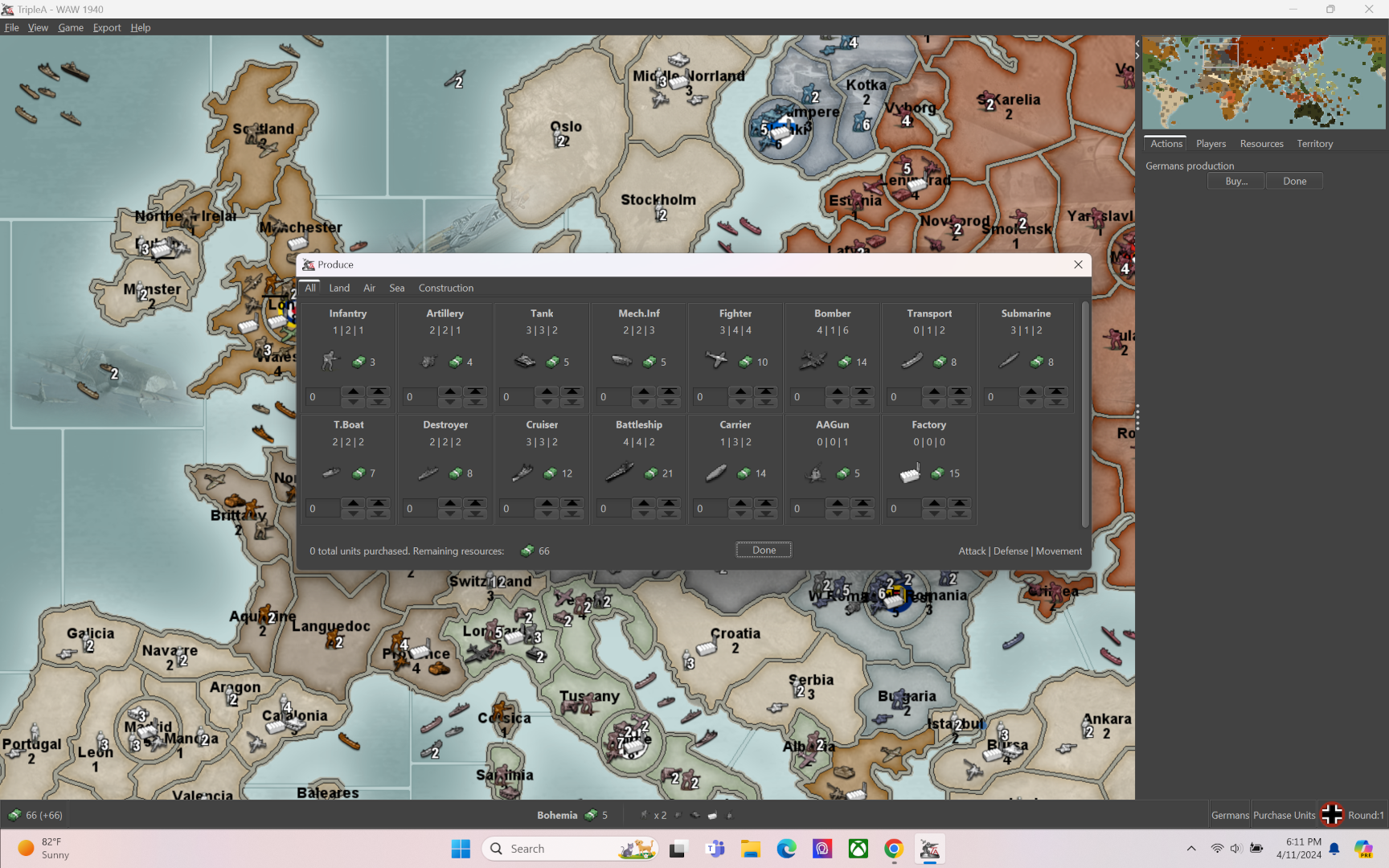
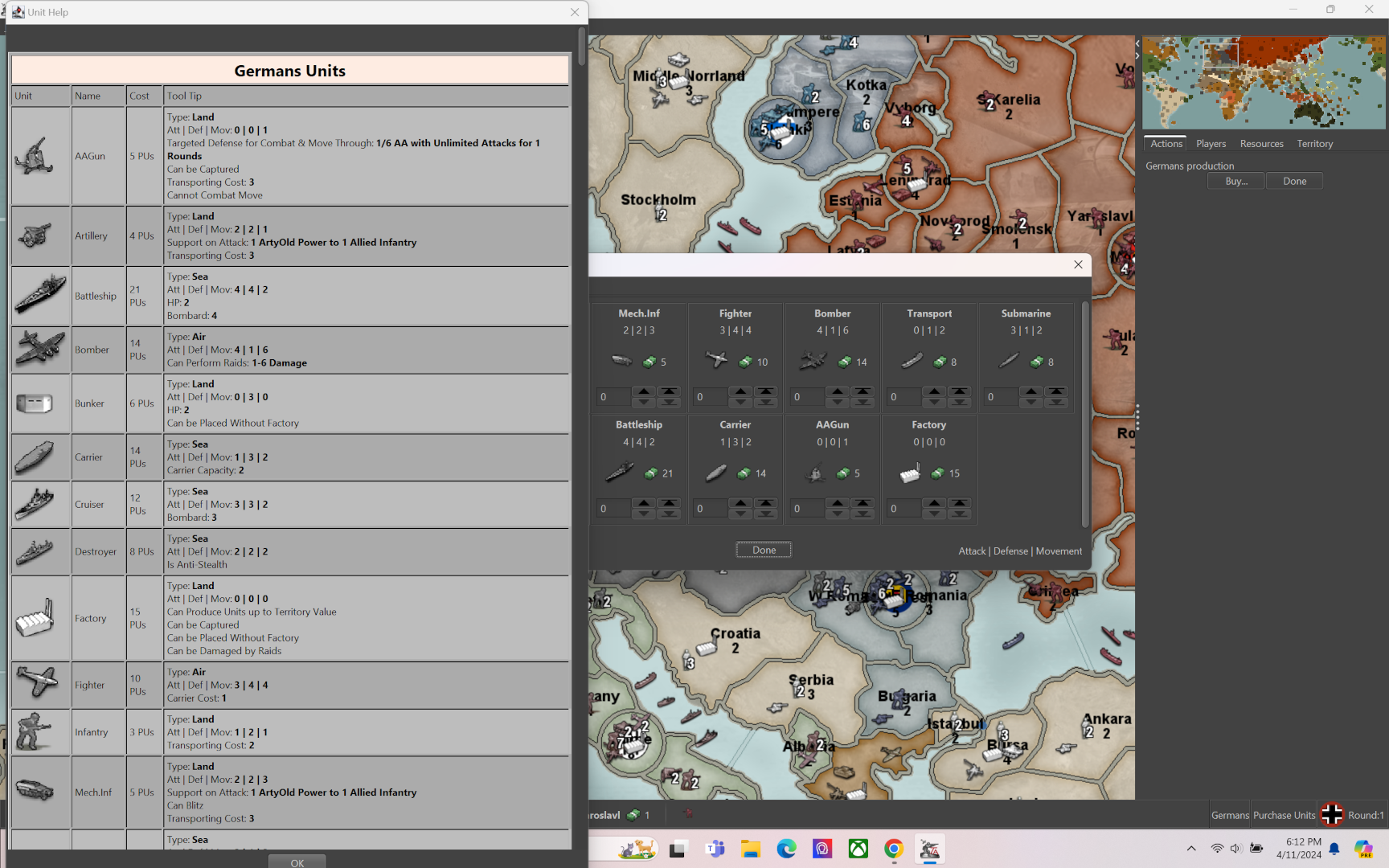
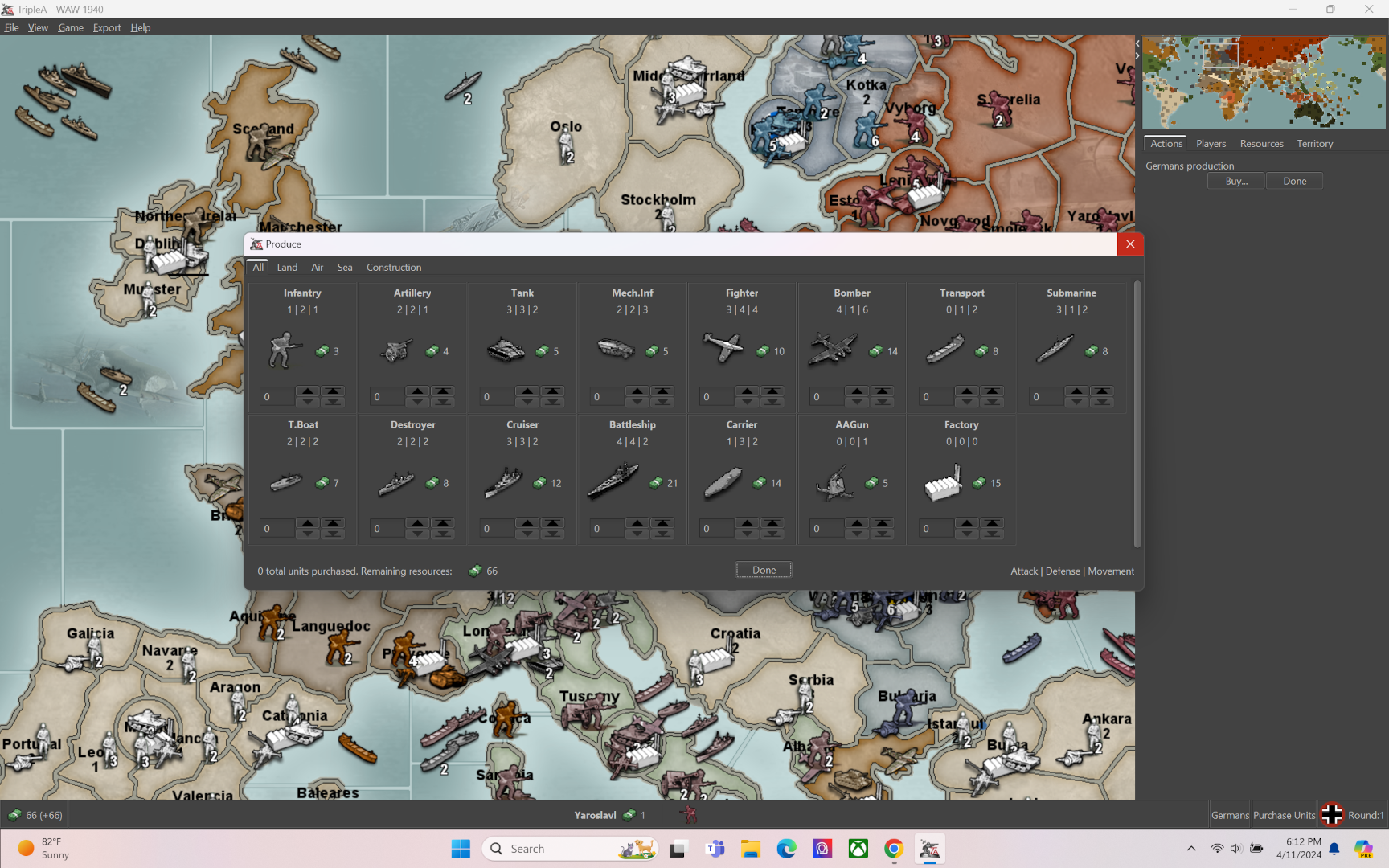
I think what people will notice right away if playing on maps that use something other than 100% for the unit zoom or place.txt, is that their battleview or purchase screens or the place will scale to match. So it something is too larger or two small in either view, they don't really have a way to isolate the one from the other, since the older builds it would only effect the units in the map display. Not sure if that makes sense, sorry I'm terribly typist hehe. Catch ya next round gang!
-
Created this git issue and added to Problem Tracker
-
The code to use scaled map images vs unscaled images was very confusing, and that was the issue - they got switched along the way. I just pushed a fix for it: https://github.com/triplea-game/triplea/pull/12507
That resolves the issue of the unit images appearing very small in the purchase window.
The units in the bottom bar is just a new feature, they are scaled to the currency display that is in the bottom bar as well. There's a number of places that could use larger font & image sizing, the bottom bar is another victim to that problem.
-
@lafayette
I noticed that my triplea.log has grown to 10MB, here is a compressed version.
triplea-log.zipIm not sure why it has grown.
Should it have a maximum size of say 2MB ?
-
triplea.log continues to append to itself. I keep it open in notepad++, highlight it's contains, delete it then save. This way when I start receiving errors I can check the log for the problem.
Cheers...
-
@thedog The log file should roll over at around 10MB and then keep at most 3 of them. Looks like total logging data is capped to 30 or 50MB total.
This is the config in play from
logback.xml:<rollingPolicy class="ch.qos.logback.core.rolling.SizeAndTimeBasedRollingPolicy"> <!-- rollover daily --> <fileNamePattern>triplea-%d{yyyy-MM-dd}.%i.log</fileNamePattern> <!-- each file should be at most 10MB, keep 3 days worth of history, but at most 50MB --> <maxFileSize>10MB</maxFileSize> <maxHistory>3</maxHistory> <totalSizeCap>50MB</totalSizeCap> </rollingPolicy> -
@wc_sumpton
My variant is to rename it and then I have a reference for comparison, Notepad++ compare, between 2 or more files. -
@lafayette
I had never let it grow to such a size, but good to know.It is still a large amount of data, that would for the most not be used/accessed.
Would smaller file sizes be worth having?
-
I'm not sure if the log file policy is actually correctly configured. I don't expect trace messages to be in the log file, yet I see them.
EG:
25642 16:41:40.475 [Thread-7] TRACE o.t.generic.xml.reader.XmlMapper - MappingIt does not look like my log file has rolled over for some time:
dan@desk:~$ du -hs ./triplea/triplea.log 210M ./triplea/triplea.log -
Made a issue for new games not being playable in the lobby
https://github.com/triplea-game/triplea/issues/12517
It's important to me and well, I'm sure @TheDog would like to see his map available as well.
It's under project instead of issues, so move if needed.
This is really important to map makers and should be for triplea in general.
Being able to create your own or modified map is a Huge appeal to triplea.
Anyway, I think it's important. I will not be spamming the problem tracker

-
Raise this, for triplea.log not truncating
https://github.com/triplea-game/triplea/issues/12536 -
It seems like it is soft-launch and/or hard launch time for TripleA.
Next steps:
-
(soft launch) update build config such that every update to the code creates a new "release" instead of a "prerelease". This update itself will be considered an update, and there-after the 'download' button from the TripleA website will download the very latest TripleA
-
(hard launch) update 'servers-config' to indicate 2.6 as the latest version, this will trigger 'your TripleA is out of date' messages to the 2.5 users
-
-
2.6 is now launched!
From now on, the latest version of the game will be available from the triplea website: https://triplea-game.org/download/
I'm thinking around Wednesday we'll make the next updates to trigger the "your game is out of date" notification for 2.5.
-
FWIW, here are the TripleA 2.5 download stats:
"name": "migrations.zip", "download_count": 181, "name": "triplea-game-headed-2.5.22294.zip", "download_count": 490, "name": "triplea-game-headless-2.5.22294.zip", "download_count": 366, "name": "triplea-lobby-server-2.5.22294.zip", "download_count": 141, "name": "triplea-maps-server-2.5.22294.zip", "download_count": 146, "name": "TripleA_2.5.22294_macos.dmg", "download_count": 18011, "name": "TripleA_2.5.22294_unix.sh", "download_count": 12042, "name": "TripleA_2.5.22294_windows-32bit.exe", "download_count": 6962, "name": "TripleA_2.5.22294_windows-64bit.exe", "download_count": 86768, -
@lafayette Definitely TripleA should have more downloads. I guess it's just because most persons in the world just don't know about its existence at all.
Will be interesting to see the Windows 32 bit downloads for 2.6. I guess that very few persons are still on such systems, so the question of whether to have that download option at all may come up in the near future (as I'm also sure there are persons who just don't know what 32 and 64 bit even mean: they just know that they have Windows so don't know what to click when presented with such choice so may download the wrong version, especially users on 64 bit Windows downloading 32 bit because they do not know or are not sure about it).
-
Had some oddities dl'ing an updated map in the 2.6 version.
"Ok, I tried again and was able to get it to work with a remove then redownload.
Still, it's odd that the 'update' button was missing and I had to do remove the map, close triplea, then open and go to mapdownloads again to add the map, normally when a map has a new version there's a button for update.
It also reached 100% twice during that single download, (ie it reached 100%, then went back to 0 then started up again, like it had 2 separate things to download). Quite odd."
-
Was the interface rearranged in 2.6? cuz a lot of little things feel off/different, but I didn't keep a copy of 2.5 to compare with. It feels like some stuff on the right side of my screen is getting cropped that didn't used to get cropped, like maybe there was a bar giving space there that isn't now. And now if I click on a nation in players the section goes white and that white doesn' tgo away so easily, so I have to ctrl-click to clear it out. A bunch of other little things too;
-
@LaFayette or whomever...
... can we please have sort of a "Whats New" or some addition to the Release Notes at https://triplea-game.org/release_notes/
Would be really helpful to encourage people to update.
I must admit I have failed to keep track during the last four years of development (since 2.5.stable).





Hello! It looks like you're interested in this conversation, but you don't have an account yet.
Getting fed up of having to scroll through the same posts each visit? When you register for an account, you'll always come back to exactly where you were before, and choose to be notified of new replies (either via email, or push notification). You'll also be able to save bookmarks and upvote posts to show your appreciation to other community members.
With your input, this post could be even better 💗
Register Login