💥 1941 Global Command Decision - Official Thread
-
Here's a quick dude for the Soviets... and the USA... and the British


I figure to just do one like that painted up for each of the main nations when I get the chance. Like the Japanese dude, I upscaled from our standard Soviet Inf graphic, and just gave him a quick paintjob to look decent at 54px. Hopefully this helps for familiarity with the units, and gets us that more the action-y pose for the main dudes. The others can serve as alts, or for other roles like conscripts or elites. Should help with the overall cohesion I'd think. Like if the Inf unit looks pretty much the same, I think players are maybe more likely to accept the other stuff with a nod right? hehe
ps. added the American up there too. I reworked him from the default though, because the default dude is running and holding his rifle in the off hand with no finger on the trigger, and that just didn't feel right to me lol. This seemed more appropriate somehow.
Pps. Ok there's a quick painted Brit to round out team Allies
-
Ok here's the dude for Italy

If that works for you guys we can start building out the G40 unit folders and Expansion units folders I think. I tried to make the new Infantry units slightly larger, so I'd probably downscale maybe 95% to get them matching the inf from the Frostion set, and just to make sure they don't clip if upscaled to 68 px high in the calc.
I'll try to clean stuff up when I pull the images back out, and would also like to try a more nuanced mask for the tints, where a bit more color shows through, mainly on the infantry and the fighter/bomber aircraft so the air roundels can show some color information there.
Trying to match the dropshadows for the infantry is kinda rough. He must have done it in illustrator or something rather than gimp, cause I haven't found a great solution. I tried to give the new infantry a similar shadow painted manually, but it doesn't look as good to me, I think perhaps because all Frostion's Infantry units are standing legs together with their arms shouldered, whereas the action pose all dude have their legs apart and are pointing their rifles. Our default units used a shadow halo rather than a drop so I went with that, but I tried to dial it back a bit so it wouldn't be as pronounced/dark. I think this works well enough, but then I've been staring at it for hours and am eager to move on lol. The only dropshadows that really bug me are the ones on the V2 rockets and the British artillery unit, since they really stand out to me. I was going to rework those so they're not as pronounced. For the alt infantry, I'd just keep the shadows as is, cause they look pretty good. To me it's almost as if like the New Infantry is in the spotlight and the others are sorta downstage or something, catching the sidelight. That's how I'm rationalizing it anyway heheh.
-
@black_elk
Im a minimalist kinda guy and the dropshadows can be dropped/removed for me. (yes I like puns )
)Especially the aircraft as the shadow is only relevant when taking off and landing.
Also it would look cleaner and be less work to match Frostions set, just my 2p.
-
Ok I'll do my best to remove what I can. It may take a little while longer. Frostions units are not at 100 percent opacity, so invariably the shadows blend into the images at the places where they come together. So sometimes removing the shadow means basically removing the image beneath. With no shadow at all the edges can also appear quite hard, so you kinda need something, but I'll admit the shadows have been a source of frustration.
The ships look fine to me and most of the mechanized units, but I agree it's a little weird with the aircraft. Doesn't feel as pronounced with the roundels in place, but when they're removed the shape of the shadows is more noticeable. I'll knock those back first and see how it feels tomorrow.
The shadows are a lot less noticeable when the units are on a background, so hopefully I don't have to noodle it too hard hehe. Maybe I can just knock the opacity down another 15% and not have to work on it forever lol.
-
@black_elk
Thanks! It will be easier on my eyes. -
@black_elk I really liked infantry images too. Maybe could you make the Japanese soldier pointing their gun straight left (rather than pointing upper-left corner) for consistency?
-
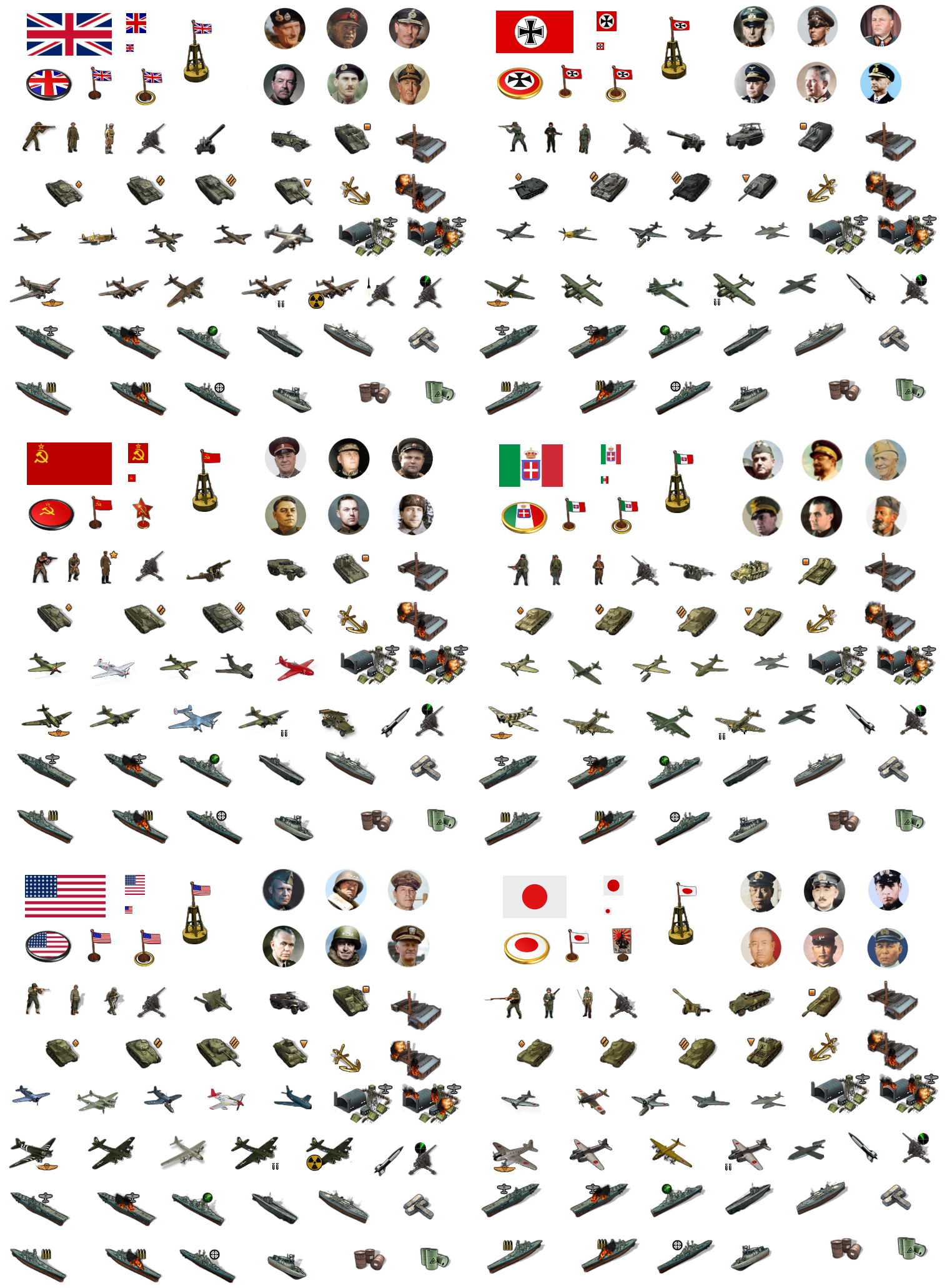
Ok that went a bit smoother than expected.
I was able to nix the shadows under the aircraft to give a more in flight look by dialing the opacity way down. I tried to keep just enough so the images wouldn't flatten but I think it looks a bit better.
I did another Japanese dude too with a more Banzai attack stance hehe

Here it is with the shadows clipped
-
@black_elk
Oh yeah, clean, sweet and petite!!! -
Right on! Here's a quick tint for that set...
I went a bit more muted for the vibrancy on the Axis side, and just a touch more vibrant for the Allies. It's a little hard to predict what will look best once they're out on the field, but this seemed like a decent place to start.
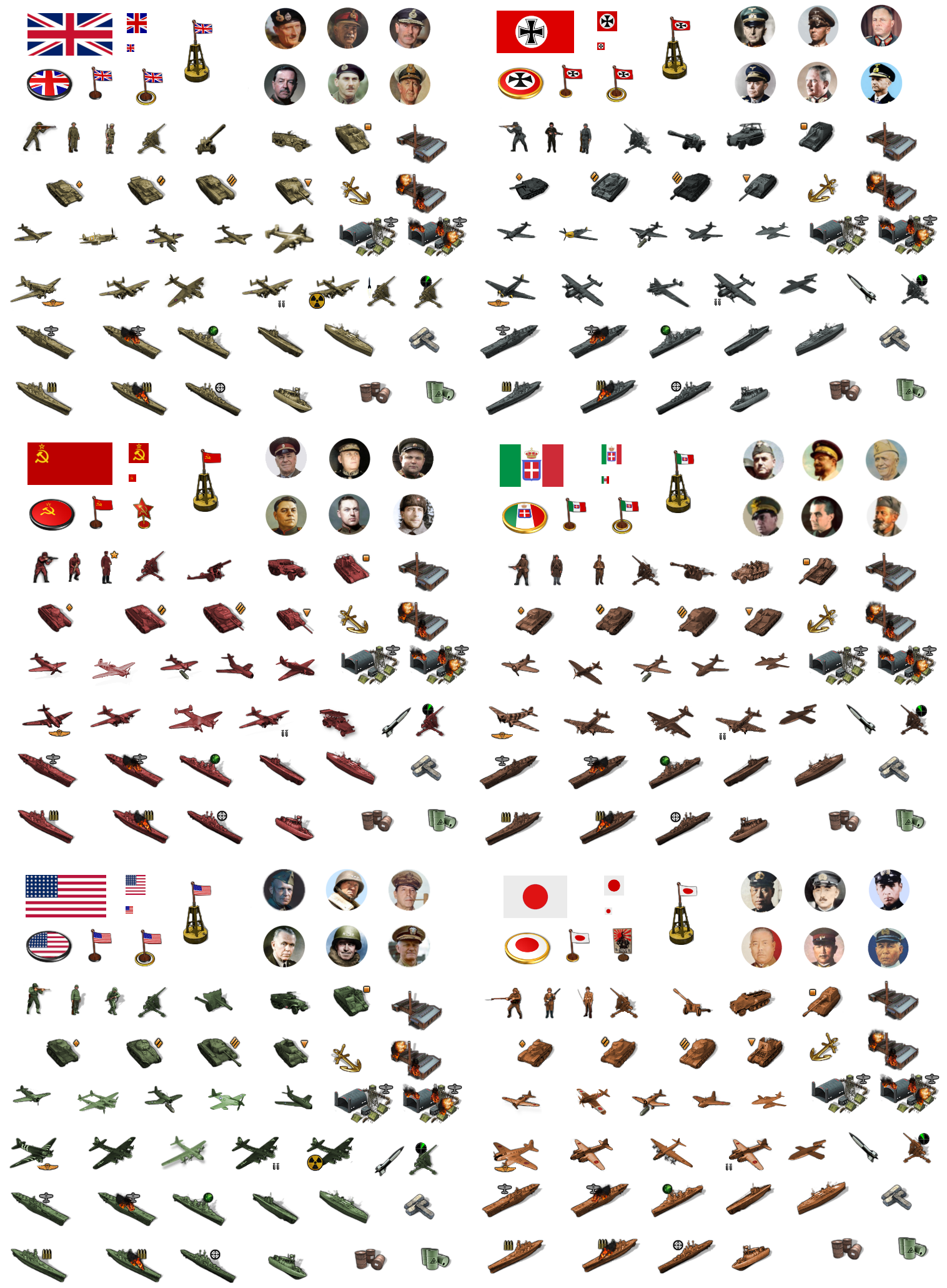
I think the only thing I'm missing for G40 is the Harbour unit. We have the anchor, but I figured we should probably make something that looks a bit more like a Base. For the tech stuff I think I have everything covered. Like basically I'll just use Frostion's V2 rocket or the radar symbol and do something like this I guess...?

Something along those lines anyway. We may need to shrink the Airbase unit a bit so it doesn't dwarf everything around it lol.
Other than that and the Harbour, I think I have everything for G40 covered except for long range jets for a couple nations. Probably I can just add the synthetic fuel icon to the German jet or something like that, since I have it down already as a placeholder. Sorta makes sense, like late game tech that got shared or whatever hehe.
ps. Actually the big ass airbases look pretty alright. I added the older roundels to the ABs to see how that would look. Seemed pretty cool.
For Harbours I'm going to combine the buoy flag and the anchor graphics, which looks pretty good as a combo.
Here is the tinted set upscaled to 150%. Looks ok to me for peeps who want the larger units. I'll do a quick example on the map when I get a chance.
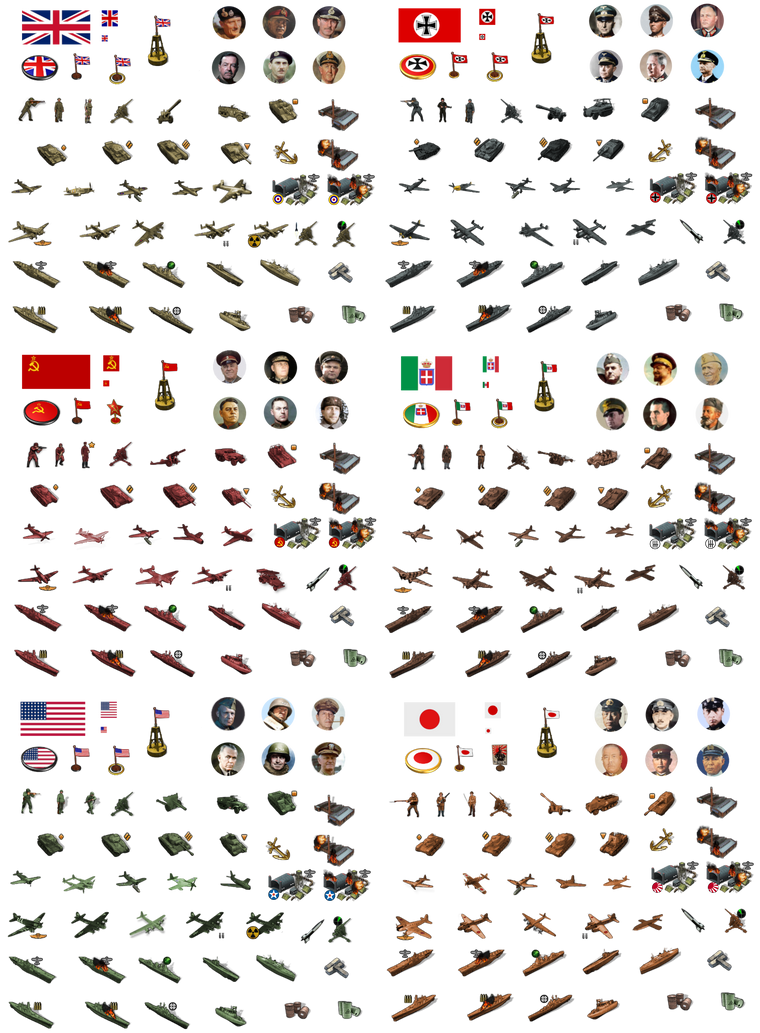
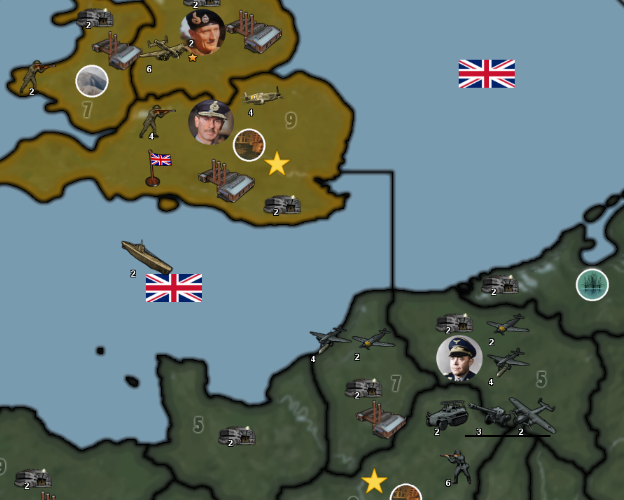
Here's how that would present at scale...
I had a pretty thick borderline going in that map, I think it must have been 1px+3 with no antialiasing on that paintjob hehe, but it gives a quick impression.
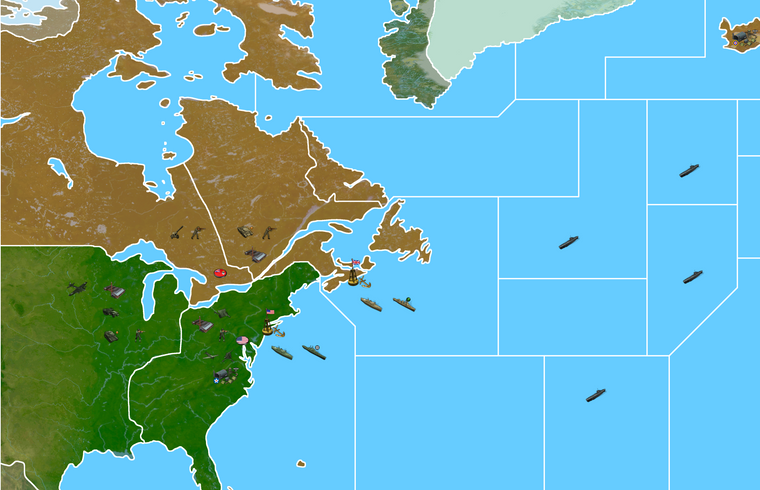
I cropped that detail from the map at 16816 px. The boards show it resized in my browser but if you click in you can see how it'd look with the map display at 100% and units at 150%. I think one could probably push the units up to 200% if they wanted, for extra large units, but they might start to blur. Guess it just depends what players like. Ideally for G40 I'd think we should be able to get something similar to the display on Bung's map or in that ballpark. 125% still felt a bit on the tiny side to me, 150% felt like they'd be easier to grab with the cursor hehe.
I didn't have a VC star handy, so I just used the large oval roundel for that here. I think for the Sea Zones it would be cool to show a roundel or flag next to the sea zone number to indicate control. Maybe do the same on land with the flags by the TT name. When I get some time, I'll soften the shadow lines on the ships since they still feel a bit heavy.
-
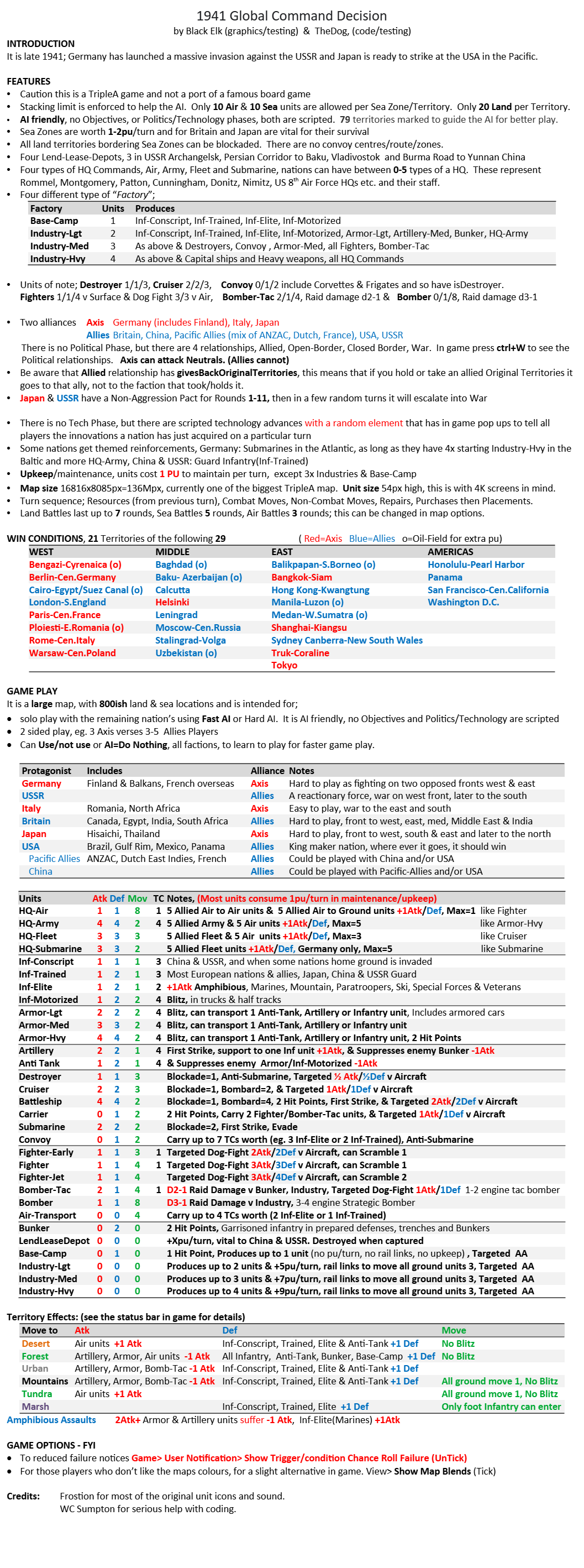
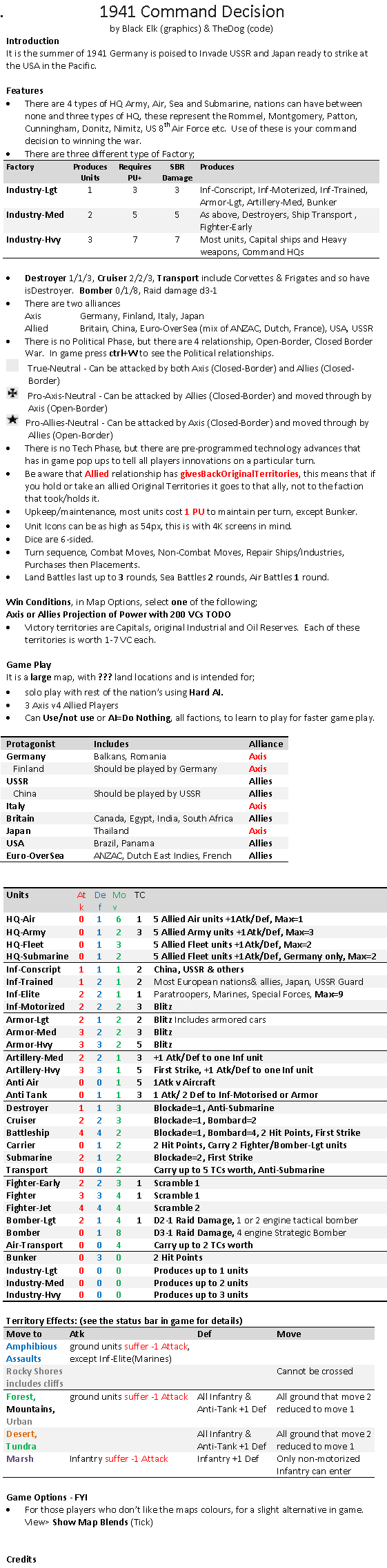
Below is the latest Game Notes that match the current code, just to give a direction to where 1941 Command Decision is going.
.
-
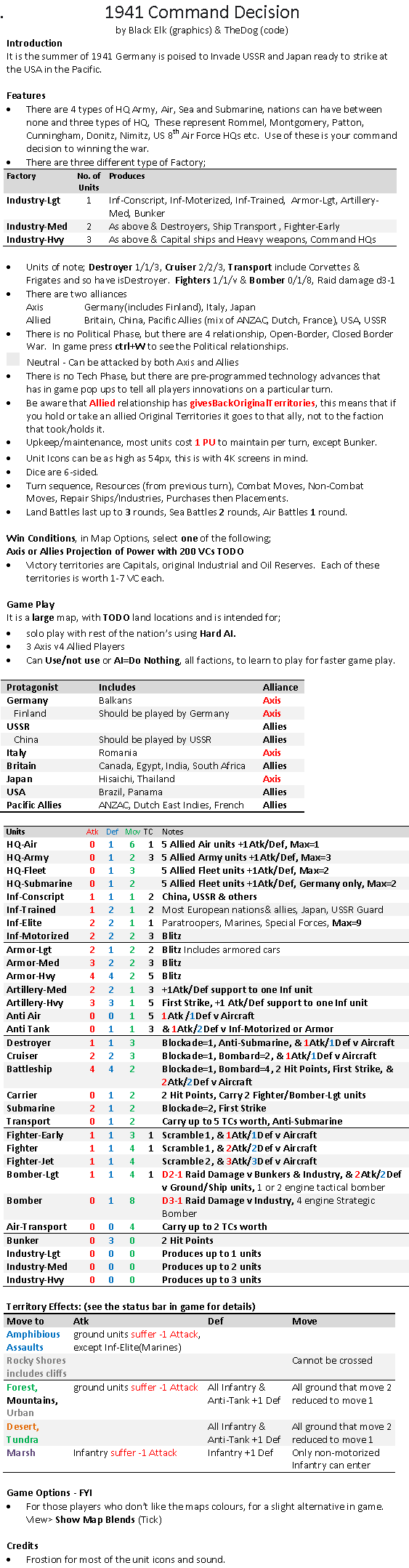
Below is the latest Game Notes that match the current code, just to give a direction to where 1941 Global Command Decision is going.
Note the Destroyer and Cruiser stats especially their move.
Also note the Fighter/aircraft stats
These are experimental, I hope they work as intended..
-
@Black_Elk @beelee
One step closer. Map is in TripleA, with some units.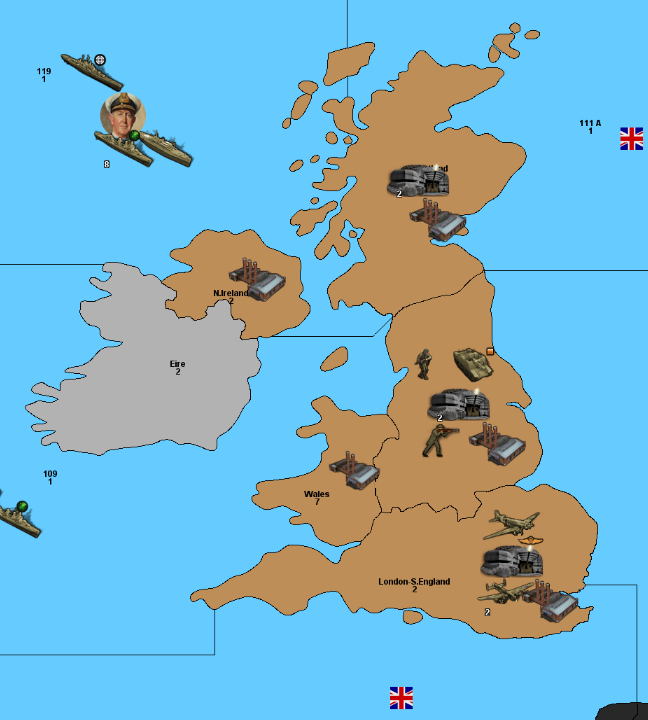
-
@thedog :flexed_biceps:
-
Hell yeah! Nice work!!!
-
Currently doing boring testing, fortunately the Fast AI can do that for me, whilst I keep adding in units to balance the game.
Turn 9, so that's late 43, the USA & Britain decided to do this
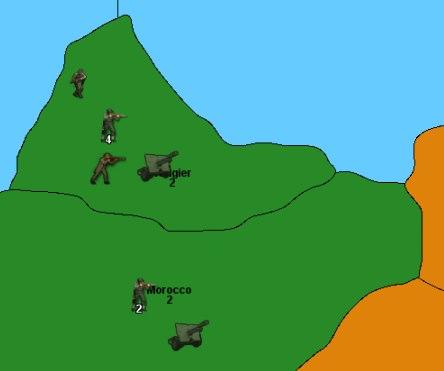
Yes its missing Flags.
There is also a lot of Destroyers in the Atlantic because of random appearing German subs.
-
I have a problem with the island of Shikoku, its invisible to placing units

However the island Kysuhu works as it should.
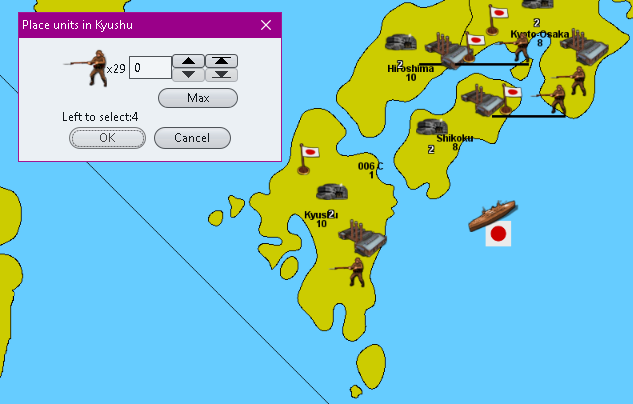
.
Also, you can take units from Shikoku island, as below, but not place them.
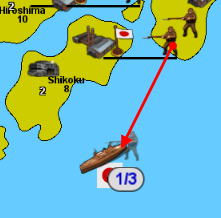
So how can I fix this?
-
@thedog hmm ... those are the starting units then ? That can be moved from Shikoku ?
Can you place with edit ?
-
hmm ... those are the starting units then ? That can be moved from Shikoku ?
Yes starting units, Yes can be moved.
No cannot place with Edit.
Add units, wants to add to SZ 006 C when I click on the island, it says 006 C

-
@thedog I guess some sorta connection problem ? maybe ? maybe try going through the xml SZ006 line by line and Shikoku too
-
The connections are there, as below.
<connection t1="006 C" t2="Kyushu"/>
<connection t1="006 C" t2="S.Korea-Chosen"/>
<connection t1="006 C" t2="Shikoku"/>


Hello! It looks like you're interested in this conversation, but you don't have an account yet.
Getting fed up of having to scroll through the same posts each visit? When you register for an account, you'll always come back to exactly where you were before, and choose to be notified of new replies (either via email, or push notification). You'll also be able to save bookmarks and upvote posts to show your appreciation to other community members.
With your input, this post could be even better 💗
Register Login