How to modify borders on an existing map
-
@thedog said in How to modify borders on an existing map:
@panther
Thanks!
I'm no expert, I know a little and that's dangerous. I was getting the same error as @Davor-Pavlić and I did not know why.
Never mind. I am not a map-maker or map-making expert myself. I just played around with the tools some years ago to get a basic understanding of how it works. And those tools haven't changed since that time.
And my knowledge about image editing comes in handy when answering to related questions
 .
. -
Alright so i made some progress. Base tiles are working however i have a few graphical issues which i could use some help with.
- Units are stacked together on top of eachother.
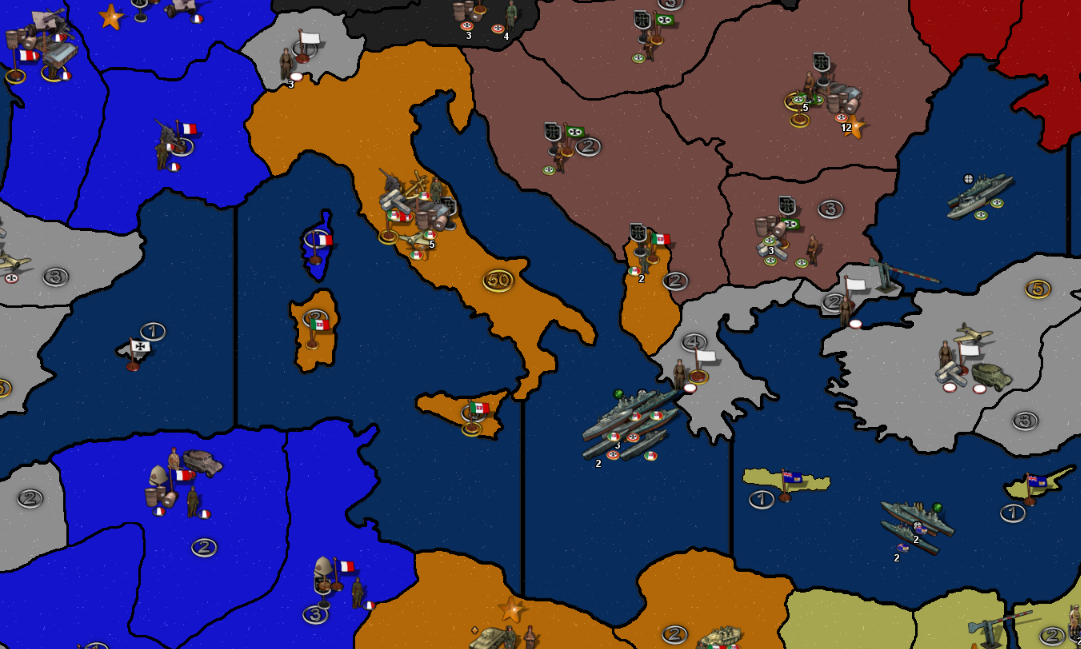
- Some of smaller island territories lost most of their outline during the polygons grabbing, while most didn't. Should i go back to map editing and increase the border width? The width was the same as every other territory.
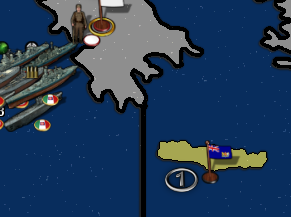
- Some of the lakes lost their blue color and are white like they are neutral territories. Not sure why this happened. Seems like they became land territories.
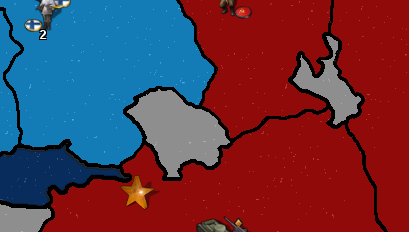
- North Sea zone automatically gets recognized as a land territory. Orkney and Shetland islands not showing.
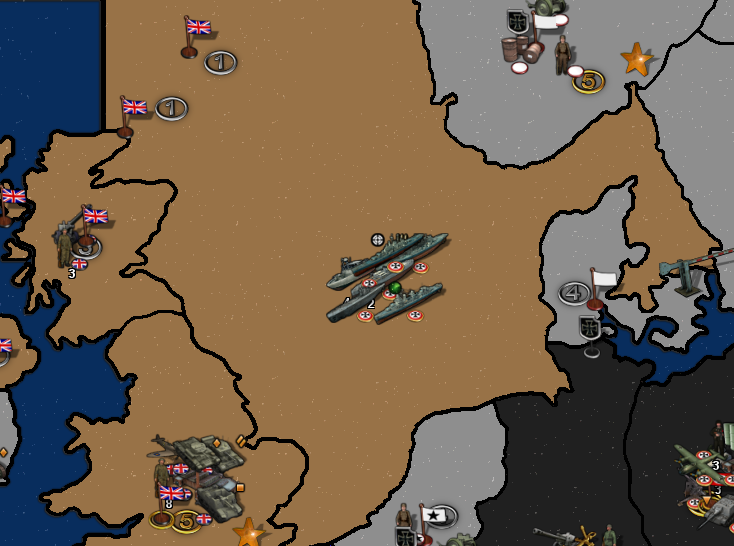
Overall, i had quite a few problems with polygon grabbing, usually with sea territories, like 80% of the time when i clicked on the sea TT it would actually select an island, and when i finally managed to select the sea zone, some islands would just dissapear like they don't have a border, which i found to be odd, since all borders are the same width.
-
@davor-pavlić A thing I always say is that, for more than one-and-a-half year, mainland Italy was split between the Axis and the Allies, so mainland Italy being a single territory is something of which is very hard to make sense.
Mainland Italy was invaded starting from 3 september 1944 and split on the Gustav line from December 1943 to June 1944 and on the Gothic line from August 1944 to March 1945.
-
I can agree with that and that is one of the things i will look forward to changing along the way. I also plan to split my new Poland into two parts so that the west can get captured by the germans and the east by ussr.
Currently im just readjusting the zones, not adding any new ones, but i hope to learn to that too in the future.
-
I am pretty satisfied with what i have achieved in only a few days, considering few days i couldn't even imagine what it took to make and edit maps.
-I have fixed the bugs and redone the polygons and centers, this time everything is really good when it comes to baseTiles. Next step would be relieftiles.
-Another thing i don't know how to do is move the little territory income symbols. Any advise regarding that is highly appreciated.
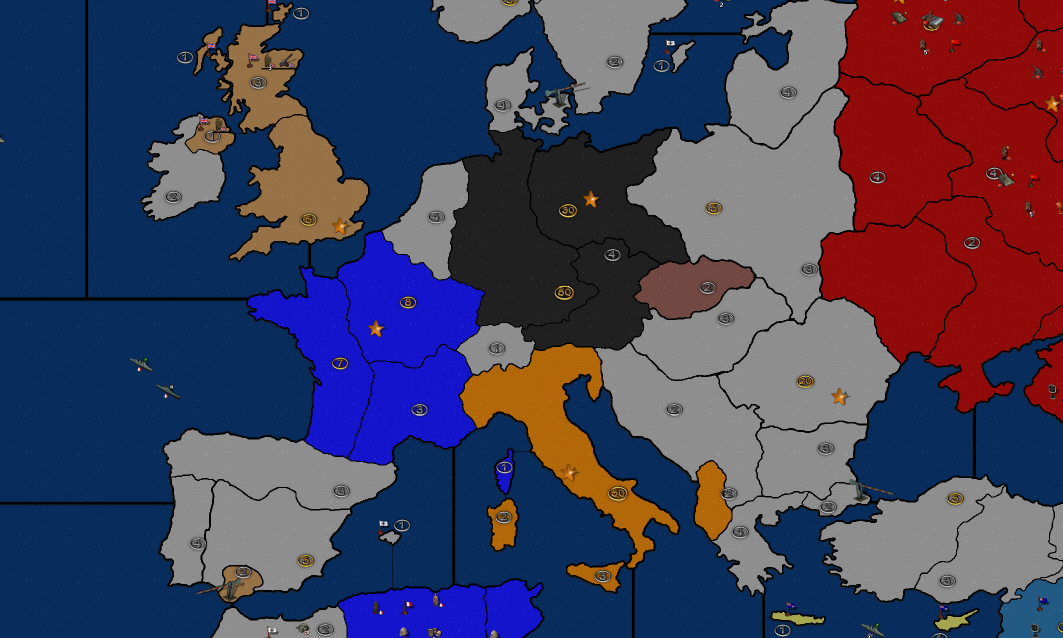
But yeah, this is pretty much how i want europe to look like as of 1939. Maybe Poland is too big, im not sure.
-
Nice work! I like it
One thing I thought would be cool for Iron War is a more even distribution of the production values, esp for the big ticket territories. I feel like some of the Allied spots could be increased in value, like England and Scotland, and then have more of the Axis value spread around to adjacent TTs, so it's not so wild. Like Italy with 2 TTs worth 25, feels somehow more sensible than 1 TT worth 50 hehe. If that makes sense.
I think overall the map benefits when more spots are worth 5, to accommodate production builds. I thought Rally Points were novel, but I kind of like the way building factories works. So I'd rather just see more spots worth 5 I guess.
For values in the German core, I think it'd be cool if W. Germany was knocked down to 25 or 35 and just put that value into the Low Countries or Poland, or Austria, or France but basically making a bit more of that high value production into the contested zones. Or same deal with Japan, just making Manchuria worth more say. Just so it doesn't feel quite like the Axis are so much more concentrated than the Allies. Also the TTs in the Africa and the Mideast, seem to really tip the balance quite a bit between sides. So that's another area where a production tweak might be fun. I think it would be cool to see more value into the Med and North Africa, so it's a little more swingy there, instead of so much focus on Sub-saharan Africa which tends to dominate in the current. I still think Britain would be a more interesting faction if it just included British-Colonies and South Africa hehe, but that might be more than you're after.
I think Carriers using v3 rules on this map would definitely be aces though! If possible, I'd love to see that. The revised placement rules are super buggy into Sea Zones that border multiple coastal factories. V3 carrier rules would solve that issue and be more familiar to players of the more recent World War II games.
My only other suggestion for an Iron War 1939 mod would be to up the fuel so the AI can function properly. It's sort the main thing that brain freezes the machine in the current 1940 map. They manage Steel and regular purchasing pretty well, but I think more high value TTs spread around would increase their factory buys for sure, which might be simpler than rally points, if you just did a higher economy game overall basically. I think a few more convoys might be fun as well.
I believe the Production Value images are part of the decorations in its own folder. So to change the images they're in that folder called PUs. Then tripleA puts them into their location, so that's in the gamefiles somewhere as a value where you should be able to change the coordinates to shift em around.
-
Thanks!
I agree with your points. I will consider it once i get to that point.
Do you have any suggestions how i could overlay original Iron War relief map over my new blank map, since the original reliefTiles now do not match my map?
I've tried erasing the TT borders on a relief map but that of course also deletes the graphics as well. I'm clueless what to try.
-
I believe there is a plug-in for gimp that you can use to heal transparency. Filters/enhanced heal transparency or something along those lines.
If you have an image of the relief, just post it and I'll see if I can replace the information from the surrounding pixels. Sometimes if the image is very large, GIMP will lock up, but I think it can be done if I say split the map into smaller section and then stitch them back together.
That's what you're after right, just to replicate the relief for a line that was erased and now shows as transparency?
Here's a youtube video that explains how to get what you want. The main one is heal transparency/heal selection.
https://www.youtube.com/watch?v=0Cd5qEkiWRM
When you get the hang of it, and want to dive on the Mod I'll help you play it for sure hehe. Iron War is fun! Frostion said it was chill to do alt start dates for the game. I asked him a while back if he cared, and he was cool with the idea. Also gave the nod to us using his units for a G40 overhaul, which is what I've been trying to do lately. He only asked that if we wanted to redux Iron War that we do it a separate map file so as not to overwrite the standard game files, which you'd need to do anyway if adjusting borders.
I'd suggest just calling it Iron War 1939 and then tweak it till it fits the bill. A 1941 version will a Pearl Harbor opener would also be fun I think.
-
Sure, here is the map :
https://drive.google.com/drive/folders/1d4lOQ2CbHLe_YhN-n6Gy3XuAaWHuE6lX?usp=share_linkYes, i only need to fill in the erased graphics once i manually erase the borders/outlines and readjust them.
I have Photoshop, ill see if i can do the heal transparency in it since im not very familiar with that feature. If not ill use GIMP.
Thanks for the link ill check it out a bit later.
Also yeah, i definetly will change the name of the map and all those stuff. Firstly im concerned about visuals and when i have look exactly how i want then ill dive deeper into actual mod, like changing the opening popups, changing territory values, etc. I'll consider you for help!!
-
Ok it took GIMP a few minutes to resynth it. This was challenging because the relief itself is not at full opacity. The image varies in opacity 100% for the sz and borders, but semi-transparent in the land tiles. To heal it I had to first flatten the image against 50% gray, manipulate the image, then reduce the opacity again to try and match the original. It's hard to gauge the opacity for the original image though. It felt like the 75% range so I just did that, but then the colors are showing slightly differently afterwards. So either the opacity is off, or flattening the image changed the color information initially. Not entirely sure there. Like it's close, but not quite exact, the stuff on land appears more muted now and the sz more vibrant. You might be able to do it in PS with more success.
The heal transparency tool in GIMP basically it just pulls from the surrounding pixels to fill in the gaps so not a perfect solution, there might be better stuff in PS. It's similar to the clone stamp, but this should get you closer to what you're after. You will probably have to retrace your new lines though.
Unfortunately that baseline shows anti-aliasing for the black lines which makes those much harder to isolate or duplicate/manipulate. Ideally you'd have a 3 color baseline to work with at 1px so you could expand those lines and then tweak the fuzz after, but did the best I could with what was there heheh. Anyway, hopefully it helps
https://www.dropbox.com/s/5im5ifovj7551co/relief map modded.png?dl=0
ps. Since there aren't that many borders to change, I could probably go in and manually repaint the relief in those areas instead, which may end up being simpler to keep everything else looking the same. The tricky part is when you have a reduced opacity to start with, it throws off some the paint tools in GIMP, otherwise I'd think it would be simpler just bang over the borders you don't want with a stamp lol. I can give it another attempt when I have a few minutes.
-
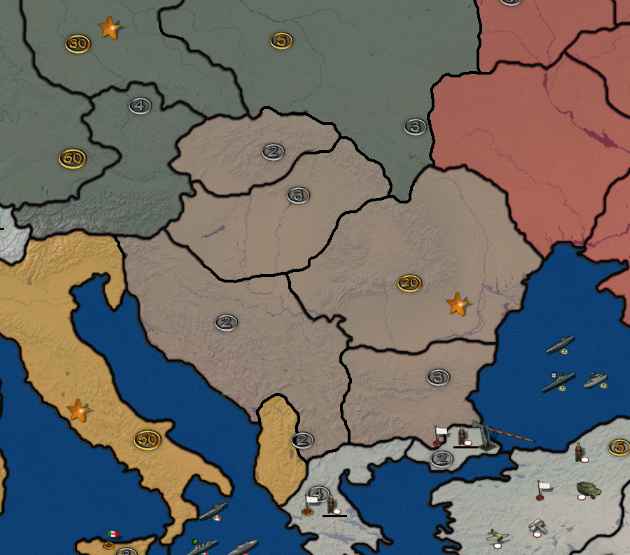
If by muted land you mean everything looks a bit darker then yeah i see it, however you did a great job with heal transparency. You saved me a lot of time with that, probably days lol. I could retrace the new lines with ease most likely, but in the meantime i will try to use PS to maybe try to make the land brighter.
You clearly know more about this than i do, so if you find the time go ahead and give it another go, let me know.
Thanks for the help either way!
Edit : This is how it ended up looking after a quick 2min retrace
-
This be a good one to stickie. I have a lot of the same questions. Sadly, I'm not that confident that I can achieve Davor's success rate

-
My success rate is only because of my motivation to make this, actually i wanted to make this for months and only decided to start few days ago!
But come on, if these helpful folks weren't in the mood to help, i would still be stuck on tile reconstructor

This thread turned from a question to mod development in a span of few days
-
@Black_Elk i've messed in PS a bit and this is how it ended up.
Map with heal transparency (i didn't retrace it yet while taking this shot)
Same map but adjusted the brightness and contrast
-
@black_elk I think @Frostion's Iron War has one of the most unexpected income distribution I've ever seen. Once me and an other guy were looking at the map (searching something to play) and we were both amazed at seeing things (don't remember exactly what) like each of the Guianas worth 10 while England (with Wales) was worth 5 and Italy 50.
-
@Davor-Pavlić Glad to see you got it up and running! Sweet!
Yeah if you like I can give it another pass sometime later this week. If you get all the changes you want to make to the borders and such figured out, I can just do it all at once and try to clean the relief up. Probably what happened is I made the opacity for the relief layer a little higher than it should have been, I bet if it was dialed back like 25% or whatever, it would look pretty much the same as the OOB Iron War.
ps. Oh bam! Looks nice with the brightness/contrast adjustment. Yeah that might achieve a similar result with less work heheh. Killer!
@cernel Yeah the income spread there is super wild. Like I understand the gameplay need to have Axis TTs more valuable in relative terms, but definitely feels pretty nutso when comparing certain places. I feel like if it was just a bit more even steven in terms of the PU spread it wouldn't feel as weird. Also having England be more valuable just makes more sense to me from a gameplay standpoint.
-
Alright! I'll do what i can to retrace it in such a way that it doesn't stick out while also playing with brightness and contrast. I'll try to find a way to get rid of the leftovers like this after retracing :
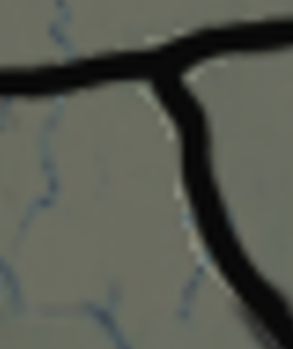
Sure, give it a go whenever you feel like it! Do you want me to send you an untraced map tomorrow with my edited brightness?
-
Sure thing, sounds good!
You made a lot a progress inside a week, well done. Way to go dude!
Catch ya next round
-
So i've attempted to retrace the new lines, with mixed results. I had trouble finding out what brush size was used for the original map, i found 3 to be too thin and 4 to be too wide, so i somehow decided on 3.1. Other than that, i finally settled on a good brightness level, sure it's not like the original but it doesn't exactly have to be.
This is how relief map ended up looking (Europe)
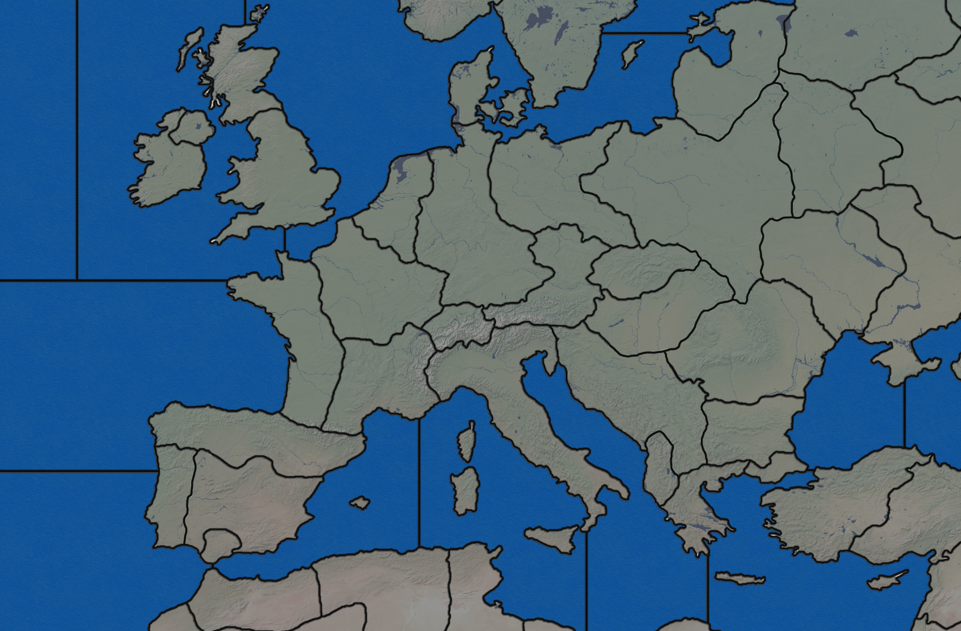
At first glance it doesn't look bad, but once you take the time to notice new outlines of the territories you can see it doesn't seem to fit in with the rest. Once you zoom in then you can see this better :
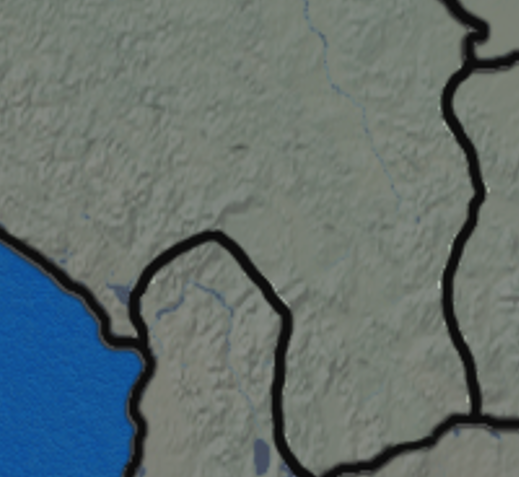
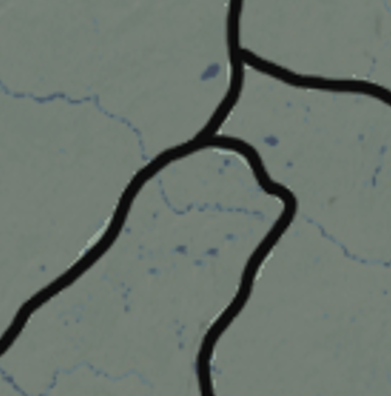
First of all, the most noticeable things are the obvious left-overs from tracing lines which i couldn't remove successfully. Any attempt at erasing them results in erasing the relief as well.
Second of all, original Iron War relief outlines seem to be blurry, you can see it's not exactly crystal clear once zoomed in, compared to my retraced lines. I haven't thought of a solution yet, maybe make the new lines blurry as well? I turned anti-aliasing on as well.
Third and the last noticeable thing, is that the original relief map has another line next to the black one, a thin grayish outline running alongside the main black outline, while mine don't. I guess i should follow the original and do it for my lines as well.
@Black_Elk here you can find the untraced map and my current traced map, just in case you want to see a difference between the two. Hopefully you will be able to fix this mess in case i don't succeed lol
https://drive.google.com/drive/folders/1d4lOQ2CbHLe_YhN-n6Gy3XuAaWHuE6lX?usp=share_linkWhen it comes to actual map, i think i am pretty much satisfied with the European territories, i wouldn't change anything else border-wise. I'm looking at ww2 world maps and i don't see any major differences that i would need to change from the original. If anyone has any suggestions lemme know.
Thats it for now!
-
Right on, I'll take a look. I'm sure given enough time and elbow grease I could rework a baseline for Iron War, which would make it somewhat simpler to rework the border line independent of the relief. Basically so you can get a consistent line when redrawing the borders. I suspect that similar to way I was working on the G40/Domination Map, Frostion probably had the relief and the borders as separate layers, then added them together at the end, with a fair bit of noise reduction or gaussian blur for the borders to soften them. Especially since Iron War uses black lines, so they're feathered up a fair bit. The paintbrush tool in PS/GIMP sometimes struggles to hit that same amount of blur, so the line may appear relatively thicker/thinner or harder/sharper when redrawn, whereas if expanding from 1 px to achieve the same you could probably get something a bit more consistent.
Or if you wanted to take a crack at it yourself the method is basically this...
First open your baseline in GIMP/PS, add a new layer. Then return to the Baseline layer but reduce the opacity to like 50%. This will allow you to see the difference between your new lines and the old ones.
Then return to your new layer, and basically you retrace the borders but with a 1 pixel line using the Pencil tool rather than a Paintbrush to ensure the line is 100% black. Using no Anti-Aliasing for that. Once the borders are redrawn at 1px, you can delete the layer showing the baseline image so all that's left is your black line at 1px.
Once you have that black line, you can then isolate it with the color picker tool, and do handy things like expand the selection or stroke the line. An easy method would be to expand to 1 pixel beyond the width of the lines that Frostion had, that way your new borders will totally cover up the old ones when you add in some blur. Then just repaste those new lines on top of the relief image so it all looks consistent.
Just some random thoughts on the Iron War production values since that was brought up earlier w/ Italy.
In Iron war the infantry cost is at base 10 PUs and just about everything else in the unit roster costs between 11-30 pus. That makes the replacement cost of a hitpoint and relative value of infantry pretty high, and everything else relatively cheap, so it's really money more than production that is the limiting factor for hitpoint spams in this game. A TT worth 10 PUs, is sorta the equivalent of TT worth 1 PU in A&A. A TT worth 30 is more like 3 PUs in A&A. So even though the values seem wildly disproportionate in some spots, it's not nearly as high an economy game as one might think. The highest value TT on the board is still 50 which is still only 5 in A&A terms for hitpoint replacement, all relatively low. A TT worth 5 PUs in Iron War is only half the replacement cost of a hitpoint, but the big jump is that it allows for the factory buy at that value.
I think you could easily raise the value of Allied capital TTs to 25 or 30 PUs and that's not going to bust the playscale here, and it would make the balance/parity by sides feel a bit more believable. Or take a TT like Italy, you could easily split that into a TT in the North worth 30 and one in the South worth 20 and I wouldn't bat an eye.
I'd ballpark it to something like this...
TTs 1-4 PUs: basically this is like 0-1 Ipc in A&A terms. Meaning you'd have to take over a bunch before they get you enough value to even produce a single hitpoint. 10 TTs worth 1 PU before you could buy an Infantry unit with the money for example.
TTs 5-9 PUs: This is sort like TTs worth 1 in A&A. Technically you could build a facility on a 1 PU TT, but it's not really worth it there. In Iron War because of the way factories work (build cap at 5 units) a low value anything above 5 is still pretty viable, so it plays a bit different on that count. These TTs are the real floor though, since they are the one's that allow the player to push their production fronts.
TTs 10 and up: Everything worth 10 PUs or more to me is sort of the real entry level, since these TTs are worth enough to replace a hitpoint they become the real drivers of the playbalance. I think anything between 10-50 one could play with those values to try and get a rough parity going with less concentration at the high end. So if West Germany or Italy or Japan is worth 50. Going to 15 or 20 or 25 for some surrounding territories doesn't seem all that wild at all to me. I'd highball rather than lowball it on this map, since the floor is actually already pretty low.
I think Iron War is best as a single player game vs the AI. The things that would make it drag in PvP don't matter as much in that style of gameplay, and generally I think the game is better where it leans into the reality that most people will probably play it that way, solo vs the machine. I think if designing a new opener, you'd want a balance where the AI does basically everything you'd expect a human to do especially in the opening turn. Like on G1, it's a massive nerf if the HardAI fails to take the Danish straits for team Axis. It really hoses their opener and the whole game. So basically trying to avoid stuff like that in a redux I think would be good hehe
This thread is older like 2017, but usually my requests to Frostion were stuff like including more 5 PU tiles, or increasing the amount of production in contested Tiles relative to the uncontested Tiles. Or just more fuel lol.
https://forums.triplea-game.org/topic/73/iron-war-official-thread?page=1



Hello! It looks like you're interested in this conversation, but you don't have an account yet.
Getting fed up of having to scroll through the same posts each visit? When you register for an account, you'll always come back to exactly where you were before, and choose to be notified of new replies (either via email, or push notification). You'll also be able to save bookmarks and upvote posts to show your appreciation to other community members.
With your input, this post could be even better 💗
Register Login