Mini (Me) Map options

-

Created this thread to not hijack the LME thread.
Further to our discussion...
Would it be possible to be able to set the frame colour and fill for the view box on the mini map?
eg.
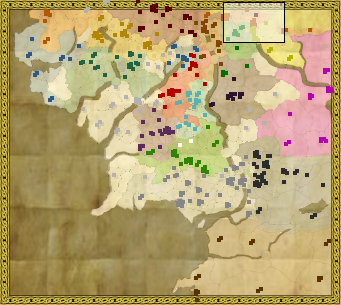
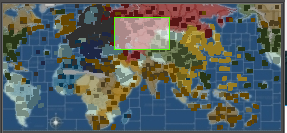
(and yes I used lime green in my example just for you)
Example
smallMap.territory.saturation=0.5
smallMap.unit.size=4
smallMap.viewer.borderColor=000000
smallMap.viewer.fillColor=191919
smallMap.viewer.fillAlpha=0.5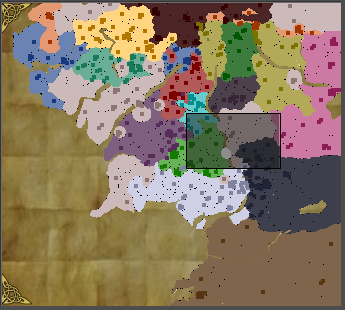
PRs:
https://github.com/triplea-game/triplea/pull/3453
https://github.com/triplea-game/triplea/pull/3540 -
@hepps As you wish...
TripleA Developer with a Passion for AI: https://forums.triplea-game.org/topic/105/ai-development-discussion-and-feedback
-
@redrum could the mini map tell me when I am pushing my men into a suicide attack?
Then cut me off from drinking further?
:face_with_tears_of_joy:
-
@hepps Well I could use the logic from the AI to probably indicate if it would disagree with your attack and put a notification on the minimap.
TripleA Developer with a Passion for AI: https://forums.triplea-game.org/topic/105/ai-development-discussion-and-feedback
-
@redrum "You're too drunk! Please stop playing now!"
-
@hepps So potentially small map properties:
smallMap.territory.alpha=0.5 # 0.0-1.0 (transparent to opaque)
smallMap.unit.size=4 # size of unit squares
smallMap.viewer.borderColor=C0C0C0
smallMap.viewer.fillColor=C0C0C0
smallMap.viewer.fillAlpha=0.5 # 0.0-1.0 (transparent to opaque)Thoughts? Any additions?
TripleA Developer with a Passion for AI: https://forums.triplea-game.org/topic/105/ai-development-discussion-and-feedback
-
@redrum My next one was the dot size... but I see that is in there already.
Still looking at it.
-
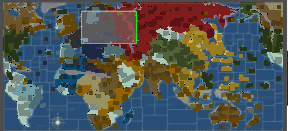
@hepps Here's TWW small map changing like all of them:
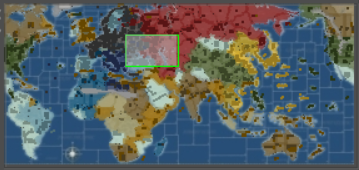
Original:
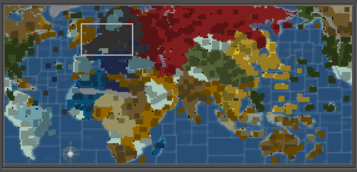
TripleA Developer with a Passion for AI: https://forums.triplea-game.org/topic/105/ai-development-discussion-and-feedback
-
@redrum For TWW reducing the unit dot size is great!
-
@redrum Why not only allowing for the smallMap to be either above or under the ownership colours? I'm not sure what the transparency setting is making transparent.
-
smallMap.territory.alpha=0.5
smallMap.unit.size=2
smallMap.viewer.borderColor=C0C0C0
smallMap.viewer.fillColor=C0C0C0
smallMap.viewer.fillAlpha=0.5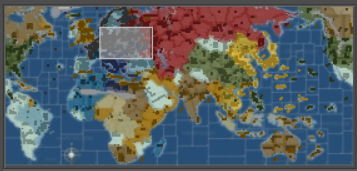
TripleA Developer with a Passion for AI: https://forums.triplea-game.org/topic/105/ai-development-discussion-and-feedback
-
TripleA Developer with a Passion for AI: https://forums.triplea-game.org/topic/105/ai-development-discussion-and-feedback
-
@redrum How can I test this feature? I've found the relevant branch, but there are no releases. Does it mean that I have to compile the code? And how do I do that? Is it complicated? Should I just wait a few days until it is merged with master?
-
@alkexr Yeah, until the PR is merged into master, it doesn't build a release. Most people just wait til the PR is merged then grab the latest pre-release from github. You can also pull the source code down and run it which isn't too difficult. Here are the minimum steps to run the source:
- Make sure you have git and gradle (build framework) installed
- Pull down the triplea repo: https://github.com/triplea-game/triplea
- Open up the command line, navigate to the base directory of the project, and run these commands:
./gradlew test
./gradlew check
./gradlew run
If you don't like the command line then you can instead use an IDE (eclipse, intellij, etc), import the project into that, install the gradle plugin, and run from your IDE (more developer setup here: https://github.com/triplea-game/triplea/tree/master/docs/dev).
TripleA Developer with a Passion for AI: https://forums.triplea-game.org/topic/105/ai-development-discussion-and-feedback
-
PR merged. This can now be tested in the latest pre-release: https://github.com/triplea-game/triplea/releases/tag/1.9.0.0.10351
-
@redrum I just wanted to point out just compiling and running the code is easier than you described.
It's sufficient to just download the zip of the specific branch and run./gradlew run(or.\gradlew runon Windows) in a folder this zip has been unzipped to.
The gradle wrapper will automatically install gradle if its doesn't already exist, and run the code afterwards. -
@roiex Ah, didn't realize the wrapper would pull down gradle. Thanks for the follow up.
-
@redrum No Problem ^^
It's basically all the wrapper does.
If a valid installation is found, the gradle installation is being invoked and all the argument are being passed over -
Just awesome!!! I just reworked the TWW minimap.... thing is way better than it ever was.
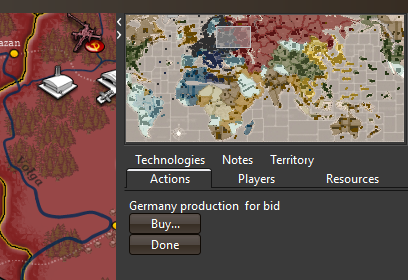
-
So some bad news on this feature. The fill alpha for territories is causing problems because territories when conquered are drawn over the previous one. This causes conquered territories to become a blend of the previous owner color and the new owner color when alpha is set to less than 1 (some amount of transparency). So instead of alpha parameter, I'm going to have to switch this to just have territories being filled with a slightly lighter version of their set color. This should achieve a similar effect except won't capture any of the underlying smallMap image texture if there is one. Moving forward please use "saturation" instead of "alpha".
smallMap.territory.saturation=0.5TripleA Developer with a Passion for AI: https://forums.triplea-game.org/topic/105/ai-development-discussion-and-feedback





Hello! It looks like you're interested in this conversation, but you don't have an account yet.
Getting fed up of having to scroll through the same posts each visit? When you register for an account, you'll always come back to exactly where you were before, and choose to be notified of new replies (either via email, or push notification). You'll also be able to save bookmarks and upvote posts to show your appreciation to other community members.
With your input, this post could be even better 💗
Register Login