Game of Thrones & A Song of Ice and Fire - Official Thread
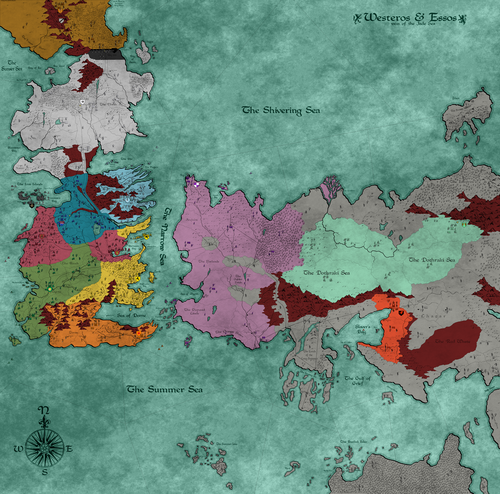
-
@redrum Why being against the concept of a FFA in which each player takes 1 power each and the remaining ones are assigned to the AI?
This is how complex games like "Crusader Kings" work, and it is the only good way to represent most of history, as it is quite rare that you irrevocably reach a condition in which most of the world is definitively committed to a two-sided war, like in World War II (and even in that case, there were still some extraneous dynamics, like the intra-alliance competition for conquering territories yourself, instead of your allies (especially between Communists and Liberal-Democrats), the neutrality between the Soviets and the Japanese, and, of course, the Italian de-fascistization and betrayal).
The current problem is just that the AI is very bad at dealing with FFA politics, but if it works well enough for games like "Crusader Kingds", maybe it can eventually work well enough for TripleA too?Anyways, Greyhawk Wars (at default) is a straight 3 sides game, from start to finish, like Domination 1901. So I guess you mean the game can be, like, 3, 4, 5 or 6 sides, instead? Not sure if you misunderstood what @RogerCooper said. I believe he meant that you can have scripted random events, like the Greyhawk Wars one, that change alliances, not that the random events of that game actually do that (aside from the vanquishing/reviving dynamic that is just for putting a power out of the game and bringing it back). I'm actually not sure what @RogerCooper has in mind, as currently TripleA doesn't allow handing over a power to the control of another player (meaning moving powers from a fixed alliance to another one), so, at most, it would be still a fixed number of players that keep control of a set number of powers that may have their relationships with other powers forced upon them randomly (or you can have a notification telling you to reload the game and hand over this or that power to the player that it is controlling this or that alliance).
-
To be clear, my suggestion would be having "A Song of Ice and Fire" officially working like "Feudal Japan", except having some players always assigned to the AI (I believe at least "NightsWatch" and "Others" should fall into this category, not entirely sure if FreeFolk should too).
-
@redrum said in Game of Thrones & A Song of Ice and Fire - Official Thread:
First post updated with latest info.
I have ASoIaF updated to work with v1.9. I'm making a few small updates to the notes and player colors. I'll look to create a repo and add it to in-game downloads over the next few days.
For the first upload I would suggest no gameplay related updates at all, so that they can all figure in the history of the repository, then.
-
Having these two maps in this same thread it is also going to be confusing because the original thread of "Game of Thrones" is called "A Song of Ice and Fire v1.0" (as that was the original map name, shortened to "ASoIaF"), so people will likely think that is rather the original map thread of "A Song of Ice and Fire" (that never had one). Of course, they are linked in the right position, but maybe some people will wonder if you have mixed them up there.
-
@redrum said in Game of Thrones & A Song of Ice and Fire - Official Thread:
@Cernel It would be more useful to just have a single post that links to all the different GoT maps that you know exist and a brief description of your understanding of them. The last one you linked to "A Song of Ice and Fire" by kor438 seems to have made some significant improvements/changes but isn't listed in TripleA and doesn't appear to have ever been upgraded to 1.9.
Topics about "Game of Thrones" (obtained by searching for "Thrones", then selecting the relevant results):
Current main map thread for "Game of Thrones":
https://forums.triplea-game.org/topic/950/game-of-thrones-a-song-of-ice-and-fire-official-threadOriginal main map thread for the current "Game of Thrones" (formerly called "ASoIaF") map in the repository (Old TripleA developer forum):
http://tripleadev.1671093.n2.nabble.com/A-Song-of-Ice-and-Fire-v1-0-td7581892.htmlOther "Game of Thrones" threads in the current TripleA forum:
https://forums.triplea-game.org/topic/478/game-of-thrones-bugs
https://forums.triplea-game.org/topic/1302/did-anybody-fix-that-bug-on-the-game-of-thrones-map
https://forums.triplea-game.org/topic/1497/fixed-game-of-thrones-map-bugOther "Game of Thrones" threads in the old TripleA developer forum, referring to this "Game of Thrones" map or variants of it:
Game of Thrones Maquis
http://tripleadev.1671093.n2.nabble.com/Game-of-Thrones-Maquis-td7583763.html
The Game of Thrones map bug
http://tripleadev.1671093.n2.nabble.com/The-Game-of-Thrones-map-bug-td7587435.htmlOther "Game of Thrones" threads in the old TripleA developer forum, referring to no particular maps or to other maps (but not always sure if the map is not the same or related):
Westeros Map? Game of Thrones..
http://tripleadev.1671093.n2.nabble.com/Westeros-Map-Game-of-Thrones-td6630031.html
Westeros Map/Mod announced!
http://tripleadev.1671093.n2.nabble.com/Westeros-Map-Mod-announced-td7450212.html
GAME OF THRONES MODDING/MAPPING STAFF ANNOUNCED!
http://tripleadev.1671093.n2.nabble.com/GAME-OF-THRONES-MODDING-MAPPING-STAFF-ANNOUNCED-td7579721.html
GAME OF THRONES - staff NEWS!
http://tripleadev.1671093.n2.nabble.com/GAME-OF-THRONES-staff-NEWS-td7579888.html
A Mod of Ice and Fire
http://tripleadev.1671093.n2.nabble.com/A-Mod-of-Ice-and-Fire-td7584544.html"Game of Thrones" mentions in the current project tracker:
https://github.com/triplea-game/triplea/issues/3573
https://github.com/triplea-game/triplea/issues/3160"Game of Thrones" mentions in the old project tracker:
https://sourceforge.net/p/triplea/bugs/1082/List of reported issues at the linked threads, for the "Game of Thrones" map:
- Maybe some connections to Qohor are missing. [FIXED, IF VALID]
- The territory Qohor keeps changing colour every turn. The owner stays the same even after the colour changes. [FIXED]
- Especially since two hitpoints units don't repair as default (assumingly, but not surely, intended), having the same image for damaged makes them visually impossible to tell them apart. [NOT FIXED]
- FreeCities has Sellswords image but can't have it in game. [QUESTIONABLE]
- Grayjoy has Ironraiders image but can't have it in game. [QUESTIONABLE]
- Starks has Northmen image but can't have it in game. [QUESTIONABLE]
- Tyrell has Warship image but can't have it in game. [QUESTIONABLE]
- Midlands Road has wrong connections. [FIXED]
- Lhazar and North Khyzai Pass are not connected. [FIXED]
- Dothraki have no attack capable sea units (nor any air units), thus they can be surely sea restricted with ease (also, by intended rules, you can never attack with only attack 0 transports, even though TripleA doesn't support this restrictions) (Irinam: -There simply are no Dothraki seaman, so having no sea Units at all would probably be more accurate.). [QUESTIONABLE]
- The Midlands Road name appears somwhere in the Dothraki sea. [FIXED]
- At the start of the game, Qohor is Neutral and uncontested but occupied by FreeCities troops. [FIXED]
- The opening combat move for Dothraki AI is to attack Qohor (perhaps because it is occupied?). When they occupy Qohor, the territory remains Neutral. [FIXED]
- When the FreeCities attack Qohor, all three territories (both Midlands Roads and Lhazar) light up as under attack. [FIXED]
- When the aforementioned attack is successful, the FreeCities troops occupy Midlands Road/blank rather than Midlands Road/Qohor as intended. [FIXED]
- All maps using no properties, maybe because they are meant to work by V1 rules, currently are unable to return fire, as well (for example, the Games of Thrones map). [FIXED*]
*The naval bombardment behaviour for the game is now v3 style.
Unofficial versions and variants and related currently downloadable outside the repository (several others have been lost, as the downloads are not anymore functional, and are not presented):
Qyrti:
Map name:
Game_of_Thrones_v2
Post:
http://tripleadev.1671093.n2.nabble.com/Game-of-Thrones-Maquis-tp7583763p7584784.html
Download:
http://www.mediafire.com/file/ddguwpcdsdln68x/Game_of_Thrones_v2.zip/file
Alternative xml:
https://forums.triplea-game.org/assets/uploads/files/1532553170089-game_of_thrones_v2.zip
Notes:
The game can be loaded with the 1.8.0.9 engine, but needs to be unzipped first, because it has been zipped uncorrectly (double folder).
The notes claim incorrectly this to be a mod of "Game of Thrones", which is not true, as it needs its own skin to work properly (it is just its own map).
The game is clearly largely unfinished, especially regarding politics, and not seriously playable (it might be somewhat playable with houseruling and editing).
The "alternative xml", if refoldered correctly, can be loaded with the 1.9.0.0 engine as a mod of "game_of_thrones", using that map as skin (instead of "Game_of_Thrones_v2"), thus missing several units images and other skin elements.kor438:
Map name:
A_Song_of_Ice_and_Fire
Post:
http://tripleadev.1671093.n2.nabble.com/The-Game-of-Thrones-map-bug-tp7587435p7587606.html
Download:
https://www.mediafire.com/file/53b1axtf74f5kn3/A_Song_of_Ice_and_Fire.zip/file
Notes:
The game can be loaded with the 1.8.0.9 engine, but the skin fails to load (warning: Image Not Found:flags/FreeFolk_small.png).
The game can be started on case insensitive systems if unzipped.Matoro:
Map name:
GoT
Post:
http://tripleadev.1671093.n2.nabble.com/A-Mod-of-Ice-and-Fire-tp7584544.html
Download original:
https://www.mediafire.com/file/tjqnjrszie7p71k/GoT.zip/file
Download latest:
http://www.mediafire.com/file/rs76ik107nuwcw7/GoT.zip/file
Notes:
The game appears working.@RogerCooper or anyone. I see that several offered maps and mods on this theme are not anymore downloadable at the given links. If anyone as anything else than what I linked here or that it is available in the repository (which currently means "Game of Thrones" only), except the "ASoIaF" map, that is just the old version of "Game of Thrones", please reupload it here or somewhere, and post a link to it, if you wish.
-
@wc_sumpton said in Game of Thrones & A Song of Ice and Fire - Official Thread:
GoT Issues
- https://github.com/triplea-game/triplea/issues/3160 (not sure if any of these still remain)
For what I understand, they've all been fixed, and I believe you can remove the "ice box" label.
-
Some very interesting inputs from an old thread:
http://tripleadev.1671093.n2.nabble.com/The-Game-of-Thrones-map-bug-tp7587435p7587532.html
Thersite:
Next, politics seem like a must.
The starting alliances would be:
Tully-Stark
Lannister-BaratheonThe starting war would be:
Tully-Stark VS Lannister-Baratheon
Greyjoy VS Tully-Stark
Greyjoy VS Lannister-Baratheon
Targaryen VS Freecities
Targaryen VS Lannister-BaratheonAnd all the other relationships would be neutral at start. Of course, all of this would change (or not) as the game goes on.
Next, the new units, attachments, and production tables:
Production tables:
Tully: Sellsword – Swornsword - Archer – Catapult – Trebuchet – Knight – Raft – Galley – Warship – Castle – Fortification - Tower
Tyrell : Sellsword – Swornsword - Archer – Catapult – Trebuchet – Knight – Raft – Galley – Warship – Castle – Fortification – Tower
Stark: Sellsword – Swornsword - Archer – Catapult – Trebuchet – Knight – Raft – Galley – Warship – Castle – Fortification – Tower
Arryn: Sellsword – Swornsword - Archer – Catapult – Trebuchet – Knight – Raft – Galley – Warship – Castle – Fortification – Tower
Lannister: Sellsword – Pikeman – Archer – Crossbowman – Catapult – Trebuchet – Knight – Raft – Galley – Warship – Castle – Fortification – Tower
Baratheon: Sellsword – Swornsword - Archer – Catapult – Trebuchet – Knight – Raft – Galley – Warship – Castle – Fortification – Tower
Martell: Spearman/Desertraider – Archer – Catapult – Trebuchet – Horsearcher – Greenbloodboat – Galley – Castle – Fortification - Tower
Targaryen: Sellsword – Archer – Unsullied – Catapult – Trebuchet – Raft – Galley – Valyrianwarship – Castle – Fortification - Tower
Dothraki: Horsearcher – Horselord – Bloodrider – Khal – Raft – Galey – Castle
Freecities: Sellsword – Archer – Unsullied – Pitfighter – Catapult – Raft – Galley – Trireme – Castle – Fortification - Tower
Freefolk: Archer – Wildling – Warg – Catapult – Giant – Mammoth – Raft – Castle
Greyjoy: Sellsword – Ironraider – Archer – Catapult – Trebuchet – Knight – Raft – Longship – Greatship – Castle – Fortification - Tower
Units attachments:
Infantry:
Sellsword: 1/1/1 supportable 1 TC 3 PU
Swornsword: 1/2/1 supportable 1 TC 4 PU
Pikeman: 1/2/1 supportable 1 TC 5 PU
Ironraider: 2/1/1 supportable isMarine 4 PU
Spearman/Desertraider: 1/3/1 supportable 1 TC 5 PU
(name undecided, Martell's core unit)Unsullied: 2/2/1 1 TC 4 PU
Pitfighter: 3/3/1 1 TC 7 PU
Archer: 1/1/1 support 1 TC 4 PU
Crossbowman: 1/2/1 support 1 TC 5PU
Wildling: 1/2/2 supportable 1 TC 5 PU
Warg: 3/3/2 support 1 TC 10 PU
Giant: 4/4/1 supportable isTwohit 2 TC 15 PU
Artillery:
Catapult: 2/2/1 support 2 TC 6 PU
Trebuchet: 4/1/1 support 2 TC 8 PU
Cavalry:
Knight: 3/2/2 blitz 2 TC 7 PU
Horselord: 1/1/2 blitz 2 TC 4 PU
Horsearcher: 1/2/2 support 2 TC 5 PU
Bloodrider: 3/3/2 blitz 2 TC 8 PU
Khal: 4/4/2 supportable 1 TC 12 PU
Mammoth: 2/5/2 blitz isTwohit 2 TC 15 PU
Ships:
Raft: 0/1/2 3 T 8 PU
Galley: 2/2/2 1 T 10 PU
Warship: 3/3/3 2 T 14 PU
Longship: 2/2/2 supportable 10 PU
Greatship: 3/3/3 support 1 T 14 PU
Trireme: 2/2/4 4 T 14 PU
Greebloodboat: 0/1/2 4 T 8 PU
Valyrianwarship: 4/4/2 2 T 1 C 16 PU
Constructions:
Castle: isFactory 20 PU
Fortification: 0/1/0 2 PU
Tower: 0/4/0 5 PU
Special:
Direwolf: 4/3/3 10 PU
Dragon: 5/4/4 1 CC 20 PU
Neutral:
Mountainclansman: 2/2/1
Troll: 2/3/1
-
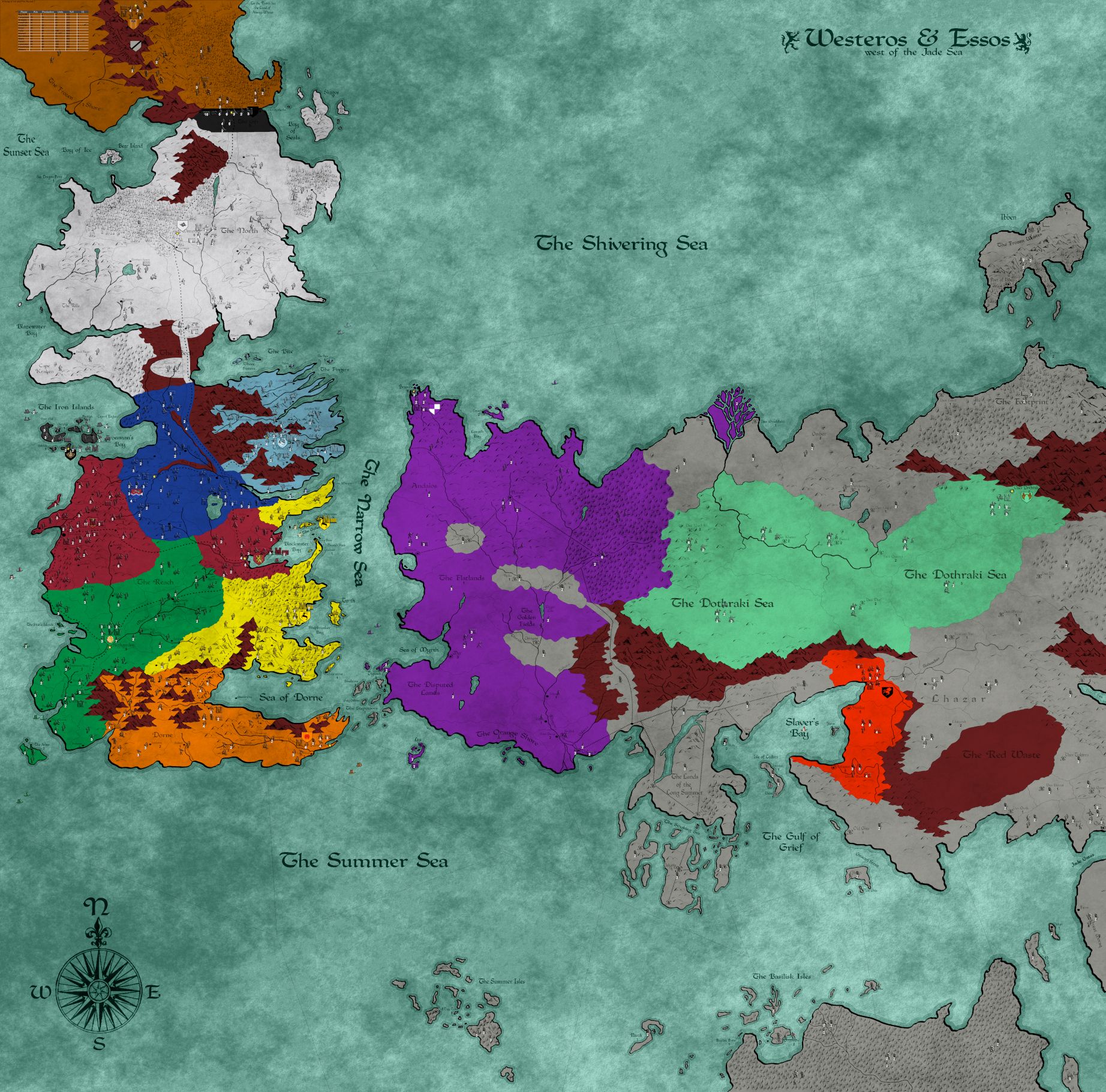
A Song of Ice and Fire (version 0.6)
Cernel's Review:
"A Song of Ice and Fire" presents itself as a great map and a great game, on most levels (pointing out, however, that I have not played it, yet, and I've almost no knowledge of the referring setting).
On a gaming level, it feels a well balanced compromise between playability and complexity, also referring to the advanced but streamlined political system and to the well manageable territory effects system, adding some more realism and variety to the map, without too much of a headache for the players (a rare case in TripleA where territory effects complexity is fairly contained).
Graphically speaking, it is notable for its simple but beautiful and highly consistent unit images, for a true boardgame feeling, blending nicely with a good looking and well detailed, yet not too busy, map.
The foremost issue this map has is that it is unclear how it is supposed to be actually played, to start with. Nothing about it is explained in notes and the map just presents itself as a 14 players Free For All, with "Others" being unusable. This would normally mean that the map needs 14 or 13 human players to be played (depending if using "Others" or not), each one taking one "player", but this cannot be the case. First of all, it seems that the "Others" player must be played only by the AI, but this is not stated in the notes. For the remaining part, I guess what people will do is taking 1 player each, leaving all the remaining ones to the AI, and I guess this should be good enough to make the game playable, at least up to 7 human players, as likely the participants will select for themselves players having some chances to actually win the game (and if they don't, it's their own fault). However, if this is the way the game is envisioned to be played, it should be clarified in notes, as well as having the "Others" player defaulting to the AI.
Once you start playing it, the main issue is finding yourself wondering what are the rules? Also since TripleA doesn't fully support all intended rules in all cases (with particular reference to sea transports), it is necessary knowing what ruleset the players are supposed to abide to (and the program to follow). If not providing a full rulebook, the notes should tell what is the referring ruleset, then detail all exceptions to it.
The biggest issue that I see here is that there is way too much units' accumulation. Take for example Stark; on round 1, as that player, I gain 7 peasants to place and I can purchase 21 sellswords: 28 units in total! Of course, since I start with a meagre 6 placement spots, I would first need purchasing and placing several castles, to achieve only a portion of such a placement capacity, but let's not forget this is a FFA with politics, and it easily happens, in such games, that you stay not at real war with anyone for many turns, potentially accumulating an enormous quantity of units.
The best way to solve this issue would be with the addition of upkeep costs, but this would need rethinking the units balance very extensively, and actually adding more income or multiplying the PUs gained out of it.
Without resorting to upkeep, I would cut all productions by half the current values, rounded up, and get rid of all or most national objectives. Also, I would reduce the peasants gained per turn to 1 per 6 territories (I would actually rather prefer 1 per 12 total production, but TripleA doesn't support this possibility). For example, doing so for Stark would reduce income collection on the starting territories to 26 only (that is less than 9 sellswords), and the starting maximum placement abilities (in the capital) to 3.
The production and placement abilities often don't make any good sense with one another (especially when adding the income from national objectives), as this map has the biggest relative placement constrictions that I've ever seen. Players have often anemic starting placement abilities (too few castles) while having a much bigger placeable units potential, due to the generous assignment of peasants and the increased income (without increasing placement limits) from generous national objectives. Stark, as detailed above, is an example. Another example is NightWatch, that collects 9 PUs each turn but has only 1 regular placement spot, thus the only way to spend all the income by placing stuff in The Wall only is by buying 1 trebuchet and 1 wall each turn, and you really don't want trebuchets. Since they don't have any trebuchets nor any walls in The Gift, I see no way they could have been able to spend their income so far (meaning in the implied rounds before the first round of the game), unless they were keeping failing tech research. Assuming you don't intend to buy trebuchets or naval units with them, eventually the only way to use your income (beside tech development) will be placing a castle in the gift, that I don't think you actually want to, as I can see that being eventually taken by Stark. So, I really don't understand how I would spend my income, playing as NightWatch (and this makes it even harder to guess how the AI will manage the matter, if NightWatch is going to be into its care (I've run a game in 1.8.0.9 with all players to AI, and what happened is that FreeFolk conquered The Wall on round 10, capturing 40 PUs of saved income from NightsWatch)).
It's a though call arguing over units balance without having ever played the game, but, merely looking at the so called "common" units, I can see that their relative balance on costs is quite bad. First of all, it seems that the units in general have scarcely any defensive advantage, especially since the two fodder units (peasant and sellsword) have the same strength for attack and defence alike. This is usually not advisable (there are reasons why Axis&Allies games have fodder at attack/defence 1/2), as it makes very hard to push your stack next to your enemy, and, maybe more importantly, near to impossible to move around it, but in conditions of great superiority (and in such conditions, without a substantial defensive advantage, you would just go for the frontal attack, most likely), much decreasing strategic options, making the game into hardly anything else but a linear push. I can see that in this case the "wall" units should provide the defence superiority (by draining the strength of the attacker), and they seem fairly well balanced as a matter of cost and all, but such units cannot be moved, so the risk may be that it may become common to lock your enemy by deadzoning, which would make the game static (something that a FFA surely doesn't need). Both the "archer" and the "knight" units are very bad units, compared to the "sellsword", so much that I suppose almost no archers or knights should be bought over more and more sellswords. The archer is the worst unit, as it is absolutely inferior in attack, even taking into account the support bonus, while it is just the same relative strength for less hitpoints in defence; the additional defence in hills makes it minimally interesting, but still very marginal a choice. Knights appears to be very expensive and tactically pointless, relatively, as they cost twice a sellsword and have twice the strength both in attack and in defence, thus lacking any tactical value (a sellswords only force will be always superior to a combination of sellswords and knights), but just having the strategic value of additional movement, that they pay dearly by halving the hitpoints per TUV. Assuming the factual +5 bonus when attacking castles is correct (and the notes, stating +3, are wrong), catapult is decently balanced, as it is a very bad unit if you are attacking anything without a castle, but if you are attacking a castle it is good enough to justify its cost, especially considering placement limits. On the other hand, trebuchets are almost worthless units, overall, being only slightly better attackers outside castles (where you don't want to have them anyways) and even worse attackers inside castles (as the catapult would attack at 8 with double support, for total 10 power, and the trebuchet at 9 with triple support, for total 12 power, while costing, respectively, 6 and 8, thus the catapult having a higher relative power, other than being cheaper and requiring less supportable units to get to such power) in exchange for losing a lot in defence and hitpoints. If I would play the game, and would have only the choice of the common units (that is Tully), besides walls (that seem a good buy, if you need such things), I think I would just buy a lot of sellswords and hardly anything else but a few knights and some catapults, and the last two ones only in case I really feel I greatly need momentum, which should be quite rare in a FFA (as in such kind of games it is mostly about building up your strength, taking it slow). On the other hand, the sea units seem reasonably balanced, when you consider that carrack is a tech (so it makes sense that it is quite good compared to galley), but, just as a matter of realism (referring to those units in history, as I don't know what they are in the scenario), I believe that galley and carrack should have some transport capability too and should certainly move faster than cogs (of course, this would need increasing their costs considerably).
I abstain on commenting on the uncommon units for brevity, and also since it is pointless, as first the common units should be rebalanced (they cannot seriously be left as they are), then all the other ones redefined, as well. But let me just point out that currently unsullied are not very good units, if you compare them to sellswords (as a 3/3 at cost 3 is much better than a 6/6 at cost 5), but the combination of sellswords and unsullied really makes archers worthless, if they weren't already.
Finally, I want to point out that the considerations above are mostly based on costs, but, as it is, this map is extremely limited on placement capabilities, which comes in as a very big item, therefore. However, this makes knights much better, but certainly not archers.
Beside balance considerations, I really don't like the dynamic of giving +5 strength to infinite attacking catapults/trebuchets, when assaulting a castle. I don't think it makes any sense that you having castles make your enemy stronger than not having them, so any such dynamics should rather decrease the defensive advantage of castles, not turning them into a liability for the owner. That even more so in the moment the defensive ability castles grant is really relatively minor, overall (the actual main static defensive units are walls, not castles).
To fix the common units, I suggest decreasing the attack strength of sellswords to 2 (from 3), as this change alone should fully fix the relative balance of archers and knights, as well as giving some defensive superiority to the fodder (as it is in most TripleA games, and it should better be). This would imply that walls negate the attack ability of sellswords, unless they are supported by archers or such, which may be too extreme; this could be fixed by making walls giving only -1 attack, but up to 5 units (still not cumulable with castles) (this would also make walls a tad weaker, that may be advisable if reducing the attack strength of the main purchaseable fodder). Decreasing the attack of sellsword to 2 should also make catapults really good (yet not trebuchets), maybe too much, but I would rather completely rethink catapults and trebuchets in terms of somehow countering walls (and on a limited basis, so that you have advantage at having more catapults/trebuchets only if facing more walls, not 1 to infinite like now in case of castle presence), rather than castles, in the first place, since, as the units are laid out, it is the walls that are the true static defenders of the game, while the castle is mostly a factory unit with some defensive capabilities that can justify but a tenth of its cost, even without considering the bonus they, instead, give to enemy artillery. If, instead, it is preferred keeping the current dynamics, artillery can be balanced by the combination of making sellsword attack at 2 and giving +3 bonus to catapult and +5 bonus to trebuchet, when facing castles (instead of the current +5 for both).
Just for realism, once archers are made good enough for their cost as default, I would also make them lose 1 attack strength when attacking in forests (while keeping the additional 1 defence bonus when defending in hills) (also this way keeping the influence of terrains more neutral overall).
Of course, any changes to the common units would require reviewing all the units, or at least all the purchaseable ones.
The main perplexity I have on the politics system of this game is that "Alliances Can Chain Together" is enabled (and not even editable). While the fact that if you declare war on somebody all his allied are instantly at war with you too is a cool dynamic, the fact that you need the consent of all its allied to enter an allied relationship with somebody makes this option extremely hard to work with in a FFA environment, and the fact that you will, then, ally with all of them makes for the game escalating and consolidating into two alliances, ore maybe even only one (as nobody wants to be the one getting ganged up). For example, at start game, if NightsWatch wants to ally with Stark, it will need the consent of Tully too, which I don't see how it can make sense. Moreover, the UI for this property is lacking as, if refused, NightWatch would be unable to see if Tully or Stark refused the proposal (and, actually, it will be always told that the target, Stark, in this case, refused it, which may be easily confusing for inexperience players). Another extreme behaviour is that if you decide to go at war with somebody, you need the consent of all your allies, which I don't think it really makes sense, as an independent power should normally be able to declare war on whoever it wishes to (then, rather, the allies should have the option of following the lead or breaking the alliance, if not of remaining allied without sharing in the new war). It could make sense if, then, the warring player could be able to break the alliances that are restraining it from going at war, but the way politics are coded implies that this is going to take time (and for sure it won't be able to try again on the same turn a war action that failed for allied opposition). I'm not surely against this rule, mainly because I've actually never played any games having it enabled, but I definitely believe such a strong behaviour should be at least optable out (the property made editable). Anyways, a fair amount of playtesting would be needed, to see how this option would actually work out in game (maybe it will be fine, but I've doubts).
For the remaining part, I see that the politic system (clearly taken from Napoleonic Empires FFA) is quite slow reacting, with no backstabbing allowed and considerable delays in going from Allied to War. In general, this tends to be an issue in FFA, where it can cause either a general tendency to shy away from actually making war on anyone, or cause people to stick with the current political outlook. In particular, I see that you can only downgrade from allied to ceasefire (not from allied to war) and there is a one additional round delay between going allied with somebody and downgrading to ceasefire with the same, thereafter. Specifically, I've tested that Stark and Tully can downgrade to ceasefire only starting from round 2 and, if you go allied with them during the firs turn of NightsWatch, you can downgrade to ceasefire with either only starting from round 3 (if they are both allied with each other, you can only downgrade both).
Still regarding the political system, I don't understand why you cannot downgrade from Allied to Open Borders (as an alternative to Ceasefire), if that is intended. You might have allied units inside your territories that you may not want to get stranded, I can immagine.
Finally, "Ceasefire" is a very poor naming choice for a setting without guns (I suppose the only "firing" unit is the dragon), and it should be renamed appropriately.
Regarding the productive abilities of the various players, I see that there are a lot of cases of units a player possesses but cannot produce (meaning not even replacing them if lost), or at least I've never seen a game that has half as many. I think such cases should be limited as much as possible, as it tends to feel lame being unable at least to replace your units, with maybe the only exception of air units not subjected to AA fire, as they are very easy to keep alive indefinitely. Not knowing the setting, I cannot express a definite judgment on the matter, but, for example, I wonder if it really makes sense for Stark to be unable to produce Direwolves and Mountain Clansmen (how did it end up having them, in the first place, then?). In general, I suggest reviewing all the cases of units that players have but cannot produce, trying to limit them as much as feasible (for example, having read a little about it, I agree with not being able to purchase Dragons, though I wonder if there should be some random event for them possibly hatching, eventually).
A minor element I would change is disabling infrastructures (castles and walls) from blocking blitz. I don't think it makes any sense that a territory with 1 wall in it blocks a knight or such, and since such a unit costs only 1 PUs, that feels much too cheap of a blocker.
For others, the ability of the "Other" unit of generating 1 "Wight" each turn is very strong (and highly unbalancing, since Others are gained randomly). This is not necessarily bad, just very random and very influential, but if such a huge random element is wanted (which may be actually good, to add some variability to the generally static situation of FreeFolk, but only as long as FreeFolk are strong enough), it will need playtesting to evaluate its impact in the game, as it is going to be a very powerful element, potentially and much variably reducing the strength that FreeFolk can exercise elsewhere. Without having played the game yet, it looks to me that the production or TUV of FreeFolk need to be considerably increased from the current values, or the Wights made weaker in combat, or a combination of the two, to offset such a potentially daunting threat, that should eventually materialize in increasingly huge numbers right next to its capital (to be clear, I suspect the current impact of Others makes the game much unbalanced against FreeFolk). I also wonder if it makes sense that Others units cannot go back into their capital; if they should be able to, then "The Frostfangs" can have an impassable territory effect, rather then being generally impassable.
Apparently, all powers in the game have 1 capital each (the one of "Others" being impassable), except Baratheon and Lannister, having 2 capitals each. I wonder if it would be rather better for the consistency to the setting if nobody would have any capitals (for example, if Tully would lose Riverrun, should they still be able to raise troops and other military units or not?). Not knowing the setting, but just thinking on it on realistic terms, I would suggest either having no capitals for anyone or giving everyone the ability (with user actions) to create new capitals. In particular, I read that Meereen was a city that Targaryen conquered, thus they were able to produce military units before having that territory, henceforth you would assume they should be able to do it still if losing it (am I right?).
I personally generally dislike national objectives (or at least I prefer income or other resources to be just given by territories or units), and this map is no exception. Now, this is not an issue itself, as I can just deselect national objectives (though I would have to convince all the other players to accept this), also this way having less income (thus less units accumulation), but, in this case, to make sense, it would be good having a trigger system that change the starting income when national objectives are deselected (NightsWatch start with 4 instead of 9, etc.).
As a matter of personal preference, I don't think the technology really adds to the game, and I feel the game is complex enough, so I see that as a scarcely worthwhile addition to it, and would cut it off the game (however, being optional, one can just opt out, as I would do): more complexity is not always better. If kept, I would strongly suggest to add icons to make very clear what techs every power currently has, so that at least it is not needed to remember them or keeping checking the tech tab. Also, if tech has to be, probably it should be made so to represent the technological differences already present at the start of the game, with techs already assigned to the various powers accordingly, as I've a hard time believing that everyone starts the game at the same technological level (it would be opportune to do this with triggers and custom properties, so that such triggers won't trigger if tech is deselected). In particular, I don't like the special exceptions for some naval techs to the Dothraki. I would rather suggest a more extensive naval tech system, equal for everyone, with most ships unlocked by techs (and, of course, also techs empowering them), and Dothraki simply having none of such techs, while the other players all having one or more already at start game.
I guess that the "Dragon Growth" tech cannot be just removed, if it is wanted to somehow represent the fact that the Dragons keep growing, getting mightier and mightier, but I surely don't think this should be anything related to technology, and I would rather substitute it with a series of randomly triggered events achieving that (it would probably be more logical that the Dragons become stronger and stronger each round, but this is probably going to be hard to define sensibly).
A huge issue with the notes is that they completely lack detailing how the politic system works in general. The notes should fully explain what relationships you can reach from each one, what are the delays after you reach a relationship, to move from it to another, and clarify how the chained alliances rule impacts on all relevant political actions (if such a rule is kept, which may be not advisable).
The notes are missing to clarify that you cannot have more than 1 castle per territory (also a strange limit, that I don't think can be realistically justified, and, in fact, "The Wall" starts with 3 castles in it), but it is fairly obvious that you don't want to do that anyways, as the castle is like 10 time costlier than its defensive value only, basically being mainly just a factory with some relatively minor additional combat abilities (and I dislike this too, as castles should be mainly about combat defence, at least in the real middle ages). Also the fact that the modifiers given by castles and walls are not cumulable with each other should be communicated.
I also wish the notes would be clearer regarding what units each power can produce. What the notes offer is a table with all the common units, then telling for every player what of those units cannot be produced by the same. It would be better having a general table in which you can see what each player can produce (with a player for each row and a unit for each column).
The notes should fully clarify the role of the "Others". If it is so, they should say that "Others" must the assigned to an active AI, and the way units are generated for them should be fully detailed (also with the probabilities of getting them).
The notes should inform that the behaviour for powers having multiple capitals is incurring in the captured capital penalties only upon losing both capitals (also meaning losing the saved income only when losing the last remaining capital).
The only drawing I'm certain I would change is splitting "The Kingsroad" into two, so to have two territories in between of The Twins and Harrenhal. While I understand that is probably a very good road, now seems more like a bullet train.
The units of Arryn should be recoloured, meaning remade by copying and recolouring the units of Tully, aside from the mountain clansman, as currently they are bad looking, having much too little contrast with respect to their brightness (particularly visible in castles and walls).
The units of Dothraki should be recoloured, for the same reasons already detailed for Arryn.
Graphically, a remark I feel making to the skin, and sadly a quite problematic one, is that the zones borders are all 1 pixel wide lines. This makes very hard to see the connections, mostly due to the various black details, much degrading the playability of the game. In this case, just making them thicker would not help much, as, then, they would look akin to the rivers; so I would suggest detailing them 3 pixels thick, with some antialiasing, and changing the colour, maybe to white or light grey).
Moreover, and this might be even worse, there is the inconsistency of sometimes using rivers as borders. So the matter would be somehow easily to tell apart the rivers that serve as borders from those that do not.
The combination of the above two problems is a huge drawback for the map, making it factually unplayable at default settings, unless you keep hovering the mouse to verify where the territories actually end, which makes the game very hardly playable. The territory structure of the map really needs to be made somewhat clear, for this map to be considered truly of good graphical quality. Until this is addressed, the map is still well playable by deselecting "View/Show Map Details", which I'm sure it is what virtually everyone is going to do as soon as it starts playing the game (so, practically, all the map details of this game are there just to cause confusion and being switched off as soon as possible, never to be seen again; not because they are ugly, but because they greatly damage the playability of the game). However, beside switching details off being a lame solution and a fail for the graphics of the map, this has the issue of not seeing the territory effects, that are at least supposed to be displayed in the details.
Moreover, in a few cases the details make too hard to spot connections or even make them look differently from the basic drawing (for example, with details enabled Old Oak and Brightwater Keep look not connected, but you would rather wonder if, instead, Highgarden connects to The Shield Islands Sea Zone, while, if you switch details off, Old Oak and Brightwater Keep look quite clearly connected, for sharing a substantial border).
Regarding the details drawing of the territory effects, there is the issue that they are not always certain, to say the least, thus needing hovering the mouse for making sure of those too. For example, there are several non-hill territories with hills displayed in the details, and one cannot be sure when there are enough hills displayed for the territory to rate as such or not. For example, you can see that Banefort is not a "hills" territory, while the nearby "Raventree Hall" is a "hills" territory, and there is really no way to ascertain that by just looking at the map (as, instead, a good territory effect representation should be sure to do). Another one of several examples may be that Bloody Gate is a "hills" territory without displaying any hills or mountains at all. If one would argue that having a road in between of mountains is what makes it a "hills" territory, then how to explain that, instead, Midlands Road is not a "hills" territory, while being in the same condition, and actually at least having some hills in it (I actually tend to think that this is an omission, and Midlands Road should be a "hills" territory)? But there are many other cases in which territories without hills or mountains, that are in between of mountains, spuriously rate as hills or don't; for example, Blackmont is hills while Skyreach is not (this might be a case of missing territory effect, and Skyreach should actually be a "hills" territory too). An extreme example is maybe "The Dothraki Sea", that is not a "hills" territory despite being next to mountains and having 25 hills or pairs of hills displayed in it (more than several other territories that count as hills). Also, sometimes territory effects are completely not displayed coherently by the graphics. For example, Greywater Watch is a "forest" territories, while displaying no trees at all (that it is usually what identifies a territory as such).
This is more a program (asset) issue than a map one, but currently TripleA lacks a sound for technological research in "classical". Consequently, the sound you get is definitely out of the setting, and substantially spoils the whole sound experience, while playing this game. Beside fixing this at the program level (as it would be advisable the most), I suggest muting (with "NONE") the tech development sounds or providing fitting ones for this map (or Classical in general).
Another tweak I suggest (this time a minor one) is adding a blank image for the victory city symbol (a map.properties setting for hiding it would be better, but TripleA currently doesn't allow not showing it), so to have it practically invisible. Those standard victory cities symbols are out of the theme of the map, and, since all victory cities are all and only the capitals, you don't need to distinguish them.
I would also shrink the minimap to half the current dimensions. At the current dimensions, it makes for a thick right side bar, taking out too much board view to little benefit.
Let me also say that I'm amazed anyone went to the extent of making a map of such quality to never have it even added to the repository. Luckily, the download link has survived through the years, so that such a distinguished work has not gone to waste, yet.
It would be good to know a full list of credits, if anything else but the original map details drawing has not been done by the original mapmaker. In particular, I wonder if all the units were made by him/her or have some other origin.For the game, I see the following issues:
- I believe Old Oak and Brightwater Keep should be connected (missing connection bug), albeit the drawing is not very clear there, and seemingly contradictory with details enabled (but I think connections should be primarily based on the basic view).
- In notes it says "All artillery gain +1 defense in hills terrain and +3 offense when attacking Castles", while the bonus with enemy Castles is actually +5 (considering current units balance for catapult (but not for trebuchet), I tend to think the bug is in the notes, rather than in the attachments).
-
Changes look good. Great work to revive a game that had the potential to be popular if only it had ever worked from the outset.
-
@Hepps As a suggestion... may want to change this....

to this...

I mean I know the Lannister's had big fat stacks... but I'm pretty sure it was coins and not wads of cash.

-
@Cernel is my fav nerd! Seriously though, Game of Thrones or even Star Wars and all the other famous franchises could get more people playing Triple A if someone mentioned these games maybe on a Facebook group for those gendres
-
@Cernel said in Game of Thrones & A Song of Ice and Fire - Official Thread:
Some very interesting inputs from an old thread:
http://tripleadev.1671093.n2.nabble.com/The-Game-of-Thrones-map-bug-tp7587435p7587532.html
Thersite:
Next, politics seem like a must.
The starting alliances would be:
Tully-Stark
Lannister-BaratheonThe starting war would be:
Tully-Stark VS Lannister-Baratheon
Greyjoy VS Tully-Stark
Greyjoy VS Lannister-Baratheon
Targaryen VS Freecities
Targaryen VS Lannister-BaratheonI've never seen the show or read the books for this setting, so I was wondering some things about this, if anyone knowledgeable is around (just curious myself):
Is this quote by the book or by the movie or both (I assume that the books and the movies are not exactly the same, as that's what happens, right?)?
Is this political outlook fully correct with the map as presented in the "A Song of Ice and Fire" map (look at the image at my previous post)? And is the map fully correct with any point in time on the scenario. If not, what should be the correct political starting situation and setup changes to make things right?
How is Targaryen at war with Free Cities and Lannister-Baratheon? In the map, there are at least 4 neutral territories between Free Cities and Targaryen, while Targaryen and Lannister-Baratheon are so far away they cannot care about each other even if they want.
-
A Song of Ice and Fire is now released and available to download from TripleA experimental category: https://github.com/triplea-maps/a_song_of_ice_and_fire
-
@redrum Cool, but I would still wait to play it until at least the most glaring issues are fixed (like the extreme unbalance between the units you can get and what you can place, and the obvious very bad balancing of several units). While this is clearly the best attempt at Game of Thrones up to date, it definitely needs to be taken over by someone good at mapmaking, and, preferably, with a good knowledge of the setting. I wonder if you are planning to fix it all yourself, but, in general, it always feels like a waste of skills to me when the developers (also veqryn) do such things, so also for this I think the best would be if someone capable would get interested in taking over the ownership of this map.
Also Game of Thrones units are far from perfect, maybe I'll get around reviewing that, eventually.
A thing I wonder is: are the swornswords missing? Or do the sellsword represent both sellswords and swornswords? Maybe calling them swordsman, in this case? Just looking at the Thersite list.
-
@Cernel Well, better to release it and see if someone wants to provide feedback or take it over as it is a nice base map and units. I don't plan to balance and play test it myself but will do XML updates if someone provides feedback with proper justification.
I think the reason developers end up working on maps is one cause its fun to create maps and that we don't have enough map makers to own all the maps. We also have the age old problem of everyone likes to create half done maps but no one likes to finish maps or maintain them.
-
@Cernel Nothing like a ringing endorsement to build some excitement around a map!
I will provide you with a quote that I hope tempters your zeal for providing input...
"If you must tell me your opinions, tell me what you believe in. I have plenty of doubts of my own" Johann Wolfgang Goethe
I guess what I am saying is add something to the conversation more than just blanket criticism. If you have gone so far as to establish that the unit roster is imbalanced... would it not be more helpful to make some suggestions, perhaps identify which units are out of balance? For certainly you have already done the work to establish this if you have already made these determinations.
-
@redrum said in Game of Thrones & A Song of Ice and Fire - Official Thread:
@Cernel Well, better to release it and see if someone wants to provide feedback or take it over as it is a nice base map and units. I don't plan to balance and play test it myself but will do XML updates if someone provides feedback with proper justification.
Personally, if I would ever get interested in tweaking this map into full playability, I would rather make a variant of it, call it "ASoIaF Cernel", and do whatever I want with it. Why should I lose likely a lot of time attempting to convince anyone to agree to a number of changes when there is just no reason to it, in the moment nobody plays the game anyways?
@Hepps It's not so easy, as proposing a well made tweaking and rebalancing of this map would require a huge descriptive effort, but I believe I've at least touched most main points, with some suggestion changes, in my previous review, actually.
-
@Cernel No reason to create a variant since if you want to take over the map then its yours

-
I'm currently trying to improve the "A Song of Ice and Fire" map for fun. I am especially working on improving the units.
While I would like to improve the map itself, I am not that good at map design.
-
@Greg-Anderson Cool. I'd be glad to review the changes and help you contribute them to the official map repo. Posting your thoughts here would be good.




Hello! It looks like you're interested in this conversation, but you don't have an account yet.
Getting fed up of having to scroll through the same posts each visit? When you register for an account, you'll always come back to exactly where you were before, and choose to be notified of new replies (either via email, or push notification). You'll also be able to save bookmarks and upvote posts to show your appreciation to other community members.
With your input, this post could be even better 💗
Register Login