-
@redrum as far as i can tell yeah like 4/4 now
"You should never have told me horses sleep standing up, it gave me a mental block." - Mister Ed
-
@ubernaut Alright. I'll take a look then today.
-
@ubernaut I was able to reproduce and fix the bug on G40 G1 related to the error "IllegalStateException - ConcurrentBattleCalculator.calculate: friendlyUnits should but does not contain all units from targetsToPickFrom". Here is the PR and once that is merged, you can download the new pre-release to avoid the error: https://github.com/triplea-game/triplea/pull/5933
Thanks again for testing and reporting the issue.
TripleA Developer with a Passion for AI: https://forums.triplea-game.org/topic/105/ai-development-discussion-and-feedback
-
@redrum sure happy to check out the ai again after the update im not sure how to be notified tho so you might want to ping m.

"You should never have told me horses sleep standing up, it gave me a mental block." - Mister Ed
-
@ubernaut Ok. I'll reply here once its merged and there is a new pre-release to test.
-
@ubernaut Latest pre-release should now have the fix: https://github.com/triplea-game/triplea/releases
Here is direct link for the Mac install: https://github.com/triplea-game/triplea/releases/download/2.0.18008/TripleA_2.0.18008_macos.dmg
TripleA Developer with a Passion for AI: https://forums.triplea-game.org/topic/105/ai-development-discussion-and-feedback
-
@redrum cool will check it out soon and get back to you with my findings.
-
@redrum alright here you go ... more feedback battling the Axis AI on the WWIIClassic map. Played 3 matches and finally won the 3rd match
Match 1: So, I played the Axis AI finally again after maybe a year and my 1st match as always for fun I forfeited my 1st Russia turn (intentionally blow dice on Tech and only start the game if I don't get a Tech and lose all of Russia's money) and so I played very well but I totally had to concentrate on the German AI and so the Japan AI literally rolled and took Russia ez early but I did finally take down the German AI's capitol with my USA troops maybe round 9 but the Japan AI had a stack of 43 Infantry right next to it so it liberated the German AI capitol ez the next round and so funny the Japan AI easy rolled into the USA and took it's capitol because I did not see it's swift western America assault and that left me with a lone UK and so I gave up I think it was round 13. The Japan AI literally had maybe 130 units at that point because it was such a Japan AI crush
Match 2: this time I didn't forfeit my 1st Russia turn and I had maybe the worst start I ever had because it had been awhile since I played this map and played this game vs the Axis AI so I lost bad my 2 first main battles vs the German AI to start and so the German AI rolled hard and had lots of PU's and took down my Russian capitol early like round 3 maybe and also it was odd the Japan AI didn't start the match attacking Pearl Harbour but it still rolled and also went straight for Western USA most of the match and FUNNY the Japan AI attacked Western USA and had 1 Infantry and 2 Fighters left and my last roll hit but the Japan AI did not choose to destroy the Fighter and take Western USA with an Infantry but instead destroyed the Infantry and retreated and left me to still own the Western USA! Eventually the Japan AI took the USA so I gave up then maybe round 14. I didn't play great but I think I was rusty
Match 3: A repeat of match 2 but this time I did a perfect sweet start with Russia and the German AI was in shock from the start and I managed to hold back the Japan AI sweetly but I also now perfected my USA western defence with smarter purchases and positioning (shook the rust off) and so once I swarmed the German AI capitol I took it easy with the USA troops but I could have even taken it with my Russia troops because I played Russia so well ... in this match there was an error in round 8 that I sent to the "Report error to Triple A" function thing ... so look for that ... I forget what the error said but it was some long message and didn't effect the match I believe. Anyways, once I took the German AI capitol I bought mostly Bombers and some Tanks and my Allied countries quickly snuffed out most of the Japan AI forces and I finally ended the match in round 14 taking its capitol;
So, battling the Axis AI is way easier than battling the Allies AI as I said earlier in this thread because theres one more AI country to battle with the Allies obviously.
Was fun. Redrum, I will battle the AI again once I know you've done some kind of tactical update to the AI. Could you let me know if you do
-
@redrum one more question before i test it out again does AI understand tech or should play with tech off?
-
@ubernaut It doesn't understand tech. I believe it will randomly put some PUs towards it sometimes. I honestly don't even know what the techs are in G40
@Captain-Crunch Yeah, you really stuck it to the Axis AI that 3rd game. Close to a perfect opening with Russia makes it really hard on the German AI to make enough money to defend itself. I think even a human would struggle with Germany against that Russia turn 1.
TripleA Developer with a Passion for AI: https://forums.triplea-game.org/topic/105/ai-development-discussion-and-feedback
-
@redrum same as v3 pretty much
-
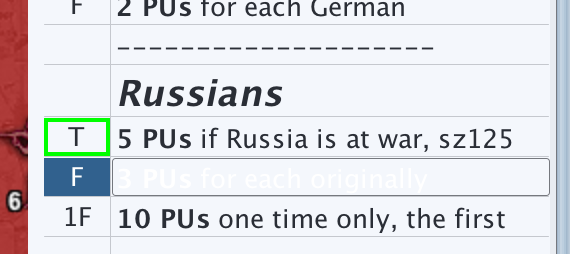
@redrum noticing a ui problem on mac, can't really see the objectives and if you select them they get even harder to see:
-
@redrum save files don't seem to be working properly in the prerelease either wanted to show you a strange move the ai did in the japan first turn but it locked up when i tried to save it the autosave seems to reset to the german first turn.
-
@ubernaut Yeah the objectives issue on mac I think has been reported already: https://github.com/triplea-game/triplea/issues/5792
Not sure I know what you mean with the save game. I loaded your save game it seems fine as it was at the end of Japan's NCM. Make sure you aren't trying to load a save game with the pre-release into the stable release as that would cause issues.
TripleA Developer with a Passion for AI: https://forums.triplea-game.org/topic/105/ai-development-discussion-and-feedback
-
@redrum nope when i try to load it starts the game over. i tried a few of the autosaves they were all doing the same thing.
-
how many accounts does Frostion have hes an alkexr, Shulz, Jazan, Ubernaut clone amiright ez
@redrum ya I never "blame" the AI I'm just stating what I was doing and since I'm just playing the 1 map so far is why I have gotten the 33 wins vs each of the 2 AI scenarios
 Its draining but fun!
So, I was about to edit in my last post that last game about round 7 or 8 maybe I wanted to move a Tank from Sinkiang to Manchuria and I hadto only move 1 space to the country in between and then click to Manchuria because the auto-line graphic pointed to the neutral country of Mongolia instead and blocked my Tanks 2 movement ability to get to Manchuria ... my point is I dunno if that will cause a glitch eventually and is a minor thing but I am telling you it for sure
was fun and I'll watch for tactical updates to the AI -.-
-
@Captain-Crunch clones? i can assure you, there's only one of me.
-
@redrum anyway if you can see that move please tell me what the ai was thinking there off the coast of russian far east, seemed to only limit movement options with no real benefit.
"You should never have told me horses sleep standing up, it gave me a mental block." - Mister Ed
-
and I could post again about the Combat Window height size, I guess I'll wait for my next AI update test
I tried 3 resolutions and all sucked but my current computer resolution and for some of the countries you really haveto hold and then rehold your mouse button to scroll up or down to find the "undo move" button and it wasted too much time but whatev still fun
redrum posted my UI request in the right thread already but I wanted to remind you its annoying
-
@ubernaut Hmm. Not sure why you don't see the saves loading as it loads fine for me:
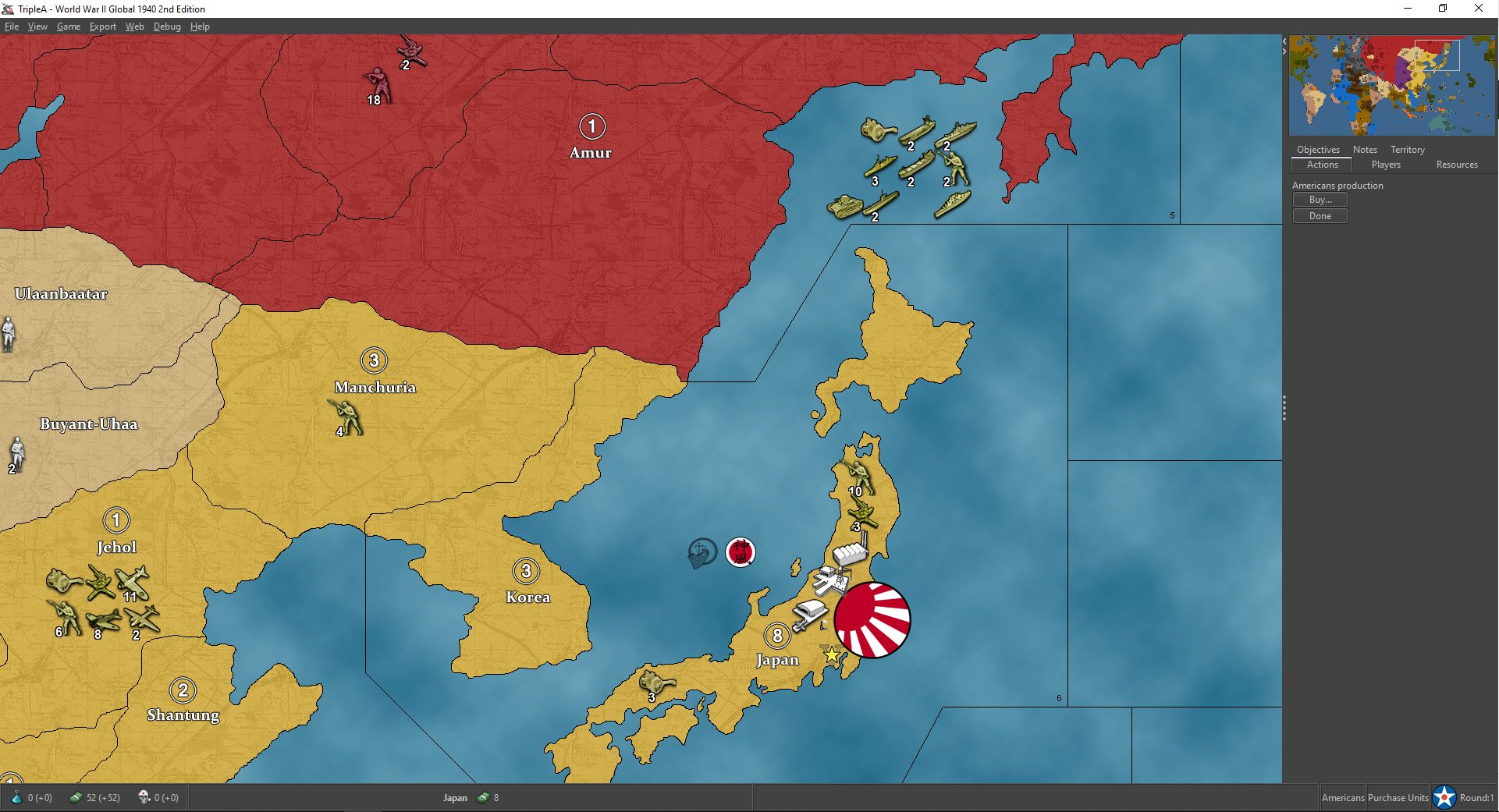
I think the move is related to the AI anticipating that it will end up at war with Russia but it is a bit strange.
TripleA Developer with a Passion for AI: https://forums.triplea-game.org/topic/105/ai-development-discussion-and-feedback



Hello! It looks like you're interested in this conversation, but you don't have an account yet.
Getting fed up of having to scroll through the same posts each visit? When you register for an account, you'll always come back to exactly where you were before, and choose to be notified of new replies (either via email, or push notification). You'll also be able to save bookmarks and upvote posts to show your appreciation to other community members.
With your input, this post could be even better 💗
Register Login