why did we remove the undo all button for movement phases?
-
just wondering what the logic was there
-
@ubernaut
Removed ??? It was very useful....
Weeks ago when I re-sized myTripleA windows this button was moved in a different line below respect to other buttons so I thought the button was removed, then I found it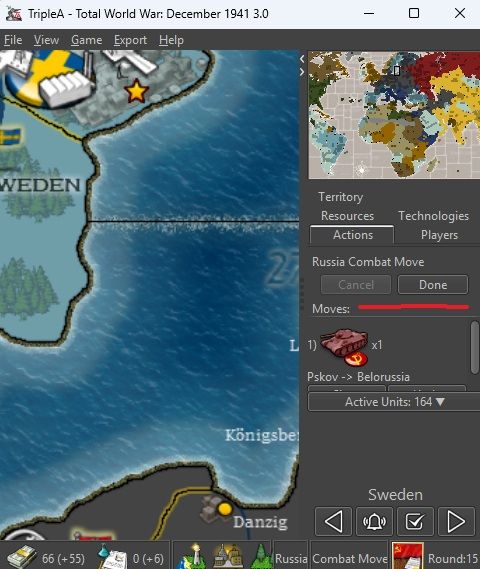
-
-
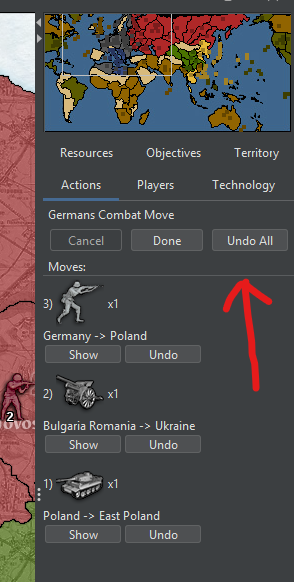
I just updated to 15650 and it's there:
Combat Move:
Noncombat-Move
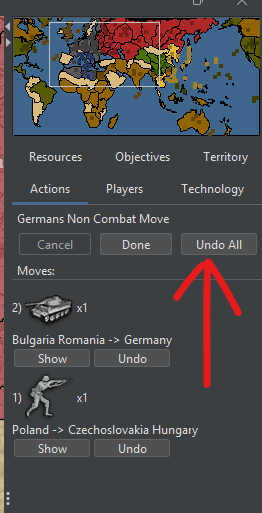
I suggest having the "Undo All" button in the same place as the "Cancel" button, meaning that there is no "Undo All" button when the "Cancel" button is usable, whereas there is the "Undo All" button instead of the "Cancel" button when the latter is unusable (like in the screenshot which I quoted).
-
-
@cernel what does the cancel button even do? never noticed it before and i can’t seem to even get it to light up lol
Unselects all selected units (same as the "Escape" key). (When you click on "Undo All", you also unselect them all as if you clicked on "Cancel" too.)
Obviously, the "Cancel" button would be better named as "Unselect All" or just "Unselect".
I almost never use it as well. You can do the same with the "Escape" key or by right-clicking with the mouse until you have no more units selected (which can be speeded up by right-clicking on a type of units to unselect all units of that type). I guess it exists as a matter of principle for supporting mouse-only gaming or for people who refuse to take 1 minute to read the “Movement/Selection Help”.
-
@Cernel oh right i’ve used esc for long long i don't even think abt it now lol thanks

-
@malmessi @panther @cernel i’m not sure if this is an issue with the default frame size but i always have to resize my sidebar to get that to appear i only need to resize it a little bit tho seems like there is some fine tuning we are lacking in the default settings (at least for the mac os x skin).
-
@ubernaut What's the resolution of your screen?
-
@Panther 2056 x 1329 (16 inch mac book pro at maximum resolution)
-
@Cernel realizing that i doubt anyone uses the cancel button. ostensibly you’d do that by dragging the movement arrow outside the map to the cancel button i don’t think i have ever done this.
-
@lafayette motion to either remove the cancel button or at least move it to the third position so that it is the one that gets hidden when the sidebar width is too small.
i think we actually don’t need as everyone intuitively knows to use either the escape key or just click in any invalid destination to cancel a move.
no rush or anything i know you on a journey atm
-
@ubernaut cancel is effectively u sable? Click and drag is not usable imo.
The button placement could use rework in general. A tweak at least for sure so undo all is not such a hidden feature.
-
@LaFayette have you ever used the cancel button? dragging outside the main window with an active movement arrow seems very counterintuitive to me
-
@ubernaut genuine question. I'm on a train and can't play test. A click and drag to click a button is arguably a hack imo, which is to say unusable
-
@LaFayette it’s not rly click and drag what i mean is that the cancel button only is clickable when you have clicked on a unit and it’s movement arrow is active so effectively everything on the screen aside from a valid destination click, the done button or the undo all button is the same as clicking the cancel button.
-
I think this whole thing can be solved by completely removing the functionalities of how the right-click currently works for deselecting units (comprising removing every right-click function with keys involved) and instead having the right-click open the prompt which you currently open by clicking on a territory without clicking on a unit but adding a "None" button beside the "All" button to unselect all units (like the "Cancel" button in the "Actions" bar currently does), removing this button from the bar. This would also have the benefit of removing the problem of said prompt being currently unusable if a territory happens to be completely covered in units or very badly usable if it is difficult to find a spot not covered by any units in the territory. (Moreover, this would be more intuitive as this is how things work in Windows (where the left-click is for selecting and the right-click is for opening the "context menu").)
Moreover, I would remove the numerically arbitrary "Alt" to select groups of tens (which I do not use).
In practice, the current first two paragraphs of the Movement/Selection Help, namely:
Selecting Units
Clicking on a unit stack adds 1 unit of the stack to the selection.
CTRL-click on a unit stack selects All units in the stack.
Shift-click on a territory/sea zone selects All units in that zone.
Click on a zone (not a unit) to choose the units to select from that zone.
Alt-click on a unit stack selects 10 units in the stack.Deselecting Units
Escape unselects All selected units.
Right click on a unit stack deselects 1 unit in the stack.
CTRL-Right click on a unit stack to unselect All units in the stack.
Right click (not on a unit) to deselect the last selected unit.
Alt-Right click on a unit stack deselects 10 units in the stack.would become these three paragraphs:
Selecting Units
Left-Click on a unit stack to select 1 of these units.
Ctrl + Left-Click on a unit stack to select all of these units.
Shift + Left-Click on a zone to select all units in the zone.
When no units are selected, Right-Click on a zone to select units from that zone.Deselecting Units
Escape to unselect all selected units.Selecting/Deselecting Units
When one or more units are selected, Right-Click to modify the current selection.(Just like now right-clicking and dragging moves the map instead of unselecting units, right-clicking and dragging would still move the map instead of opening the prompt for selecting units.)
(All this would reduce the number of the relevant explanation lines from 10 to 6.)
-
Is "Undo All" and the "Cancel" button the same thing ?
I don't see any cancel button anywhere
-
@beelee strange maybe your button order is different form mine somehow?
try expanding the width of the sidebar.
cancel essentially just deselects any currently selected units movements
-
@Cernel wasn’t even aware of all of these existing commands i do use the control click for getting an entire unit type. didnt realize at all that right clicking current deselects units selectively.
i dont think it’s a great idea to flip the click tho not sure the current thing is broken just a bit convoluted and not well understood probably



Hello! It looks like you're interested in this conversation, but you don't have an account yet.
Getting fed up of having to scroll through the same posts each visit? When you register for an account, you'll always come back to exactly where you were before, and choose to be notified of new replies (either via email, or push notification). You'll also be able to save bookmarks and upvote posts to show your appreciation to other community members.
With your input, this post could be even better 💗
Register Login