TripleA Logo TripleA Forum
    • TripleA Website
    • Recent
    • Popular
    • Register
    • Login

    My map editor for TripleA
    Scheduled Pinned Locked Moved Map Making
    31 Posts 6 Posters 41 Views 5 Watching
    Loading More Posts
    • Oldest to Newest
    • Newest to Oldest
    • Most Votes
    Reply
    • Reply as topic
    Log in to reply
    This topic has been deleted. Only users with topic management privileges can see it.
    • xxXEddieXxxX
      xxXEddieXxx @Vendetta
      last edited by xxXEddieXxx

      @Vendetta thank you for the feedback, i got some valuable feedback from others aswell and will pushing out a release later. I will make a little update post when im finished 🙂

      V 1 Reply Last reply
      Reply Quote 4
      • V
        Vendetta @xxXEddieXxx
        last edited by Vendetta

        @xxXEddieXxx One more little quality of life suggestion:

        On the territories tab, it lists out existing units which each have a box to enter how many there are and a ticker you can use to raise the number up and down.

        Right now, you get rid of units by entering a 0 or ticking down until it gets there. It doesn’t actually remove the old unit entry fully from your screen until you refresh by hitting something like Add New Unit or going to another territory or tab.

        Having an X button next to each unit that just does a one click clear and refreshes instantly so it’s gone right away would be convenient. And perhaps a clear all button that removes all units from the territory, either above or below the whole list.

        1 Reply Last reply
        Reply Quote 2
        • ubernautU
          ubernaut Moderators Lobby Moderators @xxXEddieXxx
          last edited by

          @xxXEddieXxx this looks cool any hope of a mac build?

          "You should never have told me horses sleep standing up, it gave me a mental block." - Mister Ed

          xxXEddieXxxX 1 Reply Last reply
          Reply Quote 0
          • xxXEddieXxxX
            xxXEddieXxx @ubernaut
            last edited by

            @ubernaut sure i can provide one

            ubernautU 1 Reply Last reply
            Reply Quote 3
            • ubernautU
              ubernaut Moderators Lobby Moderators @xxXEddieXxx
              last edited by

              @xxXEddieXxx nice 🙂

              "You should never have told me horses sleep standing up, it gave me a mental block." - Mister Ed

              1 Reply Last reply
              Reply Quote 0
              • V
                Vendetta
                last edited by Vendetta

                One more feature that would be helpful is a tab where it charts all the factions and their income, TUV, etc. Right now I can look them up one by by one on the nations tab and it will say how much their starting territories are worth, but I don't see anywhere that lists them all alongside each other, or that adds up TUV of their starting forces.

                xxXEddieXxxX 1 Reply Last reply
                Reply Quote 2
                • xxXEddieXxxX
                  xxXEddieXxx @Vendetta
                  last edited by

                  @Vendetta goes straight to the list 😄
                  Already thought about that but forgot it.

                  TheDogT 1 Reply Last reply
                  Reply Quote 2
                  • V
                    Vendetta
                    last edited by

                    Also, when adding new nations, would be helpful to have a shortcut that lets you copy all the rules of a production frontier from an existing nation

                    1 Reply Last reply
                    Reply Quote 1
                    • B
                      beelee @xxXEddieXxx
                      last edited by

                      @xxXEddieXxx said:

                      me again, I know. You asking yourself how can i post again.

                      heh heh I thought maybe you had some bot offspring 🙂

                      Looks pretty cool. So this is basically an xml editor ? Such as most people use notepad++ I think, although I'm still stuck on emacs because that's what I know how to use lol

                      Anyway, I will check it out. Keep up the good work. It's appreciated.

                      🫡

                      xxXEddieXxxX 1 Reply Last reply
                      Reply Quote 1
                      • xxXEddieXxxX
                        xxXEddieXxx @beelee
                        last edited by

                        @beelee well its a bit more then emacs and notepad 😄

                        B 1 Reply Last reply
                        Reply Quote 2
                        • B
                          beelee @xxXEddieXxx
                          last edited by

                          @xxXEddieXxx

                          heh heh yea the screenshots seemed to suggest that. I guess I'll just start clicking buttons and see what happens 🙂

                          1 Reply Last reply
                          Reply Quote 0
                          • TheDogT
                            TheDog @xxXEddieXxx
                            last edited by

                            @xxXEddieXxx
                            Versions
                            Time for version numbers now you have gone pulic ? (foolish boy 🙂 )

                            .
                            Draw Borders-
                            --I cannot modify 1941 Global Command Decision, GCD,  its too big, any chance to enable this ?

                            image.jpeg

                            .
                            Home page Problems/warnings
                            1941 GCD has 2 problems/warnings, To me they are warnings not problems
                            --I would like to tick them off as completed as intended ?

                            image.jpeg

                            When I check the map, the circle does not change should I get a tick ?

                            image.jpeg

                            .
                            Connections
                            1941 GCD Islands are not islands, see below they are a different color to other land and Tazmania & New Zealand are Sea Zones
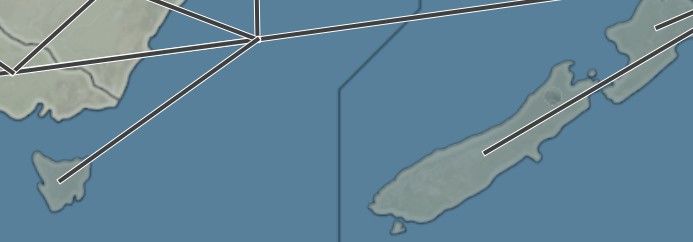
                            image.jpeg

                            .
                            Connections
                            --Map wrap around spans the whole width of the map.
                            --Can these wrap around connections be in a different color or maybe as dashes?
                            --or can you stitch the map together so its connections are more natural?

                            .
                            Terrain 
                            --I cannot find the relief textures, where are they? 🙄

                            .
                            Units panel
                            --Home/left hand pane is too wide, save its space for the map/the rest
                            --Units panel is too long, requires way to much scrolling, as too much space between options
                            --Move Cost Attack, Defence,Move etc drag North East, NE, on the same lines as Unit icon
                            --Then GIVES SUPPORT should be next to Combat, so between Movement, as it +/- to Atk & Def

                            --Allied Support could be Green
                            --Enemy support could be Red

                            --Air and Anti Air can also be used as Targeted Attacks and fires before Fires First/isFirstStrike, so the label should include that

                            .
                            Novice/Expert mode for usage of map editor
                            --Maybe you need Novice mode, shorten option choices, keeping it simple
                            --Expert mode, show all options, thats me, yes its clutter, but it's all there, then no need to have expand/hide everywhere in Expert mode.

                            https://forums.triplea-game.org/tags/thedog
                            https://forums.triplea-game.org/topic/3741/curated-best-top-maps-triplea-guides

                            TheDogT xxXEddieXxxX 2 Replies Last reply
                            Reply Quote 2
                            • TheDogT
                              TheDog @TheDog
                              last edited by TheDog

                              Doh
                              Forgot, need an option to load current place.txt file (Please)

                              EDIT When I picked a single space/loaction it looks like it loads the place.txt, is that correct ?

                              https://forums.triplea-game.org/tags/thedog
                              https://forums.triplea-game.org/topic/3741/curated-best-top-maps-triplea-guides

                              1 Reply Last reply
                              Reply Quote 2
                              • xxXEddieXxxX
                                xxXEddieXxx @TheDog
                                last edited by xxXEddieXxx

                                @TheDog

                                Time for version numbers now you have gone pulic ? (foolish boy 🙂 )

                                !!! I agree how could i even forget that. 😄

                                --Home/left hand pane is too wide, save its space for the map/the rest

                                Right at the end of the side is a little button that collapses it.

                                The rest are good points they will go into my list 🙂

                                Draw Borders-
                                --I cannot modify 1941 Global Command Decision, GCD, its too big, any chance to enable this ?
                                image.jpeg

                                That map's picture is 16,816 × 8,085 pixels, about 136 million. The editor refuses to hold pictures over 50 million pixels in memory, because one copy of GCD is about 540 MB and every drawn line keeps another copy for undo maybe i need to disable it on big maps.

                                C 1 Reply Last reply
                                Reply Quote 1
                                • B
                                  beelee
                                  last edited by

                                  @xxxeddiexxx

                                  Oh so this is an overhaul of the "Map Creator Tools" not just an xml editor. Although I guess you still have to have the baseline image or whatever it's called drawn or copied by yourself

                                  xxXEddieXxxX TheDogT 2 Replies Last reply
                                  Reply Quote 2
                                  • xxXEddieXxxX
                                    xxXEddieXxx @beelee
                                    last edited by

                                    @beelee exactly ! it was supposed to be a suprise this is why i used these screenshots 😄

                                    B 1 Reply Last reply
                                    Reply Quote 2
                                    • B
                                      beelee @xxXEddieXxx
                                      last edited by

                                      @xxXEddieXxx

                                      heh heh sorry Didn't mean to spoil the surprise 😊

                                      It surprised me 🙂

                                      1 Reply Last reply
                                      Reply Quote 1
                                      • TheDogT
                                        TheDog @beelee
                                        last edited by

                                        @beelee
                                        Yes , its Map Creator Tools but ++ good 🙂

                                        https://forums.triplea-game.org/tags/thedog
                                        https://forums.triplea-game.org/topic/3741/curated-best-top-maps-triplea-guides

                                        1 Reply Last reply
                                        Reply Quote 2
                                        • C
                                          Cernel Moderators Lobby Moderators @xxXEddieXxx
                                          last edited by

                                          @xxXEddieXxx said:

                                          That map's picture is 16,816 × 8,085 pixels, about 136 million. The editor refuses to hold pictures over 50 million pixels in memory, because one copy of GCD is about 540 MB and every drawn line keeps another copy for undo maybe i need to disable it on big maps.

                                          I think there should not be an upper limit here. If someone would want to make a map which is 50,000 per 40,000 pixels, for a total of 2 thousands million pixels, why not allowing it?

                                          If wanting to set a hard upper limit, I suggest 100,000 per 100,000 for a total 10 thousands million pixels being the limit. That should most likely cover every possible map-making needs.

                                          xxXEddieXxxX 1 Reply Last reply
                                          Reply Quote 0
                                          • xxXEddieXxxX
                                            xxXEddieXxx @Cernel
                                            last edited by xxXEddieXxx

                                            @Cernel
                                            its not about limiting the size of the map, there is an undo button that keeps the map in cache.
                                            So everytime you change something there is half a gig placed in there so we are having a technical limitation in terms of the implementation of this undo functionality. if we disable the undo on big maps they can get as big as they want.

                                            V C 2 Replies Last reply
                                            Reply Quote 0

                                            Hello! It looks like you're interested in this conversation, but you don't have an account yet.

                                            Getting fed up of having to scroll through the same posts each visit? When you register for an account, you'll always come back to exactly where you were before, and choose to be notified of new replies (either via email, or push notification). You'll also be able to save bookmarks and upvote posts to show your appreciation to other community members.

                                            With your input, this post could be even better 💗

                                            Register Login
                                            • 1
                                            • 2
                                            • 2 / 2
                                            • First post
                                              Last post
                                            Powered by NodeBB Forums