Warcraft: War Heroes - Official Thread
-
@Cernel @Greg-Anderson It was a fine balance between color and relief art. I did some testing and ended up on the existing mix. But I can see that especially the Tauren yellow is hard to even see up against the neutral army green. But when the players meet up, I think the colors are quite distinct, or at least distinct enough.
@Cernel Yes I forgot to make it 2.0 in the XML. This will be fixed in version map v0.1.2. I don’t know who will play it. I think time will tell. There is a lot of PVE and not much PVP going on in the first many rounds, there is also a lot of randomness and luck involved, so this might talk against it being popular in multiplayer. But I guess it is an OK map to play in multiplayer for two persons if they got the time and if the start seems reasonable and fair to both parties.
@LaFayette @redrum Regarding the Unit Help Window: Because of this map’s vast amount units, more specifically units that are not combat units or units to purchase, the unit help window is flooded with units.
It is a problem for this map (and other maps) that there is no unit sorting option that the map maker can make use of (that I know of). I guess this is a feature request, but would it be possible for the map.properties file to have options like this:
#use to NOT draw a list of units or territory names, comma delimited
#dont_draw_units=infantry,artillery
#dont_draw_territory_names=United Kingdom,Union of South Africa,German
#use to NOT show a list of units in unit help, comma delimited
#dont_show_in_unit_help=Gryhon-Egg,Loot-Level-1,Origin-Artisan,Humans-Level-1,Amulet-of-Accuracy-Itemor maybe figure out some other way that units might be set to be excluded from the Unit Help Window?
-
@Cernel said in Warcraft: War Heroes - Official Thread:
Is there a guide somewhere on how to do that exactly like you would?
The process would be OS specific and depending on which tool you would want to use. In theory a map-maker could go for lossy compression and get even more savings (but at that point it's a judgement call).
The lossless compression tool I'm aware of an use is
optipng, we run it automatically against PNG assets included with the game engine, this line shows an examples with args: https://github.com/triplea-game/assets/blob/44e60d38df85326a8007370030166b81db7a04d3/.travis/run_optipng#L14@Frostion Re: file size, what bit-rate are the sound files? The 50MB from sound is a place for savings. If you're over 128, that would be a good place to save. I'd recommend going with 96KBPS for perhaps all sound files, 128KBPS for sounds with very varied pitch ranges.
Re: unit-help & units
I'd be reluctant for the engine to not show all units. Personally I was looking there to get an explanation of the non-combat units in particular. Can you detail why you recommend the units you have to not be shown in unit help? Are they never visible to players or something like that?
I also found the engine was not helpful when using edit mode to place units. The rendering windows were stretched to the largest unit, the units were not sorted at all. Due to that it took me a solid few minutes to find the trebuchet-shot unit.
I also found I was missing the 'I' key for unit info and would have wanted units to have been labelled in the territory panel. Maybe clicking on units you do not own to show the tooltip would have been nice, I'm interested in ideas for how we can make it easier to learn about the variety of units.
Re: Unit Help Window
No matter how many units you have, the game should not be exhausting 300MB~1GB of main memory to render it. The engine is doing something quite inefficient. I think we might have a cross-product happening where it's rendering all units for all factions, with some 50 units and about 15 factions, it's 750 units, but still that should not be causing a crash.
To summarize, map specific:
- we can look at lossless image compression and more aggressive sound file compression to cut on the map size
To summarize, engine specific:
- unit sorting would be really useful for edit placements, perhaps for purchase and other unit display windows
- unit name and attribute discovery could be helped. Maybe having a faster/easier tooltip, perhaps labeling unit names in the territory window
- unit help window needs to be looked at and improved
-
I am well into round 6 of an all human game, and I noticed a few things and issues that are now fixet (but not released). More fixes and adjustments are sure to come.
V0.1.1 to v0.1.2
• Some unit price adjustments.
• All instances of items and origin skills affecting “all heroes”, now only affect heroes of the opposite faction.
• Pets (Mastiff and Battle-Chicken) must now be built and are no longer generated automatically. This is because pets can end up be generated out at sea and then become stuck there.
• Fixed dynamite unit. It can no longer be thrown over air ways and it now actually works and participate in battle
-
@Frostion When will the updated version be released? Is there also a way to make the map free-for-all?
-
@Greg-Anderson
Here is the first draft of v0.1.2 but you will have to start a new game to make the changes work. So if you got a game going then you could just wait for the official new release of v0.1.2
Manually replace the files in your downloaded zip with the two files in this zip: v0.1.2.zip@LaFayette
Unit image files are like 10 MB
Relief+basetiles is like 125 MB
Sound are like 55 MBFor the map most sound files are 160 KBPS. This was because that I could hear a real noticeable difference between 160 and 128 when it came to some of the music files.
Let’s look at the image compression at some point. I would want you to try to compress an image of the tiles at some point. Thx.
Regarding unit help window, I can see the need for players to want info on many if not all units. Maybe add categories to the unit help window? Use the existing categories but then also add a miscellaneous (assorted?) categoy for all the units that do not fight or are not factories etc.
Yes, edit -> add units is a mess for a map like this. Maybe it can be fixed with categories in the add units window?
I don’t mind no "i" key, as I just hover the mouse over units, so I really never noticed that the I key is not there anymore

-
Because of my lack of testing, and especially testing stuff like naval transportation of heroes, I didn’t really know the behavior of the engine.
It actually seems like no unit generation of land units (createsUnitsList) happens at sea at all. Lucky me

So the previous change about pets been generated at sea, and that this was problematic, is not the case. It does not happen. Woohoo!
-
@LaFayette said in Warcraft: War Heroes - Official Thread:
The lossless compression tool I'm aware of an use is
optipng, we run it automatically against PNG assets included with the game engine, this line shows an examples with args: https://github.com/triplea-game/assets/blob/44e60d38df85326a8007370030166b81db7a04d3/.travis/run_optipng#L14I've no idea how to do anything out of that, but this is not the thread for talking about it. I suppose I will just ask that to be run on all images of my map when asking it to be added to the repository. Shouldn't this maybe be a standard procedure, even if the mapmaker doesn't ask for it?
-
@Cernel I'm offering to do so for this map, not so for any map whenever. Notably there is some coordination that should take place. I could be convinced maybe to do so across all maps on occasion, but again the coordination makes it more prohibitive. In general the map-upload process has been updated/designed to reduce/eliminate any centralized bottleneck like map admins running a compression job, namely so map makers can do all on their own.
-
OK here is the latest pre-release of the v0.1.2 of the map – EXCLUSIVLY for download here

v0.1.2.zip
It is only XML changes - just copy it over to the map/games folder in zip fileV0.1.1 to v0.1.2
• Some unit price adjustments.
• All Elites and Veteran units cut to half price.
• Destroyer now moves, 2 not 3.
• All instances of items and origin skills affecting “all heroes”, now only affect heroes of the opposite faction.
• Fixed dynamite unit. It can no longer be thrown over air ways and it now actually works and participates in battle.
• Spells may now cross air ways (This is more intuitive, and now the spells may follow a hero flying on a 4 move air transport)My own experience:
When I play vs myself, controlling all 8 players, then I have not had the game break down. But I would much more like to play against AI. But when I play against AI there is a lot of different errors that can cause the map to crash. Is this what other people see? Or is it a memory thing?It is kind of demonization getting 5-10 rounds into the map and it breaks down. I guess I have to save some more, maybe after every round, and see if that changes anything.
-
FWIW @Frostion , if you clone the map, or extract the zip file, it's in the right format for direct upload to github. https://desktop.github.com/ makes the sync process easier. If you commit often, then you can go back in time to any commit and restore; which means no more needs to take backups and syncing up to github is a just a few clicks of a button and no file zipping.
-
@LaFayette I have used the free tool PNGGauntlet-3.1.2 (super easy to use) to compress all the tiles images. The total map size unzipped has gone from 204 to 167 MB.
-
V0.1.1 to v0.1.2 is now downloadable ingame
NOTE: This version does not seem to AI compatible! At least not on my PC. The map will only start with all human players. Please take a look at this dear Devs
• Some unit price adjustments.
• All baseTiles and reliefTiles images have been compressed, reducing their size to about 65% of before.
• All Elites and Veteran units cut to half price.
• Instructor Origin, Officer Origin, Recruitment-Posters and Crown-of-Kings now generates less veterans and elites. All standard fighting units still produce 1 veteran or 1 elite per turn.
• Dwarven Riflemen added as an elite purchasable unit.
• Destroyer now moves, 2 not 3.
• All instances of items and origin skills affecting “all heroes”, now only affect heroes of the opposite faction.
• Fixed dynamite unit. It can no longer be thrown over air ways and it now actually works and participates in battle.
• Spells may now cross air ways (This is more intuitive, and now the spells may follow a hero flying on a 4 move air transport)
• The terms “Ranged Speed” and “Ranged Power” has been replaced by “Targeted Rolls” and “Targeted Power”. I really liked the old terms, as they were more Fantasy roleplay-like, but it also could create some confusion if players are used to see the other terms. Also the engine generated tooltips use the new terms. -
So i have tried the game out and the A.I. turns seemed to work fine. I am playing as suggested the horde races. After the A.I. went it then asked me to pick my Orc hero's origin skills. I picked four different ones and then continued but no matter what i did i could not place the skills on the hero as it suggested i do. It just kept saying nothing else can be placed in the region my hero was standing in. So i continued the turn without placing them and then at the end of the turn it let me place them again like they were recruits instead of skills and then even though i had moved my hero into the factory location during the turn it still wouldn't let me place them so i am at a loss. No clue what i am doing wrong or right. Hope this helps.
-
@avshar I think that I have to help the players out a bit more by writing an explanation on how to place and activate the origin skills. I will update the map with this at some point.
You have to purchase the skills, then place them on the Hero Bar, not the Hero him/her self.
The hero bar is the top bar of the map. But it is also to be placed on a specific area of the Hero Bar, the buttom left area (between the squares) of the field in the bar. Right now the pop-up picture during start is the only hint, and this is obviously not enough.
Please return with more feedback when you get it to work
 Right now I have not worked on this map for some time so my list of things to fix is empty.
PS: Download the latest pre release to avoid game breaking errors. There still are errors but not the critical anti air error that bugged this map for a long time.
PPS: And use Hard AI.
-
@Frostion Ok i will try this and play it again. I have the current version of the game and always play the A.I. on top difficulty. I will let you know if encounter any other problems. Maybe i will also start a game against the Horde to see if those issues you mentioned are still happening.
-
@avshar if playing against horde, I would recommend setting all horde players to 125% income at the start screen, to compensate for them stacking up units and not expanding so much during early game.
-
Frostion, WoW, just WoW !!!
It looks and feels great.
First game, playing Orc Horde only, rest are Hard AI.
Crashed see screenie below. Tried to send it via report to TripleA, but it would not let me.
Tried to replay from the last saved Even and Odd saves, it still crashes at the same point.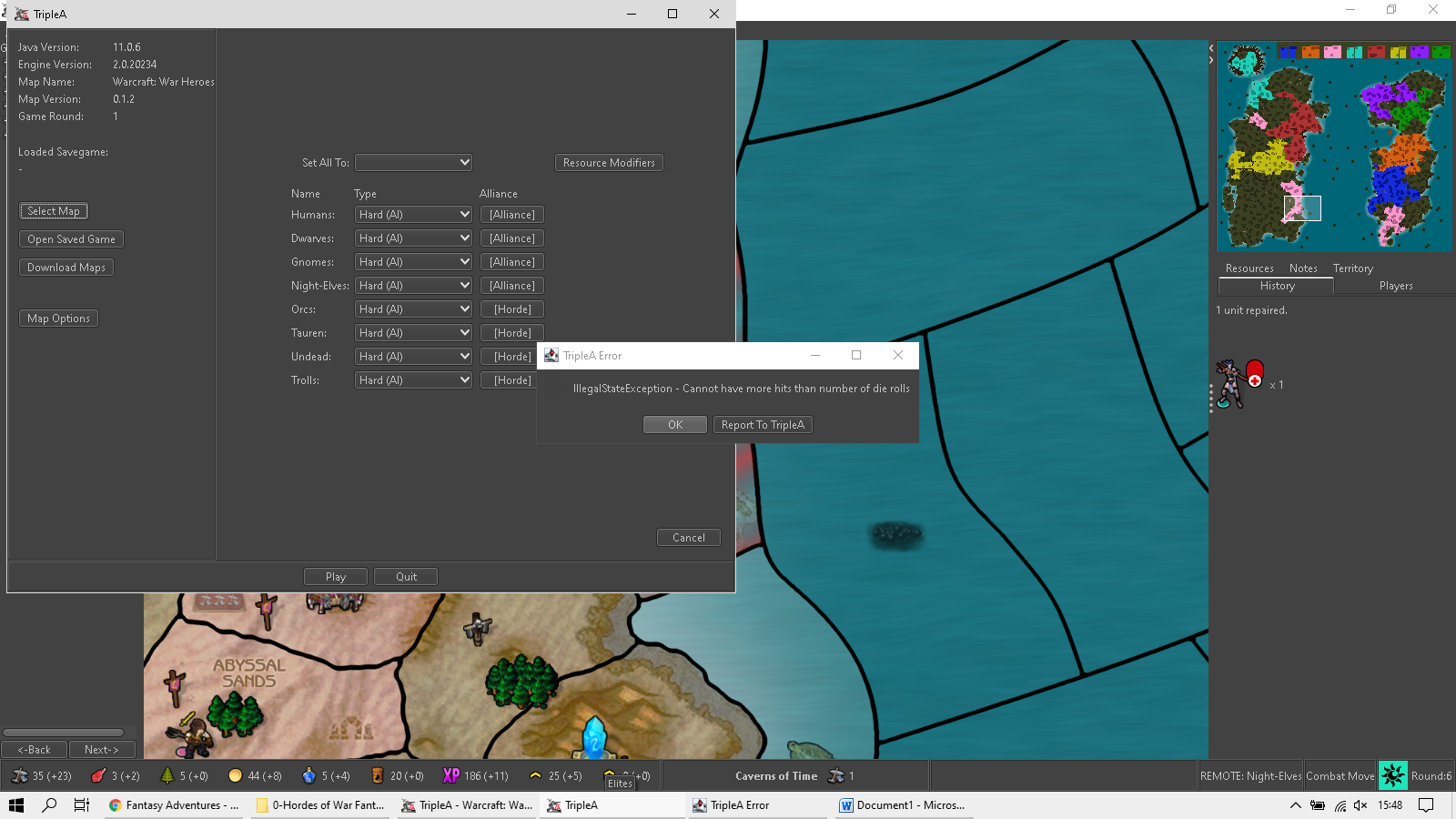
-
@TheDog yea the map still has some issues. Could you drag and drop the save you have into a post here? Then maybe a dev can take a look at what is causing the breakdown. That would be great!
EDIT: That error does look familiar. You could also try to download the latest prerelease and run the save again. Maybe a newer version of TripleA will actually run it without errors.
https://github.com/triplea-game/triplea/releases -
After playtesting this map a bit more, trying to figure out the next development step, I can again point out this map’s 3 biggest issues. As these are pretty much all AI related, does any dev with AI knowledge feel like taking a look at the save game and the error reports? ( @Alexei-Svitkine @redrum @LaFayette @RoiEX or other dev?)
-
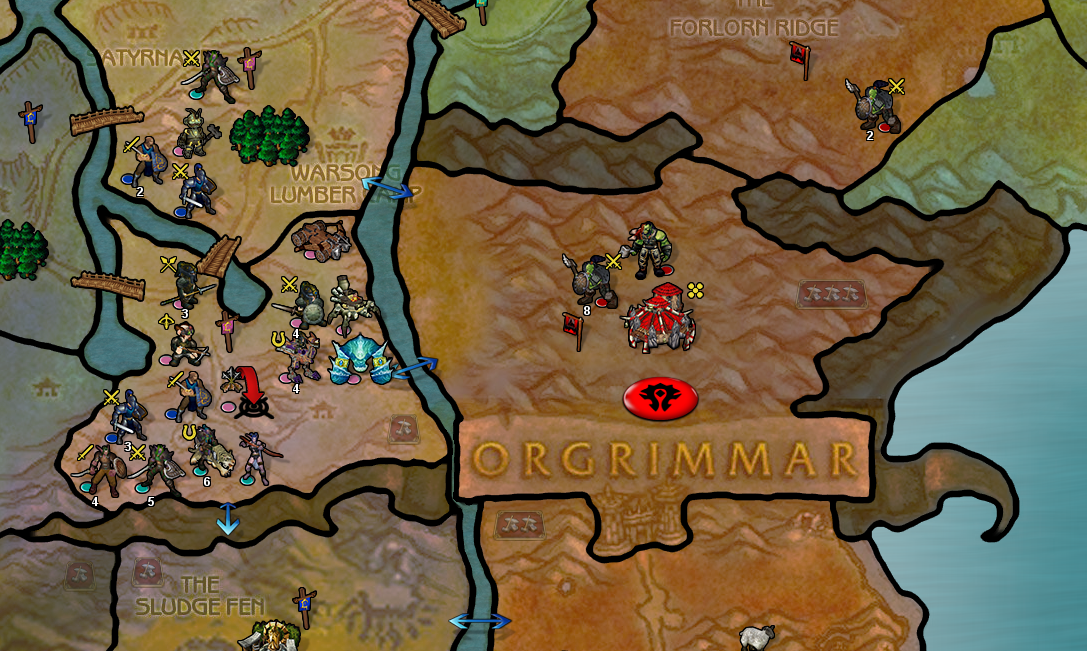
The AI-players are lacking the ability to handle land territory canals that do only allow certain units. (In this map these are called airways and marked with blue arrows) The result is AI players stacking up around capitals and other places with airways. Like here, where the enemy army stacks up outside a capital that they cannot enter the way they want to. Only flying units can pass these canals:
26roundsWWH.tsvg
-
The AI-players lack ability to purchase factories during play. At some point during map development, the AI did purchase factories, but not at present time for some reason. This really hinders the AI from winning. I assume it is some kind of resource type issue, as there are plenty of 3+ PU territories.
-
The "Wrong owner" Issue. When AI controlled main players capture territories from AI minor players this error pops up. It does not happen when human controlled main players capture from AI minor players. I suspect the cause is that the AI minor player units killed spawn an infrastructure unit when killed, and this unit is overtaken by the attacker.
(Don’t blame me for duplicate error reports, as I did not upload more than one of these (I think)):
https://github.com/triplea-game/triplea/issues/6836
https://github.com/triplea-game/triplea/issues/6439
https://github.com/triplea-game/triplea/issues/6840
-
-
Do any of those error reports have a savegame attached that is just before the error occurs?





Hello! It looks like you're interested in this conversation, but you don't have an account yet.
Getting fed up of having to scroll through the same posts each visit? When you register for an account, you'll always come back to exactly where you were before, and choose to be notified of new replies (either via email, or push notification). You'll also be able to save bookmarks and upvote posts to show your appreciation to other community members.
With your input, this post could be even better 💗
Register Login