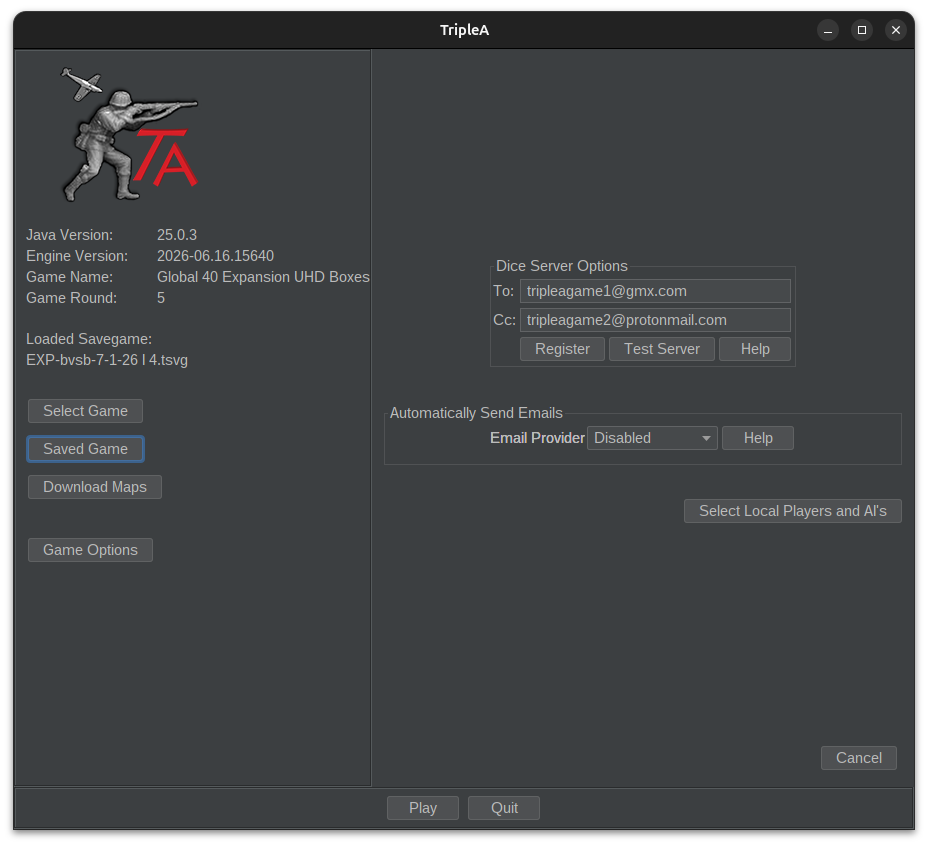
Hi All - I thought that it might be helpful to explain how PBEM works, because in my personal experience, a lot of people like to play live, but they may have a perception that PBEM is too difficult, or don't know how to do it. So, here's an easy to follow guide !!
The process to play PBEM is very simple. First, you just need to register on the Marti dice server. This will allow you to get the dice rolls for each and every round of battle. The link is here:
https://dice.marti.triplea-game.org/
To START playing PBEM and to initiate a NEW PBEM game, start here.
If you your game has already started, then skip to the section below.
INITIAL PBEM SETUP
First, ensure that you have the correct map selected by clicking on "Select Map"
Next, click on "Map Options" and input all of the various options, including the IPCs for the bid, victory conditions, Regular Luck vs. Low Luck, etc.
Next, click on "Start PBEM" (note - do NOT click on on "Start Local Game")
In the Dice Server section, ensure that "https://dice.marti.triplea-game.org/" is selected.
Enter YOUR email address in the "To:" section and your OPPONENT's email address in the "Cc" section
For the Game ID, you can input any description that you prefer, e.g. "Player X versus Player Y" You do not need a specific Game ID # or anything like that. This is just a description.
When you finish completing this section, click on "Test Server". IF you receive an error message, either YOU or your YOUR OPPONENT is NOT registered on Marti. Once you are both registered on Marti, you will automatically receive a test Marti die ranging from 1-6. Both players should receive this email from Marti indicating that you are now ready to start receiving dice results from battles, etc.
Next, click on the drop-down menu item for Play by Email -- select Gmail. Note: we suggest that you use gmail, as other email address like yahoo, hotmail, and international domains tend to cause problems with the server. Many players use a gmail account just for playing TripleA games and keep their regular email address for non-TripleA items, which is recommended.
In the subject field, type the same or similar description to what you typed in the Game ID section for the Dice Server, e.g. "Player X vs. Player Y"
In the the "To" field, enter your email address SEPARATED BY ONE SPACE (and not commas or semicolons) followed by your opponent's email address
In the Login filed, enter YOUR email address
In the Password field, type YOUR gmail password
Click on the "Remember Me" field
Click on "Test Email" -- BUT, it is VERY COMMON to receive an ERROR message. Don't worry -- gmail has a normal security protocol to require the user to manually accept 3rd party applications to access its gmail server with your password. You should receive an error message with a link for instructions to activate this, or just follow the instructions below to"Enable Less Secure Apps" as outlined on the google support link below:
https://support.google.com/accounts/answer/6010255?hl=en
NOTE -- if you prefer not to follow these steps, then simply skip this, as there is a back-up solution (see steps below).
Next, click on "Play" at the bottom of the page.
You are now able to make your builds, your combat & non-combat moves, etc.
At the END of your turn -- you have 2 options:
(a) if you successfully sent a test email in Step #14, then click on "Post Turn Summary" and the entire game file and a nice summary will be sent automatically to your opponent.
(b) however, if you received an error message in step #14 above, then simply click on "File" and then on "Save" to save the game file to your desktop, or a specific file folder, for example. Then, write an email to your opponent, and attach the game file as you would attach any other attachment, and simply send it to your opponent.
You and your opponent can then continue to send the game file back and forth using the instructions below.
ONGOING PBEM INSTRUCTIONS
** Note -- this assumes that you have the initial game file setup and have already started your game **
Download the game file that your opponent sends to you in an easy to find folder or desktop.
Start TripleA software
click "open saved game"
click on the file and then click "open"
Try following steps #10-15 above, and whether or not that works, go to step #6 below
click on "play"
After that, you just play as normal, make your moves, etc.
At the END of your turn, click on "File" and the "save" to save the file to a specific folder or desktop
Compose an email message to your opponent and attach the same game file and send it back to your opponent in an email !
If you have any questions, please feel free to let me know, and I am happy to play a few sample moves with you by PBEM if you need assistance. My email = 5683deltium@gmail.com
Cheers, Deltium