Subcategories






Recent Posts
-
-
@Ramon No problem! I ran into the same problem when making changes to my North Africa map. Black_Elk made very cool reliefTiles for our map, but I didn't know how he made them. So when changing some territory borders, the reliefTiles didn't update along with them. I tried several things and what I described above ended up working the best. You can still see that the map is slightly darker at the places where the change happened, but I still tried my best to conceal it.
The best thing actually to do is trying to contact the map maker! However, the map maker for NML is Black_Elk, and when I contacted him for North Africa, he didn't reply. But maybe you have more success!
-
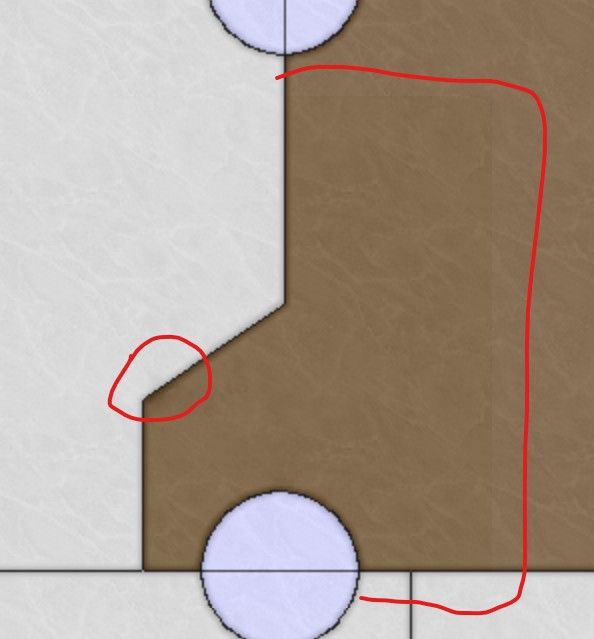
@ramon Changing the reliefTiles is difficult when you do not have the overlay that the game used. You can actually modify individual tiles, but it is not recommended if the change is across multiple tiles. Assuming that this is the case, you'd need to use the baseline image, change the borders there, and then break it using the tile image breaker. Then, you'd need to open the reliefmap by combining it using the tile image reconstructor. Also open the modified baseline map so that you can see what borders you removed and where the new borders are. To remove borders from the reliefmap, you can do the following. In the images you sent, you can see that the color of the territories isn't empty, it has a black-ish (or white/gray-ish in the other) color with a very low opacity. Try selecting this as color and remove the borders using this color. If you use GIMP, you can select the color using CTRL+click when having the pencil tool selected. Do not make it transparent as you did, that will make the territory shade go away completely. You should not be using the eraser at all, only the pencil tool. To draw new borders, you can select the white border color and use it to draw the new borders. If you lower the opacity of the baseline map and put it above the reliefmap, you can see the new borders and you can trace them. Then you can use the heal tool to make the borders and territory colors look more like the rest of the reliefmap, with different shades of colors. This doesn't necessarily make it look nice though. Even if you do your best, you will still probably have spots with a different shade than the rest of the map, but it's better than nothing.
One small tip is to past the reliefmap not once several times in GIMP, so that you have like 10 identical layers. This will increase the opacity of the reliefmap. If you then combine all these layers, you essentially have increased the opacity. This allows you to actually see everything properly. You'd still need the heal tool to make the colors blend into each other better. Then you can lower the opacity of the layer so that it is around the same as the original reliefmap.
Last option is to create your own relief tiles using your own overlay. This might be a lot of work but it would ensure that the map looks nice.
