


Subcategories

  • 0 Votes
    22 Posts
    5k Views
    ebbeE
    @wc_sumpton haha, days of confusion, indeed... ... with all your advice and suggestions I got it working well, so consider the Issue with upgrading units to be closed and solved the exception for North Mino and Sawayama I made as it is a single inland lake: with a harbour one could build warships in there which I do not consider useful as it is isolated and no strategic extra value for amphibious assaults with ships as no extra terr.'s can be reached via the lake.. thanks a lot
  • How to remove multiple unit-types in a trigger?

    2
    1 Votes
    2 Posts
    619 Views
    ebbeE
    @ebbe The best questions are the ones that can answered by ones selves ... hahaha... so : <option name="removeUnits" value="all:Kobaya:Sengokubune:Atakebune" count="1"/> was correct: but as I had count="1" it only removed 1 unit , ofcourse... so made it count="99" and it seems to work
  • Objectives tab

    4
    0 Votes
    4 Posts
    675 Views
    D
    solved it map name is domination 1898 so needed domination_1898 instead of domination1898 :astonished_face: my bad! lol
  • Updating Maps

    6
    0 Votes
    6 Posts
    1k Views
    RogerCooperR
    @beornthebold-0 I sent my e-mail to you in chat.
  • (how to get a) Notification for Trigger with "chance" element

    4
    0 Votes
    4 Posts
    723 Views
    wc_sumptonW
    @ebbe The Switch can be very powerful, Grasshopper! OR May The Switch be with you! Cheers...
  • Constructable Canals

    2
    1 Votes
    2 Posts
    493 Views
    RogerCooperR
    @beornthebold-0 You could create an actual sea zone for the canal, with prohibited entry until a specific unit is built.
  • Start of turn PUs

    Moved
    10
    2 Votes
    10 Posts
    2k Views
    BeorntheBold 0B
    It's actually easy to make this happen. Here is an example in the map file: <step name="AquellaEndTurn" delegate="endTurn" player="Aquella"/> <step name="AquellaUserActions" delegate="userActions" player="Aquella" display="Diplomacy"/> <step name="AquellaPolitics" delegate="politics" player="Aquella"/> <step name="AquellaTech" delegate="tech" player="Aquella"/> <step name="AquellaPurchase" delegate="purchase" player="Aquella"/> <step name="AquellaCombatMove" delegate="move" player="Aquella"/> <step name="AquellaAirborneCombatMove" player="Aquella" display="Airborne Attack Move" delegate="specialCombatMove"/> <step name="AquellaBattle" delegate="battle" player="Aquella"/> <step name="AquellaNonCombatMove" delegate="move" player="Aquella" display="Non Combat Move"/> <step name="AquellaPlace" delegate="place" player="Aquella"/> <step name="AquellaTechActivation" delegate="tech_activation" player="Aquella"/> All I did was change the order of the steps, moving the "endTurn step to the top of the list. It works perfectly. You will have to do it for each player.
  • How to disable automatic elimination of unescorted transports?

    6
    1 Votes
    6 Posts
    1k Views
    wc_sumptonW
    @Jason-Green-Lowe From my understanding "Unescorted Transport Dies" no longer does anything and has been deprecated. Try: <property name="Transport Casualties Restricted" value="false" editable="true"> <boolean/> </property> Leave 'editable' equal to true so that you can change it using "Map Properties" on the main screen. Cheers...
  • Lets make a new Map Making Guide

    14
    1 Votes
    14 Posts
    5k Views
    O
    @thedog thanks for suggesting me
  • Make submarines pass through destroyers?

    8
    1 Votes
    8 Posts
    1k Views
    wc_sumptonW
    @jason-green-lowe If it ends in "xxx...Territories" that is where to look, and count equal to or greater than the number of territories listed to be true. 'direct...Territories', 'allies...Territories' and 'enemy...Territories' take their cues from the 'players' option or 'attachTo' if 'players' is missing (If you use 'players' it is best to add the 'attachTo' player to the list. Some conditions will add 'attachTo', some do not, and those that do clear it out so that there will not be any duplication.). "unitPresence" is what "xxx...Territories" is looking for in each territory listed in "xxx...Territories" value list. The key word here is each, not the group as a whole. PoS2 states that units listed together separated by a colon means "OR", this is incorrect. Colon separated list means cumulative. So in your example you have: <option name="enemyPresenceTerritories" value="@SeaZones@" count="1"/> But there is no "unitPresence" telling "enemyPresenceTerritories" what to look for. PoS2 states: "If missing, then presence needs only 1 of any unit, and excluded needs to be completely devoid of units" Well... I treat "xxx...Territories" like I treat triggers, always have "conditions" and "when". It's not always necessary, but the TripleA engine is very old, and there have been may contributors to the code, that assumptions may not work as desired. So add: <option name="unitPresence" value="ANY" count="1"/> <!-- If you want zero units add invert --> <!-- <option name="invert" value="true"/> --> Hope this helps. Cheers...
  • List of unit options?

    2
    1
    3 Votes
    2 Posts
    840 Views
    TheDogT
    If you have not already. Download the map from High Quality> The Pact of Steel Visit this site when it works http://www.starlords3k.com/XOB.html
  • add image to Politics Pop-up

    1
    4
    1 Votes
    1 Posts
    541 Views
    No one has replied
  • option name="unitPresence" value="Unit" count="0"

    5
    1 Votes
    5 Posts
    877 Views
    ebbeE
    @rogercooper thanks for all feedback: this is the current trick I use.... but I like to free some space in the purchasing panel...
  • Custom Label for Part of a Turn?

    5
    1
    0 Votes
    5 Posts
    856 Views
    Jason Green-LoweJ
    @thedog That's interesting with the serial numbers. I tried changing my code to use serial numbers, but I'm still having the same problem. Any other ideas? @wc_sumpton <delegate name="initDelegate" javaClass="games.strategy.triplea.delegate.InitializationDelegate" display="Initializing Delegates"/> <delegate name="tech" javaClass="games.strategy.triplea.delegate.TechnologyDelegate" display="Research Technology"/> <delegate name="tech_activation" javaClass="games.strategy.triplea.delegate.TechActivationDelegate" display="Activate Technology"/> <delegate name="battle" javaClass="games.strategy.triplea.delegate.BattleDelegate" display="Combat"/> <delegate name="move" javaClass="games.strategy.triplea.delegate.MoveDelegate" display="Combat Move"/> <delegate name="place" javaClass="games.strategy.triplea.delegate.PlaceDelegate" display="Place Units"/> <delegate name="purchase" javaClass="games.strategy.triplea.delegate.PurchaseDelegate" display="Purchase Units"/> <delegate name="endTurn" javaClass="games.strategy.triplea.delegate.EndTurnDelegate" display="Turn Complete"/> <delegate name="endRound" javaClass="games.strategy.triplea.delegate.EndRoundDelegate" display="Round Complete"/> <delegate name="placeBid" javaClass="games.strategy.triplea.delegate.BidPlaceDelegate" display="Bid Placement"/> <delegate name="bid" javaClass="games.strategy.triplea.delegate.BidPurchaseDelegate" display="Bid Purchase"/> <delegate name="politics" javaClass="games.strategy.triplea.delegate.PoliticsDelegate" display="Politics"/> <step name="germansPolitics" delegate="politics" player="Germans"/> <step name="germansTech" delegate="tech" player="Germans"/> <step name="germansPurchase" delegate="purchase" player="Germans"/> <step name="germans0CombatMove" delegate="move" player="Germans"> <stepProperty name="resetUnitStateAtStart" value="true"/> </step> <step name="germans1CombatMove" delegate="move" player="Germans" display="Naval Penetration Move"/> <step name="germansBattle" delegate="battle" player="Germans"/> <step name="germansNonCombatMove" delegate="move" player="Germans" display="Non Combat Move"/> <step name="germansPlace" delegate="place" player="Germans"/> <step name="germansTechActivation" delegate="tech_activation" player="Germans"/> <step name="germansEndTurn" delegate="endTurn" player="Germans"/>
  • 0 Votes
    5 Posts
    920 Views
    Jason Green-LoweJ
    @wc_sumpton Well, yes, I agree that the way I'm creating the feature is far from ideal. I've got a cleanup trigger that resets the canBeMovedThroughByEnemies back to false at the end of each combat move. I would indeed prefer to have a supportAttachment, but my understanding is that those wouldn't work right now with the existing code, and I think tripleA is short enough on developers right now that it's not practical to request special features just for my map. I tried switching from directExclusion to (directPresence + invert), and that did the trick. Thanks again for the help!
  • 1 Votes
    6 Posts
    869 Views
    TheDogT
    Just in case you have you not tried; Game> User Notification> Show Trigger/condition Chance Roll Failure (UnTick) and for Success, but you have to do this manually and for each map. As Ebbe has asked above it would be great if the map maker could set this.
  • Roll a die and activate different triggers based on the result?

    6
    0 Votes
    6 Posts
    1k Views
    Jason Green-LoweJ
    @wc_sumpton Lol, yes, you've found the problem. There's nothing wrong with the code, but I put the enemy ships in Sea Zone 127 while I was testing, instead of Sea Zone 126. If I put the ships in the correct zone, everything works exactly as intended. Anyway, thanks again for all the support.
  • Suicide Units don't fire if not accompanied by non suicide units

    Moved
    7
    0 Votes
    7 Posts
    2k Views
    Jason Green-LoweJ
    @thedog That worked, thanks!
  • Can a condition check a player's total income?

    5
    0 Votes
    5 Posts
    822 Views
    Jason Green-LoweJ
    @wc_sumpton This is great, thanks! I think it will work well.
  • Multiple Objectives Tabs?

    5
    1 Votes
    5 Posts
    1k Views
    Jason Green-LoweJ
    @wc_sumpton Thank you for the suggestion, but unfortunately the only effect seems to be that the single objective tab takes on the last name assigned. So I can rename the tab 'VPs', but I can't get a second tab this way.

Recent Posts

  • @xxXEddieXxx
    version 0.2.6
    Using 11 Ring of Power

    Units
    When you hover over a unit icon the current Tooltip popup activates. This is a quick way of viewing the current stats of the unit in a familiar format.

    Text and Sounds
    Game Notes

    image.jpeg
    .
    It used to read the *.xml
    Now if there are html style comments they also get written to
    games/map_name/.notes.html
    So there can be a duplication.
    The xml version should be deleted.
    As the new way is games/map_name.notes.html only.
    So the file changed is only games/map_name.notes.htm not *.xml

    Texts
    These 5 tabs should be in the left hand pane. Saving space by removing them for each tab.
    They are so distinct they don’t need to be grouped together as tabs.
    Also by removing sounds (left pane) and adding it to Messages like Messages & Sounds as sounds are directly paired with Messages/notifications they should be treated together and on the same pane.

    .
    image.jpeg

    Text> Unit tool tips
    As these are units add in Units icon, also add in hover Tooltips, as this would help fill in the current tool tips.

    .
    The tool tip of
    Duplicated & clutter text, is not needed, please remove. the tool tip of
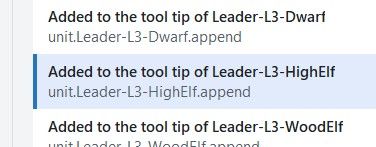
    image.jpeg

    .
    Please add a Partially formatted text box, between Text box (raw as written in Tooltip.txt) and the Preview box.

    Partially formatted text box
    Takes the text from text box above and for every <br> and <p style, partially formats the text by placing it on a new line. This will encourage Novice, Advanced and me to use this as faffing about with unformatted text is a pain and time consuming.

    Maybe just remove the Text box option?

    eg. leadr-L3-HighElf would look like this

    * Max 1, 4HP, is Heroic, Lvl 3 of 3 <br> * Generates +1 Diplomacy & +3 Fame /turn <br><b><p style="color:green;"> * Duel: Targeted 6 Atk/Def vs Heroic</p></b> <b><p style="color:green;"> * Command: +1 Atk/Def to 6 units</p></b> <b><p style="color:blue;"> * Armoured: Suppress, -1 Atk/Def to 1 enemy unit</p></b>

    A save would reassemble the broken lines into one line.

    .
    Preview - Display/Formating is off
    From TripleA
    .
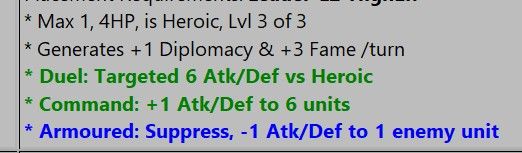
    image.jpeg
    .
    From Map Editor
    Note the extra spacing
    .
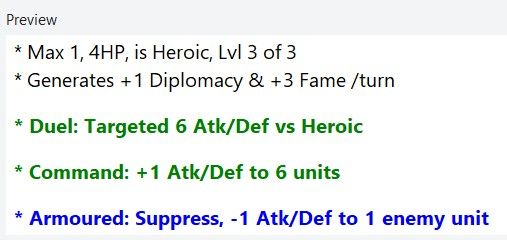
    image.jpeg

    You might want to put some help text on the right panel to aid with the tooltip text ?
    Here is mine to myself from 1941_global_command_decision

    # <br> forces a line break in text (carriage-return) # <b> Bold </b> # <i> Italics </i> #      non-breaking space, used for lots of extra spaces # Colored Text, supports one line HTML <br> <b><p style="color:green;"> * Rail links to move land units upto 3 territories, depending on terrain effects</p></b> # Pumpkin Orange #FF7518 hex color # LightSeaGreen #20B2AA hex color - good for matching cyan color of Construction/consume by # Red - Combat additions # Orange - Warning or notification, usually to say what can be targeted or not # Blue - Suppression (-1) off enemy Attack or Defense # Green - Movement or transport # image source must be in /map/doc/images - they will be for all factions unless make tooltip & faction image.png unique for EACH faction # tooltip.unit._Dev-Armor-Inf= <br/><img src="Armor-Inf.png"/> <br> * Develop <b>Armor-Inf </b> Type:Land. Cost ??pu <br> * Att | Def | Mov: 3 3 1 <br> * PTo complete, place on a Territory with: <b>Industry-Hvy</b>

    Text> Political actions
    There is no way that a map maker will use this pane as it requires too many repetitive entries.
    eg. 11 Rings of Power has 2240 entries with multiple fields per entry. 🙄

    I have a crude parameter driven program, to generate the notifications.properties lines, that you can have, just say?
    Then you can take its crudeness and turn it into something a novice can use?

    Maybe this is for a much latter version as it will require lots of testing and time?

    There appear to be 7 elements to the Political Action, these would be better displayed in the right hand pane. This would mean a more complicated right hand pane, but all of the Political Action text is well laid out and easier to read.

    Text> Objectives
    Using Greyhawk Wars as an example
    Please add a Partially formatted text box, below Text box (raw as written in Tooltip.txt).

    Partially formatted text box
    Takes the text from text box above and for every <br> and <p style, partially formats the text by placing it on a new line. This will encourage Novice, Advanced and me to use this as faffing about with unformatted text is a pain and time consuming.

    Maybe just remove the Text box option?

    .
    Missing objectiveValue
    The command for Objectives is usually an <option name="objectiveValue" value="2"/>
    This could/should be read only as the focus of this panel is the text of the objectives.txt

    Missing uses field
    Another useful display only function is how many uses the Trigger has.
    <option name="uses" value="1"/>

    Text> User Action
    Using Greyhawk Wars as an example, the app lists 984 instances, I question this number.
    Searching for UserActions this counts 181 instances 😕
    I think the number is closer to 181.

    There appear to be 6 elements to the User Action, these would be better displayed in the right hand pane. This would mean a more complicated right hand pane, but all of the User Action text is well laid out and easier to read.

    read more

  • Renaming existing units from within the editor could go on the enhancements list. Would also have to rename the unit images they're currently using, including any of the tech variant ones.

    read more

  • @xxXEddieXxx
    Pedantically it is not multiple files, but a singular file, place.txt, so remove the 's' from files.

    read more

  • @TheDog

    I'll rename it to "Unit places" and look into a separate switch to show and hide the starting units. https://github.com/xXEddieXxx/eddies-map-editor/issues/54

    what do you mean with your second point?

    read more