


Subcategories

  • Urgent: AI purchase, placement and amphibious noncombat

    1
    0 Votes
    1 Posts
    359 Views
    No one has replied
  • 0 Votes
    4 Posts
    681 Views
    wc_sumptonW
    @RogerCooper Are you saying that you don't have a '<relationshipInitialize>' section? It relationship are not initialize then there is nothing to set. That is why the trigger is falling. I have tried to set a tank unit to transport infantry, but if I didn't set "isLandTransport" then the trigger would fire but nothing would happen. But if I set "isLandTransport" to false then the trigger would change it to true. Hope this is helpful. Cheers...
  • Error loading my new(ish) map

    11
    0 Votes
    11 Posts
    1k Views
    RogerCooperR
    @ff03k64 Check this post for how to find the game.dtd I suggest using an editor that specifically supports xml. I use XML Copy Editor.
  • About AI purchase behavior and unit costs

    2
    1 Votes
    2 Posts
    445 Views
    TorpedoAT
    One clear example how the AI behaves when it comes to purchase. Germany can build 2 air units from start: For the matter of simplicity, i only state the most important values (attack/defense/movement @ cost) Aircraft A = 2/2/4 @ 9 Aircraft B = 3/3/4 @ 13 In this setup, the AI is purchasing only Aircraft A (dozens of test rounds) If i either increase A to 10 or decrease B by 1, the AI will only purchase Aircraft B. The first thing which irritates me is, that the cost difference between those units seems rather high in comparison to land or sea units in my game, but it was needed to get to the tipping point where the AI recognizes that one or the other air unit is best purchase. Normally i would only up the cost by 2 PUs if a unit gets +1 att/def more. This works ok because the AI will purchase both more or less, but is never totally ignoring a purchase like with those air units i mentioned above. A couple of land and sea units that AI is purchasing both and never ignore it are the following ones: Light Tank = 2/2/2 @ 7 Med Tank = 3/3/2 @ 9 and Destroyer = 2/2/2 @ 12 Cruiser = 3/3/2 @ 14 Those the AI is purchasing both more or less. Do Air units have different AI purchase code/formula than land/sea units?
  • Variant of Global 1940

    Moved
    6
    0 Votes
    6 Posts
    2k Views
    Brent StoudtB
    Thank you both. The polygons represent places on the map. Polygon map showing how it overlays the map.....
  • Custom Technology NullPointerException

    4
    1 Votes
    4 Posts
    937 Views
    stalinpashaS
    @wc_sumpton What a hero, fixed!! [image: 3EFH.gif]
  • A better word than "infrastructure"

    5
    1 Votes
    5 Posts
    951 Views
    C
    How about "appurtenance"?
  • End turn trigger calculation

    10
    0 Votes
    10 Posts
    2k Views
    wc_sumptonW
    @beelee I started a new topic for this discussion. Cheers...
  • isLandTransportable for units with 0 movement

    Moved
    5
    0 Votes
    5 Posts
    887 Views
    TorpedoAT
    <property name="Selectable Zero Movement Units" It seems that this only effects the player? Example: <attachment name="unitAttachment" attachTo="Mot.Inf" <option name="attack" value="1"/> <option name="defense" value="2"/> <option name="movement" value="2"/> <option name="canBlitz" value="true"/> <option name="transportCost" value="4"/> <option name="isLandTransport" value="true"/> <option name="createsResourcesList" value="-1:PUs"/> With above isLandTransport unit, AI is able to pick up below isLandTransportable Unit and move it. <attachment name="unitAttachment" attachTo="Infantry" <option name="attack" value="1"/> <option name="defense" value="2"/> <option name="movement" value="1"/> <option name="transportCost" value="2"/> <option name="isLandTransportable" value="true"/> <option name="createsResourcesList" value="-1:PUs"/> But AI seems not be able to pick up following one: <attachment name="unitAttachment" attachTo="FlaK88" <option name="attack" value="2"/> <option name="defense" value="2"/> <option name="movement" value="0"/> <option name="transportCost" value="3"/> <option name="isLandTransportable" value="true"/> <option name="typeAA" value="AA"/> <option name="attackAA" value="3"/> <option name="maxAAattacks" value="1"/> <option name="mayOverStackAA" value="true"/> <option name="isAAforFlyOverOnly" value="true"/> <option name="createsResourcesList" value="-1:PUs"/> Seems its only for the player, and at least thats ok as long only the human player has units with movement=0. But i have a unit which is for all players, so thats problematic as i like to have it at 0 movement while still being transportable by the AI. Is there something i dont know?
  • 0 Votes
    5 Posts
    924 Views
    C
    @Zaroph said in Strange AI behaviour making an "impossible" movement over a canal while landing a unit: Wasnt sure which category to use so posting it here. https://forums.triplea-game.org/topic/1708/how-to-submit-a-bug-report
  • Determine purchase count of a given unit?

    2
    0 Votes
    2 Posts
    921 Views
    RogerCooperR
    @Michael-Hoover You can't limit it directly. There are 2 workarounds. You can limit the total number of units of the type available You could have the unit producible only at a specific facility with a limited production capacity
  • Bunker, 1 round battle, stalemate, offense participation next round

    9
    0 Votes
    9 Posts
    1k Views
    C
    @TorpedoA Sorry, nevermind. I haven't tested it and remembered "canNotMoveDuringCombatMove" units would never attack, but, apparently, they do. In this case, I think there is not a clean way to have non-attacking units. However, this issue might be tracking the problem (which might be a regression): https://github.com/triplea-game/triplea/issues/7167
  • How to use 'canMoveThroughEnemies' with land units?

    5
    0 Votes
    5 Posts
    969 Views
    TorpedoAT
    @wc_sumpton Nevermind 2.0 has a new XML option canRetreatOnStalemate. We can use that to explicitly allow conscripts an option to retreat on stalemate.
  • How to only block Subs with Destroyers

    Moved
    3
    0 Votes
    3 Posts
    540 Views
    C
    Moved to Map Making.
  • isAAforFlyOverOnly for Air units and Low Luck

    15
    0 Votes
    15 Posts
    2k Views
    B
    @TorpedoA yea it's that they'll give scramble ability to other planes now even if a normal AB isn't there. isAirBase values: allows units with canScramble and requiresAirbaseToIntercept function from a territory with this unit
  • 0 Votes
    30 Posts
    4k Views
    wc_sumptonW
    @LaFayette I would give YAML a try, gives me a chance to learn something new. (Been trying JAVA, just can't seem to get this old head around it.:anguished_face: ) Cheers...
  • I like to share a NWO mod of mine in a fast simple way, but how?

    Moved
    13
    1 Votes
    13 Posts
    2k Views
    B
    Hi @TorpedoA If you wanna add as a separate map here is Frostion's guide: https://docs.google.com/document/d/1FfF7N0srp9QG0_if5D-c1d1Aa1QTttdhxgm1GBh3pI4/edit
  • Editing an HML

    3
    1 Votes
    3 Posts
    566 Views
    C
    @DominicVenditti said in Editing an HML: The XML file is named the exact same as the original code and its in the exact same place inthe directory as well. Anybody have any clue what I'm missing here? Thanks You are supposed always to rename the game, when you modify it in any way, unless you intend to update the original, in which case you should upgrade the version number for it. Doing this will also assure you are looking at the right one.
  • 0 Votes
    11 Posts
    2k Views
    C
    @LaFayette said in Polygon grabber tool issues with islands inside a single territory: The SZ name in territory is used as part of: territory click detection relief image breaker center picker placement picker That list is not fully exhaustive, it gets pretty complex to go down the tree of everything that uses that functionality and then everything that relies on that and so on.. It's a mess that the name of a territory is used at all to determine the territory type, in particular because it is not consistently done in that manner either. Right, that is why I said "mapmaking utilities aside". So, once you have made the map, the only one of these points that matters is the "territory click detection" one, which is the only one I'm aware of, as well, if that comprises hovering the cursor to get information, as well.
  • UPDATING OLDER MAPS FOR 2.1

    Moved
    26
    1
    1 Votes
    26 Posts
    5k Views
    LaFayetteL
    There is a DTD, doc type definition that does enforce which XML entities and properties are allowed. I was thinking you meant an XML property as opposed to a TripleA <property> tag. In XML, a property is typically a value after a tag, eg: <tag property=123> When parsing in an enforcing mode the DTD defines which properties are valid and which are not. Though you are right about property name values. An unrecognized one would go unused. EG: <property name='not-recognized'>

Recent Posts

  • @xxxeddiexxx

    Lay out unit places
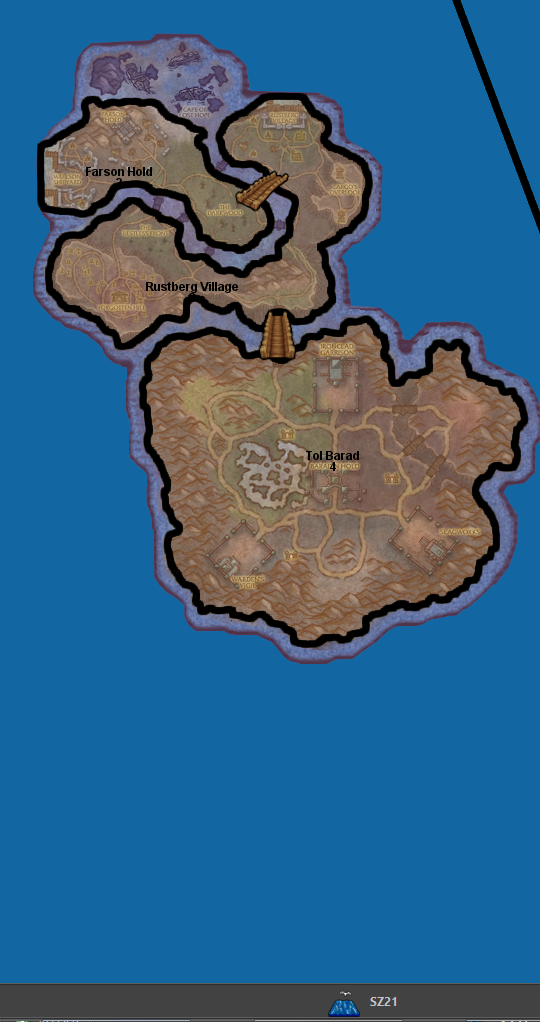
    Could do with showing the px size of the unit & its zoom size from the map.properties file, before placment

    Need to show the direction of unit overflow of the last unit in a TT/SZ. The default is to the Right, but depending on where the last unit appears in the TT/SZ the mapmaker might want to the left.
    Using a toggle say ctrl+O to switch between Right and Left overflow.
    On screen an arrow should indicate the current overflow direction.
    In place.txt overflow is seen as
    | overflowToLeft=true (overflows to the left)
    | overflowToLeft=false (default, no need to show as overflows to the right)

    The ability to add one more placment in the selected TT/SZ
    The ability to remove, highlighted placment.

    Current mapmakers are used to these, but maybe a right click menu is the way to go? (even for the toggle)
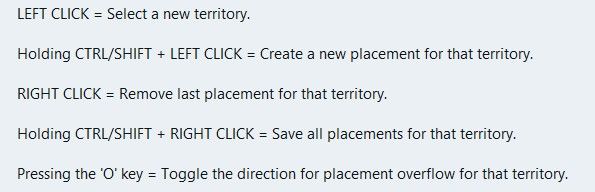
    image.jpeg

    .
    Wish list questions
    As the placement is based off center location it would be great if the app suggested moving the center coordinates to fit in more placments?
    What value upto would work, 27px as this is half the maximum height of the unit?
    Would the reiterations take to long? If so reduce the maximum pixels to move.
    If it made a suggestion then an option to do it. (right click menu option do it)

    .
    Save
    Before each save in Expert mode, a mapmaker needs to know what is going to be saved.
    This is critical if you accidentally change something unintended or forget you have changed something.
    A section that you can tick as read only/Dont save for each of the files to be saved.
    Especially the. xml as it messes with the order and formatting.
    The app should remember these setting from last save

    .
    Places (should be sorted & grouped, here is a suggested order)

    Units --- Capitals – I prefer a yellow star, not C Centers Comments Decorations Names PUs – should show the PU value as well as P, eg 6P Terrain Effects Victory Cities/Centers --- Blockade Convoy Kamikazi

    Places Options
    Right Click on TT/SZ for a menu to add/remove the items shown
    Left drag to move the selected item

    When there is no file or nothing to display, against the selection it should say None)

    .
    Earthquake
    The map gets shoved down and I lose my train of thought.
    There is a space reserved for shoving the map down to display things, like

    image.jpeg

    Can this space be reserved by moving up/compressing the ‘white’ space above the map, so the map does not move, please, pretty please.
    Yes this space will be ‘white’ space, but its better than moving the map.

    read more

  • @xxXEddieXxx said:

    @Vendetta it will disable itself automatically with a message to the user(you are on a big map there is no undo bla bla)

    Ah allright. I missed this post. I see there is not actually a limit: just the undo gets automatically disabled. That is good.

    read more

  • new update:

    A lot has changed since the first test version. Most of it comes straight from your feedback, so thank you for that.

    Territories and the map Places menu: show capitals, centers, convoys, names, PUs and the other markers on the map, several at once, drag them and save. Unit places: lay them out automatically (Squeeze as a spiral, or Grid), create the missing ones, or reload them from the files. Too many territories? Merge one into another, or remove many at once, smallest first. Split with a line and an Eraser for borders; a click erases a whole border between two territories. Islands can be clicked; before, the click chose the sea zone around them. Capital brush: a click moves a nation's capital. Units at the start: each row has a ×, and Remove all clears a territory. Resize map: make the whole map bigger or smaller, with everything on it. Export territory pictures: a PNG per territory, to draw over. Very large maps (eg 1941 GCD): borders can be drawn into them now. There is no undo for these lines, and the editor says so first. How the map looks Canals are clearly marked in their tool. Textures for the relief: premade ones, your own pictures, and Find textures in the map. Thht symbols now. Political view: land in its alliance's colour. Connections across the map's edge show as dashed lines. The Neighbours view no longer starts with a territory chosen. Place numbers hide when zoomed out. Nations, units and rules Rename a nation; its flags and unit pictures move with the next save. Has no capital for nations that are meant to have none. Flags from one picture, in all the sizes the game needs. Compare nations: territories, income, units and TUV side by side. New nations can buy the same as an existing one. Objectives: a tool of its own for national objectives. A nation's placing and moving rules in plain words. Stacking limits for unit types and for nations. Units panel rearranged; support to allies shows green, to enemies red. Terrain effects: values written with a count are read correctly now. Technology effects, buy window tabs and a Publish tool with a checklist. Easier to use Show all options in the File menu, for those who want everything open. Fine as it is: mark a problem or note that is meant so, and it is no longer counted. Check's tick stays after a save. The editor's version shows in the File menu and on the start page. A TripleA that is too old for the editor is told at the start, and the editor looks right under imbus. Maps that start in TripleA Every land territory gets its territory attachment, so a new map starts. Check and Play now start the game in memory and play its first round. Play opens TripleA only when that works, and says why when it does not. Nations without a capital no longer stop the game. Several edits that could break a game are fixed: splitting a territory, renaming one that a variable list names, adding an Activate Technology step. New problems are shown before you play, eg land units left in a sea zone. The "gamePlayer is null" crash came from TripleA loading two games at once; the editor now avoids that when it starts TripleA. Colours Nations, land without an owner and impassable land show in the colours TripleA uses. Other A Mac download

    https://github.com/xXEddieXxx/eddies-map-editor

    read more

  • @xxXEddieXxx Ok then just a setting for having/not having the undo feature (default having). I think it's quite important not forcing a maximum limit.

    read more