


Subcategories

  • Can a Unit do 2 damage on one hit? (Make enemy select 2 casualties)

    6
    0 Votes
    6 Posts
    863 Views
    C
    @gabegolfer said in Can a Unit do 2 damage on one hit? (Make enemy select 2 casualties): How would I assign the number of dice rolls per round? <option name="attackRolls" value="*"/> <option name="defenseRolls" value="*"/> *natural number Would that be in the “unitAttachment” section? Yes. Is more than one dice roll per round even possible? Yes, since Classic.
  • Step Name

    step
    1
    0 Votes
    1 Posts
    322 Views
    No one has replied
  • foreach syntax

    3
    0 Votes
    3 Posts
    554 Views
    RogerCooperR
    @Cernel Thank you. The capitalization issues without error messages are hard to catch.
  • Reset Option

    11
    0 Votes
    11 Posts
    2k Views
    wc_sumptonW
    @Michael-Hoover as @Cernel stated "-reset-" is used to clear multiple values. You can use a "playerProperty" to change a "switch" value. You stated: <attachment name="conditionAttachment_WaxOn" attachTo="Player1" javaClass="RulesAttachment" type="player"> <option name="switch" value="true"/> </attachment> Then you would need to create a condition for when to turn the switch to false: <attachment name="conditionAttachment_TurnWaxOff" attachTo="Player1" javaClass="RulesAttachment" type="player"> <!-- Create the condition here --> </attachment> Then by checking the state of "conditionAttachment_TurnWaxOff" you could use this to then set "conditionAttachment_WaxOn" to "false": <attachment name="conditionAttachment_WaxOff" attachTo="Player1" javaClass="TriggerAttachment" type="player"> <option name="conditions" value="conditionAttachment_TurnWaxOff"/> <option name="players" value="Player1"/> <option name="playerAttachmentName" value="RulesAttachment" count="conditionAttachment_WaxOn"/> <option name="playerProperty" value="switch" count="false"/> </attachment> To change "conditionAttachment_WaxOn" to false. Hope this helps. Cheers...
  • Convoy zone

    15
    1 Votes
    15 Posts
    4k Views
    A
    I think I have it working. I am using national objectives. Thanks for the help.
  • Error with Trigger Attachment

    trigger
    9
    0 Votes
    9 Posts
    1k Views
    RogerCooperR
    @Cernel Of course the issue was that I forget to set "Use Triggers" to true.
  • Placement Picker Tool

    3
    -1 Votes
    3 Posts
    691 Views
    Michael HooverM
    Yeah Its just frustrating...its probably because I am running TA in a virtual machine at the moment. Glad to hear the tool is good though.
  • New Map Question

    5
    -1 Votes
    5 Posts
    1k Views
    C
    @Michael-Hoover said in New Map Question: I don't suppose there is a way to give the "isSub" abilities to a land unit? You cannot in the current 1.9 release, but you can in the current 2.0 prerelease.
  • Game notes max width

    36
    0 Votes
    36 Posts
    6k Views
    LaFayetteL
    @Cernel the HTML needs to be fixed within the constraints of the HTML rendering. There is no code fix for us to apply here. We're not modifying the HTML, we're not rendering it ourselves. There is no way we're going to change anything (short of rebuilding an HTML renderer, IE; a web-browser) that makes this exact HTML render how you want.
  • Land units with strategic bombing?

    26
    0 Votes
    26 Posts
    6k Views
    C
    @Frostion So, to summarize and make sure, is the latest issue at hand that disabling any units doesn't disable their AA attacks nor their ability to give support, while it correctly disables their regular attacks, instead? Isn't that maybe just intended?
  • unitInitialize

    5
    0 Votes
    5 Posts
    1k Views
    B
    @andrewthree said in unitInitialize: Thank you both! It's amazing how you can be looking right at something and not see it. Heh heh It's got me many a time
  • Fun İssue

    14
    0 Votes
    14 Posts
    3k Views
    SchulzS
    Doubling unit costs and setting up games dice would definitely help too.
  • WWII v3 1941 Mod

    Moved
    6
    0 Votes
    6 Posts
    963 Views
    RogerCooperR
    @eagledrc If you send me your mod, I will post on my site. I have a lot of mods not in the scenario repository as well as 2 mods that in the scenario repository but don't work in the versions in the repository. Complete Scenario List
  • Where are the XMLs?

    Moved
    4
    0 Votes
    4 Posts
    936 Views
    Captain CrunchC
    Cernel move this to the Shulz, Frostion, Lafeyette Topic forum please
  • First map; error: Unable to load expected resource: polygons.txt

    19
    1 Votes
    19 Posts
    3k Views
    H
    @Cernel thx man, i had to make the reliefTiles map a bit transparent, cut it up with the imagetilebreaker and replaced the old reliefTiles with the new ones. The map is, apart from some balancing basicly ready thanks to you guy. you're legends Hidde2k
  • Population / manpower

    17
    0 Votes
    17 Posts
    3k Views
    U
    Dear @redrum and Dear @Hepps, thanks a lot for the advice to look into the Civil War map. There are many good mechanics implemented there.
  • Map/xml with tech system?

    3
    0 Votes
    3 Posts
    862 Views
    SchulzS
    https://axisandallies.fandom.com/wiki/Domination_1914_NML_Navalland
  • Trigger when units are present on map?

    6
    0 Votes
    6 Posts
    1k Views
    C
    @redrum said in Trigger when units are present on map?: @Frostion Yeah, as @Cernel pointed out not a bad feature request. @Frostion Not a wonderful solution but, for now, one might do this with a limited amount of coding by using "eaches" on the conditions, then having as many same conditions assigned to the trigger as the number of units specified in the conditions themselves, then a condition type equal to the minimum number you want (in your case, 5), if you are following me. However, I'm not sure if it would work, as eaches are normally used to make the trigger firing that many times. EDIT: Nevermind, checked pos2 it says that eaches are just 1s, condition wise.
  • Problem with TriggerAttachment using placement option

    trigger
    12
    0 Votes
    12 Posts
    2k Views
    RogerCooperR
    @Cernel Thank you, I will fix it.
  • How do you modify the Map Rules?

    4
    1 Votes
    4 Posts
    1k Views
    redrumR
    @RyansPlace You'll need to unzip the map file then go to "\map\games" directory inside it. There you'll see the various game XMLs for that map. Open the one that corresponds to the game you want to edit then find those 2 properties and change them to editable="true".

Recent Posts

  • @xxxeddiexxx

    Lay out unit places
    Could do with showing the px size of the unit & its zoom size from the map.properties file, before placment

    Need to show the direction of unit overflow of the last unit in a TT/SZ. The default is to the Right, but depending on where the last unit appears in the TT/SZ the mapmaker might want to the left.
    Using a toggle say ctrl+O to switch between Right and Left overflow.
    On screen an arrow should indicate the current overflow direction.
    In place.txt overflow is seen as
    | overflowToLeft=true (overflows to the left)
    | overflowToLeft=false (default, no need to show as overflows to the right)

    The ability to add one more placment in the selected TT/SZ
    The ability to remove, highlighted placment.

    Current mapmakers are used to these, but maybe a right click menu is the way to go? (even for the toggle)
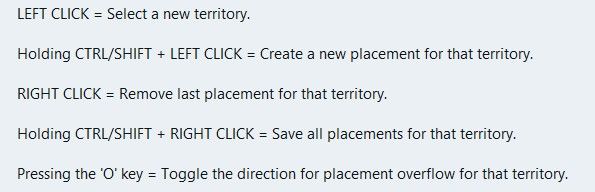
    image.jpeg

    .
    Wish list questions
    As the placement is based off center location it would be great if the app suggested moving the center coordinates to fit in more placments?
    What value upto would work, 27px as this is half the maximum height of the unit?
    Would the reiterations take to long? If so reduce the maximum pixels to move.
    If it made a suggestion then an option to do it. (right click menu option do it)

    .
    Save
    Before each save in Expert mode, a mapmaker needs to know what is going to be saved.
    This is critical if you accidentally change something unintended or forget you have changed something.
    A section that you can tick as read only/Dont save for each of the files to be saved.
    Especially the. xml as it messes with the order and formatting.
    The app should remember these setting from last save

    .
    Places (should be sorted & grouped, here is a suggested order)

    Units --- Capitals – I prefer a yellow star, not C Centers Comments Decorations Names PUs – should show the PU value as well as P, eg 6P Terrain Effects Victory Cities/Centers --- Blockade Convoy Kamikazi

    Places Options
    Right Click on TT/SZ for a menu to add/remove the items shown
    Left drag to move the selected item

    When there is no file or nothing to display, against the selection it should say None)

    .
    Earthquake
    The map gets shoved down and I lose my train of thought.
    There is a space reserved for shoving the map down to display things, like

    image.jpeg

    Can this space be reserved by moving up/compressing the ‘white’ space above the map, so the map does not move, please, pretty please.
    Yes this space will be ‘white’ space, but its better than moving the map.

    read more

  • @xxXEddieXxx said:

    @Vendetta it will disable itself automatically with a message to the user(you are on a big map there is no undo bla bla)

    Ah allright. I missed this post. I see there is not actually a limit: just the undo gets automatically disabled. That is good.

    read more

  • new update:

    A lot has changed since the first test version. Most of it comes straight from your feedback, so thank you for that.

    Territories and the map Places menu: show capitals, centers, convoys, names, PUs and the other markers on the map, several at once, drag them and save. Unit places: lay them out automatically (Squeeze as a spiral, or Grid), create the missing ones, or reload them from the files. Too many territories? Merge one into another, or remove many at once, smallest first. Split with a line and an Eraser for borders; a click erases a whole border between two territories. Islands can be clicked; before, the click chose the sea zone around them. Capital brush: a click moves a nation's capital. Units at the start: each row has a ×, and Remove all clears a territory. Resize map: make the whole map bigger or smaller, with everything on it. Export territory pictures: a PNG per territory, to draw over. Very large maps (eg 1941 GCD): borders can be drawn into them now. There is no undo for these lines, and the editor says so first. How the map looks Canals are clearly marked in their tool. Textures for the relief: premade ones, your own pictures, and Find textures in the map. Thht symbols now. Political view: land in its alliance's colour. Connections across the map's edge show as dashed lines. The Neighbours view no longer starts with a territory chosen. Place numbers hide when zoomed out. Nations, units and rules Rename a nation; its flags and unit pictures move with the next save. Has no capital for nations that are meant to have none. Flags from one picture, in all the sizes the game needs. Compare nations: territories, income, units and TUV side by side. New nations can buy the same as an existing one. Objectives: a tool of its own for national objectives. A nation's placing and moving rules in plain words. Stacking limits for unit types and for nations. Units panel rearranged; support to allies shows green, to enemies red. Terrain effects: values written with a count are read correctly now. Technology effects, buy window tabs and a Publish tool with a checklist. Easier to use Show all options in the File menu, for those who want everything open. Fine as it is: mark a problem or note that is meant so, and it is no longer counted. Check's tick stays after a save. The editor's version shows in the File menu and on the start page. A TripleA that is too old for the editor is told at the start, and the editor looks right under imbus. Maps that start in TripleA Every land territory gets its territory attachment, so a new map starts. Check and Play now start the game in memory and play its first round. Play opens TripleA only when that works, and says why when it does not. Nations without a capital no longer stop the game. Several edits that could break a game are fixed: splitting a territory, renaming one that a variable list names, adding an Activate Technology step. New problems are shown before you play, eg land units left in a sea zone. The "gamePlayer is null" crash came from TripleA loading two games at once; the editor now avoids that when it starts TripleA. Colours Nations, land without an owner and impassable land show in the colours TripleA uses. Other A Mac download

    https://github.com/xXEddieXxx/eddies-map-editor

    read more

  • @xxXEddieXxx Ok then just a setting for having/not having the undo feature (default having). I think it's quite important not forcing a maximum limit.

    read more