




Subcategories

  • Error message

    Moved
    4
    1 Votes
    4 Posts
    842 Views
    C
    Assuming you are making or modifying a map, moved to Map Making. If not: https://forums.triplea-game.org/topic/1708/how-to-submit-a-bug-report
  • Chain a notification off of a User Action

    3
    1 Votes
    3 Posts
    1k Views
    Michael HooverM
    @Cernel Along that line of thought, perhaps a better way of phrasing what I was trying to say is this: Rather than the outcome of the user action being notified of itself, could we substitute (or just reference) something from the notifications file? I'm confident I can do this because the userActionAttachment has the activateTrigger option and the triggerAttachment has the notification option. This method will work, I was just hoping for a shortcut
  • I have lots of new unit models for both WW1 and WW2

    4
    0 Votes
    4 Posts
    1k Views
    LaFayetteL
    Re: 1) really depends on the copyright that Slitherine Corp is using. They very likely have a commercial copyright. TripleA is GPLv3. Simply attributing the images is not enough. Re: 2) Uploaders generally assume any copyright risks. Copyright infringement is bad news "The law provides a range from $200 to $150,000 for each work infringed." Best case you're given a cease and desist, worst case you are sued for copyright infringement. Unless you have written permission that the images are in public domain, I don't think you can nor should use them.
  • Any way to add national morale?

    8
    0 Votes
    8 Posts
    2k Views
    C
    @RogerCooper Right, but the point here was that, in a somewhat realistic game, by the time you reach the point in which Germany "collapses", the player playing that side would have already surrendered, thus you would virtually never actually reach the point.
  • Where do I change map "version" so that "update" option is available

    8
    0 Votes
    8 Posts
    1k Views
    PantherP
    @Cernel said in Where do I change map "version" so that "update" option is available: I realize this is off topic. Agreed.
  • CannotTarget not working

    15
    0 Votes
    15 Posts
    2k Views
    B
    @redrum @Cernel Hi, I'm just a newbie into all this. Do you know if there is any development about being able to use these special Sub abilities? If I want to restrict Subs in First Strike phase to only hit surface warships, excluding aircraft (of course) and submarine (also), do you believe this small step can be more easily implemented? It will not add another screen, or other phase at all. Just make aircraft and Subs not available as valid target.
  • Determine Unit Damage

    3
    0 Votes
    3 Posts
    970 Views
    Michael HooverM
    Thanks @Cernel, I was really hoping I was overlooking something simple, but at least it is possible as you suggested.
  • Some units not showing up properly

    3
    0 Votes
    3 Posts
    576 Views
    jkprinceJ
    Thanks for the help! it works now. [image: =D.PNG] [image: =).PNG]
  • How to change unit appearance?

    13
    0 Votes
    13 Posts
    2k Views
    jkprinceJ
    Thanks for the help you two! It looks great now and I think I got the hang of it! [image: yay2.PNG]
  • Adding triggers to a Map that doesn't have them

    6
    0 Votes
    6 Posts
    738 Views
    B
    @Cernel GD it you sure got the eye. "Also be sure the phase is exactly called "russiansPurchase" (not validated)." It's "russianPurchase" Had me chasing my tail for half a day. Big thanks
  • Please Help with Github upload

    6
    0 Votes
    6 Posts
    1k Views
    Joe GJ
    @LaFayette no. redrum helped me out. thanks lafayette.
  • Kamikazi's Still Not Working

    2
    0 Votes
    2 Posts
    570 Views
    Joe GJ
    I figured it out! You have to designate Japan as the initial territoryowner for each of the Kamikaze sea zones! YAAAAAAAAAH
  • Scramble from a Carrier? Is it possible?

    13
    0 Votes
    13 Posts
    2k Views
    Joe GJ
    thanks man.
  • Can the value for createResourcesList be 0?

    5
    0 Votes
    5 Posts
    935 Views
    Michael HooverM
    Right on! Thanks for the info
  • Changing Mongolia to Russian when Japan Declares war on Russia

    10
    0 Votes
    10 Posts
    1k Views
    Joe GJ
    I figured it out thanks to Hepp's help in private chat. Here was the solution: changeOwnership only seems to work if the players changing ownership are at WAR with each other. So the trigger now has 3 steps. First it changes relationship to WAR. then another trigger does the change in ownership. And then a third trigger changes the relationship back to Allied.
  • EnemyPresence Trigger not working

    14
    0 Votes
    14 Posts
    2k Views
    RogerCooperR
    @Cernel Here is the panel [image: 844c0c9d-d5a3-4dcb-b165-45d2ad417fa2-image.png] The trick is that A&B start at war and the real players randomly ally with A or B. A & B are nominal players with no territories or units.
  • 0 Votes
    3 Posts
    677 Views
    Joe GJ
    Yah. that was it. And another typo. thanks man
  • White Squares around units

    5
    0 Votes
    5 Posts
    937 Views
    G
    @Hepps Thanks for your help, but I just researched it and found out how to remove the background.
  • Objectives Panel issue

    7
    0 Votes
    7 Posts
    1k Views
    Joe GJ
    @Cernel well damn. now its working. that so weird. cuz all the other Objectives.Properties files i've checked 'appear" to have linebreaks there. But hey, it worked, so i'm happy. THanks man. When u gonna be back on to continue our game
  • No Such Element Exception

    14
    0 Votes
    14 Posts
    2k Views
    RogerCooperR
    @danelyoung The scenario is still not working in pre-release, but works in the stable version.

Recent Posts

  • @black_elk

    you are the only one. Help us BlackElk

    😁

    read more

  • @Ramon No problem! I ran into the same problem when making changes to my North Africa map. Black_Elk made very cool reliefTiles for our map, but I didn't know how he made them. So when changing some territory borders, the reliefTiles didn't update along with them. I tried several things and what I described above ended up working the best. You can still see that the map is slightly darker at the places where the change happened, but I still tried my best to conceal it.
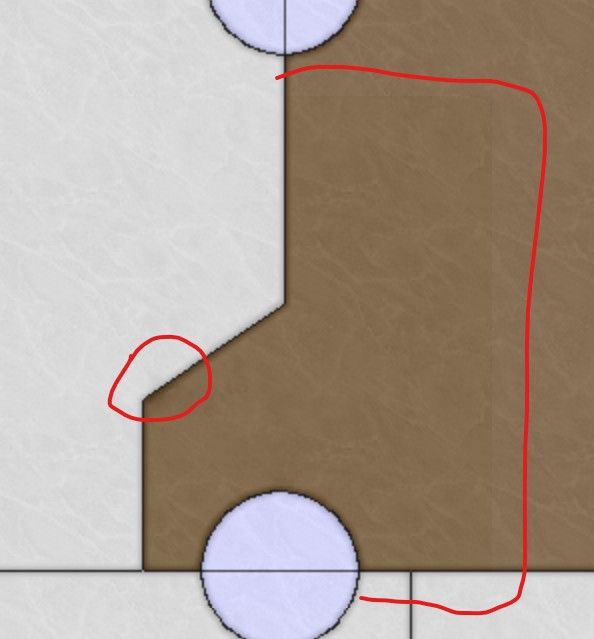
    image.jpeg

    The best thing actually to do is trying to contact the map maker! However, the map maker for NML is Black_Elk, and when I contacted him for North Africa, he didn't reply. But maybe you have more success!

    read more

  • @VictoryFirst

    Hi Victory thank you for your reply!

    Its very unfortunate that i dont have the original overlay that the map used.
    I will see what i can do!

    Cheers!

    read more

  • @ramon Changing the reliefTiles is difficult when you do not have the overlay that the game used. You can actually modify individual tiles, but it is not recommended if the change is across multiple tiles. Assuming that this is the case, you'd need to use the baseline image, change the borders there, and then break it using the tile image breaker. Then, you'd need to open the reliefmap by combining it using the tile image reconstructor. Also open the modified baseline map so that you can see what borders you removed and where the new borders are. To remove borders from the reliefmap, you can do the following. In the images you sent, you can see that the color of the territories isn't empty, it has a black-ish (or white/gray-ish in the other) color with a very low opacity. Try selecting this as color and remove the borders using this color. If you use GIMP, you can select the color using CTRL+click when having the pencil tool selected. Do not make it transparent as you did, that will make the territory shade go away completely. You should not be using the eraser at all, only the pencil tool. To draw new borders, you can select the white border color and use it to draw the new borders. If you lower the opacity of the baseline map and put it above the reliefmap, you can see the new borders and you can trace them. Then you can use the heal tool to make the borders and territory colors look more like the rest of the reliefmap, with different shades of colors. This doesn't necessarily make it look nice though. Even if you do your best, you will still probably have spots with a different shade than the rest of the map, but it's better than nothing.

    One small tip is to past the reliefmap not once several times in GIMP, so that you have like 10 identical layers. This will increase the opacity of the reliefmap. If you then combine all these layers, you essentially have increased the opacity. This allows you to actually see everything properly. You'd still need the heal tool to make the colors blend into each other better. Then you can lower the opacity of the layer so that it is around the same as the original reliefmap.

    Last option is to create your own relief tiles using your own overlay. This might be a lot of work but it would ensure that the map looks nice.

    read more