

Subcategories

  • Support Attachment

    2
    1 Votes
    2 Posts
    1k Views
    HeppsH
    @beelee I think it is only supported on a 1:* basis. I don't think anyone has ever suggested doing it the other way.
  • AI and Neutral Relationship (was Japanese vs Russians)

    11
    0 Votes
    11 Posts
    3k Views
    B
    @rogercooper As a alternative to the Feudal Japan approach a custom game property RUS AI can be set manually if Russians are to be played by the AI. <property name="RUS AI" value="true" editable="true"/> "movementRestrictionTerritories" is a player "RulesAttachment", a trigger can overwrite the value. <attachment name="rulesAttachment" attachTo="Russians" javaClass="RulesAttachment" type="player"> </attachment> <attachment name="conditionAttachmentRus1" attachTo="Russians" javaClass="RulesAttachment" type="player"> <option name='gameProperty' value='RUS AI'/> </attachment> <attachment name="triggerAttachmentRus1" attachTo="Russians" javaClass="TriggerAttachment" type="player"> <option name="conditions" value="conditionAttachmentRus1"/> <option name="when" value="before:russianPurchase"/> <option name="playerAttachmentName" value="RulesAttachment" count="rulesAttachment"/> <option name="playerProperty" value="movementRestrictionTerritories" count="India:15 Sea Zone"/> <option name="playerProperty" value="movementRestrictionType" count="disallowed"/> <option name='uses' value='1'/> </attachment> I'm only testing the trigger once based on "RUS AI". To apply/clear movementRestrictionTerritories based on the ownership of India, I think you would need 2 opposite triggers based on conditionAttachmentRus1. If RUS_AI: trigger1 (set movementRestrictionTerritories) else: trigger2 (clear movementRestrictionTerritories).
  • Random Starting Set Ups

    9
    1 Votes
    9 Posts
    2k Views
    SchulzS
    @zaroph I've just learned and decided to use another method which randomize unit distributions instead set ups; Example; <variable name="DervishConscript"> <element name="Eritrea"/> <element name="Cibuti"/> <element name="Aksum"/> <element name="Dessie"/> <element name="Adama"/> <element name="Gondar"/> </variable> <attachment name="conditionAttachmentr1" attachTo="Germany" javaClass="games.strategy.triplea.attachments.RulesAttachment" type="player"> <option name="rounds" value="1"/> </attachment> <attachment foreach="$DervishConscript$" name="triggerAttachmentDervishConscript@DervishConscript@" attachTo="Dervish" javaClass="games.strategy.triplea.attachments.TriggerAttachment" type="player"> <option name="conditions" value="conditionAttachmentr1"/> <option name="placement" value="@DervishConscript@:conscript" count="1"/> <option name="players" value="Dervish"/> <option name="chance" value="1:2"/> <option name="when" value="before:germanyCombatMove"/> </attachment>
  • Underscores in XML

    1
    0 Votes
    1 Posts
    406 Views
    No one has replied
  • Removing "X Convoy Center" texts from convoy zones

    4
    0 Votes
    4 Posts
    599 Views
    B
    @schulz yea I don't think you can have the values without the text. At least you couldn't a few years ago. Kind of a bummer. I asked about trying to get em to show with just hover or add to the bottom bar, but that idea wasn't accepted.
  • Multiple Canals

    3
    1
    0 Votes
    3 Posts
    651 Views
    SchulzS
    @thedog Thank you. Worked now. <attachment name="canalAttachment4" attachTo="SZ 67" javaClass="games.strategy.triplea.attachments.CanalAttachment" type="territory"> <option name="canalName" value="Dardanelles Canal"/> <option name="landTerritories" value="Constantinople:Bursa"/> </attachment> <attachment name="canalAttachment4" attachTo="SZ 84" javaClass="games.strategy.triplea.attachments.CanalAttachment" type="territory"> <option name="canalName" value="Dardanelles Canal"/> <option name="landTerritories" value="Constantinople:Bursa"/> </attachment> <attachment name="canalAttachment5" attachTo="SZ 84" javaClass="games.strategy.triplea.attachments.CanalAttachment" type="territory"> <option name="canalName" value="Bosphorus Canal"/> <option name="landTerritories" value="Constantinople:Bursa"/> </attachment> <attachment name="canalAttachment5" attachTo="SZ 88" javaClass="games.strategy.triplea.attachments.CanalAttachment" type="territory"> <option name="canalName" value="Bosphorus Canal"/> <option name="landTerritories" value="Constantinople:Bursa"/> </attachment>
  • EndTurnNoPU delegate not working

    3
    0 Votes
    3 Posts
    2k Views
    Z
    @beelee Idk if you can change the display or not but POS2 just has "Turn Complete" <delegate name="endTurnNoPU" javaClass="games.strategy.triplea.delegate.NoPUEndTurnDelegate" display="Turn Complete"/> Doesn't have "...No PU" in it I first tried it with "Turn Complete but it didnt work so it was something I changed to see if it did work. However it seems that ive solved it now. I changed <step name="bloodelvesEndTurnNoPU" delegate="endTurnNoPU" player="BloodElves"/> to <step name="bloodelvesEndTurn" delegate="endTurnNoPU" player="BloodElves"/> And it seems to work now. Seems weird to me that they have to have the same name even tho they are different things.
  • Trigger Not Firing Correctly

    9
    0 Votes
    9 Posts
    3k Views
    wc_sumptonW
    @beelee The problem might be with the conditions/'when'. I think control of a territory after battle is not changed until 'endTurn' so checking 'after:japanCombat' will always be false. By removing the 'when' the trigger is checked at 'endTurn' and fires. Cheers...
  • LandMine Image

    19
    1 Votes
    19 Posts
    4k Views
    B
    @hepps Right On ! That's Awesome ! Canada can give them to their Peacekeepers. Keep em safe at night Thanks [image: Rock On !!!.png]
  • trigger question - unit with hit

    36
    1 Votes
    36 Posts
    7k Views
    B
    @numetalfan I would try using "unitPresence" and"directPresenceTerritories" instead . Something like <option name="directPresenceTerritories" value="53 Sea Zone" count="1"/> <option name="unitPresence" value="battleship" count="1"/>
  • Step Name Withdraw

    3
    1
    0 Votes
    3 Posts
    676 Views
    B
    @trevan ahh...I remember that now. Idk if they're related or not, but the cause in this case is different. The reason the error threw, was because I moved some units in edit into combat as an engine workaround. When i went to retreat the air units, there was still an edited unit alive and it didn't know where it came from is my guess. I thought maybe I needed a withdraw step up by Purchase, CombatMove etc..
  • Support Attachment Question

    4
    0 Votes
    4 Posts
    711 Views
    B
    @beelee well I sent an arty and inf against 2 inf and it had 48% success rate. I sent 1 tank and 1 inf and it had 51% success. Both had same attack power. I guess it's just not gonna pick that Guard unit until all the other supported units are dead. Bummer. I can't really think of any way to hack around it. Even if I could make a trigger work somehow, doubtful, if a Guard and arty were present in same TTy, it would negate the first attachment and I could use a second one for Guards only, It'd negate all the battles with artillery. Unless I could specify each TTy. As I said, I'm doubtful of that idea.
  • Attempted Merging Values Error

    2
    0 Votes
    2 Posts
    831 Views
    C
    I've also discovered it happens specifically when rolling history backwards between the American Combat and Non-Combat phases. Don't know if that's important.
  • Using -reset- To Change Original Owner

    4
    1 Votes
    4 Posts
    620 Views
    B
    @general_zod Right on ! <attachment name="triggerAttachmentNormandyOriginallyNeutral" attachTo="Germans" javaClass="games.strategy.triplea.attachments.TriggerAttachment" type="player"> <option name="conditions" value="NormandyOriginallyNeutral"/> <option name="territories" value="Normandy Bordeaux"/> <option name="territoryAttachmentName" value="TerritoryAttachment" count="territoryAttachment"/> <option name="territoryProperty" value="originalOwner" count="Neutral_Allies"/> <option name="uses" value="1"/> <option name="when" value="after:changerCombatMove"/> </attachment> Thanks General
  • HP repair question

    5
    1 Votes
    5 Posts
    1k Views
    N
    @torpedoa Maybe by a trigger with uses = 5 the condition would be a unit in the country or in a sea zone next to it. However this might cause fifo, first in first out, which means the first 5 units would be repaired. For the next round you would need another trigger. Not an ideal solution, but maybe one that works
  • 0 Votes
    5 Posts
    937 Views
    B
    @themaster42 Rename the folder with your mod. You'll need to rename the xml as well.
  • sleeping nations trigger function

    10
    0 Votes
    10 Posts
    2k Views
    wc_sumptonW
    @Numetalfan You are probably right. I was thinking collect income, which is done at endTurn. Cheers...
  • REPAIR AND LOADING ISSUES

    8
    0 Votes
    8 Posts
    2k Views
    ubernautU
    @ebbe it's interesting i kinda like the way it is tho
  • territory Property error

    10
    0 Votes
    10 Posts
    1k Views
    wc_sumptonW
    @Numetalfan I am sorry for being unclear. The attachment name 'territoryEffectrussinawinter' may be causing the problem: <!-- <attachment name="territoryEffectrussianwinter" attachTo="russian_winter" javaClass="TerritoryEffectAttachment" type="territoryEffect"> --> <attachment name="territoryEffectAttachment" attachTo="russian_winter" javaClass="games.strategy.triplea.attachments.TerritoryEffectAttachment" type="territoryEffect"> <option name="noBlitz" value="armour:mobile_artillery"/> <option name="combatOffenseEffect" value="armour" count="-1"/> </attachment> You are creating an attachment for 'russian_winter'. Cheers...
  • map.yml - file

    Moved
    7
    1 Votes
    7 Posts
    1k Views
    RogerCooperR
    @lafayette I agree, an automated system would be better.

Recent Posts

  • Update

    Draw borders hides the relief while you draw, so you see exactly what you are editing. No more shadows: after Make territories, the relief is rebuilt where you drew. One Undo takes back both. On older maps, run Create relief… once first. Other reliefs stay untouched; a message offers Create relief… instead. Unit places: the unit size shows before you lay them out, and centers can move up to 27 px to fit more places. Overflow arrow on the last unit place; switch the side in the right-click menu. Right-click menu to add or remove unit places and to put markers where you click. Save lists the files it will write and keeps the XML's order and formatting. Places menu sorted and grouped, with "(none)" for empty kinds; capitals are a yellow star, PUs show "6P". The map no longer jumps when a banner or goal appears.
    read more

  • @RogerCooper
    About a week but it is not finished.
    I thought a more collaborative work would be better here so if you have suggestions I try to implement them. 🙂

    read more

  • @xxXEddieXxx Nice work. The first useful TripleA-related project I have seen using AI. How long did it take you to do this?

    read more

  • @xxxeddiexxx

    Lay out unit places
    Could do with showing the px size of the unit & its zoom size from the map.properties file, before placment

    Need to show the direction of unit overflow of the last unit in a TT/SZ. The default is to the Right, but depending on where the last unit appears in the TT/SZ the mapmaker might want to the left.
    Using a toggle say ctrl+O to switch between Right and Left overflow.
    On screen an arrow should indicate the current overflow direction.
    In place.txt overflow is seen as
    | overflowToLeft=true (overflows to the left)
    | overflowToLeft=false (default, no need to show as overflows to the right)

    The ability to add one more placment in the selected TT/SZ
    The ability to remove, highlighted placment.

    Current mapmakers are used to these, but maybe a right click menu is the way to go? (even for the toggle)
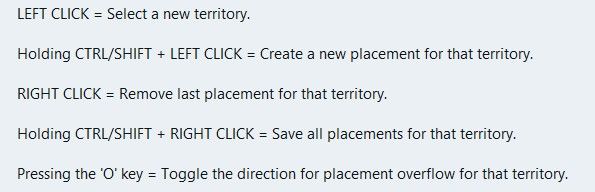
    image.jpeg

    .
    Wish list questions
    As the placement is based off center location it would be great if the app suggested moving the center coordinates to fit in more placments?
    What value upto would work, 27px as this is half the maximum height of the unit?
    Would the reiterations take to long? If so reduce the maximum pixels to move.
    If it made a suggestion then an option to do it. (right click menu option do it)

    .
    Save
    Before each save in Expert mode, a mapmaker needs to know what is going to be saved.
    This is critical if you accidentally change something unintended or forget you have changed something.
    A section that you can tick as read only/Dont save for each of the files to be saved.
    Especially the. xml as it messes with the order and formatting.
    The app should remember these setting from last save

    .
    Places (should be sorted & grouped, here is a suggested order)

    Units --- Capitals – I prefer a yellow star, not C Centers Comments Decorations Names PUs – should show the PU value as well as P, eg 6P Terrain Effects Victory Cities/Centers --- Blockade Convoy Kamikazi

    Places Options
    Right Click on TT/SZ for a menu to add/remove the items shown
    Left drag to move the selected item

    When there is no file or nothing to display, against the selection it should say None)

    .
    Earthquake
    The map gets shoved down and I lose my train of thought.
    There is a space reserved for shoving the map down to display things, like

    image.jpeg

    Can this space be reserved by moving up/compressing the ‘white’ space above the map, so the map does not move, please, pretty please.
    Yes this space will be ‘white’ space, but its better than moving the map.

    read more