

Subcategories

  • 2 Votes
    27 Posts
    7k Views
    LaFayetteL
    I think the version discussion boils down to utility vs complexity (specifically the complexity to understand and communicate how to use the map.yml version field). There is a discussion open in github issues whether to bake categories into map.yml which would put it under map maker control and alleviate the map admin team from an ongoing upkeep task. Deployment wise, remaining we'll need to generate a map.yml for every repo and upload it presumably to the top-most directory of each map. FWIW this should be not that bad, currently the map engine is now rigged to generate a map.yml file for any downloaded maps that do not have it, we'd only need to take the generated file and upload it. Otherwise, does the current map.yml look good and is it clear? The XML path I think is maybe the most error prone and it's the path of any game XML relative to the map.yml file. If the map.yml file is at the top level of a map (expected), then the XML path is really just the path to the XML file from the map folder.. Last, hopefully it's also well understood that game and map name will now come from the map.yml file and the corresponding XML attributes would be considered deprecated and no longer read by 2.6+ engines. The map.yml also removes the need for a map repository or map zip to have any kind of specific naming to match the map name in the XML, the map repo and zip could have any reasonable name and would essentially no longer matter.
  • destroysPUs Causing Error

    5
    0 Votes
    5 Posts
    1k Views
    B
    @Contango right on i had forgot about that. Glad you got it working
  • Attaching "Date" to Represent Rounds or Turns

    2
    0 Votes
    2 Posts
    387 Views
    HeppsH
    @Schulz Check this thread... worked beautifully for @ebbe https://forums.triplea-game.org/topic/2115/total-global-world-war-ii-fusion-clean-up-project/93?page=5
  • Trigger Based on Production/Income Value

    2
    0 Votes
    2 Posts
    986 Views
    RogerCooperR
    @Contango No, but the feature has been requested before. You should make a formal feature request. As workaround you could have a trigger based upon control of a specific number of a list of territories. I don't know what would happen if the same territory appeared on the list more than once. "Economic Victory" allows you to do this, but only for ending the game with a victory.
  • Game Speed

    Moved
    8
    0 Votes
    8 Posts
    1k Views
    TheDogT
    I only play against the AI. I would agree with RogerCooper the more units the slower the AI. I would add that if a lot of the units move 2+ this will also slow the game down.
  • 1 Votes
    14 Posts
    2k Views
    B
    @TorpedoA I think Hepps uses 12 in total world war. Gives a lot more flexibility. I've never done it myself. Just mod existing games
  • Kamikaze land scrambler with 1 movement theorie

    2
    0 Votes
    2 Posts
    702 Views
    HeppsH
    @TorpedoA You'd have to test this... but I fear you may run into issues as there is no way trigger a unit change in the midst of the combat phase. Not sure how the scramble and Kamikaze attachments will interact when the unit remains in the territory it scrambled to.
  • TOTAL GLOBAL WORLD WAR II- fusion & clean-up PROJECT

    155
    1
    1 Votes
    155 Posts
    93k Views
    ebbeE
    @JOSEPH-PRINCE @Hepps Thanks guys for the images.... I am ending this Thread and will move to a new one with the name: GLOBAL WWII OIL & SNOW-Project ( https://forums.triplea-game.org/topic/2592/global-wwii-oil-snow-project ) as I am heading for sharing on github soon.... ( and having plans for a side project next month ) thanks al for sharing , teaching and feedbacking me so far!
  • 0 Votes
    12 Posts
    2k Views
    C
    One does not simply take a very good looking "big" multi-coloured image and shrink it down to about 48 per 48 pixels to obtain a very good looking "small" image. The likely result is a bad looking image. The way the eyesight works is that the colour from a point is decreasingly spread over nearby visual areas in our perceived image, so images using few pixels have each pixel dirtying with its colour all nearby pixels, whereas such effect is virtually irrelevant for big images.
  • splitted USA - need help

    14
    0 Votes
    14 Posts
    3k Views
    N
    @beelee Hi, I did all steps including upload and changing ownership can you check this? Hope I've done all correctly
  • TRIGGER ROLL NOTIFICATIONS & ACTIVE TOP LAYER

    1
    1
    0 Votes
    1 Posts
    411 Views
    No one has replied
  • TripleA Bot Refresh

    5
    0 Votes
    5 Posts
    1k Views
    B
    @LaFayette can anybody do this ? Or is there a bot person that one can ask to update ? I think prastle used to do bot stuff but not anymore. At any rate, thanks for the explanation.
  • 2 Votes
    1 Posts
    547 Views
    No one has replied
  • Trigger Question

    26
    -1 Votes
    26 Posts
    6k Views
    B
    @Numetalfan add another condition to your trigger. Something like: <attachment name="conditionAttachmentTurn2OrHigher" attachTo="Germans" javaClass="games.strategy.triplea.attachments.RulesAttachment" type="player"> <option name="rounds" value="2-+"/> </attachment> I think the -+ makes it fire after round 2 as well. i can't remember
  • Another ways to solve huge stack issue

    Moved
    56
    0 Votes
    56 Posts
    19k Views
    B
    @TorpedoA Sounds way sweet. Bet you have a lot of good ideas. I'll try and check it out soon.
  • AI, non-combatmove units, amphibious assaults

    9
    0 Votes
    9 Posts
    1k Views
    djabwanaD
    Our tech ideas came from Age of Tribe's tech tree!
  • connection problems

    29
    0 Votes
    29 Posts
    7k Views
    N
    Incredible this worked!
  • AI, maxConstructionsPerTypePerTerr

    3
    0 Votes
    3 Posts
    621 Views
    TorpedoAT
    In my game, AI does place Bunkers if i purchased them by trigger. But the AI does ignore the maxConstruction per Terr.
  • 0 Votes
    3 Posts
    493 Views
    TorpedoAT
    Thanks alot. I will try.
  • consumesUnit

    3
    0 Votes
    3 Posts
    698 Views
    HeppsH
    @Numetalfan Seems strange to have (what I would presume to be) 2 very different units being used to create the same defensive unit upon merging.

Recent Posts

  • Update

    Draw borders hides the relief while you draw, so you see exactly what you are editing. No more shadows: after Make territories, the relief is rebuilt where you drew. One Undo takes back both. On older maps, run Create relief… once first. Other reliefs stay untouched; a message offers Create relief… instead. Unit places: the unit size shows before you lay them out, and centers can move up to 27 px to fit more places. Overflow arrow on the last unit place; switch the side in the right-click menu. Right-click menu to add or remove unit places and to put markers where you click. Save lists the files it will write and keeps the XML's order and formatting. Places menu sorted and grouped, with "(none)" for empty kinds; capitals are a yellow star, PUs show "6P". The map no longer jumps when a banner or goal appears.
    read more

  • @RogerCooper
    About a week but it is not finished.
    I thought a more collaborative work would be better here so if you have suggestions I try to implement them. 🙂

    read more

  • @xxXEddieXxx Nice work. The first useful TripleA-related project I have seen using AI. How long did it take you to do this?

    read more

  • @xxxeddiexxx

    Lay out unit places
    Could do with showing the px size of the unit & its zoom size from the map.properties file, before placment

    Need to show the direction of unit overflow of the last unit in a TT/SZ. The default is to the Right, but depending on where the last unit appears in the TT/SZ the mapmaker might want to the left.
    Using a toggle say ctrl+O to switch between Right and Left overflow.
    On screen an arrow should indicate the current overflow direction.
    In place.txt overflow is seen as
    | overflowToLeft=true (overflows to the left)
    | overflowToLeft=false (default, no need to show as overflows to the right)

    The ability to add one more placment in the selected TT/SZ
    The ability to remove, highlighted placment.

    Current mapmakers are used to these, but maybe a right click menu is the way to go? (even for the toggle)
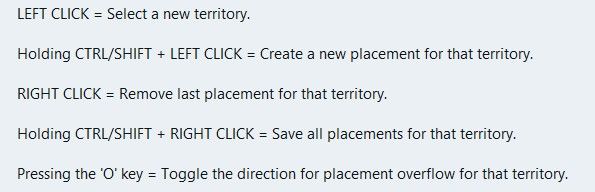
    image.jpeg

    .
    Wish list questions
    As the placement is based off center location it would be great if the app suggested moving the center coordinates to fit in more placments?
    What value upto would work, 27px as this is half the maximum height of the unit?
    Would the reiterations take to long? If so reduce the maximum pixels to move.
    If it made a suggestion then an option to do it. (right click menu option do it)

    .
    Save
    Before each save in Expert mode, a mapmaker needs to know what is going to be saved.
    This is critical if you accidentally change something unintended or forget you have changed something.
    A section that you can tick as read only/Dont save for each of the files to be saved.
    Especially the. xml as it messes with the order and formatting.
    The app should remember these setting from last save

    .
    Places (should be sorted & grouped, here is a suggested order)

    Units --- Capitals – I prefer a yellow star, not C Centers Comments Decorations Names PUs – should show the PU value as well as P, eg 6P Terrain Effects Victory Cities/Centers --- Blockade Convoy Kamikazi

    Places Options
    Right Click on TT/SZ for a menu to add/remove the items shown
    Left drag to move the selected item

    When there is no file or nothing to display, against the selection it should say None)

    .
    Earthquake
    The map gets shoved down and I lose my train of thought.
    There is a space reserved for shoving the map down to display things, like

    image.jpeg

    Can this space be reserved by moving up/compressing the ‘white’ space above the map, so the map does not move, please, pretty please.
    Yes this space will be ‘white’ space, but its better than moving the map.

    read more