











Recent Posts
-
Why not also give bunkers the ability to fire at ships (minus subs)?
Also, the Berlin-Krakow and Berlin-Warsaw distances are roughly the same in the real world (the latter being slightly closer). I would reduce the Berlin-Warsaw distance to 2 and the Berlin-East Prussia distance to 3.
-
@KurtGodel7 Gibraltar working like Suez is very debatable. I would say hell no for Gibraltar and I would tend to still say no in case a single alliance owns every territory on that strait (meaning owning both Gibraltar and Morocco with your drawing to block enemy movement).
What I mean is, for example, that, if Germany would have had the Bismarck fully repaired in Brest and then moving through the strait into the Mediterranean, Gibraltar itself would not have impeded that happening (of course, the ships in Gibraltar could have).
If the question would be whether you can fully close the strait with mines once you have Gibraltar, I'm not feeling qualified enough as a miner to answer that...
 (but surely no in case the strait is contended, for example the Axis controlling Gibraltar and the Allies controlling Morocco)
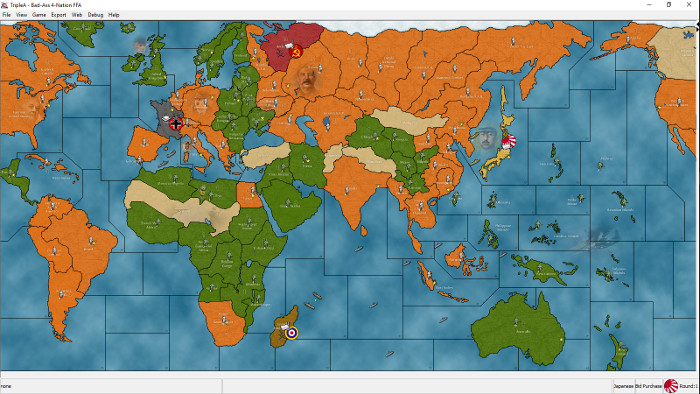
The matter could be made some clearer with a more correct depiction of the situation, like having Spanish Morocco (maybe Tangier too, but I would consider it being part of Spanish Morocco thus avoiding having it on the map) and Gibraltar being limited to what it was rather than covering the entire European part of the strait.
I'm anticipating that the European theater of this map will feel a little like New World Order, and that the Pacific theater will feel a little like The Rising Sun. In New World Order, it's normal for there to be a naval competition between the United States on the one hand, and Germany/Italy on the other. If the Axis loses this competition, the American fleet enters the Mediterranean. At which point life becomes very hard for the European Axis.
Currently I'm concerned that the European theater could be unbalanced in favor of the Allies. If I allow Gibraltar to serve as a gateway to the Mediterranean, then that allows the Axis to get out of that naval competition--so long as it is able to hold Gibraltar. My thought is that Italy should take Gibraltar on its first turn. Then turn it into an Axis hard point, and thus prevent Allied entry. Britain and America Atlantic can still exert good pressure on Germany in the west. But not the kind of "cut Italy's throat" pressure that would have been the case with an American fleet in the Mediterranean.
If it's a choice between good game play and historical realism, I'll try to achieve both. But, if I'm pushed into a corner, if I have to take one or the other, I will take good game play.
As for historical realism: I acknowledge that treating Gibraltar in this way is a stretch. It was difficult for coastal guns to hit fast moving ships, even with late war advances in radar. Ships sailing into or out of the Mediterranean would have been within range of the coastal guns, but the majority would have gotten through. I am doing this because I think it's best for game play, not because it is a maximally accurate depiction of history.
Am I 100% certain this is best for game play? No. If it seems like this rule hinders rather than facilitates a good, competitive game, I'd be open to changing this.
